How to Use AI in Customer Service: 4 Practical Ways (2026)

Four practical ways to use AI in customer service today: drafting, triage, self-service, and reporting, with the tools and setup for each.
Table of contents
AI in customer service splits into two questions: how to use it, and which product to buy. This guide is the how, four practical ways teams apply AI to support today. If you are choosing a product, start with our roundup of the best AI agents for customer support and come back here for the implementation.
What is AI, anyway?
Artificial intelligence is a catch-all term that explains the different ways technology experts have developed a connection between people and digital tools. Basically, AI is a way to break the language barrier between humans and machines by training machines and systems to “think” in a more human way. This is done by creating models and feeding them different sources of information to build their repertoire. With that, the system makes connections and explores patterns, which can be used to develop new connections. This process mimics our human thought patterns and is known as an artificial neural network. For example: predictive text. If you use Gmail, you have probably run into predictive email addresses when writing a new message. Depending on what subject you're mentioning, people who have been CC or BCC'd and even the frequency with which you email collaborators, Gmail suggests other addresses. The more you reinforce these patterns, the more the system learns from your behaviors and the more it offers personalized suggestions. This comes in other forms, such as social media feeds, mobile ads, autocorrect and a lot of daily tech usage. It can be quite helpful in detecting deviation as well. For instance, when a dataset from a company contains outliers, a well-trained AI model will signal this irregularity. When dealing with strategic projects, such as customer relations, using AI in customer service can help you filter spam, avoid scams and even prevent errors.
How AI is changing companies
Even though AI isn't really new, it's safe to say it's been changing the work culture across industries. With tools like data analyzers, bots and conversation tools, people have been getting more and more contact with new technology. But how does it impact work in the long term?
Cybersecurity with AI in digital communications
One of the biggest worries when working digitally is the risk of breaches. Most companies have a set of rules to prevent it from happening, such as user roles and permissions. However, when working across departments, time zones, and communicating externally (with vendors, for instance), it's hard to keep up with protection against threats. You can use AI as a cybersecurity tool. This is because artificial intelligence is trained to detect patterns and outliers. So if a query seems out of the ordinary, AI can signal it quickly. For example: say you have a form in which vendors can send in their details. If an external user adds spam information to this document, your AI tool can alert you, preventing clicks on suspicious links, fraudulent transactions and much more. It also works by learning users' behaviors. If a user is trying to access unauthorized files repeatedly, they might have been compromised. Additionally, if users show activity from different geotags, outside their usual hours and even through different devices, AI can be a quick detector. As a consequence, your digital workspace can be kept safer, by avoiding data leaks, phishing scams and fraud.
Availability with AI in customer support
Availability is a great asset to enhance your customer service strategy. However, it isn't always possible to be online at all times and offer a full scope of support, especially if you're dealing with a small team. How can AI help you circumvent this problem? By designing a task distribution system that works for you. This comes in handy within customer service shared inboxes. When you have a collective inbox such as help@companyname.com, how can you assign incoming tasks between agents in a way that accounts for timeslot queue management? If you use an AI tool, you can let it help you by assigning tasks based on the difficulty, expertise and current workload of each agent. With time, the tool learns to analyze incoming queries and determine how to route them based on previous interactions. For example, if the AI knows that tasks about a certain subject require more time based on previous tasks, it can send fewer of these to the same agents.
Data and personalization with AI in marketing
Even though AI can be interpreted as a machine learning mechanism, it can be used to humanize customer service, including sales and marketing. One way it can do this is by interpreting customer actions and predicting their next steps based on their history. A good example of this is targeted advertising. When potential new customers search for specific terms, access certain websites and buy items, the algorithm learns more about their behavior. AI can use this to offer the customer new options, based on interests they have previously shown. For ecommerce, this is key. Instead of offering blanket suggestions based on general consumer trends, these websites can tailor their recommendations on a personal basis. Thus, being more successful at actually converting into a new sale.
Customer service AI: reactive x generative
Before we explore the role of AI in customer support, it's crucial to understand the two main types of current AI.
Reactive AI
Reactive artificial intelligence is the most well-known type of AI. It's based on machine learning, a computer science term that encompasses feeding the machine algorithms and datasets to train it to identify patterns and predict scenarios. This is, for example, what happens when a website suggests you content after reading an article. Another good example of reactive AI is playing a simple game against the computer: the system can react to your moves and strategies and make a choice based on predictive outcomes.
 This type of AI can be considered reliable because it's tied to its context. The specific machine has been trained to perform specific tasks based on specific algorithms. As far as AI in customer support goes, reactive tools can help you analyze conversation logs, track suspicious activity such as spam and identify bottlenecks. But there's a limitation: it doesn't come with memory or flexibility. And with new AI uses, it became important that our tools reflect the context they are inserted into. Therefore: limited memory AI.
Limited memory AI
AI Platform
The inbox your team and your AI work in together
Shared inbox, live chat, and AI in Gmail, with an MCP server your AI tools can drive.
4 Ways to include AI in customer support
Now that we've explored the role artificial intelligence can play in customer service and other client-facing aspects of your company, we can learn more about their use. There are many ways to incorporate AI tools and automations into your customer service email and platforms. Here are our top 4 suggestions to start!
1. Chatbots
Chatbots are a great way to incorporate AI in customer support. They can be used in different stages of interactions with clients. For example, it's common to have promotional chatbots on ecommerce websites. Those are triggered by specific actions, such as the client searching for an item or browsing through a category. The benefits of AI agents, such as chatbots, include providing instant responses, handling multiple queries simultaneously, and offering 24/7 availability. Following the potential customer's journey, the bot prompts them with a message. This can be programmed according to different metrics, but most are based on offering an incentive, such as a discount or product suggestion. But the AI chatbots aren't just useful to gain a client. No, in fact, they can be helpful as a way to maintain a great sales customer relationship in the future. For example, clients often come to customer support with frequent queries and concerns about products or services. Usually, companies create a knowledge base with guides and answers to FAQs, but they still have to redirect customers to this space when contacted. A chatbot can do this work for you. When someone messages customer support, the AI bot detects the subject and sends them relevant information. Most times, this is enough to answer those common questions, which, in turn, keeps your inbox free from repeated clutter. With social media customer support channels, chatbots can find mentions of your company and reply with useful information. That allows you to monitor any complaints and concerns automatically.
Why it enhance customer service
- Faster responses: if the clients need a quick guide, AI chatbots can summarize it for them
- Social media monitoring: find mentions of your company and product
- Customer acquisition: find your potential client where they're at in your website, leading to conversions
- Templates: no more repeated actions, AI can detect subjects and ssend replies
2. Workload distribution
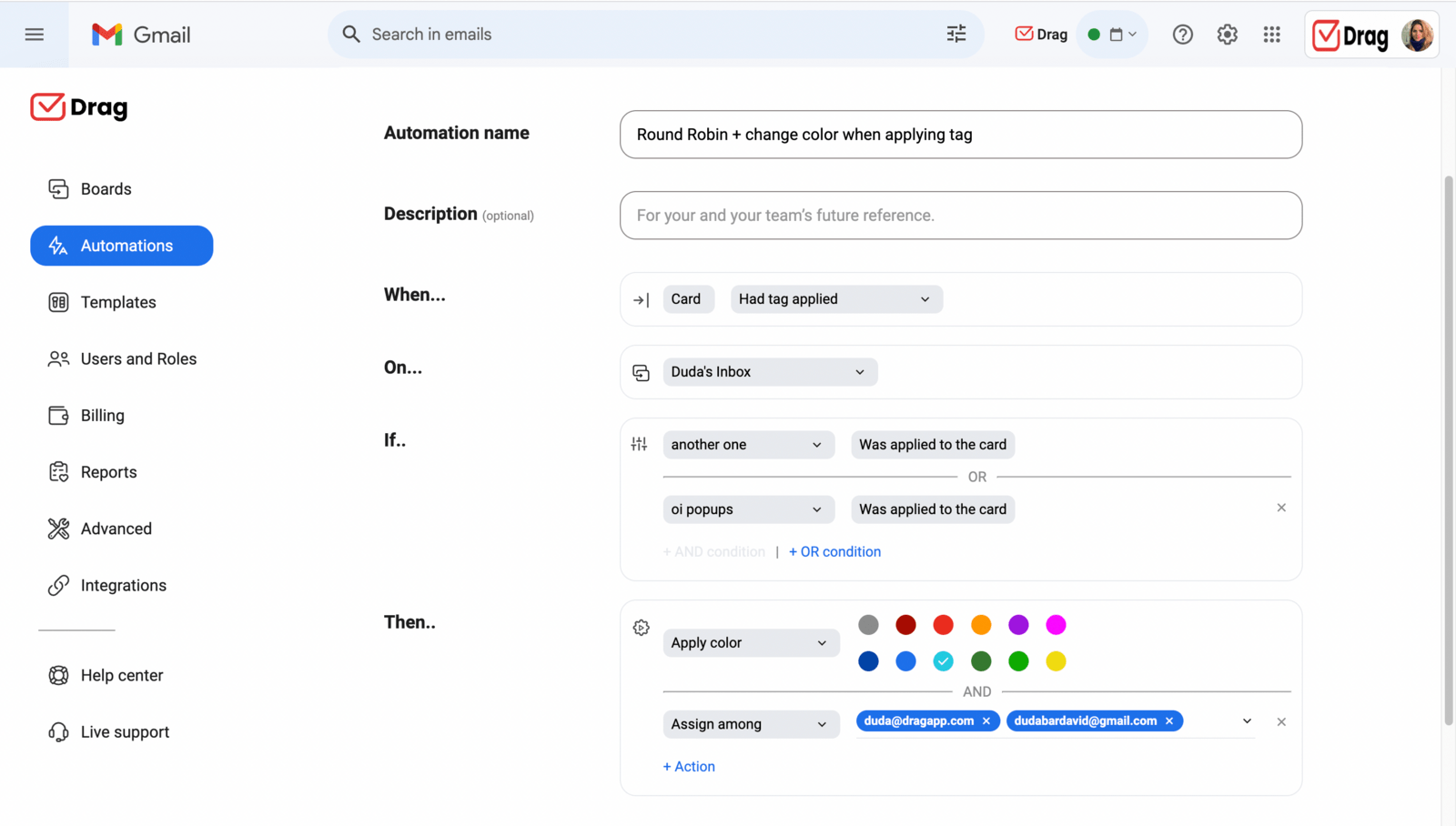 There are multiple ways to distribute work across your customer support agents, from expertise to shifts. And small businesses are often faced with the challenge of offering quick support with helpful responses. A great way to implement a more efficient team is by distributing assignments well. This requires knowing the time it takes to fulfill a task, the people who usually solve these issues and the next steps. A good help desk platform can use AI to define those strategies, by learning the agents' behavior through time. That's a good way to implement limited memory AI in the help desk context. As the platform tracks your work, it can manage certain tasks' routes. For example, agent B is quick to solve queries about onboarding, so new tasks about it will be sent to their inbox. Agent Q is often better at solving complex multi-step issues, so they have fewer, deeper questions on their queue. With machine learning, your help desk system can make your work schedule much more streamlined and productive. And considering teams are often overwhelmed with incoming messages, this is a great way to add artificial intelligence to the process.
Why it optimizes customer support
- Less clutter: your inbox is instantly categorized accordingly
- Specialization: agents can show their strenghts and offer a full scope of customer support
- Queue management: strike a balance between beign helpful and being quick
3. Customer history
As you develop your customer base, it's crucial to pay close attention to the tools used in CRM (Client Relations Management). These tools include communication channels, in which customers can share their opinions, questions and concerns. But it should also account for all the ways the clients interact with your company. The pages they access, the products and services they've acquired, the previous conversations they've had and so on. When you implement AI in customer service, you can centralize these interactions and build a profile of your relationships. For instance: your dataset shows that clients who purchased product M have later reached out with questions. If you feed this dataset into AI, you can train it to identify future interactions with other customers. But on a more personalized note, you can train generative, limited-memory AI to refer to previous conversations with clients. So if they interact with the customer service team, AI can recognize previous chats and direct people to guides and other services before the task enters an agent's queue.
Why it makes customer service faster
- Multi-channel customer support: get a centralized view of customer history
- Predictions: AI learns your customer's trends and suggests questions
4. Insights and data reports
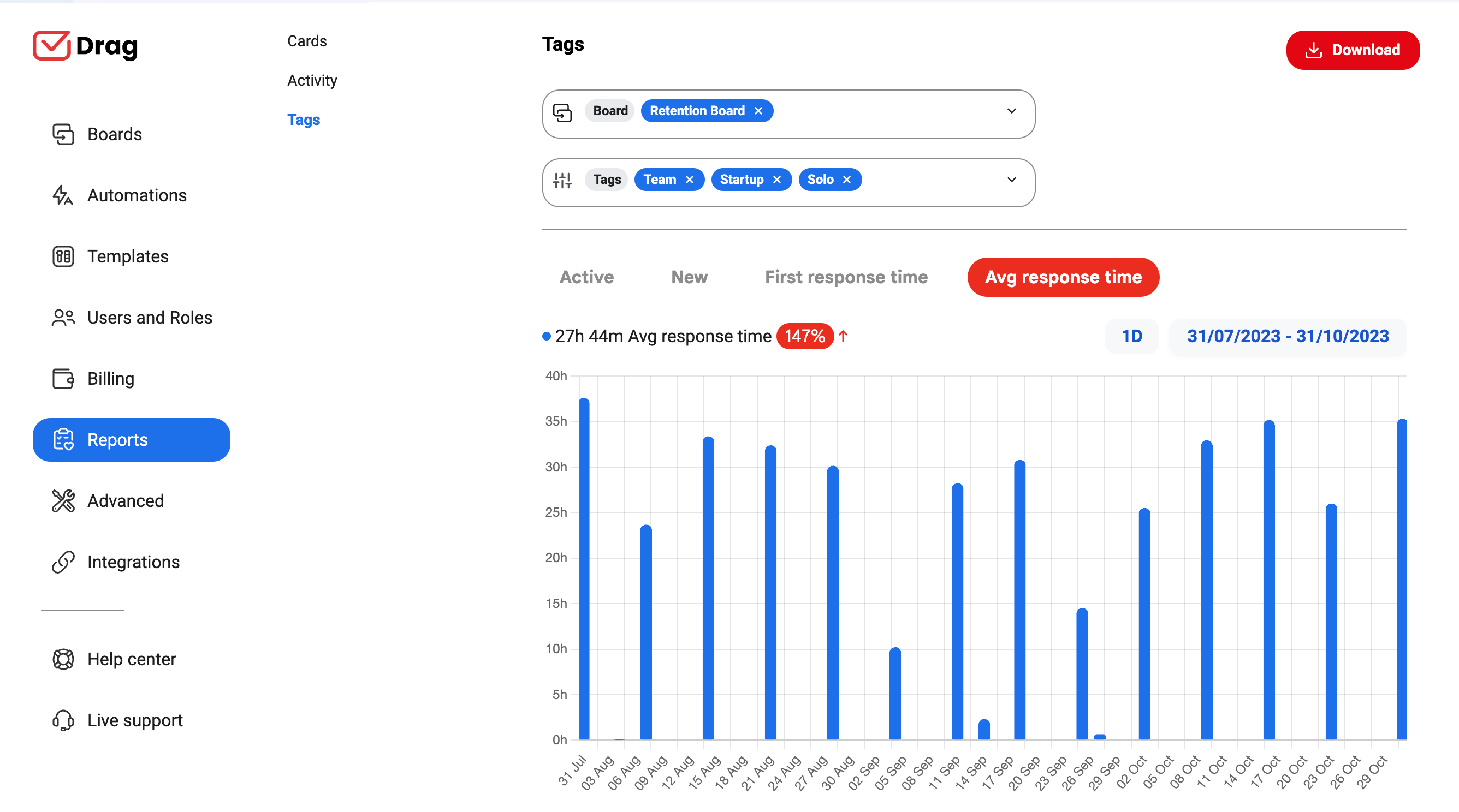 After you set up efficient workflows and allow your team to thrive with customer support messages, how do you monitor trends? That's another way in which AI in customer service can optimize your strategy. After creating a good system, you need to keep it working well and detect any bottlenecks, right? Some customer service platforms can be serviced by AI tools and complements that summarizes message histories to give you insights into the trends among conversations. By learning from previous data and following current tasks, the AI system can give you a digest of what's going on with customer support. That way, you can check which subjects come up often, which tasks take too long to fulfill, and what has haltered productivity. With that in mind, it's easier to develop new strategies for the future, based on AI's present and your expertise.
Why it helps customer service
- Analytics and reports: custom data metrics based on your workflow
- Summaries: get an insight into your inbox and conversations without having to read through all interactions
- Memory: build your AI memory by training your system to your needs and tailoring it to your tasks
How AI in customer support thrives in shared inboxes
While AI by itself can offer a lot of useful insights to customer service teams, it's important to say that the platform you use makes a huge difference. For instance, if you use traditional help desk software, you can have AI as a way to understand your customers better. But daily, you still need to manually check for incoming tickets, assign them to collaborators and follow up on further tasks. If you use a shared inbox for customer service, however, the entire process can be automated. A shared inbox is a real-time collaborative mailbox that all users can access from their login. With that in mind, any incoming mail can be categorized and redirected by AI tools. Those show up on the assignee's task lists, but they are visible to everyone so that people can collaborate on solutions. 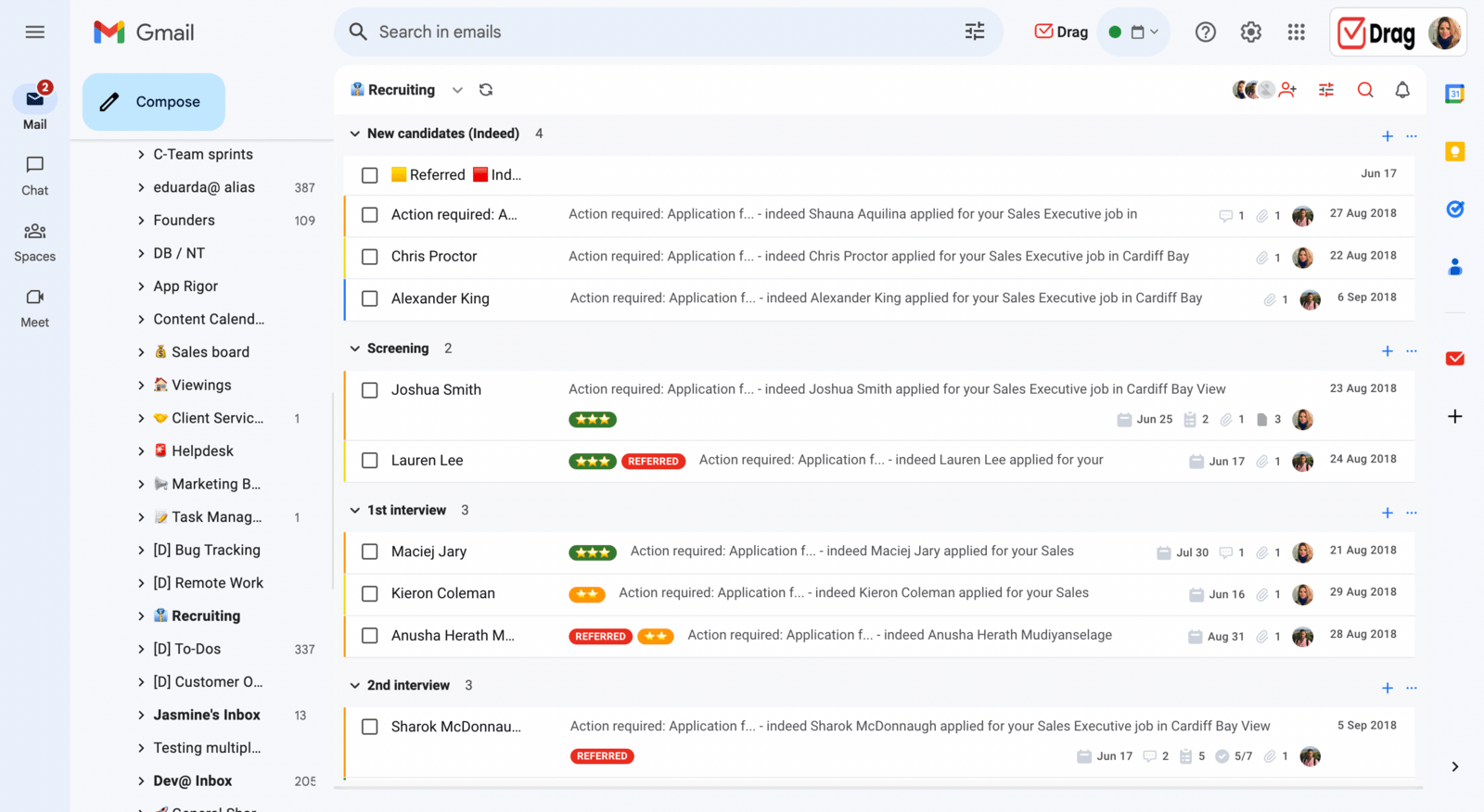 A shared inbox works great as a complement to AI and vice-versa because both of them insert automation and model repetition to streamline the customer support pipeline. With DragApp, for instance, you can use data analyzed by AI to tag emails. Then, turn them into tasks, move them into folders and create rules to assign them to specialists.
AI in customer service x ethics and customer privacy
Because of AI's new possibilities, it's crucial to take a step back and understand the importance of following regulations. While it can be interesting to analyze customer data to train your systems and offer better support, you should do it carefully. First, it needs to comply with local and global rules, such as the General Data Protection Regulation (GDPR). This means you have to get customers' consent to data collection. This also means any data needs to be safe and protected. That's what prevents any data leaks that could cause your customers' privacy concerns. So when implementing AI tools, you need to be aware of their own security pledges and protections, as well as making sure your platforms are aligned with this. That way, you avoid any breaches and worries.

Co-founder
Building Drag for nearly ten years: shared inboxes, boards, and now the AI and agent layer, all on Gmail, plus HeyHelp for the personal inbox. Writes the honest versions of the comparisons.
