








Zendesk charges you a seat fee, an AI add-on on top of it, and then a fee every time its AI resolves a ticket. It is a powerful platform, but most teams are paying enterprise prices for ticketing they do not need. If your support is really email and collaboration, a Gmail shared inbox does the job for a fraction of the cost. Here is the honest comparison, including where Zendesk is still the right call.

Table of contents
The verdict
For email-driven teams on Gmail, Drag is the better-value Zendesk alternative: it does shared-inbox support (assignment, collaboration, boards, AI) inside Gmail for $12 to $24 per seat with AI included and no AI add-on, where Zendesk runs $55 to $115 per seat plus a $50 AI add-on and a per-resolution charge on every AI-handled ticket. Drag is not a like-for-like replacement for enterprise omnichannel ticketing, though; if you need SLAs at scale, voice, and deep routing, Zendesk (or a full help desk like Freshdesk) is the better fit.
Choose Drag if you…
- Your support is mostly email and collaboration, not high-volume omnichannel ticketing.
- You want AI included in the seat, with no $50 add-on.
- You want to stay in Gmail (or give your team the choice of Gmail or a standalone app).
- You want flat, predictable pricing ($12-$24/seat) with no seat minimum.
- You want to run your inbox from Claude or ChatGPT (Drag has its own MCP server).
- You bought Zendesk by default and use a fraction of it.
Choose Zendesk if you…
- You run a large or complex operation needing deep omnichannel ticketing (email, chat, voice, social).
- You need SLAs, advanced routing, and heavy automation/reporting at scale.
- You have hundreds of agents or need its 1,200+ integration marketplace.
Looking at more options? See our best Zendesk alternatives for 2026 for a broader comparison.
Do you even need a help desk?
Before comparing features, ask the question most Zendesk shoppers skip: do you need a full help desk at all? A lot of teams land on Zendesk because it is the default, then spend months configuring a ticketing system for what is really a shared-inbox job, replying to email, looping in a colleague, handling the occasional chat or WhatsApp message. If that is your team, you are paying for enterprise ticketing you do not use.
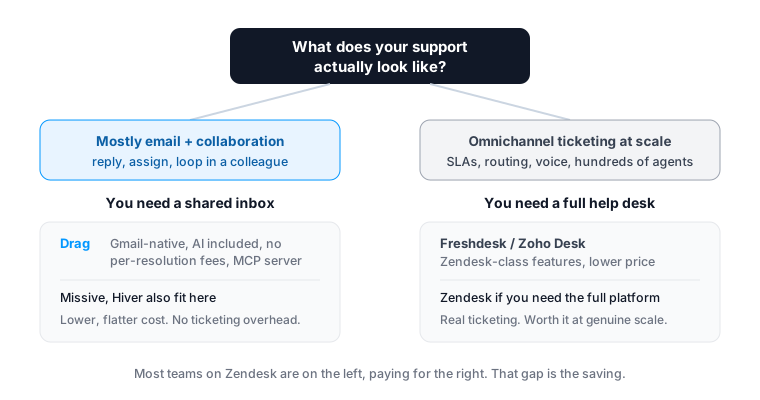
This page assumes you have asked that question and want to know how Drag (the shared-inbox answer) compares to Zendesk (the help-desk answer), honestly, including when Zendesk is the one to keep.
Drag vs Zendesk at a glance
| Feature | Drag | Zendesk |
|---|---|---|
| Pricing & plans | ||
| Starting price (per seat/mo, annual) | $12 | $55 (Suite Team) |
| Top standard plan | $24 (Pro) | $115 (Suite Professional) |
| AI cost | Included from $18 | $50/seat add-on + per-resolution fee |
| Per-resolution AI fee | None | Per-resolution fee (rate unpublished) |
| Seat minimum | None | Varies by plan |
| Platform & fit | ||
| Works inside Gmail | check_circle | cancel |
| Standalone app as well | Yes (web/desktop/mobile) | check_circle |
| Best-fit team | Email-driven shared inbox | Enterprise omnichannel ticketing |
| Setup time | Minutes | Often weeks to months |
| AI & automation | ||
| AI included | Varley, in the seat from $18 | Add-on + usage fees |
| MCP server (connect Claude/ChatGPT to your inbox) | check_circle | No (building an MCP client, opposite direction) |
| Automation / assignment | check_circle | Yes, deeper at scale |
| Channels & depth | ||
| Email + WhatsApp + live chat | check_circle | check_circle |
| Deep omnichannel (voice, social, SMS) at scale | Limited | check_circle |
| SLAs, advanced routing, enterprise reporting | Basic | check_circle |
| Integration marketplace | Core integrations | 1,200+ |
Pricing and features verified June 2026; confirm current details on each vendor’s site.
Why email-driven teams pick Drag
Pricing
No enterprise ticketing tax for a shared-inbox job.
If your “tickets” are mostly emails to support@ that a few people handle together, Drag does that inside Gmail without numbering every message or charging enterprise prices. Flat $12 to $24 a seat, no seat minimum, where Zendesk runs $55 to $115 plus AI add-ons.
- Drag: flat $12 to $24 a seat, every plan.
- No seat minimum, pay for who you have.
- AI included from $18, no AI add-on.
- Zendesk: $55 to $115 a seat (Suite Team to Professional).
- Zendesk: $50/seat AI add-on PLUS per-resolution fees.
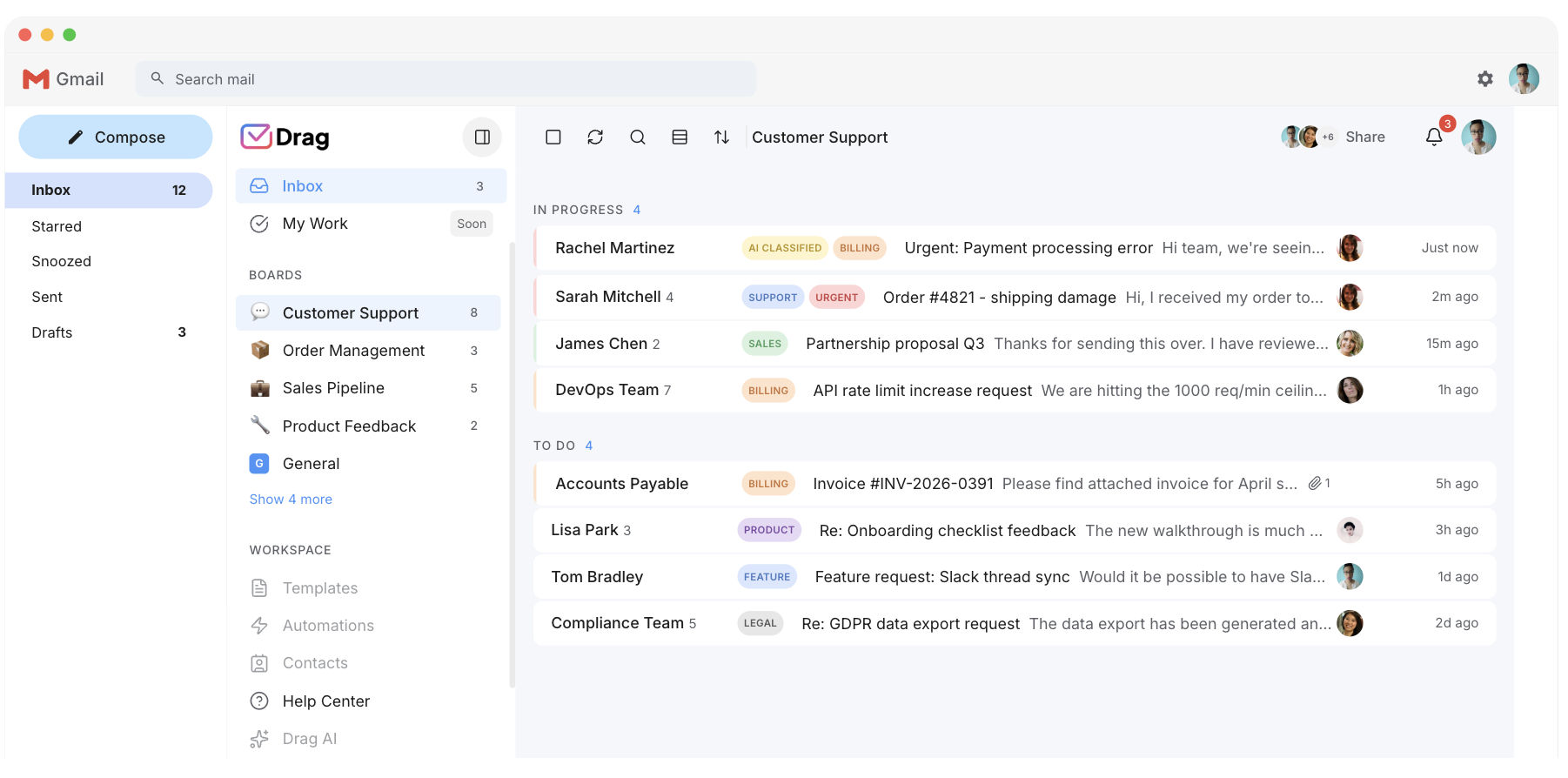
Source: Drag and Zendesk pricing pages, June 2026.
AI
AI included, not doubly charged.
Drag includes Varley, its AI, in the seat from the $18 Plus plan, with monthly AI credits. Zendesk charges a roughly $50-a-seat Copilot add-on AND a per-resolution fee on every AI-handled ticket, before any of its AI does a thing.
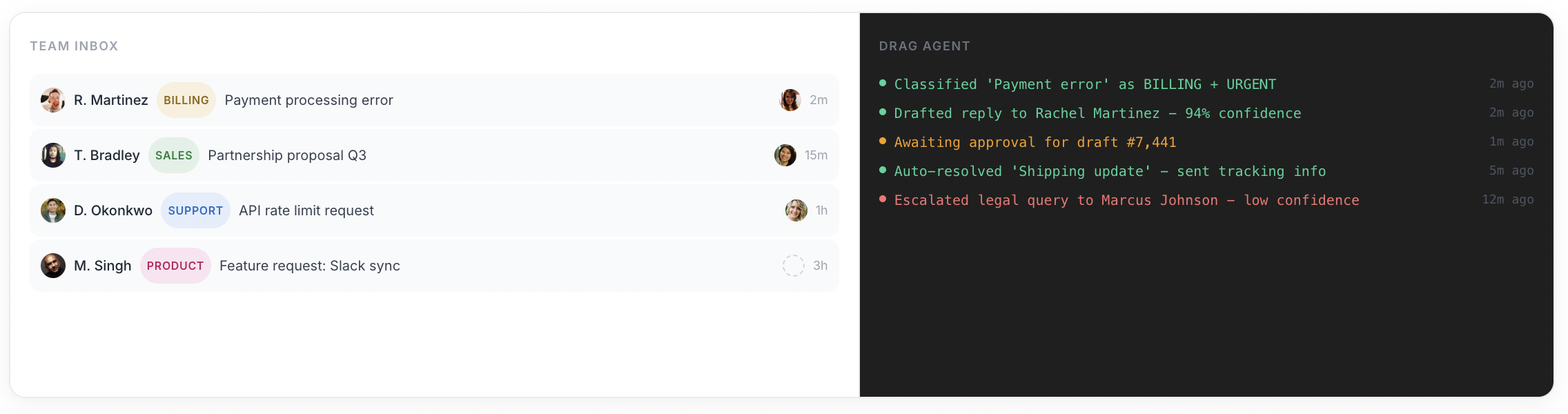
- Varley included: drafts, tags, answers from your docs and acts in your tools.
- No AI add-on. Monthly AI credits in the seat.
- AI cost is flat and predictable as you scale.
- Zendesk AI is an add-on plus usage fees on top of the seat.
Varley · Drag’s AI
One AI, four ways it works.
Varley, Drag’s AI, knows your help center, docs and past conversations. It drafts and tags every email, answers your team in Copilot, acts in Stripe, Slack and HubSpot when you approve, and on Pro resolves conversations on its own. Monthly AI credits come with every Plus and Pro seat, with no per-seat AI add-on.
Zendesk charges a Copilot add-on of about $50 a seat, plus a per-resolution fee on every AI-handled ticket.
- CopilotAsk Varley, then let it act
- AgentsVarley resolves conversations on its own
- IntelligenceWhat Varley knows, and the tools it acts in
- AssistsVarley in every email: drafts, tags, summaries
Included in Plus. Pro gets 2x the usage. Power users top up any time.
Varley resolves the routine ones on its own.
On Pro, Varley’s Agent reads the email, checks your policy, acts in tools like Stripe, replies in your team’s voice and closes the conversation. Anything it isn’t sure of goes to your team, with everything it found. Included in Pro.

I was charged twice this month
Daniel Okonkwo · Customer
- 9:38:13
Read Daniel’s email
Billing · Urgent
- 9:38:15
Checked your refund policy
Duplicate charges: refund in full
- 9:38:18
Found both charges in Stripe
$49 on 12 April, twice
- 9:38:22
Refunded the duplicate
$49 back to Daniel’s card
- 9:38:30
Replied to Daniel
Policy cited, in your team’s voice
- 9:38:35
Closed the conversation
Logged, with its sources
Connect Claude to your inbox in about two minutes.
Paste one URL into Claude’s settings, enter your API key once, and your inbox becomes 47 tools with full read and write, WhatsApp included, on the Pro plan. ChatGPT, Gemini, Copilot and Cursor connect the same way. Then just ask:

Summarise unread Support threads and assign billing to Sarah.

Label everything mentioning refunds and move it to In Progress.

What was our first-reply time this week vs last?
Zendesk announced an official MCP server in May 2026, but it is not yet available to customers; Drag’s connector is live for Pro customers today.
Explore the MCP serverMCP server
@dragapp/mcp-server
47
tools · 12 categories · read + write
https://app.dragapp.com/mcp
paste into Claude › Settings › Connectors

 + any MCP client
Features
Boards, automation, and the support tools included.
Beyond the inbox, Drag includes boards and a Kanban view, automation and assignment rules, a customer-facing help center, a live-chat widget, WhatsApp, and reporting, the collaborative and support features a team leaving Zendesk expects, included rather than tiered up.
- Boards and Kanban views inside Gmail.
- Automation, auto-tagging, assignment rules.
- Customer-facing help center + live chat included.
- WhatsApp and reporting.
- Zendesk tiers many of these into higher plans.
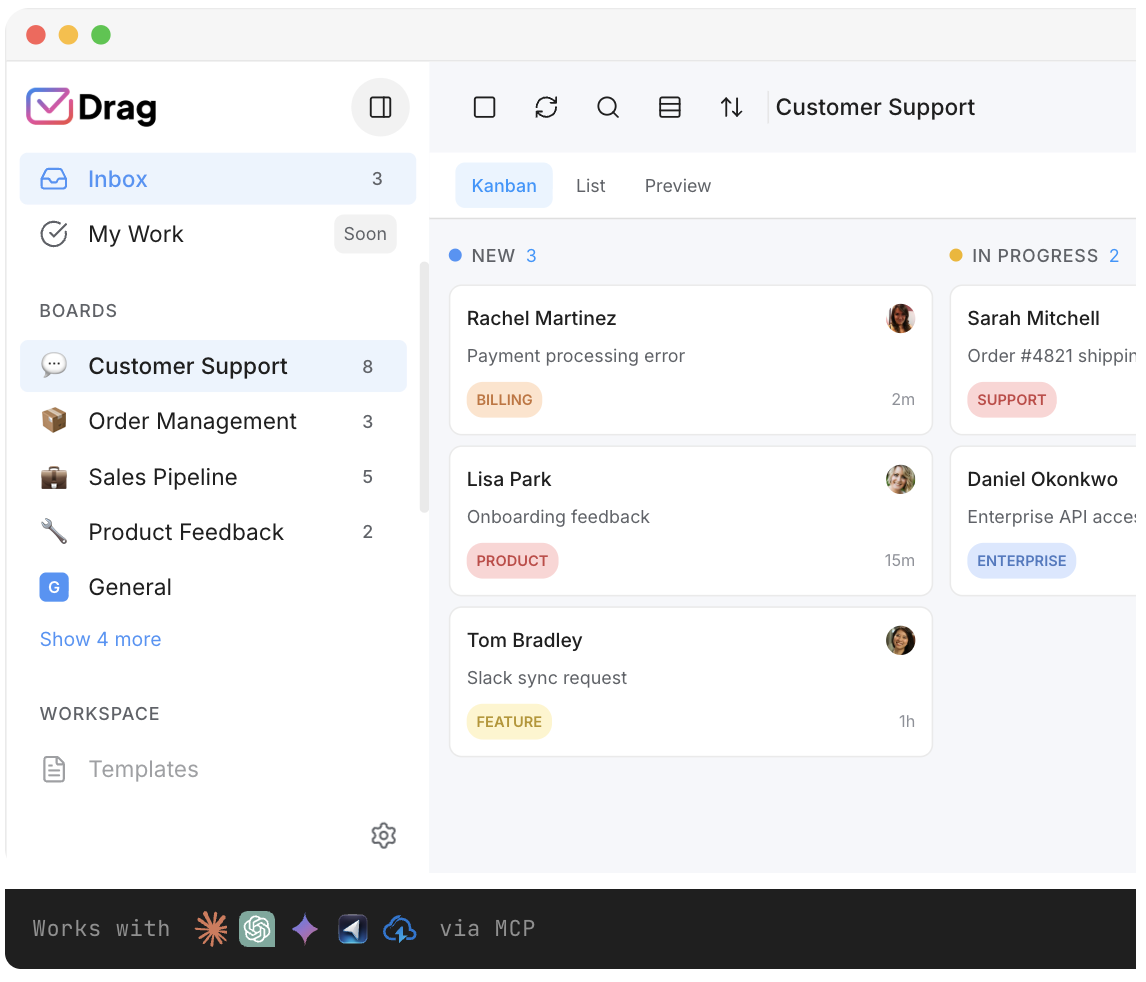
Dual experience
Gmail-native, with a full standalone app when you want one.
A fair worry when leaving a full platform like Zendesk: is a Gmail-based tool serious enough? Drag answers it both ways. It runs natively inside Gmail for teams who want to stay in the inbox they already use, and as a full standalone web, desktop, and mobile app for those who want a dedicated workspace, on the same shared data. You are not choosing between “a real app” and “staying in Gmail”, you get both, and each teammate works whichever way suits them.
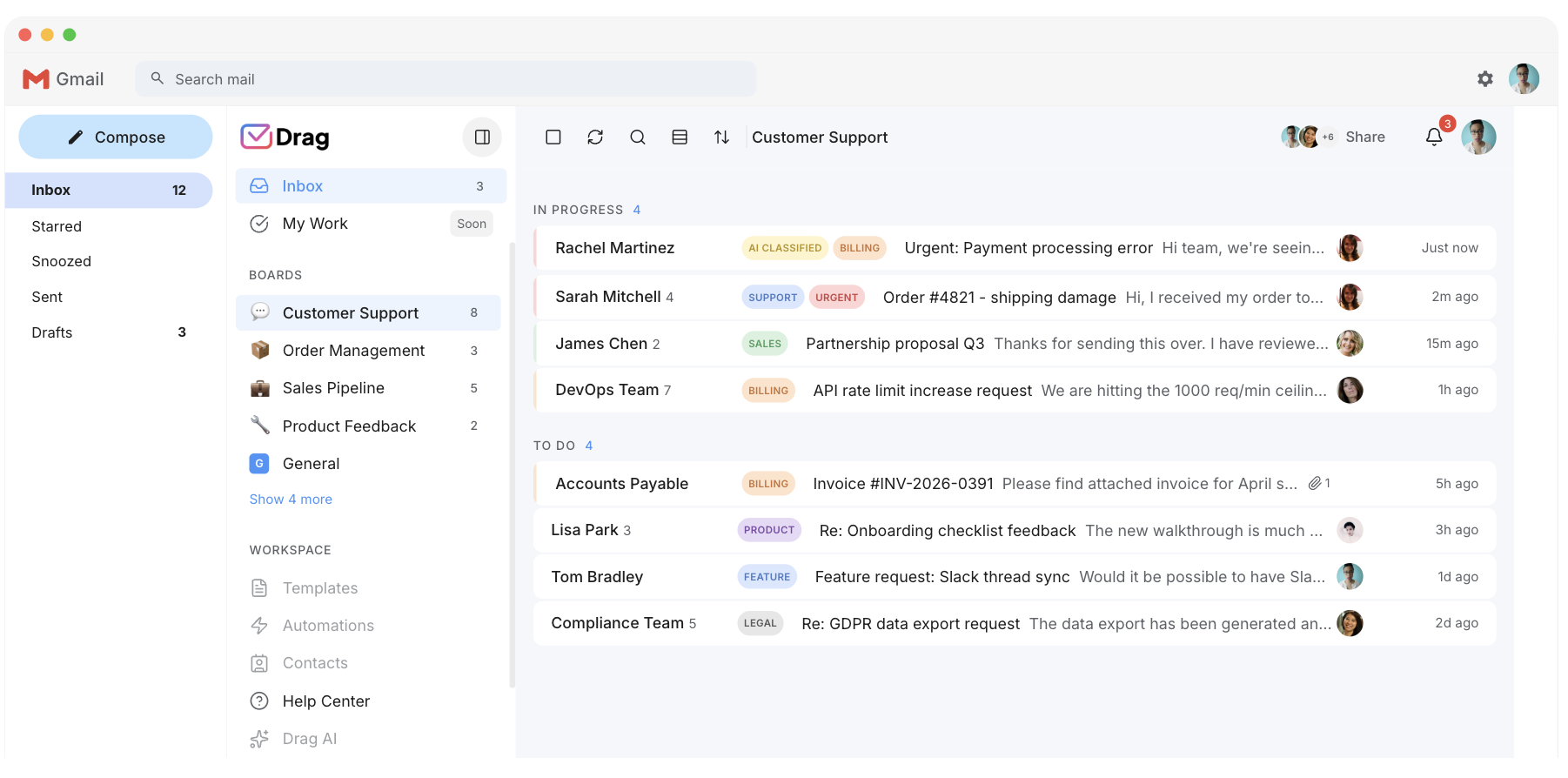
- Native in-Gmail experience, no new tab, no migration.
- Full standalone web, desktop, and mobile app on the same data.
- Each teammate works in Gmail or the app, their choice.
- A dedicated workspace if you want one, without the enterprise weight.
- Zendesk is a separate platform everyone must log into and learn.
Security
A cleaner security model.
Drag uses permission-based access rather than duplicating emails between mailboxes: access is granted to a shared inbox and revoked instantly when someone leaves, and Drag does not store your emails on its servers, a cleaner model than copying support mail into a separate platform.
- Permission-based access, instant revocation on offboarding.
- No email duplication between mailboxes.
- Emails are not stored on Drag’s servers.
- Google Cloud Partner, CASA Tier 2, GDPR compliant.
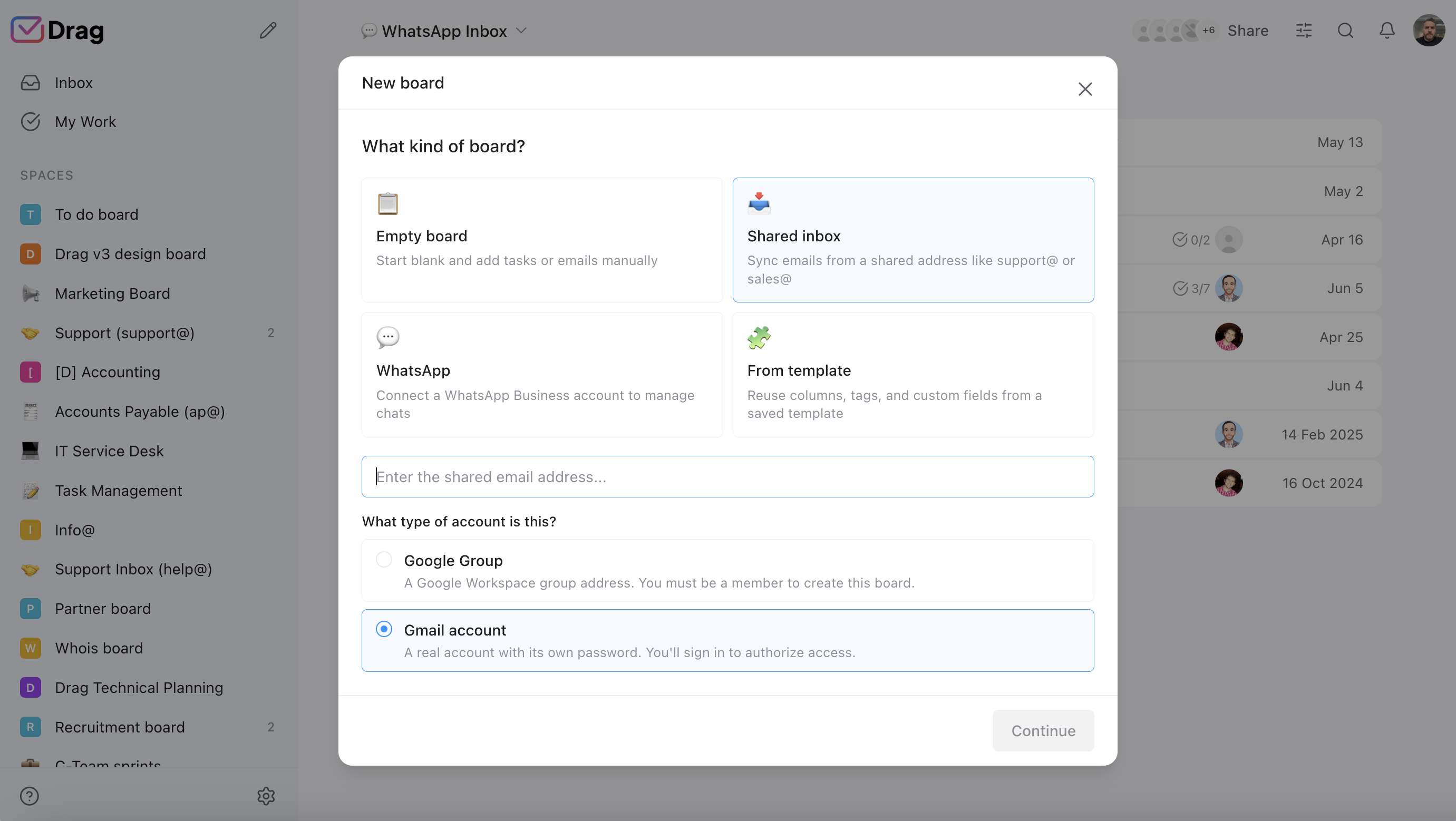
Pricing: Drag vs Zendesk
A 10-person team: Zendesk Suite Team ($55) + Copilot (~$50) is about $105/seat, roughly $12,600 a year before per-resolution fees. Drag Plus ($18, AI included) is about $2,160 a year. The difference is over $10,000, before a single Zendesk resolution fee. Put your own team size into the calculator.
AI features
 Drag Plus (AI included)
$2,160/yr
$18/user/mo × 10 seats · AI included
 Zendesk Suite + Copilot
from $12,600/yr+
$105/user/mo × 10 seats · Zendesk Copilot is a ~$50/seat add-on ON TOP of the Suite plan, PLUS a per-resolution fee on every AI-resolved ticket, so real AI cost grows with volume beyond what this calculator shows.
Your team saves at least $10,440/yr with Drag.
Estimate based on annual per-seat pricing, June 2026. Zendesk shown around Suite Team + Copilot add-on; Professional is $115/seat and per-resolution AI fees are extra. Confirm current pricing on each vendor's site.
A worked example: a 10-person support team
Put real numbers on it. A 10-person support team that wants AI:
- Zendesk: Suite Team ($55) + Copilot (~$50) is about $105/seat. 10 seats × $105 × 12 months = about $12,600 a year, before per-resolution fees on AI-handled tickets.
- Drag: Plus at $18/seat, AI already included, no add-on. 10 seats × $18 × 12 months = about $2,160 a year.
- Difference: over $10,000 a year, before a single Zendesk resolution fee.
The interactive calculator above lets you put in your own team size. (Figures use published per-seat annual pricing, June 2026; confirm current numbers on each vendor’s site.)
Drag vs Zendesk, feature by feature
The detail layer for evaluators. Each claim is backed by a Drag product screenshot and, where we state a Zendesk limitation, a cited source.
Price and AI cost structure
Drag is per seat: $12 to $24, with AI included from $18 and no AI add-on. Zendesk is $55 to $115 a seat plus a ~$50 AI add-on and a per-resolution charge.
- Drag: $12 Starter, $18 Plus (AI included), $24 Pro. No seat minimum. No AI add-on.
- Zendesk: $55-$115/seat + ~$50 AI add-on + per-resolution fee on AI-resolved tickets.
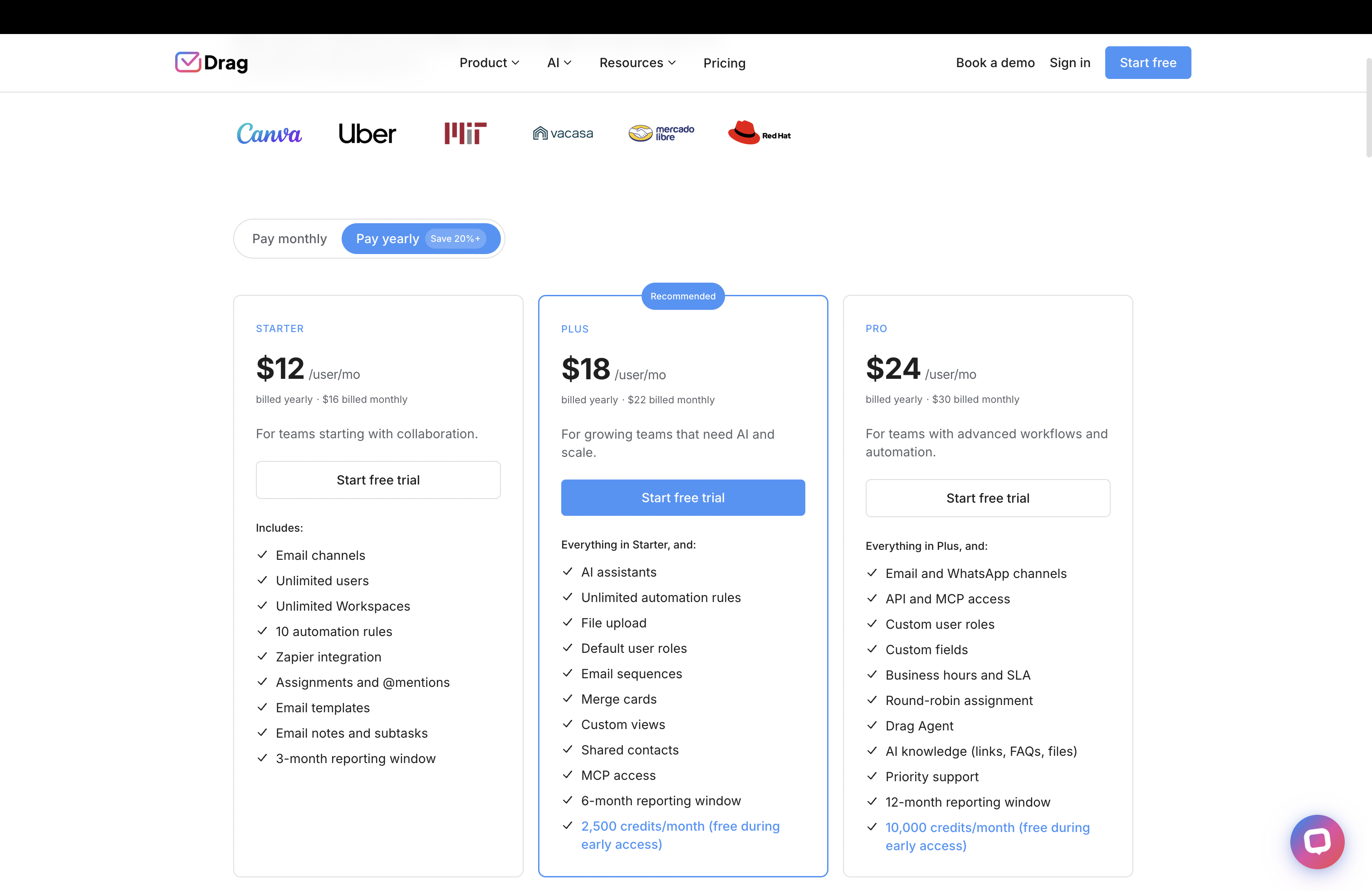
Source: Drag pricing, Zendesk pricing page.
Shared inbox vs ticketing
Drag is a collaborative Gmail inbox. Zendesk is a full ticketing platform, more than most email-driven teams need.
- Drag: shared inbox with boards, assignment, and collaboration inside Gmail. Simple, fast, no ticketing overhead.
- Zendesk: full enterprise ticketing with omnichannel and SLAs. Powerful, but more than most teams need.
AI
Drag includes Varley, its AI, in the seat from $18. Zendesk charges an add-on plus usage fees.
- Drag Plus $18: Varley drafts, tags, answers from your docs and acts in your tools. No AI add-on.
- Zendesk: ~$50/seat Copilot add-on + per-resolution fee on every AI-handled ticket.
Source: Zendesk pricing page (Copilot add-on); Drag product.
MCP server
Drag publishes its own MCP server (47 tools across 12 categories). Zendesk is building an MCP client (the opposite direction).
- 47 tools, full read and write from Claude, ChatGPT, Gemini, Copilot, Cursor, or Claude Code.
- Zendesk: official MCP server announced in May 2026, not yet available to customers. You cannot yet connect your own AI client to Zendesk.
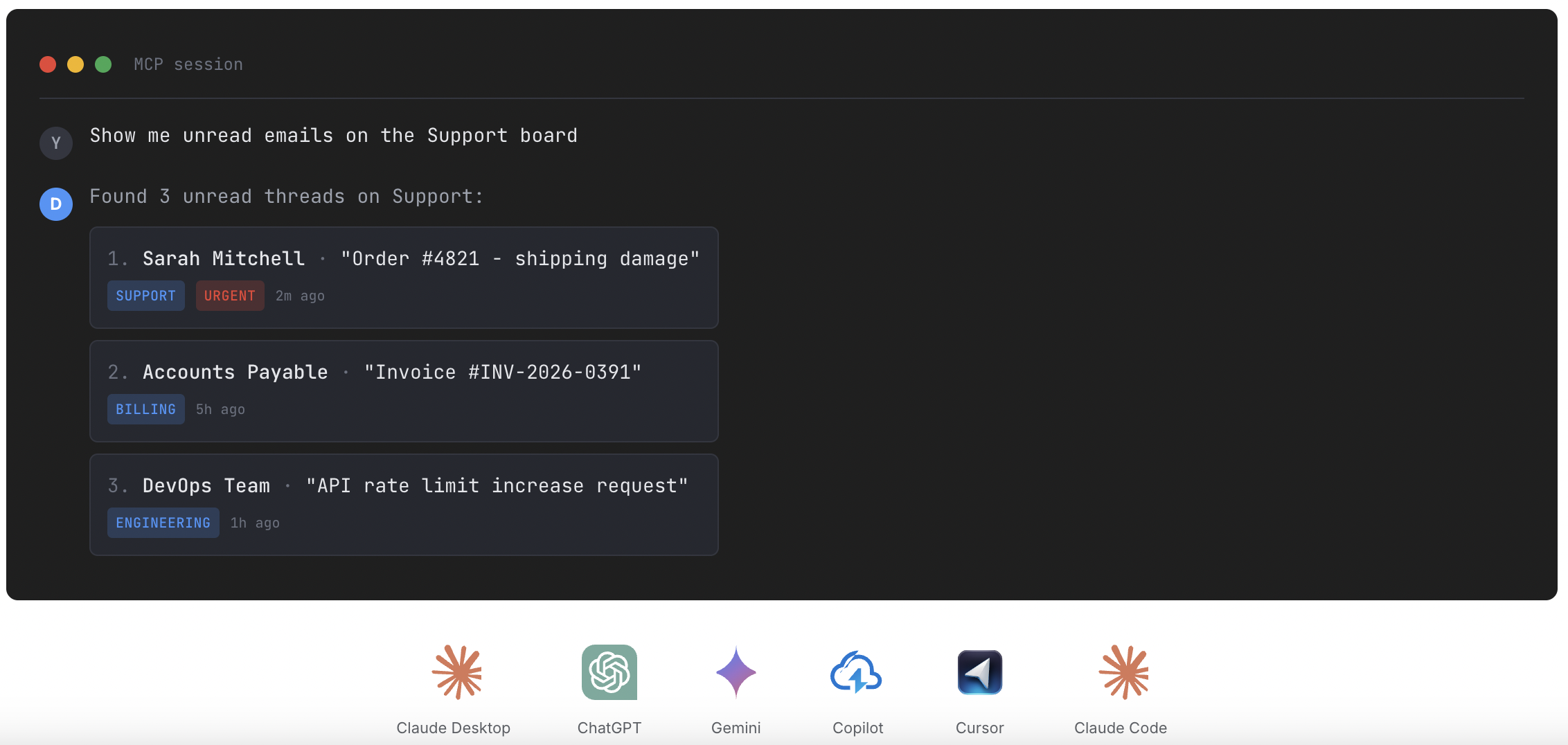
Source: Zendesk product documentation; MCP for customer support
Setup and ease of use
Drag sets up in minutes inside Gmail. Zendesk implementations often take weeks to months.
- Drag: minutes to set up in Gmail. No migration project. No retraining.
- Zendesk: often weeks to months of configuration, training, and migration.
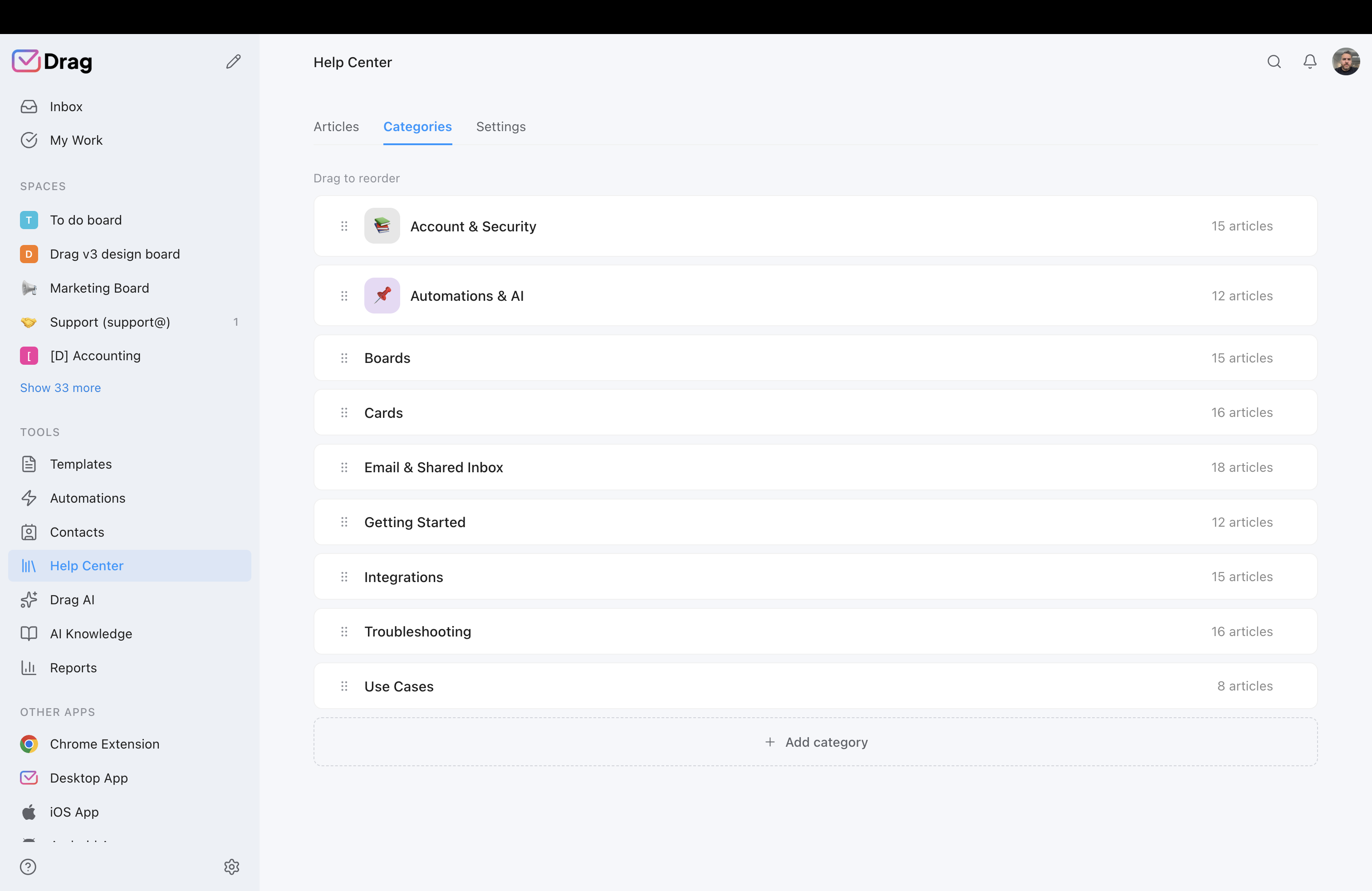
Help center and live chat
Drag includes both. Zendesk has strong offerings but prices them into higher tiers.
- Drag: customer-facing help center plus a live-chat widget that lands in your Gmail inbox.
- Zendesk: strong help center and chat, but full features require higher-tier plans.
Where Zendesk is still the right choice
To be straight: Zendesk is a serious, capable platform, and for the right team it earns its price. Choose Zendesk (or a full help desk like Freshdesk or Zoho Desk) if:
- You run a large or complex support operation needing deep omnichannel ticketing (email, chat, voice, social) with SLAs and advanced routing at scale.
- You have hundreds of agents and need heavy automation, reporting, and enterprise-grade workflows.
- You need its 1,200+ integration marketplace or specific Zendesk-only integrations your stack depends on.
Drag is not trying to replace that. It is for the larger number of teams whose support is really email and collaboration, who do not need an enterprise ticketing platform and should not be paying for one.
Moving from Zendesk to Drag is quick
Drag installs in Gmail in minutes, no migration project, no months-long implementation, and your team keeps working in Gmail (or the standalone app) instead of learning a new platform.
What customers say
“What we like the most about Drag is the ability to see at a glance where a client is during their Onboarding process, through the use of columns, tasks, and tags. It has been crucial for us because Waste Logics is a growing business and this transparency allows us to work faster and smarter.”
“There really is no comparison when it comes to Drag. We have a great relationship with their team, it’s incredibly easy to use, addresses all of our needs, and the price is right!”
“Drag provided a lot of transparency and unified our team. It allowed us to bring the entire team together to manage emails and tasks collaboratively, as opposed to working in silos, across different tools.”
Frequently asked questions
Is Drag a good Zendesk alternative?
For email-driven Gmail teams, yes: it does shared-inbox support inside Gmail at a fraction of Zendesk's cost, AI included with no add-on, plus its own MCP server. It is not a like-for-like replacement for enterprise omnichannel ticketing; for that, Freshdesk or Zoho Desk are closer.
How much cheaper is Drag than Zendesk?
Substantially. Drag is $12 to $24 a seat with AI included. Zendesk runs $55 to $115 a seat plus a ~$50 AI add-on and a per-resolution fee on AI-handled tickets. For a 10-person team that wants AI, Drag is roughly $2,160 a year versus $12,000-plus on Zendesk.
Does Zendesk charge per-resolution fees for AI?
Yes. On top of the Copilot add-on (~$50/seat), Zendesk charges a per-resolution fee for each ticket its AI resolves automatically. Drag includes Varley, its AI, in the seat from $18, with no AI add-on.
Do I actually need a help desk like Zendesk?
Often not. If your team mainly replies to email, loops in colleagues, and handles the occasional chat or WhatsApp message, that is a shared-inbox job. A full ticketing platform adds cost and configuration you may not use. If you run a large, complex, multichannel operation, Zendesk earns its place.
Does Drag have an MCP server and Zendesk does not?
Correct. Drag publishes its own MCP server, so you can connect Claude, ChatGPT, or Cursor to your inbox and run support by prompt. Zendesk announced an official MCP server in May 2026, though it is not yet available to customers; you cannot yet connect your own AI client to Zendesk that way.
Is Drag a full help desk?
No, and that is the point. Drag is a Gmail-native shared inbox with boards, assignment, AI, help center, and live chat. It is not an enterprise ticketing platform. Teams that need full ticketing should look at Freshdesk or Zoho Desk; teams whose support is email should look at Drag.
Can my team keep working in Gmail?
Yes. Drag works natively inside Gmail, and also offers a standalone web, desktop, and mobile app on the same data, so people work whichever way they prefer. Zendesk is a separate platform your team logs into.
How long does it take to switch?
Minutes to get started in Gmail, versus the weeks or months Zendesk implementations often take. There is no migration project; your email already lives in Gmail.
Does Drag include a help center and live chat?
Yes, both are included: a customer-facing help center and a live-chat widget that flows into your Gmail shared inbox.
What is Zendesk's pricing in 2026?
Zendesk Suite runs $55 (Team) and $115 (Professional), with a quote-only Enterprise above; the mid Growth tier was retired from the visible lineup in 2026. Copilot is a ~$50/seat add-on, and AI-resolved tickets carry a further per-resolution fee.
Does Drag do automation like Zendesk?
Drag supports automation, auto-tagging, and assignment rules suited to a shared inbox. Zendesk's automation and routing go deeper, which matters at enterprise scale but is more than most email-driven teams need.
Is my data secure with Drag?
Yes. Drag uses permission-based access, does not duplicate emails between mailboxes, and does not store your emails on its servers. It is a Google Cloud Partner with CASA Tier 2 verification and is GDPR compliant.
Does Drag handle multichannel?
Drag covers email, WhatsApp, and live chat. Zendesk offers deeper omnichannel (voice, SMS, social) at scale, so if heavy multichannel is core to your operation, Zendesk is stronger there.
How many users does Drag support?
Any number, with no seat minimum. Drag is used by more than 240,000 users in 50+ countries since 2017.
Can I run support reports from Drag?
Yes, in-app and through its MCP server. You can ask an AI client like Claude for response times and activity by prompt.
Should I choose Drag or Freshdesk to replace Zendesk?
If your support is email and collaboration, Drag (shared inbox, in Gmail, cheaper, AI included). If you genuinely need full ticketing with omnichannel and SLAs, Freshdesk is the closer like-for-like.


