








Everything Missive does for collaborative email, and more: AI included in the seat, a help center and live chat built in, reporting, and an MCP server that runs your inbox from Claude or ChatGPT. Use Drag inside Gmail or as a full standalone app, your team’s choice. From $12 a seat.

Table of contents

Founder’s Take
A personal note from Nick, co-founder of Drag
Missive are great. We admire their small, lightweight team and what they've done with it. They're also awesome at SEO, I see them everywhere! That may be part of the problem: their GTM is so strong that teams rarely even find the alternatives. You did, though, so while you're here:
We throw our hat in the ring with them constantly and it's a genuine 50/50. Some love Missive's simplicity; some love Drag's web app, the Chrome extension (Missive doesn't have one), the MCP server, and Drag Agent. They're one to watch and we wish them the very best.
The verdict
Drag and Missive are both excellent collaborative inboxes. The difference is flexibility and scope. Drag gives Gmail teams a shared inbox with AI, a help center, live chat, and workflow boards, used inside Gmail via the Chrome extension or as a full standalone app, your team's choice. Drag costs $12 to $24 a seat, with AI included from $18 and nothing metered. Missive is a single standalone app that unifies email with SMS, WhatsApp, and social. For Google Workspace teams, Drag is the more complete, lower-cost, and more flexible choice; for multi-channel or Outlook teams, Missive wins.
Choose Drag if you…
- Use Gmail / Google Workspace and want to work in Gmail or a standalone app, your choice
- Want AI included in the seat, not a separate AI bill or tier
- Want to run your inbox from Claude, ChatGPT, or Cursor (MCP)
- Need a self-serve help center and live chat built in
- Want Kanban boards, tasks, and reporting on top of email
Choose Missive if you…
- Need SMS or social channels (Instagram, Messenger) alongside email
- Are on Outlook or IMAP, not Gmail
- Prefer Missive’s internal chat alongside every email thread
- Want to pick your own AI model via your own provider key
Drag vs Missive at a glance
| Feature | Drag | Missive |
|---|---|---|
| Where & how you work | ||
| Ways to work | Inside Gmail (extension) or standalone app | Standalone app only |
| Standalone web / desktop / mobile apps | check_circle | check_circle |
| Email providers | Gmail / Google Workspace | Gmail, Outlook, IMAP |
| No migration to adopt | Yes, runs in your existing Gmail | No, team moves into Missive |
| AI | ||
| AI included in the seat | Yes, from $18 | No, Productive tier + usage |
| AI model | Drag AI (built in) | Missive AI credits or your own key (BYOK) |
| Run inbox from AI tools (MCP server) | Yes, 47 tools, read+write | No, MCP client only |
| Channels & support | ||
| check_circle | check_circle | |
| check_circle | check_circle | |
| SMS / social (Instagram, Messenger) | cancel | check_circle |
| Live chat widget | Yes, flows into Gmail inbox | Yes, in the Missive app |
| Customer-facing help center | Yes, AI-grounded | No (not a full help desk) |
| Workflow & insight | ||
| Kanban boards / workflow | check_circle | cancel |
| Tasks, custom fields, sequences | check_circle | Partial |
| Built-in reporting | check_circle | Limited (reviewer-noted gap) |
| In-thread team chat | Yes (notes + chat) | Yes (signature feature) |
| Pricing | ||
| Entry (annual) | $12 / user / mo | $14 / user / mo |
| AI plan (annual) | $18 (AI included) | $24 + AI usage |
| Free trial | 7-day | 30-day |
| Customer rating | 4.7 (1,200+) | ~4.6–4.7 on G2 (750+) |
Why Gmail teams pick Drag
Drag AI
AI included, not an add-on.
Drag’s AI drafts replies, tags and classifies email, reads sentiment, and summarises threads. Included in the seat from $18, one predictable bill, no API keys. Missive gates AI to its $24 Productive tier and runs it on metered credits or your own provider key.
See Drag AISix AI assistants, included
Connect Claude to your inbox in about two minutes.
Paste one URL into Claude’s settings, enter your API key once, and your inbox becomes 47 tools with full read and write, WhatsApp included, on the Pro plan. ChatGPT, Gemini, Copilot, and Cursor connect the same way. Then just ask:

Summarise unread Support threads and assign billing to Sarah.

Label everything mentioning refunds and move it to In Progress.

What was our first-reply time this week vs last?
Missive’s AI can consume outside MCP servers, but Missive ships no server of its own, so you cannot drive its inbox from an AI tool.
Explore the MCP serverMCP Server
@dragapp/mcp-server
47
tools · read + write
https://app.dragapp.com/mcp
paste into Claude › Settings › Connectors

 ClaudeChatGPTGeminiCopilotCursor+ any MCP client
Drag Agent
Drag Agent: an autonomous agent that classifies inbound email, retrieves context from your knowledge base and connected tools, takes action (refunds, ticket updates, CRM notes), drafts a sourced reply, and resolves the thread, all without a human in the loop.
09:41:02 CLASSIFY intent=billing, entity=invoice #4821
09:41:03 RETRIEVE stripe.invoices.get(4821) → $249.00 paid
09:41:04 RETRIEVE kb.search('refund policy') → 30-day window
09:41:05 ACT stripe.refunds.create(amount=249.00) → rf_8xK2
09:41:06 DRAFT confidence=0.96, sources=2, tokens=142
09:41:07 SEND thread_id=t_9f3a → resolved
Classify
Reads the email, identifies intent and extracts key entities.
Retrieve
Pulls context from your knowledge base, CRM, and previous conversations.
Act
Takes real action: issues a refund, updates a ticket, logs a note.
Resolve
Drafts a response, cites its sources, and sends or escalates.
Flexibility
Two ways to work, one inbox: Gmail or standalone.
Drag is a complete workspace: shared inboxes, assignments, Kanban boards, an AI-grounded help center, and a live-chat widget. Run it right inside Gmail via the Chrome extension, or as a standalone web, desktop, and mobile app. Same data, same boards, either way.
Missive offers one option: its own standalone app, so the whole team has to move into it.
See the shared inbox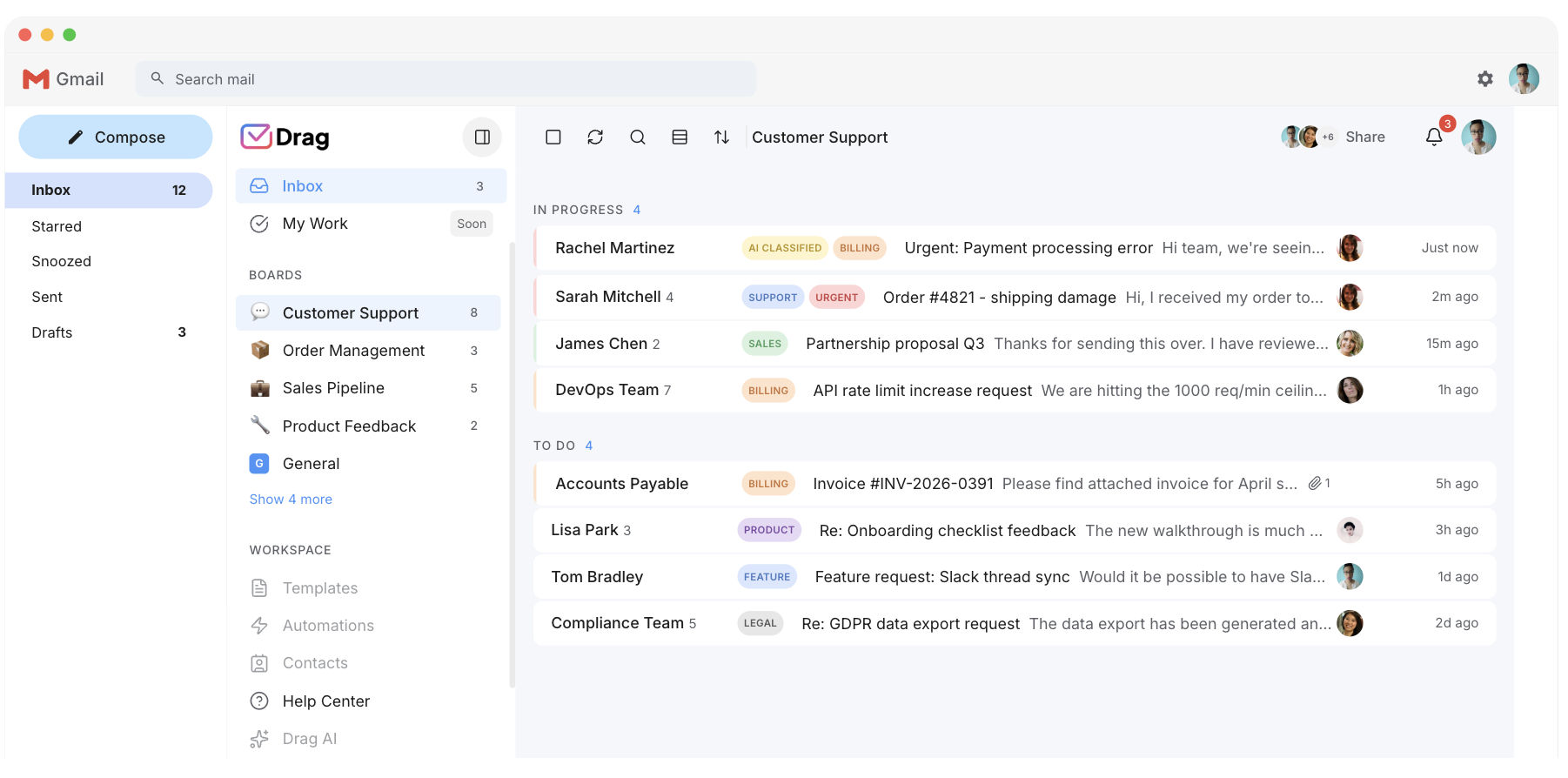
Pricing: Drag vs Missive
As of August 2026. Missive: $14 Starter / $24 Productive / $36 Business (annual), 30-day trial. Drag: $12 Starter / $18 Plus / $24 Pro (annual), AI included from Plus.
AI features
 Drag Plus (AI included)
$2,160/yr
$18/user/mo × 10 seats · AI included
 Missive Productive
from $2,880/yr+
$24/user/mo × 10 seats · AI usage (credits or BYOK) billed separately
Your team saves at least $720/yr with Drag.
Estimate based on published annual pricing, August 2026. Missive AI usage billed separately.
Pricing comparison: Drag vs Missive
Each bar runs from that product’s cheapest published plan to its most expensive, read from its own pricing page in August 2026. The bars overlap more than most of our comparisons, which is honest: Missive is not expensive for what it is. The difference is what the seat includes.
- Drag$12$24everything included
- Missive$14$36


Entry seat to top published per-seat tier, 2026. Quote-only Enterprise tiers excluded.
Prices from each vendor's own pricing page, August 2026; historical points backed by web.archive.org captures of the vendor's pricing page. Missive's pre-2024 points are month-to-month rates, since it introduced annual billing in April 2024.
Missive pricing history: a quiet line with one loud year
Missive’s entry price has barely moved: $10 to $14 since 2021, flat since 2023. The change hid in 2024, when the free plan left the pricing page and the middle tiers rose by a third, which is how a stable headline number can still reprice a team.
Prices from each vendor's own pricing page, August 2026; historical points backed by web.archive.org captures of the vendor's pricing page. Missive's pre-2024 points are month-to-month rates, since it introduced annual billing in April 2024.
Missive: annual billing did not exist before April 2024, so the earlier figures are monthly rates
| Tool | 2021–26 | Basis | 2021 | 2022 | 2023 | 2024 | 2025 | 2026 |
|---|---|---|---|---|---|---|---|---|
| Drag | +$4(+50%) | per-seat | $8 | $5 | $8 | $8 | no capture | $12 |
| Missive | +$4(+40%) | per-seat | $10† | $13† | $14† | $14† | $14 | $14 |
| Inflation (US CPI) | +23% | reference | $12 | $12.96 | $13.49 | $13.88 | $14.26 | $14.78 |
| When | Lineup | Entry / mid | AI |
|---|---|---|---|
| 2021 | Free / Starter / Productive / Business | $10 entry per user per month (month-to-month; no annual billing yet) | Pre-AI era |
| 2022-2023 | Same lineup | $13, then $14 entry | Pre-AI era |
| 2024 | Free plan de-listed from the pricing page (kept in-product); annual billing introduced in April | Starter held $14; Productive $18 to $24; Business $26 to $36 | AI arrives gated to Productive, on credits or your own key |
| 2026 | Starter / Productive / Business | $14 / $24 / $36 | Credits or BYOK (Anthropic, OpenAI, Gemini) on top of the Productive seat |
Drag vs Missive, feature by feature
The detail layer for evaluators. Each claim is backed by a Drag product screenshot and, where we state a Missive limitation, a cited source.
AI, included vs an add-on
Drag includes six AI assistants in the seat. Missive gates AI to its Productive tier on metered credits or your own key.
- Drag Plus $18/seat: draft, tag, sentiment, compose, summarise, co-pilot included. A 10-seat team pays $2,160/yr, one predictable invoice.
- Missive Productive $24/seat: AI gated to this tier ($2,880/yr for 10 seats), plus metered credits or your own OpenAI/Claude/Gemini key billed separately.
Source: Missive pricing page, Missive AI credits or BYOK, Productive tier
Run your inbox from Claude (MCP)
Drag publishes @dragapp/mcp-server, an MCP server that lets AI tools read and write your inbox. Missive is an MCP client only: it consumes outside context but doesn’t expose your inbox to drive.
- 47 tools, full read+write: triage, draft, assign, label, report, and manage your knowledge base from Claude, ChatGPT, Gemini, Copilot, Cursor, or Claude Code.
- Worked example: open Claude and type “Show unread on the Support board, summarise the top five, and assign anything billing-related to Sarah.” Claude reads the full threads through MCP, writes the summaries, and makes the assignments. You never open Drag.
- Missive: MCP client only. Pulls outside context into its own AI but does not expose your inbox for external AI tools to drive.
Source: Missive documents its MCP client integration in its product updates. Drag’s MCP server: dragapp.com/mcp / MCP for customer support
Two ways to work: Gmail or standalone
Drag runs inside Gmail (Chrome extension) or as a standalone web/desktop/mobile app, your team’s choice, same data. Missive is a single standalone app the whole team must move into.
No lock-in: your email stays in Gmail
With Drag, Gmail remains the canonical record; Drag is a layer on top, not a replacement. Cancel any time and your mail is exactly where it always was.
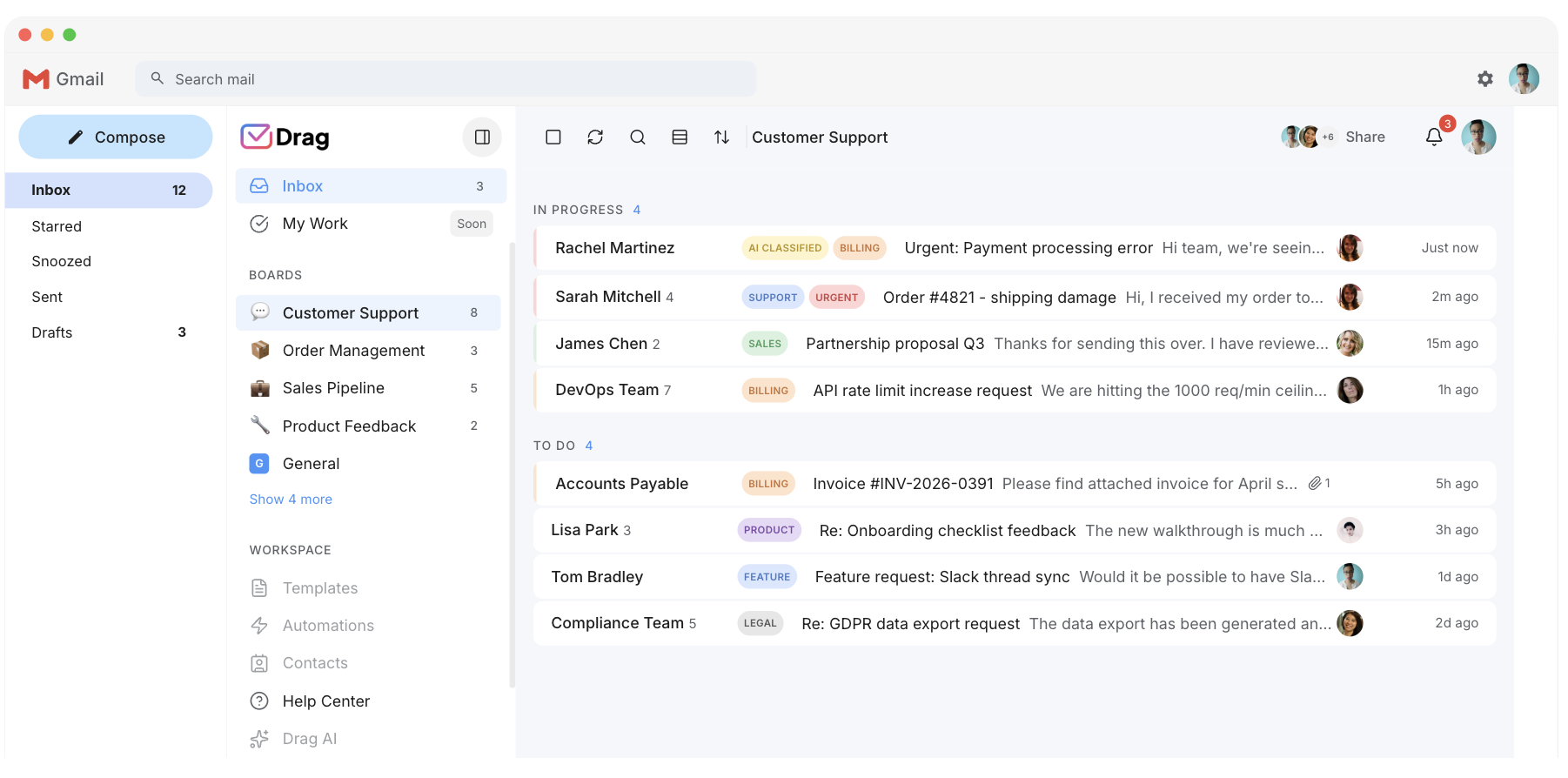
Kanban boards & workflow
Drag turns emails into cards on visual boards (New → In Progress → Done) with tasks, due dates, custom fields, and sequences. Missive offers tasks and assignment but no Kanban board view.
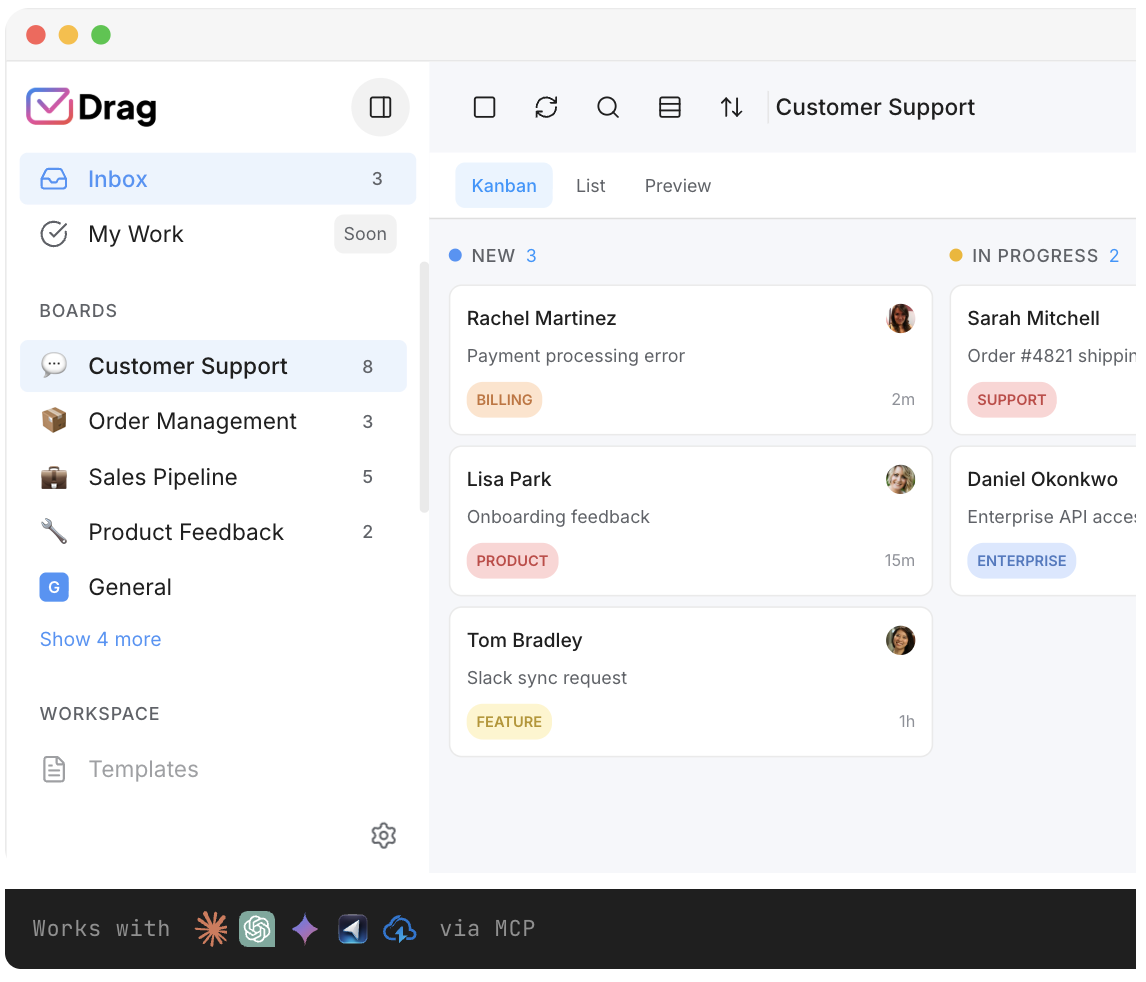
Customer-facing help center
Drag includes an AI-grounded, self-serve help center for your customers. Missive, by its own account, is not a full help desk and does not offer one. You can deflect repetitive questions with a knowledge base that stays current because it’s grounded in your real conversations and connected docs. No separate help-desk product to buy and bolt on. With Missive, a customer-facing help center is a third-party tool you add and pay for.
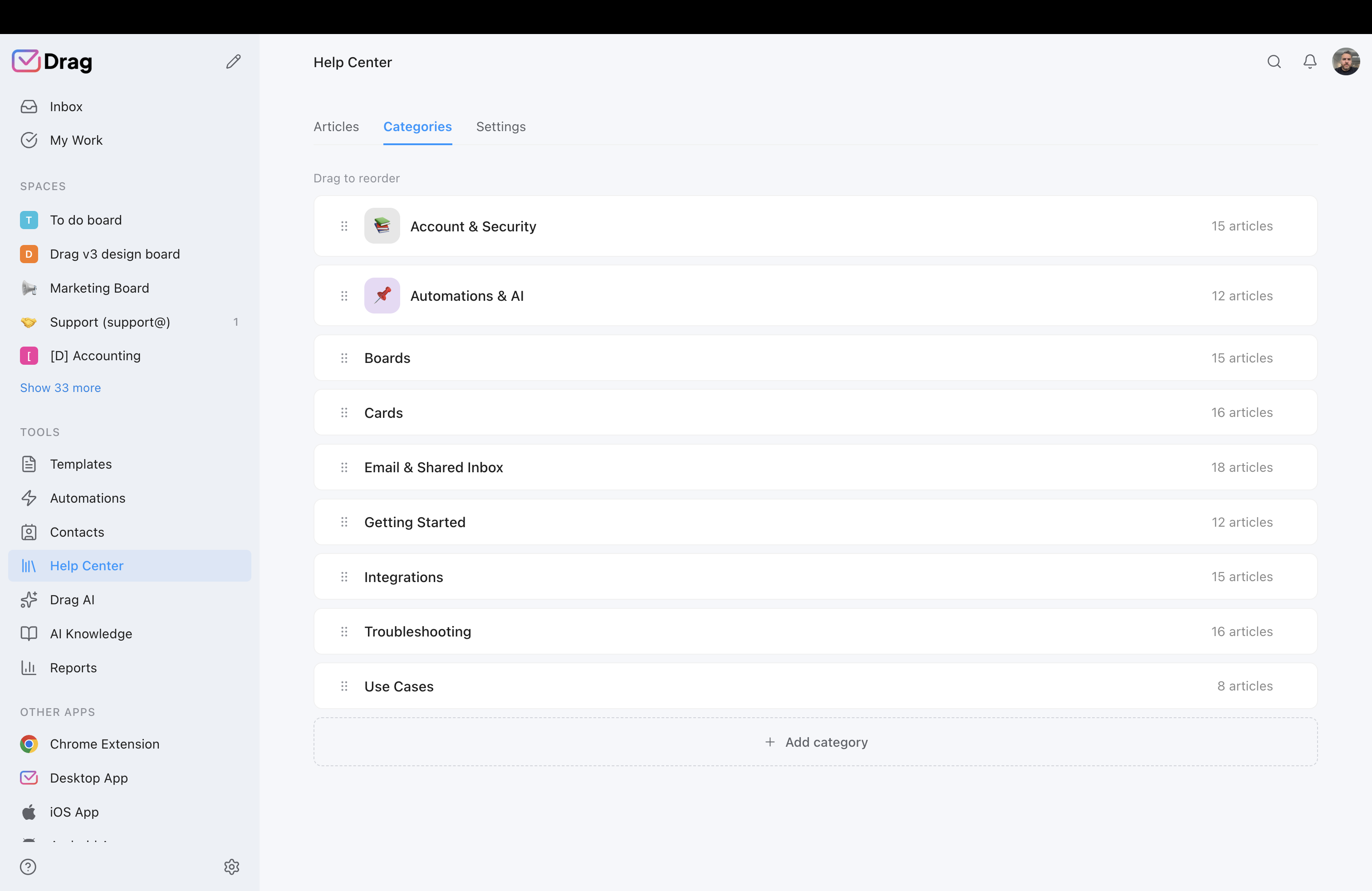
Source: Missive’s own blog describes the product as not a full help desk, without a customer-facing help center.
Live chat that lands in your inbox
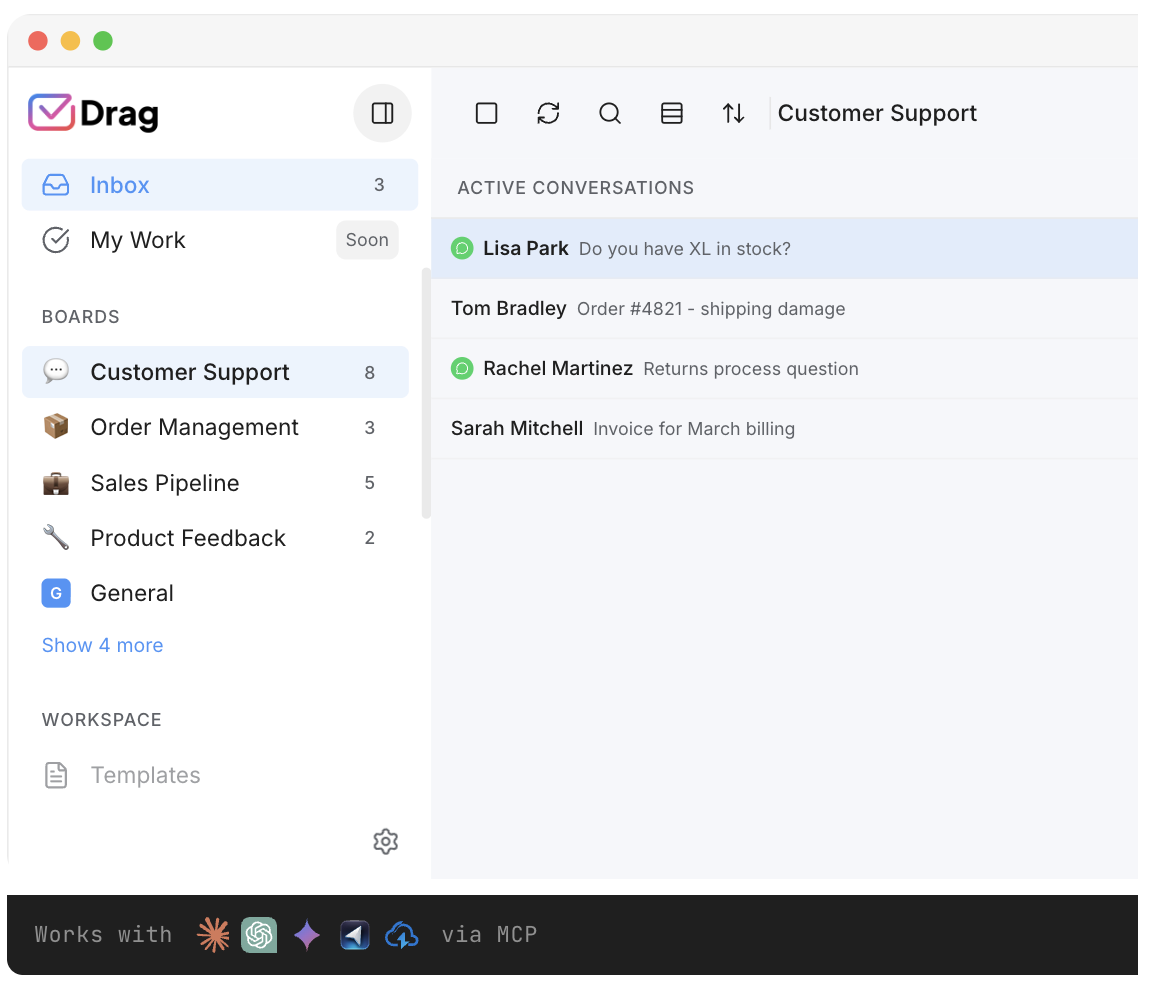
Both offer a live-chat widget. Drag’s conversations arrive in your Gmail shared inbox as cards with the same boards, assignments, AI, and SLAs; Missive’s live chat lives in the Missive app.
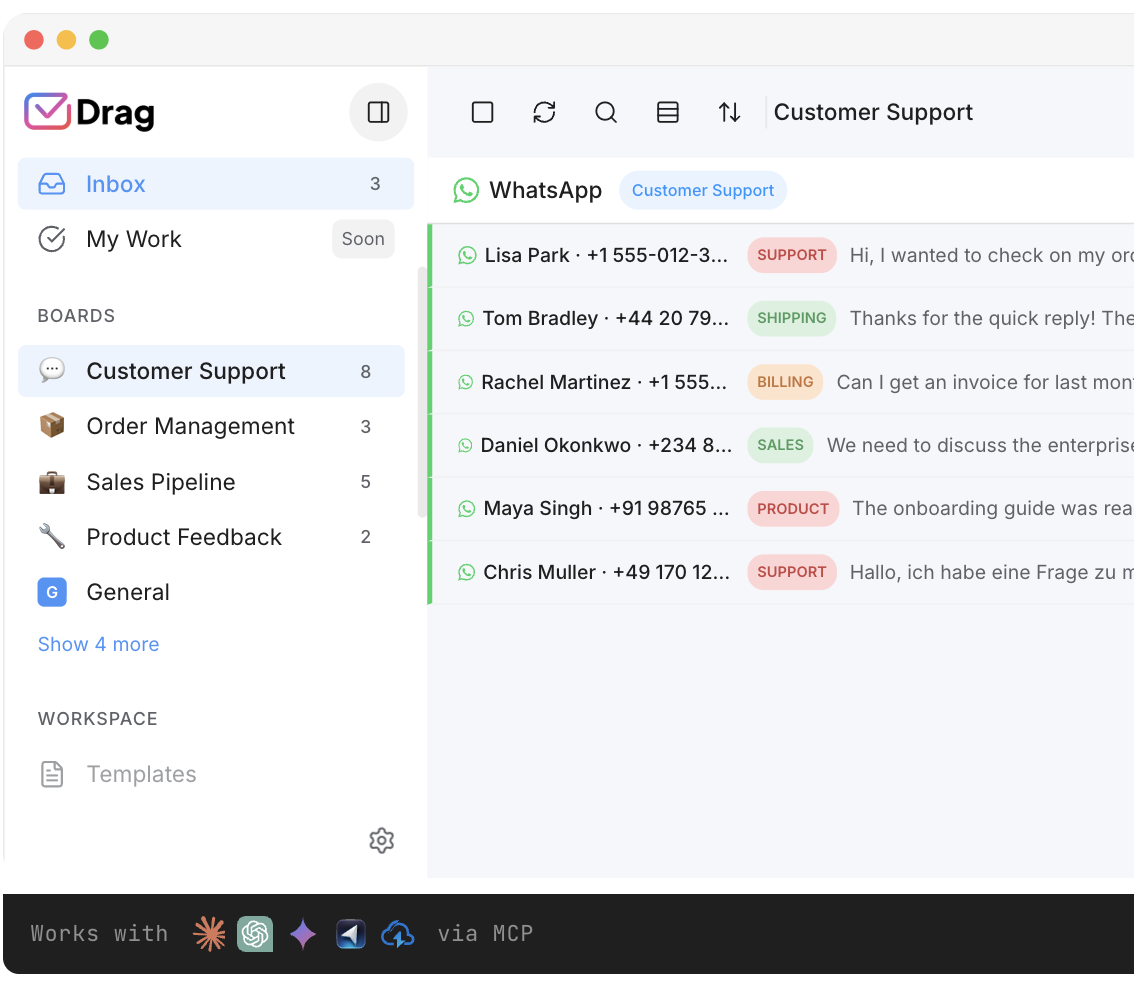
Both manage WhatsApp. Drag handles WhatsApp conversations right inside Gmail with assignment, tags, automation, and reporting.
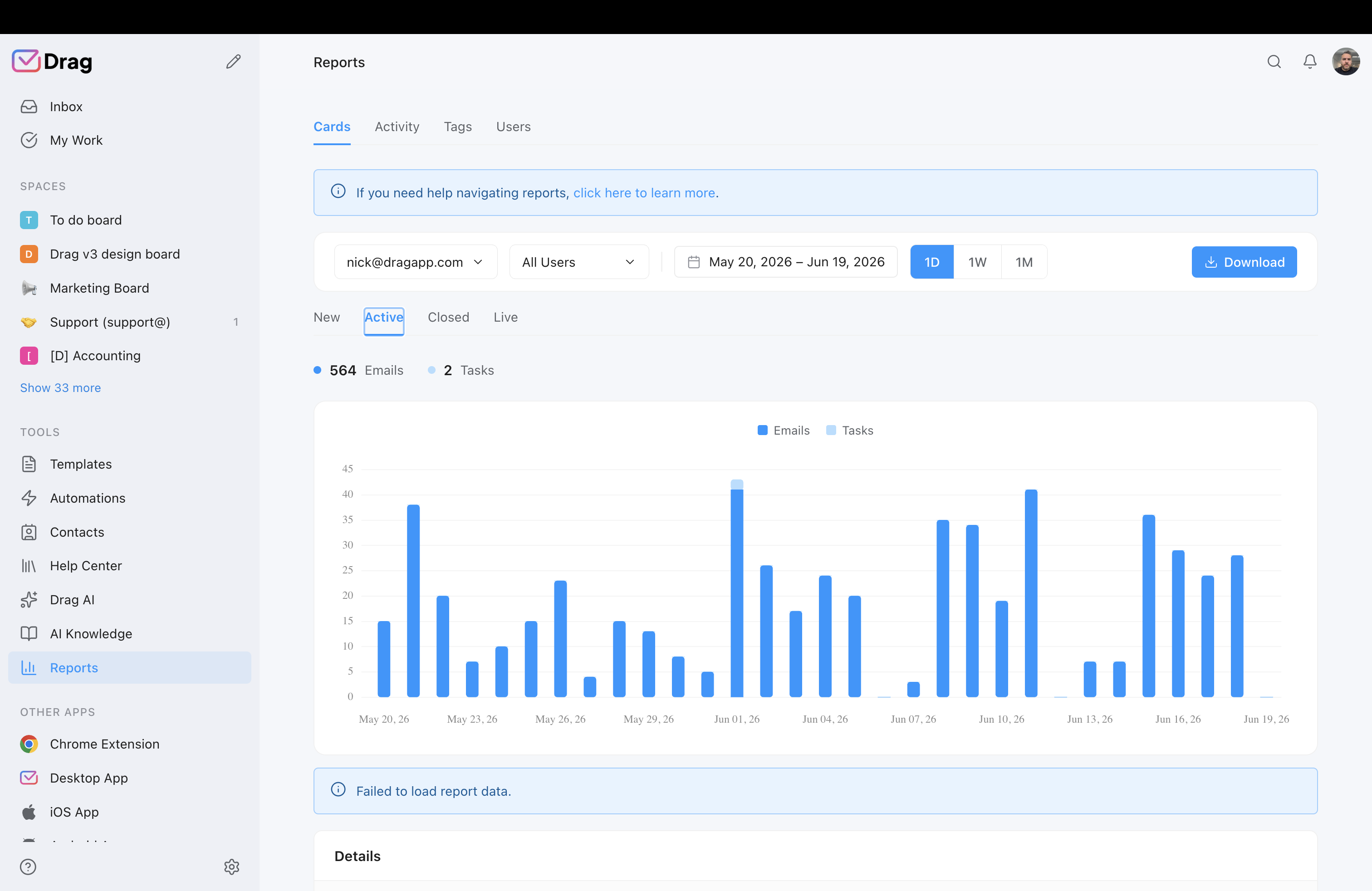
Reporting & analytics
Drag ships response-time, activity, and closed-volume reporting with CSV export, also queryable from AI tools via MCP. Reviewers flag reporting as a Missive gap.
Source: reporting limitations noted in Missive's G2 reviews (read August 2026)
Pricing
Drag $12 / $18 (AI included) / $24; Missive $14 / $24 (AI tier) / $36, AI usage extra. See the calculator above.
Source: Missive pricing page, dragapp.com/pricing
Where Missive wins
- SMS and social (Instagram, Messenger): Missive unifies these alongside email; Drag covers email, WhatsApp, and live chat, but not SMS or social.
- Outlook & IMAP: Missive works across Gmail, Outlook, and IMAP; Drag is Gmail/Workspace only.
- Internal chat in every thread: Missive embeds internal chat alongside every email thread, a collaboration model teams love.
- Ratings & maturity: Missive edges Drag on G2 and has a large, long-standing review base.
If those describe you, Missive may be the better tool. We’d rather say so than oversell. For a Google Workspace team that wants shared email, self-serve support, workflows, and AI included at a predictable price, Drag is the stronger 2026 choice.
There’s nothing to migrate.
Because Drag works inside your existing Gmail, switching from Missive isn’t a migration. It’s adding a Chrome extension (or the Drag web/desktop/mobile apps). No moving mailboxes into a new system, no IT project, no training budget. Connect your shared address, invite your team, and your shared inbox is live in under 2 minutes. Adoption is instant because your team is already in Gmail.
What customers say
“What we like the most about Drag is the ability to see at a glance where a client is during their Onboarding process, through the use of columns, tasks, and tags. It has been crucial for us because Waste Logics is a growing business and this transparency allows us to work faster and smarter.”
“There really is no comparison when it comes to Drag. We have a great relationship with their team, it’s incredibly easy to use, addresses all of our needs, and the price is right!”
“Drag provided a lot of transparency and unified our team. It allowed us to bring the entire team together to manage emails and tasks collaboratively, as opposed to working in silos, across different tools.”
Frequently asked questions
Is Drag a good Missive alternative?
For Gmail and Google Workspace teams, yes. Shared inboxes, assignments, Kanban boards, a help center, live chat, and AI included, all inside Gmail from $12 (AI from $18). Not a fit if you need Outlook/IMAP, or SMS and social channels, where Missive is stronger (note Drag does handle WhatsApp and live chat).
What’s the main difference between Drag and Missive?
Where you work and how you get AI. Drag is inside Gmail with AI included; Missive is a standalone app with AI gated to its Productive tier on metered credits or your own key.
Is Drag cheaper than Missive?
For teams that want AI, generally yes. Drag Plus is $18 with AI included vs Missive’s $24 AI tier plus AI usage. Entry prices are close: Drag $12, Missive $14.
Does Drag have AI like Missive?
Yes, included in the seat (six assistants: drafts, tagging, sentiment, compose, summarise, co-pilot) in Plus and Pro. Missive’s AI is gated to Productive and runs on credits or your own key.
Does Drag work outside Gmail like Missive?
Drag is Gmail/Google Workspace only (no Outlook/IMAP), but runs inside Gmail (Chrome extension) and as standalone web/desktop/mobile apps. Missive supports Gmail, Outlook, and IMAP, plus SMS, WhatsApp, and social. Drag handles email, WhatsApp, and live chat.
Can I run my inbox from Claude with Drag?
Yes. Drag exposes an MCP server (47 tools) for Claude, ChatGPT, Gemini, Copilot, Cursor, and Claude Code. Missive consumes outside MCP servers but doesn’t expose its inbox.
Does Drag offer a help center and live chat?
Yes. A customer-facing AI-grounded help center and a live-chat widget, both flowing into your Gmail inbox. Missive has live chat but, by its own account, is not a full help desk and lacks a customer-facing help center.
How hard is it to switch from Missive to Drag?
There’s no migration. Drag runs inside your existing Gmail. Add the extension, invite your team, go live in under 2 minutes.
Does Missive have a free plan?
Missive offers a 30-day free trial, and an unadvertised free plan for up to 3 users that no longer appears on its pricing page; its listed paid tiers run from $14.
When is Missive the better choice?
SMS or social channels (Instagram, Messenger), Outlook/IMAP teams, or when internal chat alongside every email thread is central to your workflow.
Do I need to migrate or import my email to use Drag?
No. Drag works inside your existing Gmail, so your mail is already there. Nothing to export, import, or move. Add the Chrome extension (or use the apps), invite your team, and your inbox becomes a shared workspace in under 2 minutes.
Can I use Drag and Gmail at the same time?
Yes. Drag runs inside Gmail, so you keep using Gmail exactly as you do now, with shared inboxes, Kanban boards, assignments, and AI layered on top. You can also work in the standalone Drag web, desktop, or mobile apps, same data either way.
What happens to my email if I cancel Drag?
Your email stays in Gmail. Drag is a layer on top of Gmail, not a separate system that holds your mail, so there’s no lock-in. Cancel any time and your inbox is exactly where it always was. By contrast, standalone apps that become your system of record can make leaving harder.
Does Drag have a mobile app?
Yes. iOS and Android apps, plus a desktop app for macOS and Windows, the web app, and the Gmail Chrome extension. Use whichever suits each person.
Is Drag secure?
Drag is SOC 2 and CASA certified, encrypts data at rest and in transit, and does not train AI on your data. Missive is SOC 2 Type II certified; both meet enterprise security standards.
Is Drag only for support teams?
No. Because Drag adds Kanban boards, tasks, custom fields, and automations on top of email, teams run sales pipelines, operations, HR, and IT in it too. A card can be a ticket, a lead, an applicant, or an order, not just a support request.


