








HappyFox has genuinely mature ticketing, but it is a stack: Help Desk, Chat, Workflows, and BI priced separately, with collision detection gated to the $99 Pro tier and AI billed as add-ons on top of every seat. Drag is one Gmail-native product with the essentials in the seat: collision detection from $12, Varley, Drag’s AI, from $18, boards, live chat, WhatsApp, a help centre, and its own MCP server. Here is the honest, side-by-side comparison.

Table of contents
The verdict
The best HappyFox alternative for Gmail teams is Drag: it puts the essentials HappyFox spreads across a priced stack (Help Desk, Chat, Workflows, BI, plus AI add-ons) into one Gmail-native product, with collision detection from $12, Varley, Drag’s AI, from $18, boards, live chat, WhatsApp, and a help centre on one bill. HappyFox remains the better choice for teams that need phone and social as first-class queues, IT asset management, or run 100+ agents where its unlimited-agent plans change the maths.
Choose Drag if you…
- your support runs on email in Google Workspace and you want one product with one bill
- you want collision detection at $12, not gated to a $99 Pro tier
- you want AI drafting, tagging, sentiment, and summaries included from $18, not add-ons on top of seats
- you want boards, live chat, WhatsApp, and a help centre in the seat, with no add-on stack
Choose HappyFox if you…
- you need phone and social as first-class ticket queues
- you need IT asset management or a dedicated Service Desk
- you run 100+ agents where HappyFox's unlimited-agent plans genuinely change the maths. We say so plainly below.
Comparing more help desks? See our best help desk software guide for a broader comparison.
Drag vs HappyFox at a glance
| Feature | Drag | HappyFox |
|---|---|---|
| Pricing & plans | ||
| Entry price | $12 per user (annual) | From $21 per agent, Basic hard-capped at 5 agents |
| Growth tier | $18 with AI included | Team $49; Pro $99 (where key features unlock) |
| Collision detection | Included at $12 | Gated to the Pro tier ($99 per agent) |
| AI | Varley, Drag’s AI, included from $18 | Add-ons billed on top of seats at every tier (AI Copilot, Assist AI $1-4 per user) |
| Product shape | ||
| Product shape | One product | A stack: Help Desk + Chat + Workflows + BI, each priced separately |
| Automation caps | Included | Action limits per tier; separate Workflows product $199+ per month |
| Live chat | Included, lands in the Gmail queue | Separate volume-priced product; widget disables at its cap |
| Channels & ITSM | ||
| Channels | Email + live chat + WhatsApp | Email, chat, phone, social (its genuine strength) |
| Asset management / ITSM | No | Yes (Pro+, and a dedicated Service Desk product) |
| Platform & access | ||
| Where you work | Inside Gmail + standalone apps | Standalone platform |
| MCP server (run inbox from AI clients) | Yes, 47 tools | No |
Verified July 2026; confirm current details on each vendor’s site.
Why Gmail teams pick Drag
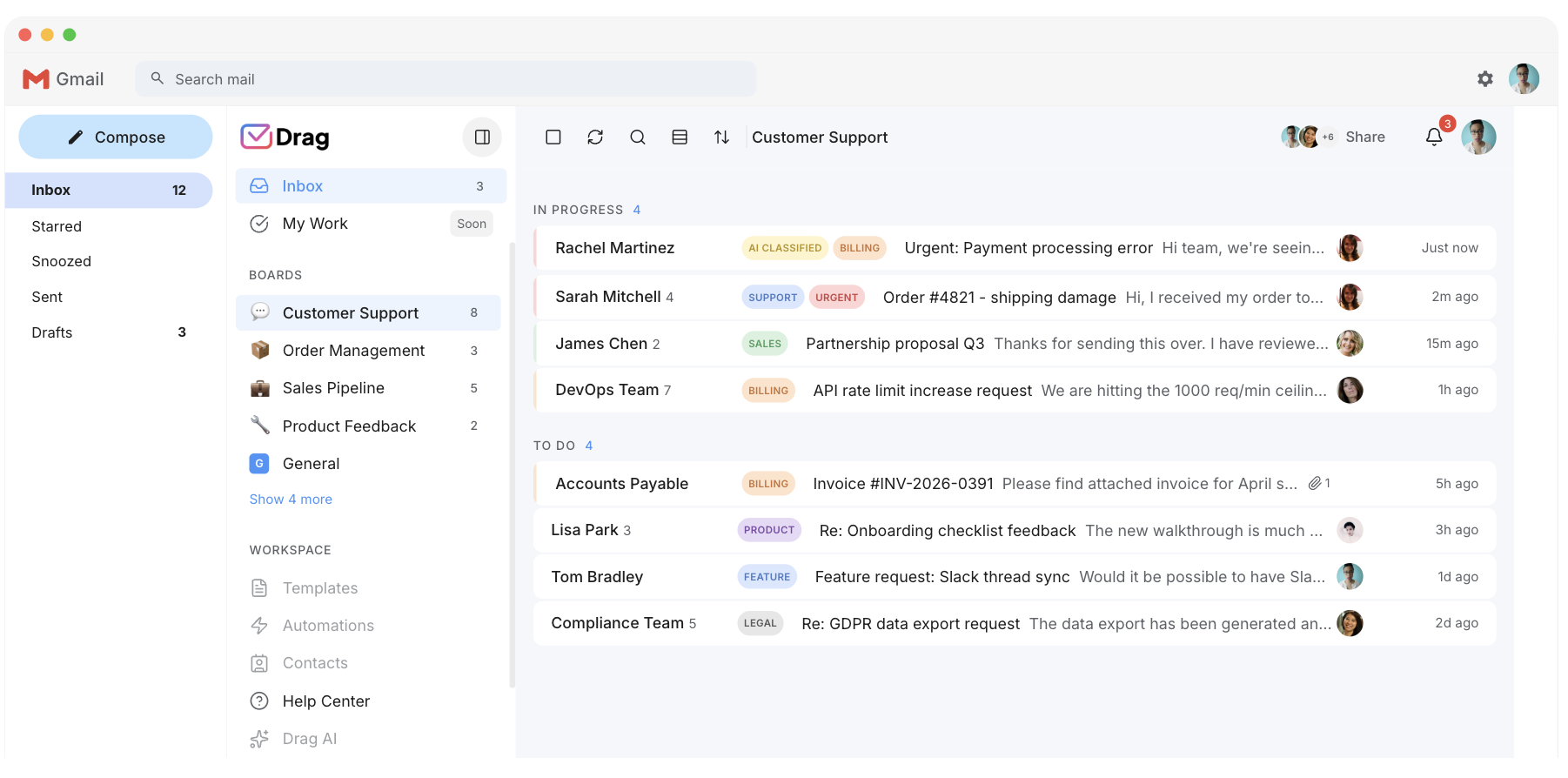
Collision detection
Collision detection is not a $99 feature.
The feature that stops two agents answering the same customer, the reason shared-inbox tools exist, is gated to HappyFox’s Pro tier at $99 per agent after its 2025 price rise. In Drag it is included at $12, alongside round-robin assignment and boards.
- Drag: collision detection included at $12, with round-robin assignment and boards.
- HappyFox: collision detection gated to the $99 Pro tier.
AI
AI in the seat, not on the invoice.
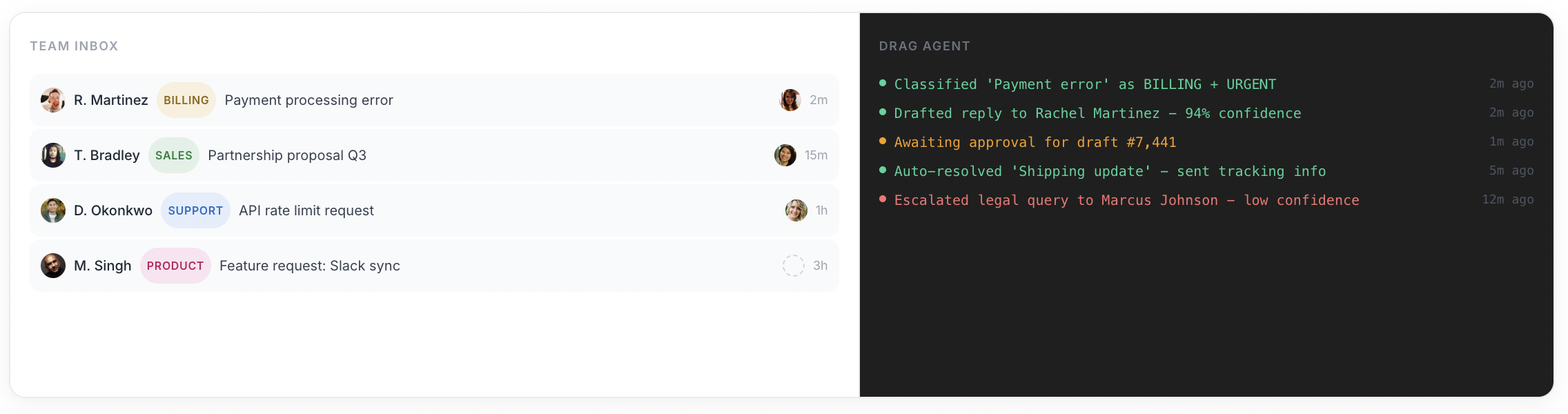
HappyFox markets an AI-powered platform, but the AI is an add-on stack: Copilot billed on top of seats, Assist AI at $1 to $4 per user, usage-billed voice AI. Drag includes Varley, its AI, from $18: it drafts and tags every email, answers from everything your team knows and acts in your tools. Five seats with Varley: $90 a month, one line on the bill.
- Drag: Varley included from $18. Five seats with Varley is $90 a month, one line on the bill.
- HappyFox: Copilot, Assist AI ($1 to $4 per user), and usage-billed voice AI, all on top of seats.
Varley · Drag’s AI
One AI, four ways it works.
Varley, Drag’s AI, knows your help center, docs and past conversations. It drafts and tags every email, answers your team in Copilot, acts in Stripe, Slack and HubSpot when you approve, and on Pro resolves conversations on its own. Monthly AI credits come with every Plus and Pro seat, with no per-seat AI add-on.
HappyFox bills its AI (Copilot, Assist AI, voice) on top of seats at every tier.
- CopilotAsk Varley, then let it act
- AgentsVarley resolves conversations on its own
- IntelligenceWhat Varley knows, and the tools it acts in
- AssistsVarley in every email: drafts, tags, summaries
Included in Plus. Pro gets 2x the usage. Power users top up any time.
Varley resolves the routine ones on its own.
On Pro, Varley’s Agent reads the email, checks your policy, acts in tools like Stripe, replies in your team’s voice and closes the conversation. Anything it isn’t sure of goes to your team, with everything it found. Included in Pro.
HappyFox sells AI add-ons for drafting and assist, but no autonomous resolution agent of this kind, and none of it is included in the seat.

I was charged twice this month
Daniel Okonkwo · Customer
- 9:38:13
Read Daniel’s email
Billing · Urgent
- 9:38:15
Checked your refund policy
Duplicate charges: refund in full
- 9:38:18
Found both charges in Stripe
$49 on 12 April, twice
- 9:38:22
Refunded the duplicate
$49 back to Daniel’s card
- 9:38:30
Replied to Daniel
Policy cited, in your team’s voice
- 9:38:35
Closed the conversation
Logged, with its sources
Connect Claude to your inbox in about two minutes.
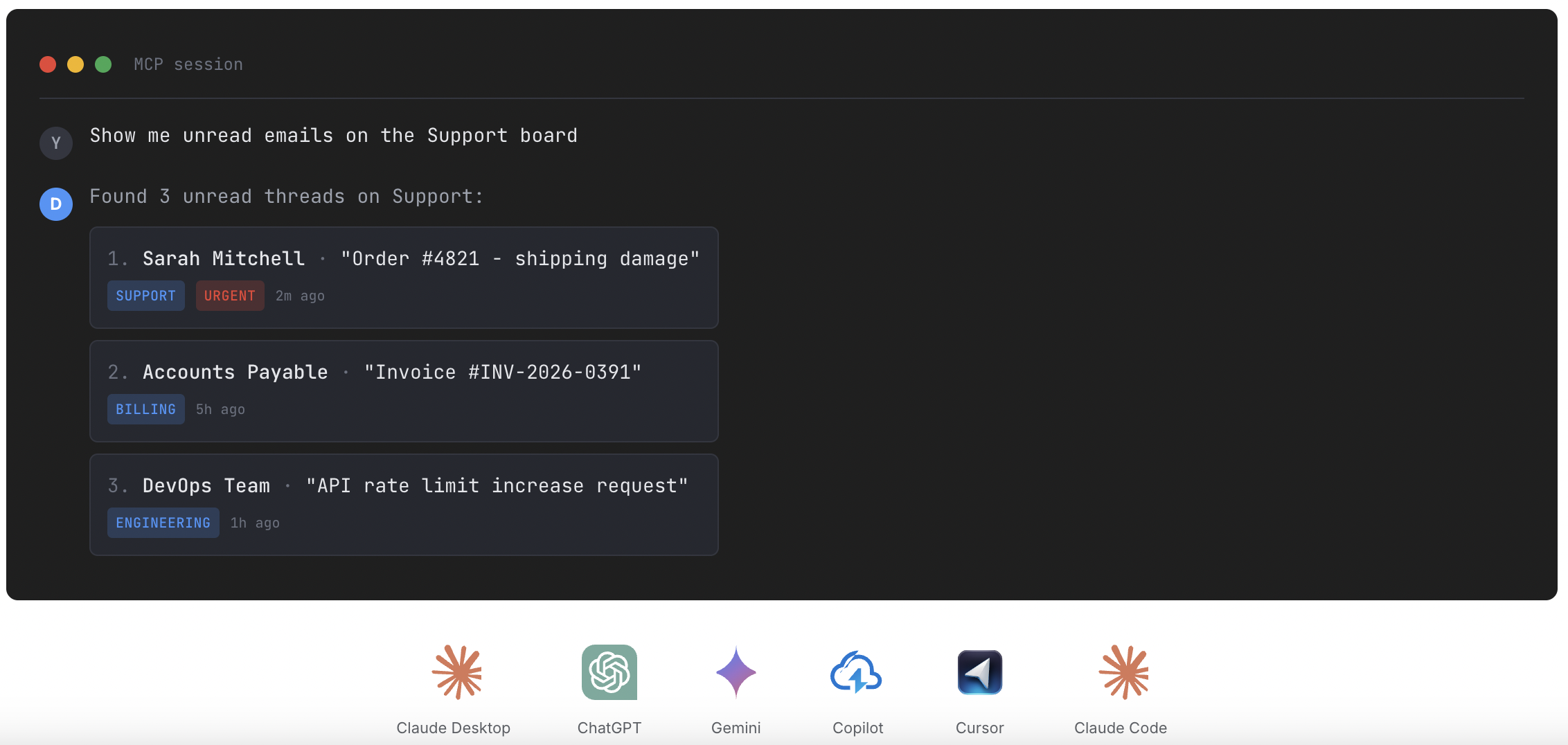
Paste one URL into Claude’s settings, enter your API key once, and your inbox becomes 47 tools with full read and write, WhatsApp included, on the Pro plan. ChatGPT, Gemini, Copilot and Cursor connect the same way. Then just ask:

Summarise unread Support threads and assign billing to Sarah.

Label everything mentioning refunds and move it to In Progress.

What was our first-reply time this week vs last?
HappyFox has no official MCP server; only third-party API wrappers exist.
Explore the MCP serverMCP server
@dragapp/mcp-server
47
tools · 12 categories · read + write
https://app.dragapp.com/mcp
paste into Claude › Settings › Connectors

 + any MCP client
One product
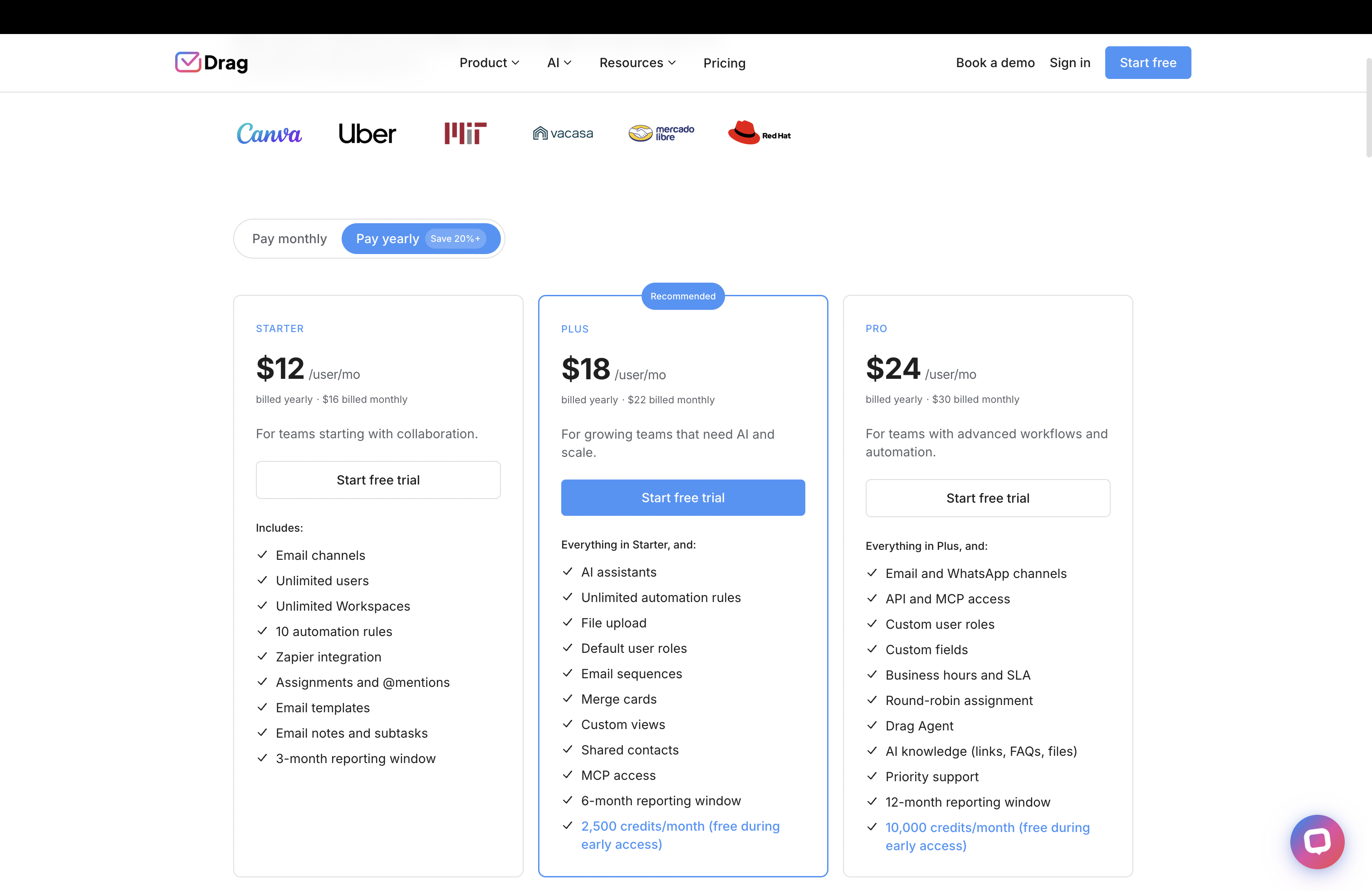
One product, one bill.
Replicating a modern support setup on HappyFox means assembling Help Desk plus Chat (volume-priced, and the widget switches off at its cap) plus Workflows ($199 a month for three) plus BI. Drag ships the inbox, boards, automation, reporting, live chat, WhatsApp, and help centre as one product; a good month never pauses a feature.
- Drag: inbox, boards, automation, reporting, live chat, WhatsApp, and help centre in one product.
- HappyFox: Help Desk + Chat (volume-priced) + Workflows ($199/mo) + BI, priced separately.
No caps
No five-agent trap.
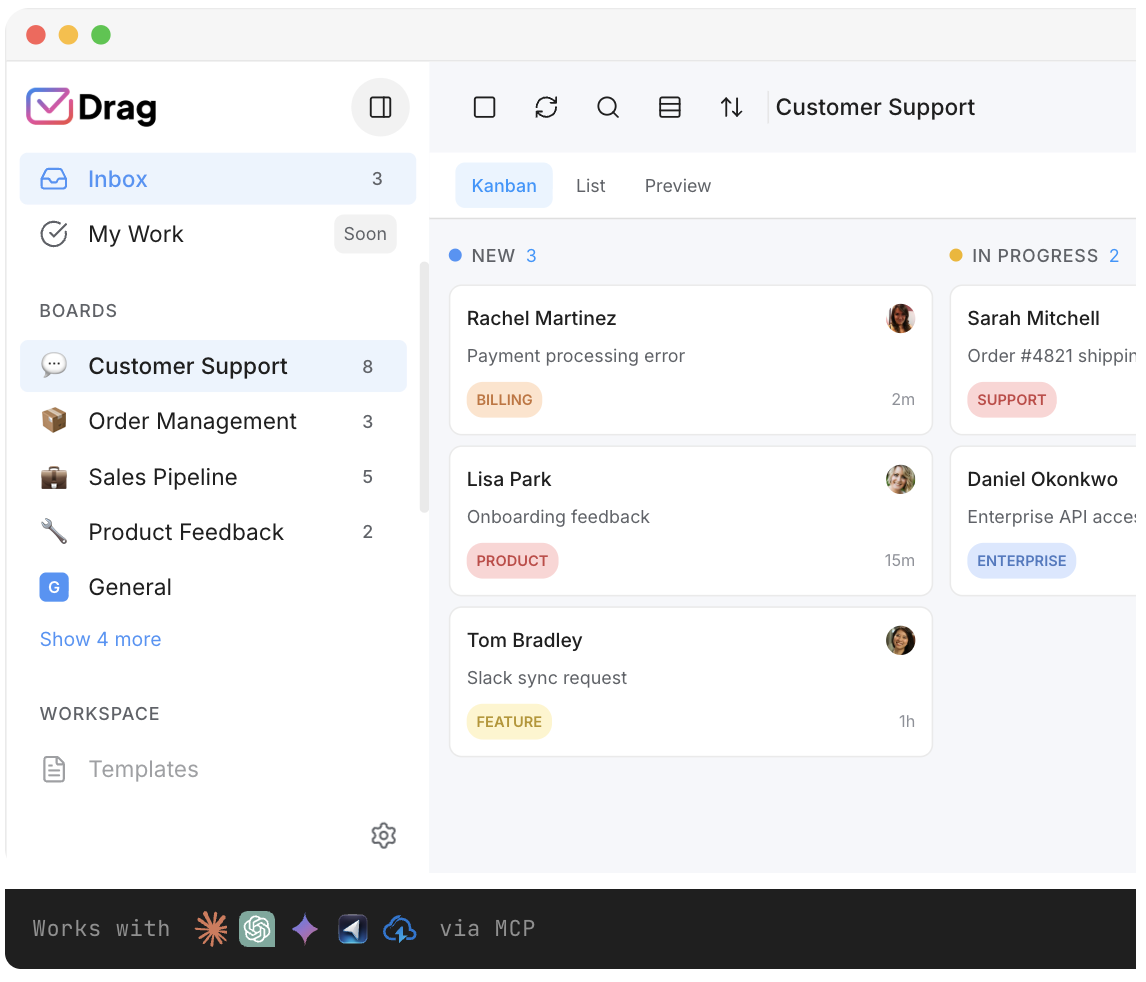
HappyFox’s entry plan hard-caps at 5 agents; the sixth hire forces the jump to $49 Team. Drag’s plans scale by seats without tier ambushes, and the 7-day trial means the fit question costs nothing to answer.
- Drag: plans scale by seats with no tier ambushes, plus a 7-day trial to start, no card required.
- HappyFox: entry plan hard-caps at 5 agents; the sixth hire forces the $49 Team jump.
Pricing: Drag vs HappyFox
Five agents on HappyFox Team is $245 a month before the AI add-ons, the chat product, or workflows. Drag with all of it included is $90. Model your team in the cost calculator.
AI features
 Drag Plus (AI included)
$2,160/yr
$18/user/mo × 10 seats · AI included
 HappyFox Team
from $5,880/yr+
$49/user/mo × 10 seats · HappyFox AI (Copilot, Assist AI) is billed on top of seats at every tier, so the Team rate shown still excludes AI; Basic hard-caps at 5 agents.
Your team saves at least $3,720/yr with Drag.
Estimate based on annual per-seat pricing, July 2026. HappyFox Basic hard-caps at 5 agents; Team is $49, Pro $99, and AI (Copilot, Assist AI, voice) is billed on top at every tier. Confirm current pricing on each vendor's site.
A worked example: five agents
Put real numbers on it. Five agents who want AI, before HappyFox’s chat and workflow products even enter the picture:
- HappyFox: Team at $49 per seat. 5 seats × $49 × 12 months = about $2,940 a year, and that is still before the AI add-ons, the chat product, or the $199-a-month Workflows engine.
- Drag: Plus at $18 per seat, AI included, no add-ons. 5 seats × $18 = $90 a month, or about $1,080 a year.
- Difference: roughly $1,860 a year, and it widens once HappyFox’s AI, chat, and workflow add-ons are switched on.
The interactive calculator above lets you put in your own team size. (Figures use published per-seat annual pricing, July 2026; confirm current numbers on each vendor’s site.)
Drag vs HappyFox, feature by feature
The detail layer for evaluators, with Drag product screenshots where they clarify the claim.
Ticketing and shared inbox
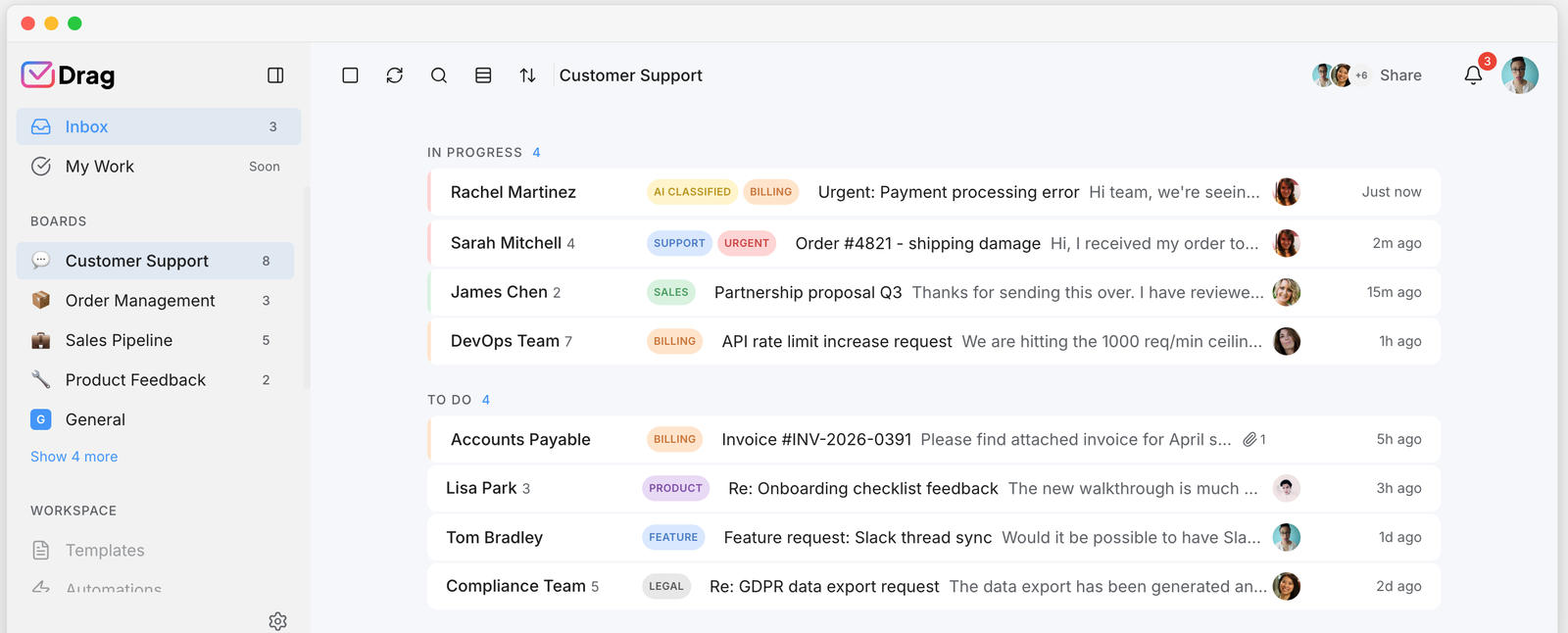
HappyFox’s ticketing is genuinely mature: smart rules, SLAs, canned actions, strong reviewer sentiment on customisation. Drag runs the queue as boards inside Gmail with the same core jobs (assignment, notes, statuses). Check both, different homes.
- Drag: the queue as boards inside Gmail, with assignment, notes, and statuses.
- HappyFox: mature ticketing with smart rules, SLAs, canned actions, strong on customisation.
Collision prevention
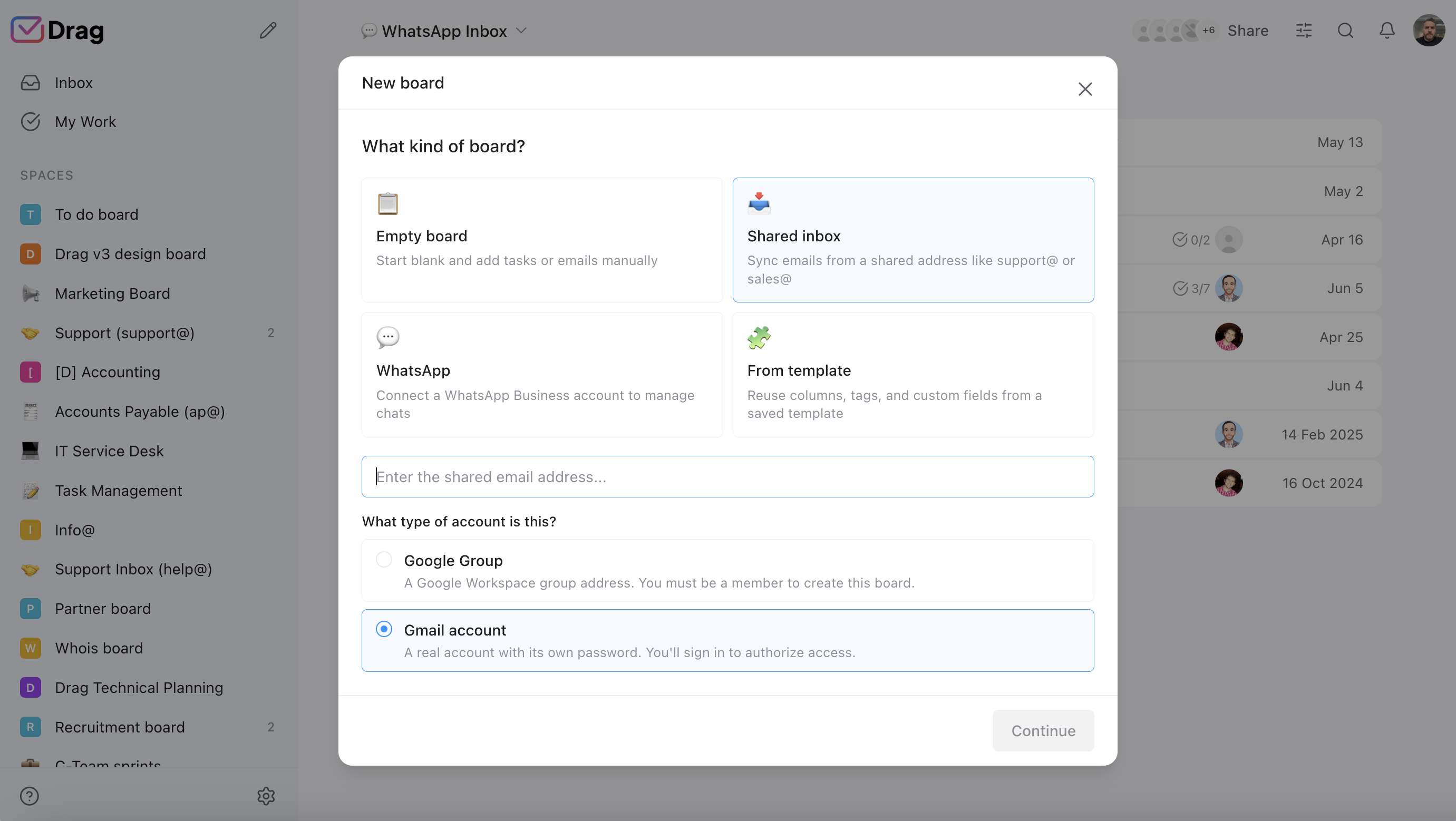
The category’s defining feature: included at Drag’s $12 versus HappyFox’s Pro gate at $99. Check Drag; HappyFox partial, honestly footnoted with the tier.
- Drag: collision detection included on every plan from $12.
- HappyFox: collision detection gated to the $99 Pro tier.
AI on the ticket
Drag’s six seat-included assists versus HappyFox’s add-on stack (Copilot on top of seats, Assist AI per user, usage-billed voice). Both have real AI; only one includes it. Check Drag; HappyFox partial with the pricing footnote.
- Drag: Varley included in the seat from $18 (drafts, tags, summaries, answers from your docs, Copilot).
- HappyFox: real AI, but Copilot, Assist AI, and voice are all billed on top of seats.
Automation
HappyFox’s smart rules are strong but action-capped per tier, with the heavier Workflows engine sold separately from $199 a month. Drag’s rules are included and extend to board moves. Check Drag; HappyFox partial.
- Drag: automation rules included, extending to board moves, assignment, and labels.
- HappyFox: strong smart rules but action-capped per tier; heavier Workflows engine from $199/mo, sold separately.
Reporting
Both report response and resolution metrics; HappyFox’s BI product goes deeper than Drag for teams that need custom cross-product dashboards, at its own price. Honest split.
- Drag: response and resolution reporting, exportable and queryable from an AI client via MCP.
- HappyFox: response and resolution reporting, plus a deeper BI product for custom cross-product dashboards, at its own price.
Channels
HappyFox wins: phone and social as first-class queues, plus its chat product. Drag covers email, live chat, and WhatsApp in one Gmail queue. Honest cancel for Drag on phone and social.
- HappyFox: phone and social as first-class queues, plus its chat product.
- Drag: email, live chat, and WhatsApp in one Gmail queue; no phone or social.
ITSM and assets
HappyFox wins outright: asset management from Pro and a dedicated Service Desk product. Drag has none of this, and IT teams who need it should weigh that heavily. Honest cancel for Drag.
- HappyFox: asset management from Pro and a dedicated Service Desk product.
- Drag: no asset management or ITSM; IT teams who need it should weigh that heavily.
If you switch: what you keep, what changes
The honest question a HappyFox team asks is not whether Drag costs less (it usually does), it is “what happens to the way we work today?” Here is the straight answer.
You keep
Your email address and history (Gmail becomes the system of record), your canned responses (recreated as templates in an hour), your help-centre content, and your SLA-style targets (rebuilt as Drag rules and the weekly numbers).
What changes
Tickets become cards on boards; the add-on stack collapses into one bill; and two things need honest replacement plans: phone and social queues would need other homes (stated plainly), and asset management has no Drag equivalent at all. If either is central, read the next section first.
Where HappyFox fits better
Three real cases.
- Phone and social support: first-class queues with an integrated contact centre; Drag does not do telephony or social ticketing.
- IT service management: asset tracking, service catalogues, change workflows, a genuine ITSM lane Drag does not enter.
- True scale: at 100+ agents, HappyFox's unlimited-agent plans (from around $1,499 a month) can beat any per-seat model, ours included; run that maths honestly.
If those describe you, stay with our blessing; this page is for the Gmail-first team under those thresholds paying stack prices for inbox jobs.
Switching from HappyFox to Drag is quick
No migration project: Drag installs into the Gmail your support address already flows through. Connect the shared inboxes, set up boards, recreate templates, invite the team. Most teams are working the queue the same afternoon; the 7-day trial answers the fit question directly.
What customers say
“What we like the most about Drag is the ability to see at a glance where a client is during their Onboarding process, through the use of columns, tasks, and tags. It has been crucial for us because Waste Logics is a growing business and this transparency allows us to work faster and smarter.”
“There really is no comparison when it comes to Drag. We have a great relationship with their team, it’s incredibly easy to use, addresses all of our needs, and the price is right!”
“Drag provided a lot of transparency and unified our team. It allowed us to bring the entire team together to manage emails and tasks collaboratively, as opposed to working in silos, across different tools.”
Frequently asked questions
Is Drag a good HappyFox alternative?
For Gmail and Google Workspace teams, yes: collision detection at $12, Varley, Drag’s AI, from $18, boards, live chat, WhatsApp, and a help centre, one product on one bill. It is not the fit if you need phone and social queues or IT asset management.
What is the main difference between Drag and HappyFox?
Shape and pricing model. HappyFox is a stack of separately priced products (Help Desk, Chat, Workflows, BI, AI add-ons) on a standalone platform. Drag is one Gmail-native product with the essentials included in the seat.
How much does HappyFox cost in 2026?
Help Desk runs from $21 per agent (Basic, hard-capped at 5 agents) through Team at $49 and Pro at $99, with custom Enterprise PRO and unlimited-agent plans from roughly $1,499 a month. Chat, Workflows, BI, and AI are priced separately on top.
Is Drag cheaper than HappyFox?
For small and mid-sized teams, usually by a wide margin: five Drag seats with Varley is $90 a month versus $245 for five HappyFox Team seats before AI add-ons, chat, or workflows.
Does HappyFox include AI?
Its AI (Copilot, Assist AI, voice AI) is sold as add-ons billed on top of seat prices at every tier. Drag includes Varley, its AI, in the seat from $18.
Does HappyFox have collision detection?
Yes, gated to its Pro tier ($99 per agent). Drag includes collision detection on every plan from $12.
Can I run my inbox from Claude or ChatGPT with Drag?
Yes: Drag exposes an MCP server with 47 tools, so Claude, ChatGPT, Gemini, Copilot, or Cursor can read, draft, assign, label, and report on your shared inbox by prompt. HappyFox has no MCP server.
Does Drag have live chat like HappyFox Chat?
Yes, included: a website widget whose conversations land in the same Gmail queue as email, with the same owners, boards, and AI. HappyFox Chat is a separate volume-priced product whose widget disables at its monthly cap.
Does Drag have a free plan?
Drag offers a 7-day trial with no card required; paid plans are $12, $18 (AI included from here), and $24 per user billed annually. HappyFox offers trials; its entry plan caps at 5 agents.
What was the HappyFox price increase?
Public analyses report the Pro tier rose from $69 to $99 per agent in mid-2025, a rise reviewers describe as steep for mid-sized teams. Legacy plan holders keep rates until renewal.
Does Drag do phone or social media support?
No, and we say it plainly: Drag covers email, live chat, and WhatsApp. Phone and social as first-class queues are HappyFox territory.
Does Drag have asset management or ITSM features?
No. HappyFox's asset management and Service Desk are genuine strengths for IT teams; Drag does not enter that lane.
How does automation compare?
HappyFox's smart rules are capable but action-capped by tier, with its heavier Workflows engine sold separately from $199 a month for three workflows. Drag's automation rules are included and extend to boards, assignment, and labels.
Who is HappyFox best for?
Teams needing omnichannel support including phone and social, IT departments wanting ITSM and asset tracking, and very large teams (100+ agents) where unlimited-agent pricing beats per-seat models.
Is HappyFox worth it at small-team size?
Reviewers rate its ticketing and support well; the friction is the model: the 5-agent entry cap, feature gates at Pro, and the add-on stack. If your support is email-led on Google Workspace, most of what you would assemble is included in Drag's seat.
How do I switch from HappyFox to Drag?
Install Drag into the Google Workspace your support address already uses, connect the shared inboxes, recreate canned responses as templates, rebuild SLA targets as rules and weekly metrics, invite the team. Gmail becomes the system of record; most teams switch in an afternoon.


