








Run customer support from Claude or ChatGPT: triage the queue, draft replies, and pull metrics by prompt, without opening your inbox.
Key takeaways
- With an MCP server, your support inbox becomes something you can operate by prompt from Claude or ChatGPT: read, reply, assign, tag, move, and report, without opening the app.
- The real unlock is composability: when Drag and your other tools (Stripe, Linear, Notion, Slack) are all connected over MCP, one prompt can act across all of them, the kind of workflow that used to need Zapier plus custom code or a dedicated ops hire.
- Drag is the only Gmail-native shared inbox with its own MCP server (47 tools across 12 categories), which makes it a natural hub for these cross-system support workflows.
- Keep a human in the loop: connect read-only first, use draft-for-approval on replies, and add confirmation steps to anything that writes to live systems.
Table of contents
Picture your support lead starting the day by typing one sentence into Claude: "Triage the Support board, draft replies to anything I can answer from our help center, flag the three hardest threads for me, and tell me if any of them are from customers who churned last month." A few seconds later it is done, threads read, drafts written, the hard ones surfaced, the churn check run against your billing system. No dashboard opened. No tabs. One prompt.
That is not a future demo. It is what the Model Context Protocol (MCP) makes possible today, and the most interesting part is not that an AI can run your inbox. It is that it can run your inbox and your other tools at the same time, in a single prompt. This guide is the practical, hands-on companion to our complete MCP for customer support guide: less about what MCP is, more about what running a real support queue through it actually feels like, triaging incoming threads, drafting customer replies, tracking response times, resolving and reassigning, including the cross-system workflows that genuinely change the job. We will use Drag, the only Gmail-native shared inbox with its own MCP server, as the hub for your support team.
(If you want the fundamentals first, what MCP is, which platforms have servers, the basics of connecting one, read our MCP for customer support guide and come back. This piece assumes you want to see it in action.)
Works with Claude, ChatGPT, Cursor, and any MCP client





What this guide covers
- A day running support from Claude
- The real unlock: one prompt, every tool
- Five cross-system workflows worth stealing
- What you need to make it work
- Keeping a human in the loop
- Claude vs ChatGPT for this
- The shape of support work is changing
- FAQ
A day running support from Claude
Here is what a working support day looks like once your Gmail shared inbox is connected to Claude over MCP, the same triage, replies, and reporting your team does now, driven by prompt. (These are real prompts; the Drag MCP server exposes the tools that make them work.)
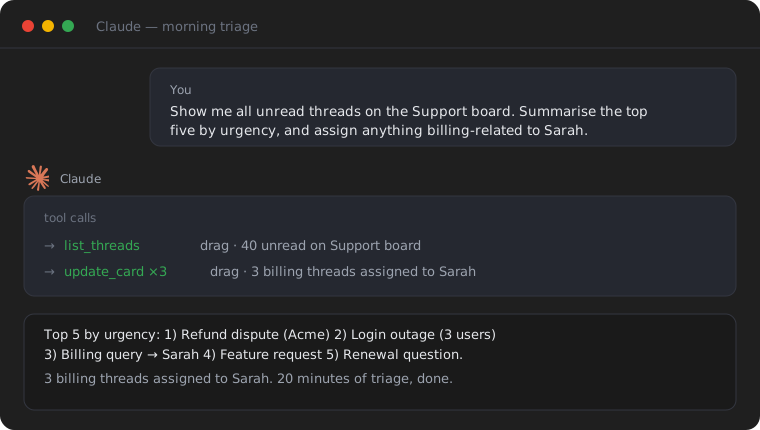
9:00am, the overnight queue. Forty threads came in overnight. Instead of opening each one, you type:
Show me all unread threads on the Support board. Summarise the top five by urgency, and assign anything billing-related to Sarah.
Claude reads the full threads (not just subject lines), writes you five tight summaries, and makes the assignments. What used to be twenty minutes of clicking is a thirty-second read. You skim, you adjust one assignment, you move on.
10:30am, a hard reply. A frustrated long-time customer. You type:
Read the latest thread from Acme Corp on the Support board. Draft a reply that acknowledges the delay, answers their question using our knowledge base, and leave it as a draft for me to review.
Claude pulls the full thread (sender, history, the actual question), searches your knowledge base for the right answer, and writes a draft in your tone. You read it, tweak one line, send. The draft was grounded in your real help articles, not invented.
4:00pm, the weekly number. Your manager wants the response-time trend. No spreadsheet:
What was our average first response time on the Support board this week versus last week? List any threads that took over a day to get a first reply.
Claude calls the analytics tools, returns the comparison, and names the slow threads so you can follow up. The whole "day" above uses only Drag's own tools. Useful, but it is still one system. The real shift comes next.
The real unlock: one prompt, every tool
Here is the thing most "AI for support" content misses. MCP is not one connection. An AI client can hold several MCP servers at once, your shared inbox, your billing system, your issue tracker, your docs, your team chat, and use them together in a single prompt, passing data between them with no glue code.
That is the difference between an AI that answers and an AI that operates your stack. As one widely shared guide put it, single-tool connections are useful, but multi-tool workflows are where an AI client starts acting like an actual business automation system. Almost everyone demonstrating this uses sales or developer examples. Support is where it might matter most, because a support reply so often depends on context that lives in three other systems. (For a look at which support platforms actually publish an MCP server today, read vs write, and which type of team each suits, see our platform-by-platform comparison.)
With Drag as the Gmail-native hub and a few other MCP servers connected alongside it, the inbox stops being a silo. A billing complaint is no longer "open the email, then open Stripe in another tab, then check the database, then write back." It is one instruction, and the AI walks the systems for you.
The honest caveat up front: each of these workflows needs the other tool's MCP server connected too (Stripe, Linear, Notion, and Slack each publish their own). Drag is the support hub; the composability is the open MCP ecosystem, not a single vendor. That is the whole point of an open standard, and it is why Drag publishing its own server matters: it makes your inbox a first-class participant instead of the one system the AI cannot reach.
Drag AI
The inbox your team and your AI work in together
Shared inbox, live chat, and AI in Gmail, with an MCP server your AI tools can drive.
Five cross-system workflows worth stealing
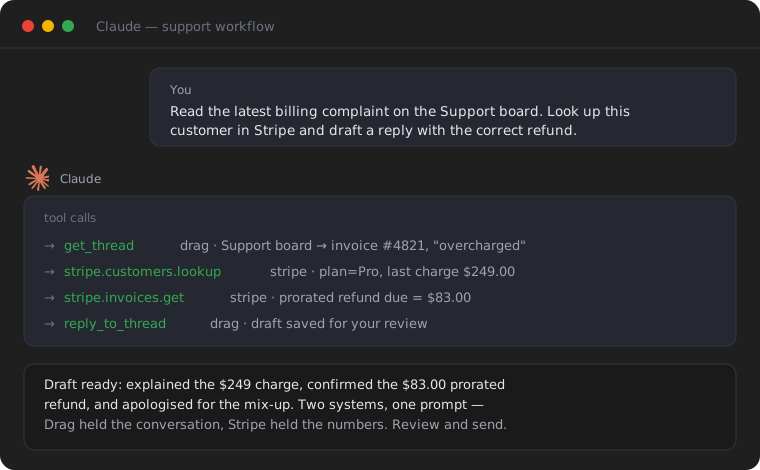
1. The billing complaint, answered with the refund already calculated. (Drag + Stripe)
Read the latest billing complaint on the Support board. Look up this customer in Stripe, check their last three payments and current plan, and draft a reply that explains the charge and offers the correct prorated refund. Leave it as a draft.
Claude reads the Drag thread, pulls the real payment history from Stripe, does the proration, and writes a reply with the actual number in it. You approve and send. What you need: Drag MCP server + Stripe MCP server connected to the same client.
2. Turn bug reports into tracked issues automatically. (Drag + Linear or Jira)
Find every thread on the Support board tagged "bug" from the last 48 hours. For each one, create a Linear issue with the customer's description, and reply to the thread with the issue number so the customer knows it is logged.
Claude reads the tagged threads, creates the issues in Linear, and closes the loop with the customer, the handoff from support to engineering that usually gets dropped. What you need: Drag + Linear (or Jira) MCP server.
3. Connect complaints to the roadmap. (Drag + Notion)
Pull this week's threads on the Support board. Cross-reference the complaints against our product roadmap in Notion, and tell me which recurring issues map to features we are already building, and which are not on the roadmap at all.
This is the report product managers never have time to make: what are customers actually frustrated by, and are we already fixing it? Claude reads the inbox and the roadmap and tells you. What you need: Drag + Notion MCP server.
4. The end-of-day standup, written for you. (Drag + Slack)
Summarise today's unresolved threads on the Support board: how many are open, which are oldest, and anything urgent. Post it as a clean summary to the #support channel in Slack.
The daily status update nobody wants to write, done from the same prompt that reviews the queue. What you need: Drag + Slack MCP server.
5. Proactive outreach from a support signal. (Drag + Stripe + Slack)
Find any threads on the Support board from customers whose Stripe subscription renews in the next 14 days. Flag the ones that mention a problem, draft a check-in reply for each, and post the list of at-risk renewals to #customer-success in Slack.
Three systems, one prompt: the inbox for the conversations, billing for the renewal dates, chat for the team handoff. This is the workflow that used to require a Zapier build with conditional logic, or a dedicated operations hire, or both. What you need: Drag + Stripe + Slack MCP servers.
The pattern: Drag holds the conversation, the other servers hold the context, and the AI is the connective tissue you used to be. None of these need custom code. You describe the outcome; the AI figures out the tool calls.
What you need to make it work
You need three things: a Gmail shared inbox with an MCP server (Drag), an MCP-capable AI client (Claude Desktop, ChatGPT, Cursor, Windsurf, Claude Code, Gemini, Copilot, or another MCP-compatible client), and, for the cross-system workflows, the other tools' MCP servers connected to the same client.
Connecting Drag takes a few minutes. In Claude, or any client with connector settings, add https://app.dragapp.com/mcp as a custom connector and enter your API key once on the secure connect page; that same hosted URL is what ChatGPT's connector interface uses. Cursor and Windsurf run the same server locally from a config block instead. The connect guide covers every client; all configurations are in the docs. Add Stripe, Linear, Notion, or Slack the same way, each in its own block, and the AI can use them together. (For the full connect walkthrough with an interactive config generator, see our step-by-step connect guide. For the basics of how MCP works, see our MCP for customer support guide.)
Keeping a human in the loop
Two of the workflows above send replies and write to live systems, so the safety pattern matters. The short version: connect read tools first and watch what the AI does before enabling writes; use draft-for-approval on customer replies rather than auto-send; and add a confirmation step to anything that mutates another system. The Drag MCP server inherits your existing Drag permissions (the AI can only do what your account can) and stores none of your data; you can revoke its API key at any time. For the full security treatment, see the security section in our MCP for customer support guide.
The more servers you connect, the more this matters: scope each one's permissions tightly, and keep the number of active servers to what a given task actually needs.
Claude vs ChatGPT for this
Both connect to MCP servers and both can run these workflows. In practice, as of mid-2026, Claude handles multi-step, multi-tool tasks, the cross-system workflows above, more smoothly and reliably than ChatGPT, which tends to need more explicit prompting once several tools are involved. Teams running support MCP servers report the same. If you are choosing a client specifically for this, start with Claude; if you already use ChatGPT, it works, just be more explicit on the multi-tool prompts. The same Drag server powers both, so you are never locked in.
Among Gmail-native shared inboxes, Drag is the only one with its own MCP server, which is one reason it has emerged as the hub for these workflows.
The shape of support work is changing
The interesting thing about MCP is not that it makes one task faster. It is that it changes the relationship between a support team and its tools. Today, your team opens a tab for every system, copies data between them, and writes the reply last. With MCP, you describe the outcome and the AI walks the systems.
That is a structural shift, not a feature. The inbox becomes the hub not because it changed, but because it is now connected to everything else through a protocol the AI already knows. Support replies get better because the AI can check billing before it writes. Reporting gets faster because the AI can query two systems in one prompt. Triage gets simpler because the AI can assign and summarize in the same step.
The practical next step is small: connect your shared inbox to an MCP client and run a morning triage. If that saves you twenty minutes, add a second server and try one of the cross-system workflows. That is where this stops being a time-saver and starts being a different way of running support.
Frequently asked questions
Can I really run customer support from Claude or ChatGPT?
Yes. With your inbox's MCP server connected, you can read threads, draft and send replies, assign, tag, move conversations, and pull reports by prompt. With Drag, that runs against a Gmail-native shared inbox using 47 tools across 12 categories.
What does 'multi-tool' or 'cross-system' actually mean here?
An AI client can connect to several MCP servers at once. So a single prompt can read a complaint in your Drag inbox, look up the customer in Stripe, log a bug in Linear, and post a summary to Slack, passing data between them automatically. Each tool needs its own MCP server connected.
Do I need Drag and the other tools to all have MCP servers?
Yes. For a cross-system workflow, each system in it (your inbox, billing, issue tracker, chat) needs its own MCP server connected to the same AI client. Drag provides the Gmail-native shared-inbox server; Stripe, Linear, Notion, and Slack provide their own.
Is this just Zapier with extra steps?
It is different in kind. With Zapier you build a rigid trigger-and-action flow in advance. With MCP you describe an outcome in plain language and the AI decides which tools to call, in what order, adapting per request. It handles the one-off, judgment-heavy tasks automations struggle with.
Is it safe to let AI act across my support tools?
With sensible defaults, yes: start read-only, use draft-for-approval on replies, confirm before writing to live systems, and scope each server's permissions tightly. Drag's server inherits your permissions and stores no data, and you can revoke access anytime. See our MCP for customer support guide for the full security section.
Does it work better with Claude or ChatGPT?
Both work; Claude currently handles the multi-step, multi-tool workflows more smoothly. If you are choosing specifically for cross-system support work, start with Claude.
Which shared inboxes can do this?
Among Gmail-native shared inboxes, Drag is currently the only one with its own MCP server, which is why it works as the hub here. Some standalone help desks and CRMs have servers too; check any tool's own docs. See our MCP for customer support guide for the full landscape.
How long does setup take?
Connecting Drag takes a few minutes (paste the connector URL or one config block, enter your API key, set tool permissions). Each additional tool's server is a similar one-step addition.

Co-founder
Building Drag for nearly ten years: shared inboxes, boards, and now the AI and agent layer, all on Gmail, plus HeyHelp for the personal inbox. Writes the honest versions of the comparisons.
