








How MCP changes customer support: connect your shared inbox to Claude or ChatGPT and run triage, drafting, and reporting by prompt.
Key takeaways
- MCP is an open standard that lets AI assistants (Claude, ChatGPT) read and act on your support data without custom integrations.
- For support, it means running your inbox from an AI client: triage, reply, assign, and report by prompt.
- In 2026 MCP is the default for AI tool connectivity (10,000+ servers). By mid-2026, at least seven support platforms ship official MCP servers, with Front, Gorgias, and Kustomer joining the early movers Plain, Intercom, Pylon, and Drag, and the list is growing quarterly; Zendesk is in early access.
- Drag is the only Gmail-native shared inbox with its own MCP server (47 tools across 12 categories, read + write).
Table of contents
- What this guide covers
- What is MCP, in plain terms?
- What does MCP mean for customer support specifically?
- How MCP works for support (the 60-second technical picture)
- What AI clients does MCP work with?
- Which customer support platforms have an MCP server in 2026?
- What can an MCP server actually do? (the tool list)
- MCP for support in practice: real prompts and what happens
- How to connect your support inbox to an AI client
- What MCP for support does NOT do (the honest limits)
- Is MCP for support secure?
- Where this is going
- Frequently asked questions
- Related guides: the support platforms and the wider ecosystem
MCP (Model Context Protocol) is an open standard that lets an AI assistant like Claude or ChatGPT securely read and act on your customer support data, reading tickets, drafting replies, assigning conversations, pulling analytics, without you building a custom integration for each tool. For support teams, it means you can run your inbox from an AI client instead of clicking through a dashboard. As of 2026, MCP has become the default way AI connects to software, with more than 10,000 public MCP servers and 97 million monthly SDK downloads, yet only a handful of support platforms expose one. Drag is the first Gmail-native shared inbox with its own MCP server: 47 tools across 12 categories, full read and write, so a team can triage, reply, and report on their support inbox straight from Claude. For the wider field of AI support tools by segment and cost, see our roundup of the best AI agents for customer support. And to assemble the whole architecture around the protocol, layer by layer with costs, follow the MCP-native support stack guide.
This guide explains what MCP is, why it matters for support specifically, what you can actually do with it today, which platforms have a server, and how to get started, written to be useful whatever tool you use.
And if your starting point is Gmail itself rather than a support platform, the Gmail MCP comparison maps every route from Claude's built-in connector to Google's official server.
What this guide covers
- What is MCP, in plain terms?
- What does MCP mean for customer support specifically?
- How MCP works for support (the 60-second technical picture)
- What AI clients does MCP work with?
- Which customer support platforms have an MCP server in 2026?
- What can an MCP server actually do? (the tool list)
- MCP for support in practice: real prompts and what happens
- How to connect your support inbox to an AI client
- What MCP for support does NOT do (the honest limits)
- Is MCP for support secure?
- Where this is going
- FAQ
What is MCP, in plain terms?
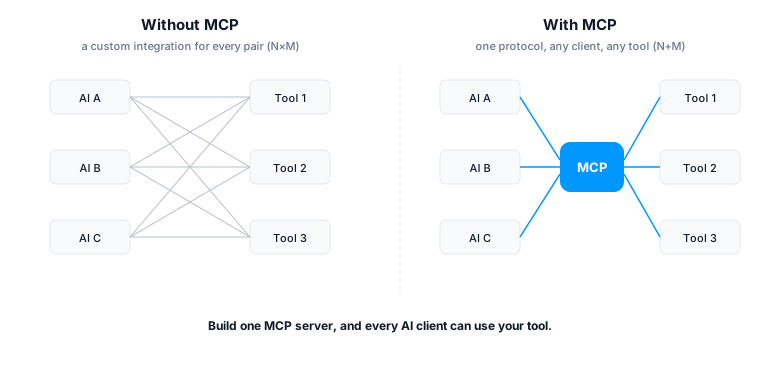
Model Context Protocol is an open standard, originally created by Anthropic in November 2024 and now governed by the Agentic AI Foundation under the Linux Foundation, that defines one common way for AI applications to connect to external tools and data. Think of it as a universal adapter. Before MCP, every pairing of an AI model with a tool needed its own custom integration: its own authentication, its own data format, its own maintenance. With dozens of models and hundreds of tools, that became unmanageable, the "N times M" problem.
MCP turns that into "N plus M." A tool publishes one MCP server that describes what it can do. Any MCP-compatible AI client (Claude, ChatGPT, Cursor, and others) can then discover and use it. Build the server once, and every AI client can drive your tool.
By 2026 this stopped being experimental. MCP is backed by Anthropic, OpenAI, Google, Microsoft, AWS, and Cloudflare, has official SDKs across major languages, and is widely described as becoming for AI tool connectivity what REST APIs are for the web. (Source: MCP / Agentic AI Foundation; ecosystem figures reported across 2026 developer surveys.)
N times M becomes N plus M. Build one MCP server, and every AI client can use your tool.
MCP vs an API, a chatbot, and Zapier
A few quick distinctions, because these get confused:
- MCP vs a normal API: an API requires the caller to already know its endpoints and formats. An MCP server describes its own tools so an AI can discover and use them with no pre-built integration. MCP is, in effect, a self-describing API designed for AI.
- MCP vs a chatbot: a chatbot is one bot answering customers. MCP lets your AI client operate your support tool, internal-facing, for your team, not a customer-facing widget.
- MCP vs Zapier / automations: Zapier and automation rules run predefined workflows in the background. MCP lets an AI take actions you ask for in the moment, by prompt. They are complementary, not the same thing.
What does MCP mean for customer support specifically?
For customer support, MCP means an AI assistant can read and act on your support data directly, instead of a human clicking through a dashboard. With MCP, an AI assistant can:
- Read conversations: list and search threads, open full message history, see assignments and tags.
- Take action: draft and send replies, assign conversations, apply labels, move items between stages, create tasks.
- Pull context: query a CRM record, search a knowledge base, or look up a past conversation to ground a reply.
- Report: answer questions like "what were our response times last week" without exporting a spreadsheet.
The shift is subtle but large: your support tool stops being only a place you click, and becomes infrastructure your AI can operate. "AI customer support" stops meaning a single bolted-on chatbot, and starts meaning any AI client you choose can run your inbox.
Try it: open Claude and type "Show unread on the Support board, summarize the top five, and assign anything billing-related to Sarah." With an MCP server connected, Claude reads the full threads, writes the summaries, and makes the assignments. You never open the dashboard.
Drag AI
The inbox your team and your AI work in together
Shared inbox, live chat, and AI in Gmail, with an MCP server your AI tools can drive.
How MCP works for support (the 60-second technical picture)
You do not need to be an engineer to use MCP, but it helps to understand the shape:
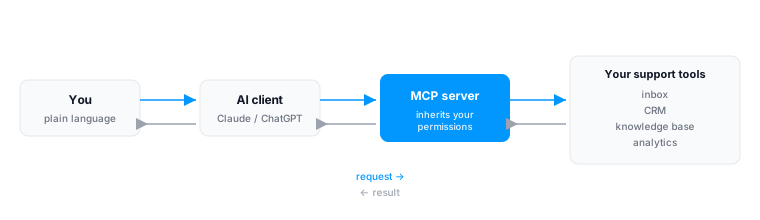
- The server is published by your support tool. It exposes a set of tools (named actions like
list_threads,reply_to_thread,assign,get_response_times) with clear descriptions the AI can read. - The client is your AI app (Claude, ChatGPT, Cursor). You connect it to the server once, usually by pasting a URL or running a short command, and authenticating.
- Authentication carries your existing permissions. A good support MCP server inherits your account's access, so the AI can only see and do what you already can. It does not create a new backdoor.
- The model decides which tools to call to satisfy your request, calls them, reads the results, and responds in natural language, often chaining several tools in one task.
Two design notes worth knowing when you evaluate a server: tool count is not the same as capability (a server with 6 well-designed universal tools can do as much as one with 30 granular tools, it is a design choice), and read-plus-write matters, a server that can only read your data lets the AI report, while a server that can also write lets it act. (Source: support-platform MCP server documentation, 2026.)
What AI clients does MCP work with?
One reason MCP matters is that it is not tied to a single AI vendor. It is an open standard, created by Anthropic and now governed by the Agentic AI Foundation under the Linux Foundation, with backing from the major AI labs. That means the same MCP server works across the main AI clients, rather than locking you to one:
- Claude (Anthropic), which created MCP and supports it natively in Claude Desktop and Claude Code.
- ChatGPT (OpenAI), which adopted MCP across its developer and desktop tooling.
- Gemini (Google) and Copilot (Microsoft), both of which back the standard.
- Developer tools like Cursor, plus a growing list of other MCP-compatible clients.
The practical takeaway for a support team: you are not betting on one AI vendor. If your team prefers Claude today and ChatGPT next year, a tool with an MCP server still works, the protocol is the constant. That vendor-neutrality is a large part of why MCP became the default standard in 2026 rather than one company's proprietary connector.
Works across MCP-compatible clients





Which customer support platforms have an MCP server in 2026?
The honest state of the category as of 2026: most well-known support platforms do not yet expose an official, first-party MCP server. A few do, and a few more are in early access.
Have an official first-party MCP server:
- Plain: a large, granular tool set, API-first design, OAuth.
- Intercom: a smaller set built around universal search-and-fetch tools.
- Pylon: a focused first-party server.
- Drag: the first Gmail-native shared inbox with its own MCP server: 47 tools across 12 categories, full read and write across email, WhatsApp, boards, assignments, labels, analytics, and the knowledge base.
For a platform-by-platform breakdown of what each server can do, read vs write, and which type of team each suits, see our guide to the MCP-native support platforms.
Early access / partial:
- Zendesk: has shipped an MCP client in early access, with an MCP server slated for early access later in 2026. So Zendesk can consume MCP, but exposing your Zendesk data to drive via an official server is not yet generally available.
No official server (community or third-party bridges only):
- Freshdesk, Help Scout, HubSpot Service Hub, and most others. Community-built servers exist on GitHub for some, but they are not vendor-maintained, which matters for security and reliability.
The Gmail-native gap: among shared-inbox tools that live inside Gmail, the category Hiver, Gmelius, and Drag compete in (Hiver and Gmelius, head to head), Drag is the only one with its own MCP server. If your team works in Gmail and wants to run support from an AI client, that is currently a one-tool list.
(Source: vendor documentation and category reviews, 2026. Availability changes quickly; check each vendor's current docs.)
| Platform | Official MCP server | Notes |
|---|---|---|
| Drag | Yes | 47 tools across 12 categories, read + write; Gmail-native shared inbox |
| Plain | Yes | Large granular tool set; API-first |
| Intercom | Yes | Universal search/fetch design |
| Pylon | Yes | First-party server |
| Zendesk | Early access (server) | MCP client live; server in early access 2026 |
| Freshdesk | No | Community bridges only |
| Help Scout | No | None known |
| Front | Yes | Official MCP server (read + limited write) |
| HubSpot Service Hub | No | Community bridges only |
What can an MCP server actually do? (the tool list)
"47 tools" is abstract until you see what they cover. A capable support MCP server exposes tools across these areas. Drag's server, as an example, covers all of them with full read and write:
- Read and search: list threads on a board, search across conversations, open a full thread with all messages, recipients, and timestamps.
- Reply and send: draft and send a reply, compose a new email, send as an alias.
- Organise: assign a conversation to a teammate, apply or remove labels, move a thread between board stages, create a task.
- Boards: list boards and columns, see members and assignments.
- Knowledge base: search articles, so replies are grounded in your real documentation.
- Analytics: pull first-response and average-response times, daily activity, and closed-conversation volume, the questions you would otherwise export to a spreadsheet.
- WhatsApp: read conversations, send messages and approved templates.
The distinction that matters when you compare servers is read versus read-and-write. A read-only server lets the AI report on your inbox. A read-and-write server lets it act, reply, assign, label, move. Drag's server is full read and write, which is what makes the worked examples below possible.
MCP for support in practice: real prompts and what happens
Here is what MCP-for-support looks like in day-to-day use. These are real prompts you can give an AI client connected to a Drag inbox, and what happens when you do.
Triage the morning queue.
Show me every unread thread on the Support board, summarize the top five by urgency, and assign anything billing-related to Sarah.
Claude reads the unread threads through Drag's MCP server, writes a five-line summary ranked by urgency, and assigns the billing conversations to Sarah, who sees them appear in her view. Twenty minutes of clicking becomes one prompt. (Best for: support leads starting the day.)
Draft a grounded reply.
Draft a reply to the Acme thread about their refund, using our refund policy.
Because the thread and the knowledge base are both reachable over MCP, Claude pulls your actual refund policy, drafts a response grounded in it rather than guessing, and leaves it for you to review and send. The human approves; the AI does the legwork.
Answer an analytics question without a spreadsheet.
What was our average first response time last week versus the week before, across all boards?
Claude queries Drag's analytics tools and answers in chat, with the comparison, no export, no pivot table. Support teams reportedly lose around four hours a week compiling reports by hand; this is that time back. (Best for: ops managers and founders.)
Find and act on a segment.
Find every open thread from an Enterprise-plan customer and tag them priority.
Claude searches, filters, and applies the label across the matching threads in one pass.
Bulk cleanup.
Move every resolved thread older than 30 days on the Sales board to Archived.
A tidy-up that would be tedious by hand becomes a single instruction.
The common thread across all of these: the human stays in charge and works in plain language, while the repetitive reading, routing, reporting, and cleanup is delegated to the AI. Nothing happens that your account could not already do; the AI just does it faster.
How to connect your support inbox to an AI client
Connecting is short, and you do not need to be a developer. In general: find your support tool's MCP server in its docs, add it to your AI client's configuration, authenticate with your API key (so the connection inherits your permissions), then ask the AI to do something simple, "list unread support threads", to confirm it works.
For Drag specifically, the fastest route is the hosted connector: paste one URL into Claude's settings, enter your API key once on the secure connect page, and you are live in about two minutes. Config-file clients like Cursor, Windsurf, and Claude Code connect through the local open-source server instead. MCP access is included, with no separate AI bill to run it. For the overview, see how to connect your shared inbox to an AI client; for the full walkthrough of both routes, see the step-by-step connect guide.
What MCP for support does NOT do (the honest limits)
MCP is powerful, but it is not magic, and a good guide says so:
- It needs an AI client. MCP is the connection layer, not an app on its own. You drive it through Claude, ChatGPT, or another client. If your team will not adopt an AI client, MCP does not help yet.
- It is not a no-code automation builder. MCP lets an AI take actions you ask for in the moment; it is not a visual workflow tool that runs rules in the background. Those are different things, and many tools (including Drag) offer both.
- A human should review customer-facing actions. Letting an AI draft a reply and letting it send unsupervised are different risk levels. For now, most teams keep a human in the loop on outbound customer replies. (Autonomous resolution is where agents are heading, see the next section.)
- It does not replace your inbox's interface. MCP is an additional way to work, from an AI client, not a reason to stop using your shared inbox's own UI. Most teams use both.
Naming the limits is not a weakness of the approach; it is how you use it well.
Is MCP for support secure?
A reasonable question, since you are connecting an AI to live customer data. The protocol is designed around your existing permissions: a well-built support MCP server inherits the access of the account that connects, so the AI can do only what that user could already do, and nothing more. Good servers are stateless, log tool calls for audit, and do not persist your data beyond the session.
Two things to check when you evaluate one: that authentication uses your real account permissions (not a shared, over-privileged key), and that the vendor maintains the server officially (community bridges may not get security updates). Drag's server, for example, inherits each user's board-level permissions, is stateless, and does not store your emails. (Source: MCP security guidance and vendor docs, 2026.)
Where this is going
MCP is the connective layer; the next step is autonomous agents that use it. An AI agent can already, in early deployments, classify an inbound email, retrieve context over MCP, take an action, draft a sourced reply, and resolve or escalate the thread. The support tools positioned to benefit first are the ones that already expose their inbox over MCP, because the agent needs that access to act.
This is the direction Drag is building toward with Drag Agent, currently rolling out in Early Access: an autonomous agent that classifies, retrieves, acts, and resolves, on top of the same MCP foundation.
MCP turns your support inbox from a place you click into infrastructure your AI can operate. In 2026 it has become the standard for AI tool connectivity, but the support category is still early: only a few platforms expose an official server, and among Gmail-native shared inboxes, Drag is the first. If your team already lives in Gmail and you want to run support from Claude or ChatGPT, that is the shortest path from reading about MCP to actually using it.
For the hands-on companion, real prompts, multi-tool workflows, and a full narrative walkthrough, see how to run customer support inside Claude or ChatGPT, and for a ready-made set, the shared inbox prompts library has fifteen built for team queues.
Frequently asked questions
What is MCP for customer support?
MCP (Model Context Protocol) is an open standard that lets AI assistants like Claude or ChatGPT securely read and act on your support data, reading and replying to tickets, assigning conversations, and pulling analytics, without a custom integration for each tool. For support teams it means running your inbox from an AI client instead of a dashboard.
Which customer support platforms have an MCP server in 2026?
As of mid-2026, at least seven support platforms ship official MCP servers, with Front, Gorgias, and Kustomer joining the early movers Plain, Intercom, Pylon, and Drag, and the list is growing quarterly. Zendesk's MCP server is in early access. Freshdesk's is in an early-access beta for Enterprise plans, with no general availability yet; Help Scout and HubSpot Service Hub do not have official servers, only community-built bridges. Among Gmail-native shared inboxes, Drag is the only one with its own MCP server.
Can I run my support inbox from Claude or ChatGPT?
Yes, if your support tool publishes an MCP server. You connect the server to your AI client once, authenticate with your API key, and then ask the AI to read threads, draft replies, assign conversations, or pull reports. Drag's MCP server works with Claude Desktop, ChatGPT, Gemini, Copilot, Cursor, Windsurf, Claude Code, and other MCP-compatible clients.
What is the difference between an MCP client and an MCP server?
An MCP server is published by a tool and exposes what it can do. An MCP client is the AI app that connects to servers and uses them. To drive your support inbox from an AI tool, your support platform needs to publish a server; the AI you use is the client.
Does tool count matter when comparing MCP servers?
Not directly. A server with a few well-designed universal tools can do as much as one with many granular tools; it is a design choice, not a measure of capability. What matters more is whether the server supports both reading and writing, and how well its tools cover your real workflows.
Is MCP for customer support secure?
A well-built support MCP server inherits your existing account permissions, so the AI can only do what you already can. Good servers are stateless, log tool calls, and do not store your data beyond the session. Prefer official vendor-maintained servers over community bridges, which may not receive security updates.
Do I need to be a developer to use MCP for support?
No. Connecting a server to an AI client is usually a short, documented setup, often pasting a URL or running one command, then authenticating. Once connected, you use plain language. Building a server requires development; using one does not.
What can an AI actually do with my support inbox over MCP?
Read and search conversations, draft and send replies, assign and label threads, move items between stages, create tasks, pull CRM and knowledge-base context to ground replies, and answer reporting questions like response times and trending issues, all through natural-language requests.
Is Drag a good option for MCP customer support?
Drag is the first Gmail-native shared inbox with its own MCP server, 47 tools across 12 categories with full read and write, so Gmail teams can triage, reply, assign, label, and report from Claude or ChatGPT. If your team works in Gmail and wants to run support from an AI client, Drag is currently the only Gmail-native shared inbox that supports it.
Does MCP for customer support cost extra?
It depends on the platform. Some gate AI features or charge per resolution. With Drag, the MCP server is included, there is no separate AI bill to run it, though you do need access to an AI client (such as Claude or ChatGPT) on your side. Always check whether a platform's MCP access sits behind a higher tier before you commit.
Related guides: the support platforms and the wider ecosystem
The platform-by-platform comparison is best MCP servers for customer support, which marks read-only against read-and-write vendor by vendor. For the wider business connector landscape there is best Claude MCP servers, and for the terminology, MCP server vs connector vs plugin vs skill. To see what this looks like in daily use, the AI prompts for customer service library ends with three prompts that work a connected queue through MCP.

Co-founder
Building Drag for nearly ten years: shared inboxes, boards, and now the AI and agent layer, all on Gmail, plus HeyHelp for the personal inbox. Writes the honest versions of the comparisons.
