








Superhuman is the fastest personal email client money can buy, and it costs what that sentence implies: $25 to $40 per user per month, with no shared inbox for your team anywhere in it. Drag is the other answer: your team’s support@ and sales@ become shared inboxes with boards, owners, and AI included in the seat, on the Gmail you already use or in a standalone app, from $12. If the email that matters most arrives addressed to a team, this is the comparison that decides it.

Table of contents

Founder’s Take
A personal note from Nick, co-founder of Drag
Superhuman did something genuinely rare in software: they gated the product for years, invite lists, demo calls, early-access branding, and turned exclusivity itself into distribution. It worked. Mass adoption, a premium price nobody else in email dared charge, and a brand strong enough that Grammarly renamed the whole company after it. As a founder, I find that strategy commendable and honestly a little enviable.
But the era that built it is over. The product is now a standard self-serve tier list inside a suite, and it will be fascinating to watch how a funnel built on scarcity performs when anyone can sign up. And two of the claims that carried it deserve a fresh look. Superhuman positioned itself as the fastest email experience ever made, and for years nobody argued. I would challenge whether that crown is still safely theirs in 2026, with AI-native clients rebuilding the inbox from scratch. More importantly, I would challenge whether Superhuman was ever a fit for a team at all. Faster individuals are not the same thing as a team that works, and the email that actually hurts a business is the one in support@ that everyone can see and nobody owns.
That second problem is the one we have spent nearly ten years on. Drag gives a team a shared address with real ownership, boards, notes, and AI in the seat, on the Gmail they already use, from $12. If you are one person chasing inbox speed, Superhuman remains a fine way to spend $25 to $40 a month. If you are a team, the comparison below is the one that matters.
We genuinely wish them well in the suite era. It takes ambition to rebrand a company around your boldest product, and email is better for having them in it.
The verdict
Drag and Superhuman solve different problems, and pretending otherwise would make this page useless. Superhuman is a premium personal email client: keyboard-first speed, AI drafting, real onboarding, at $25 to $40 per user per month, with team features that are visibility layers on personal inboxes. Drag is a team's shared inbox: support@ and sales@ become boards where every email has an owner, internal notes, and AI included from $18, running inside your existing Gmail or as a standalone app, from $12 a seat. If one person's inbox velocity is the bottleneck, Superhuman is the better product for that job. If a team shares addresses and needs to know who has what, Drag is built for exactly that, at $12 to $24 a seat against Superhuman's $25 to $40.
Choose Drag if you…
- Run shared addresses like support@ or sales@ that need owners, not just readers
- Want AI included in the seat from $18 rather than gated to a $33-to-$40 tier
- Want your team on the Gmail it already uses, extension or standalone app, no client migration
- Want to run the inbox from Claude or ChatGPT with an included MCP server
- Want a customer-facing help center and live chat flowing into the same inbox
- Want every Drag plan to cost less than Superhuman’s entry price
Choose Superhuman if you…
- Are one person processing hundreds of personal emails a day at maximum speed
- Live on keyboard shortcuts and want the deepest set in the category
- Want white-glove onboarding and productivity coaching as part of the product
- Work a personal inbox across Gmail and Outlook and want premium polish on both
Looking at the wider field rather than this pair? See the 8 best Superhuman alternatives, priced from every vendor’s own page.
Drag vs Superhuman at a glance
| Feature | Drag | Superhuman |
|---|---|---|
| Where & how you work | ||
| Built for | Teams sharing an inbox | One person’s inbox |
| Shared team inbox with owners | Yes, the shared address is the unit | No, collaboration layers on personal inboxes |
| Runs in your existing Gmail | Yes, as a layer (extension) | Yes, as a replacement client |
| Standalone apps | Web, desktop, iOS, Android | Desktop, iOS, Android |
| AI & automation | ||
| AI included in the seat | Yes, from $18 | Best AI on Business ($33 annual / $40 monthly) |
| Run inbox from AI tools (MCP server) | Yes, 47 tools, read+write, Pro plan | Superhuman Mail MCP, on the Business tier |
| Kanban boards / workflow | check_circle | cancel |
| Autonomous resolution agent | Varley’s Agent (Pro) | Go is a suite assistant, not an inbox agent |
| Limits & pricing | ||
| Entry price (annual) | $12 / user / mo | $25 / user / mo ($30 monthly) |
| AI plan (annual) | $18 (AI included) | $33 (Business, $40 monthly) |
| Free plan | cancel | cancel |
| Free trial | 7-day, no card required | Card required |
| Customer rating | 4.7 (1,200+ reviews) | Not directly comparable (sold on productivity outcomes, not review counts) |
Superhuman figures from its own pricing page and help center, read July 2026. Drag figures from Drag pricing. Both products ship an MCP server; the scope and the tier differ, covered below.
Why teams pick Drag
The shared-inbox gap
Visibility is not ownership.
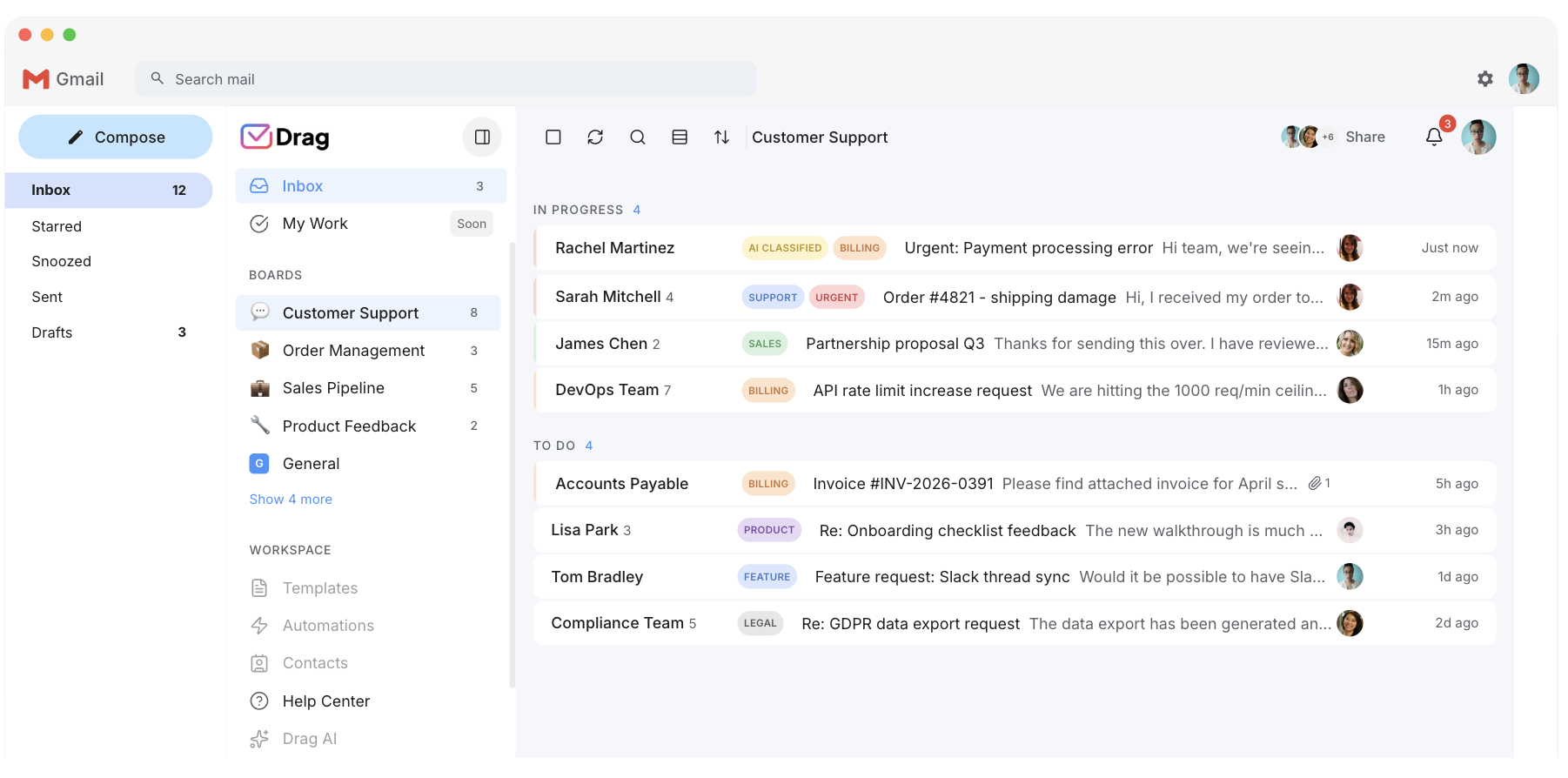
Superhuman’s team features, Shared Conversations, Team Comments, read statuses, are visibility layers: they show teammates what is happening in personal inboxes. There is no address a team owns together, no assignment, no boards, and no answer to “who has this” beyond asking. Drag is built from the other end: the shared address is the unit, every email is a card with an owner, and the team sees one board instead of forwarding copies.
- Drag: support@ and sales@ become shared inboxes with owners, internal notes, due dates, and tasks.
- Superhuman: Shared Conversations and Team Comments sit on top of each person’s own inbox.
- Superhuman: no assignment and no boards, so “who has this” is answered by asking.
Source: Superhuman help center (Shared Conversations, Team Comments); Drag product.
Varley · Drag’s AI
AI included, not gated to the top tier.
Varley, Drag’s AI, knows your help center, docs and past conversations. It drafts and tags every email, answers your team in Copilot, acts in Stripe, Slack and HubSpot when you approve, and on Pro resolves conversations on its own. Monthly AI credits come with every Plus and Pro seat, with no per-seat AI add-on.
Superhuman includes AI on Starter too, but the capabilities most people are shopping for (Auto Drafts, Ask AI, Custom Auto Labels with AI and Superhuman Mail MCP) are listed on the Business tier at $33 annually or $40 monthly.
- CopilotAsk Varley, then let it act
- AgentsVarley resolves conversations on its own
- IntelligenceWhat Varley knows, and the tools it acts in
- AssistsVarley in every email: drafts, tags, summaries
Included in Plus. Pro gets 2x the usage. Power users top up any time.
Varley resolves the routine ones on its own.
On Pro, Varley’s Agent reads the email, checks your policy, acts in tools like Stripe, replies in your team’s voice and closes the conversation. Anything it isn’t sure of goes to your team, with everything it found. Included in Pro.
Superhuman’s Go is a suite-wide assistant that works across your apps, not an agent that resolves a team’s inbound queue.

I was charged twice this month
Daniel Okonkwo · Customer
- 9:38:13
Read Daniel’s email
Billing · Urgent
- 9:38:15
Checked your refund policy
Duplicate charges: refund in full
- 9:38:18
Found both charges in Stripe
$49 on 12 April, twice
- 9:38:22
Refunded the duplicate
$49 back to Daniel’s card
- 9:38:30
Replied to Daniel
Policy cited, in your team’s voice
- 9:38:35
Closed the conversation
Logged, with its sources
Both speak MCP. The difference is scope and price.
Paste one URL into Claude’s settings, enter your API key once, and your inbox becomes 47 tools with full read and write, WhatsApp included, on the Pro plan. ChatGPT, Gemini, Copilot and Cursor connect the same way. Then just ask:

Summarise unread Support threads and assign billing to Sarah.

Label everything mentioning refunds and move it to In Progress.

What was our first-reply time this week vs last?
Superhuman Mail’s MCP ships on its $33 to $40 Business tier and works your personal inbox; Drag’s works the team’s whole operation: boards, assignments, labels and analytics.
Explore the MCP serverMCP server
@dragapp/mcp-server
47
tools · 12 categories · read + write
https://app.dragapp.com/mcp
paste into Claude › Settings › Connectors

 + any MCP client
Support
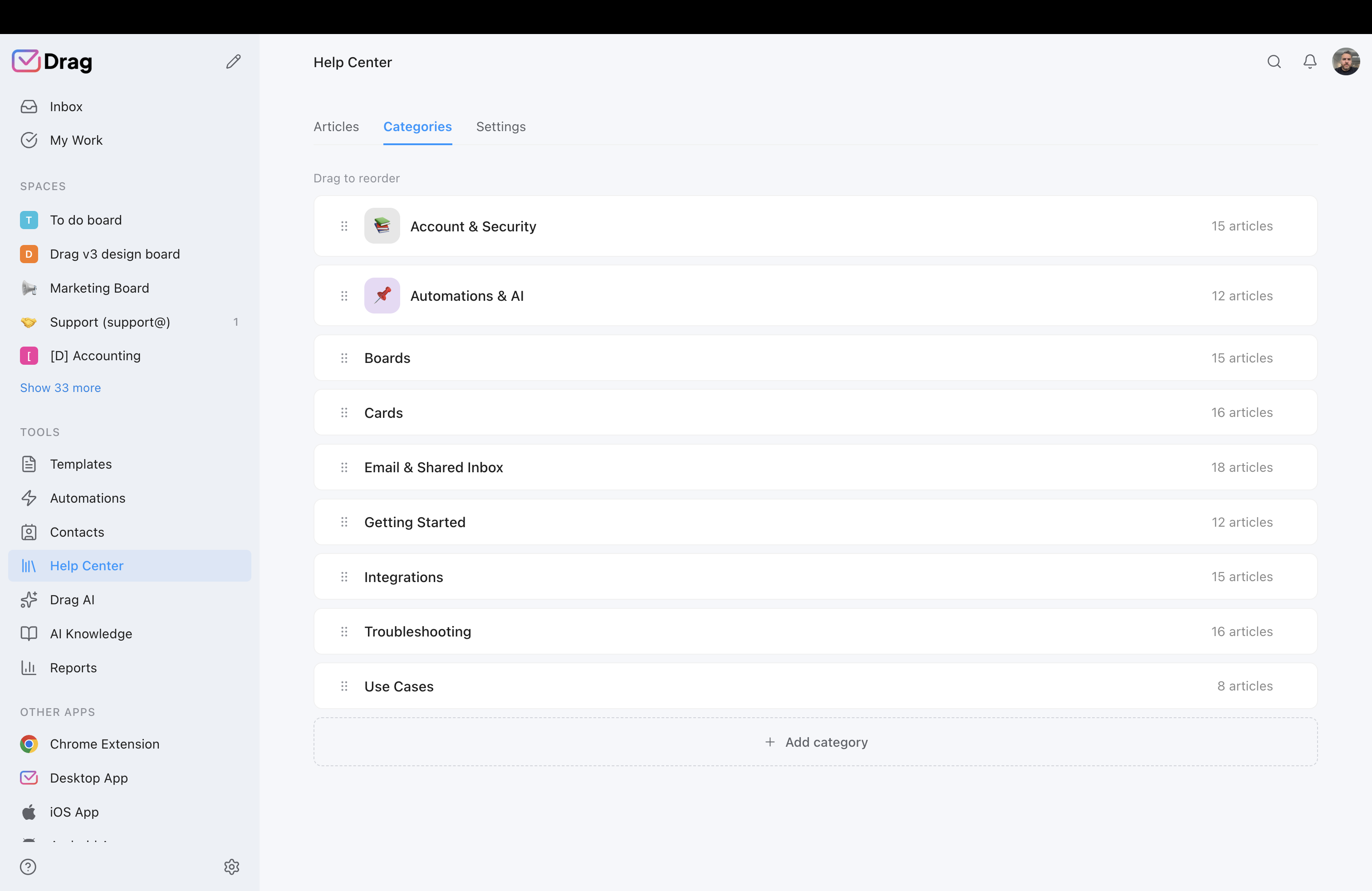
You’re also a help desk: help center and live chat included.
Drag includes a customer-facing, AI-grounded help center for your customers, and a live-chat widget whose conversations land in your Gmail shared inbox as cards with the same boards, assignments, AI, and SLAs. Superhuman has neither, and that is a category fact rather than a failing: it is a personal email client, not a support product, and it does not claim to be one.
- AI-grounded help center that deflects repetitive questions with a current knowledge base.
- Live-chat widget whose conversations land in your Gmail shared inbox as cards.
- Superhuman: a personal email client, with no customer-facing help center or live-chat widget.
Source: Superhuman product pages; Drag help center.
Pricing: Drag vs Superhuman
As of July 2026. Superhuman Mail: $25 Starter / $33 Business per user per month billed annually, which its help center states as $30 or $300 a year and $40 or $396 a year on month-to-month billing; the trial requires a card. Drag: $12 Starter / $18 Plus / $24 Pro billed annually, AI included from Plus, 7-day trial with no card. The calculator compares the AI-comparable tiers, Drag Plus against Superhuman Business.
AI features
 Drag Plus (AI included)
$2,160/yr
$18/user/mo × 10 seats · AI included
 Superhuman Business
$3,960/yr
$33/user/mo × 10 seats · Auto Drafts, Ask AI and Mail MCP sit here
Your team saves at least $1,800/yr with Drag.
Estimate based on published annual pricing, July 2026. Superhuman bills $30 and $40 per seat on month-to-month, and its trial requires a card; Drag's 7-day trial does not.
Pricing comparison: Drag vs Superhuman
Each bar runs from that product’s cheapest published plan to its most expensive, read from its own pricing page in July 2026. Drag’s whole range ends below where Superhuman’s begins.
- Drag$12$24everything included
- Superhuman$25$33


Entry seat to top published per-seat tier, 2026. Quote-only Enterprise tiers excluded.
Prices from each vendor's own pricing page, July 2026. Superhuman's pre-2025 acts as documented by UsagePricing against dated page snapshots; corporate events from company announcements.
Superhuman pricing history: how $30 became $25-to-$40
Superhuman’s seat price has been remarkably stable through three corporate events. What changed is which tier you have to buy to get the AI, and what the word “Business” refers to.
Prices from each vendor's own pricing page, July 2026. Superhuman's pre-2025 acts as documented by UsagePricing against dated page snapshots; corporate events from company announcements.
| Tool | 2021–26 | Basis | 2021 | 2022 | 2023 | 2024 | 2025 | 2026 |
|---|---|---|---|---|---|---|---|---|
| Drag | +$4(+50%) | per-seat | $8 | $5 | $8 | $8 | no capture | $12 |
| Superhuman | $-5(-17%) | per-seat | no capture | no capture | $30† | $25 | $25 | $25 |
| When | Lineup | Entry / mid | AI |
|---|---|---|---|
| Jan 2023 | Starter / Growth / Enterprise | $25 per user per month, annual | Pre-AI era |
| May 2023 | Same lineup, flat price | $30 across Starter and Growth | Pre-AI era |
| Aug 2024 | Starter / Business (Growth renamed) | $25 / $33 annual ($30 / $40 monthly) | Newest AI gated behind Business |
| Jul 2025 | Acquired by Grammarly | No change | No change |
| Oct 2025 | Company renamed Superhuman; Suite launches | Mail unchanged; Suite Free and Pro exclude Mail | Suite tiers add Grammarly, Docs, Go |
| Jul 2026 | Current | $25 / $33 annual ($30 / $40 monthly) | Bundled in the seat; best features on Business |
Current figures from Superhuman’s own pricing page, July 2026. The pre-2025 acts are documented against dated snapshots of its historical pricing pages by the pricing tracker UsagePricing; the corporate acts come from the company’s own announcements. Full working in our Superhuman alternatives guide.
Drag vs Superhuman, feature by feature
The detail layer for evaluators. Each claim is backed by a Drag product screenshot and, where we state a Superhuman limit, the vendor page it came from.
Price, and what the AI costs
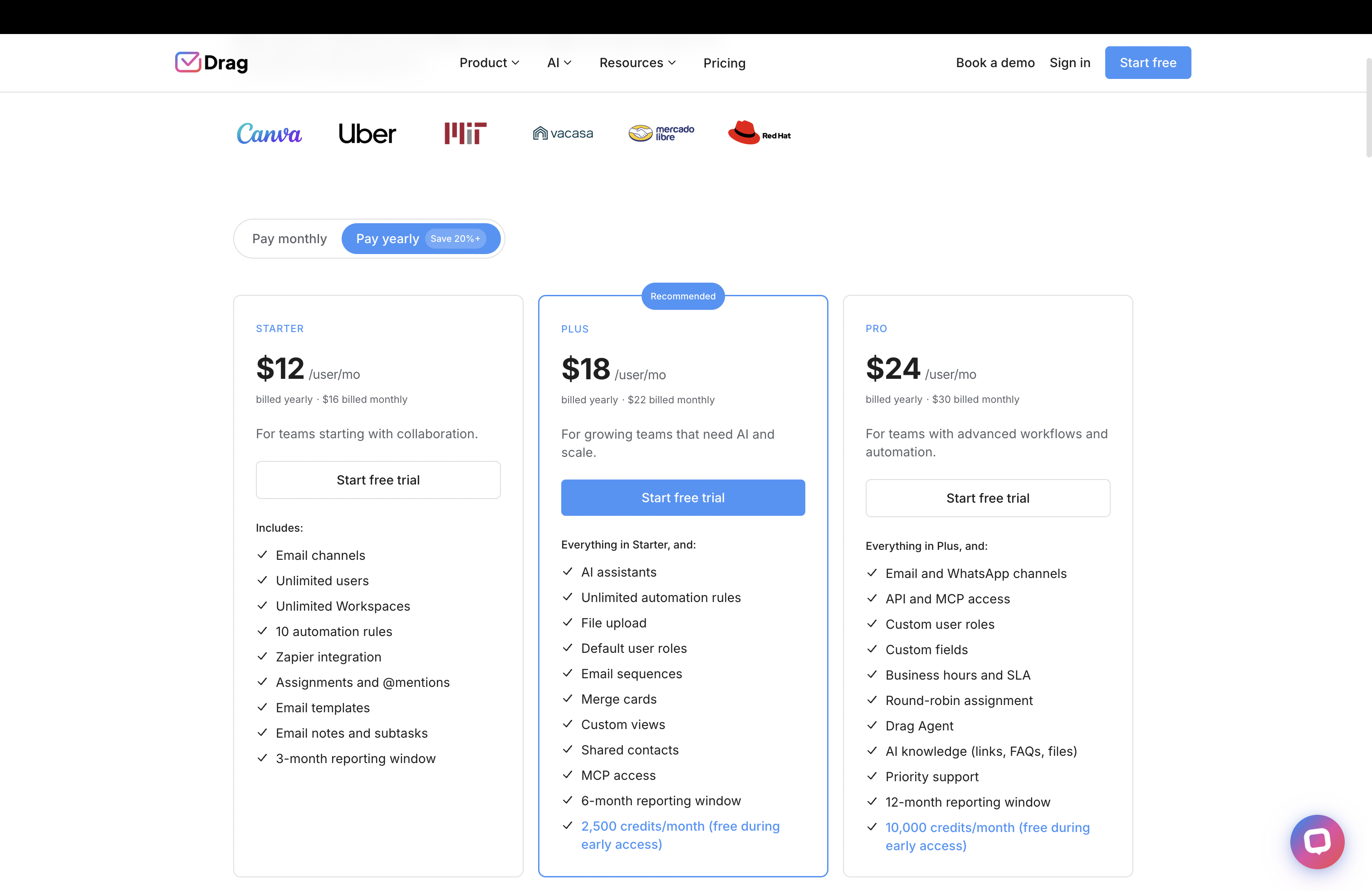
Drag’s top plan costs less than Superhuman’s entry plan, and the AI tier is the middle one rather than the top one.
- Drag $12 entry, $18 with AI included, $24 top plan. 7-day trial, no card.
- Superhuman $25 Starter, $33 Business annual ($30 / $40 monthly), Enterprise on request. Trial requires a card.
Source: Drag pricing; Superhuman pricing page and help center.
A shared address, not a shared view
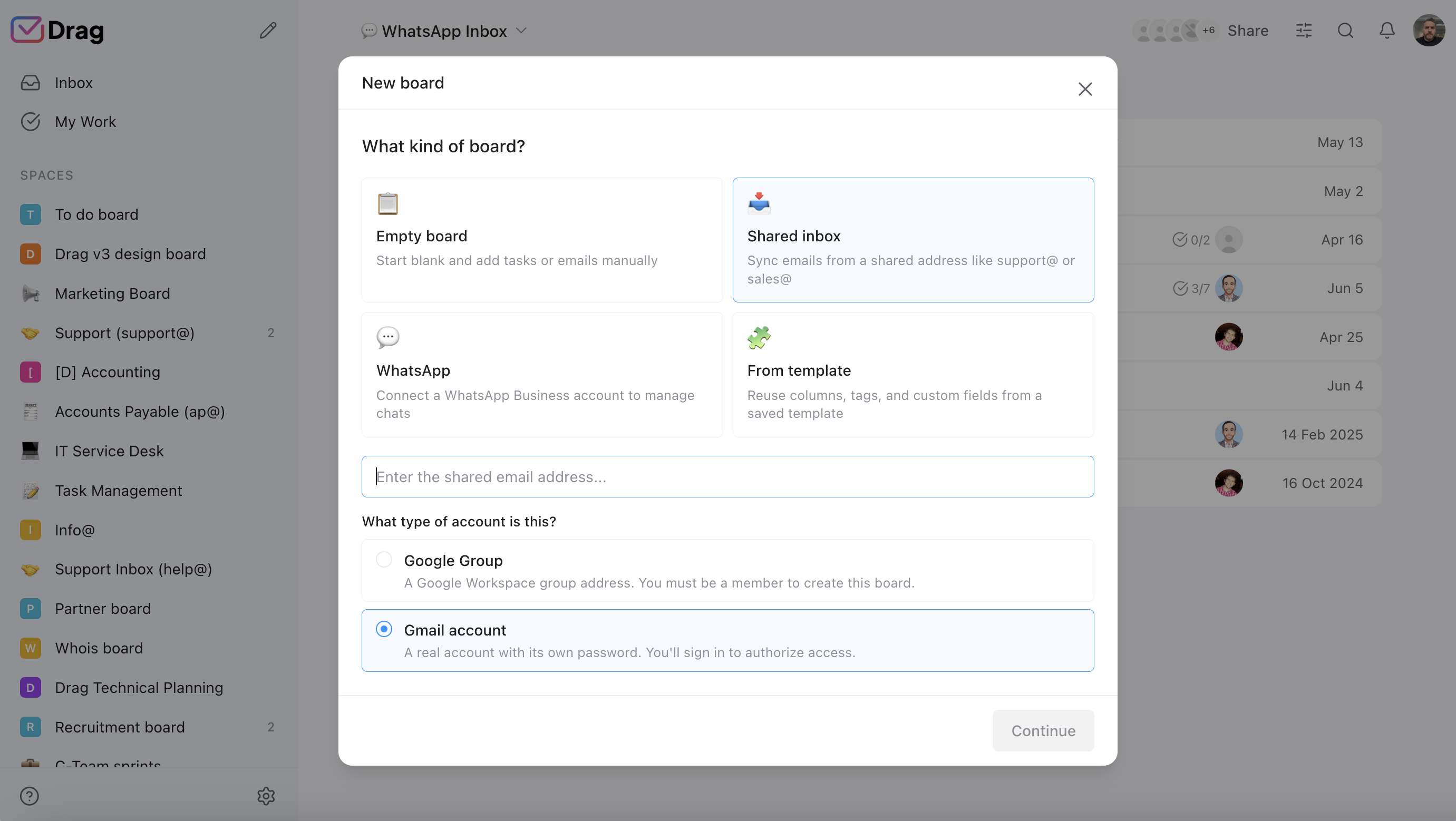
Drag gives the team an address it owns together; Superhuman gives teammates a window into each other’s inboxes.
- Drag: support@ and sales@ as shared inboxes, permission-based, with assignment and boards.
- Superhuman: Shared Conversations, Team Comments, shared drafts and team read statuses, on personal inboxes.
Source: Superhuman pricing page feature table (Team Collaboration); Drag product.
Boards, owners, and knowing who has what
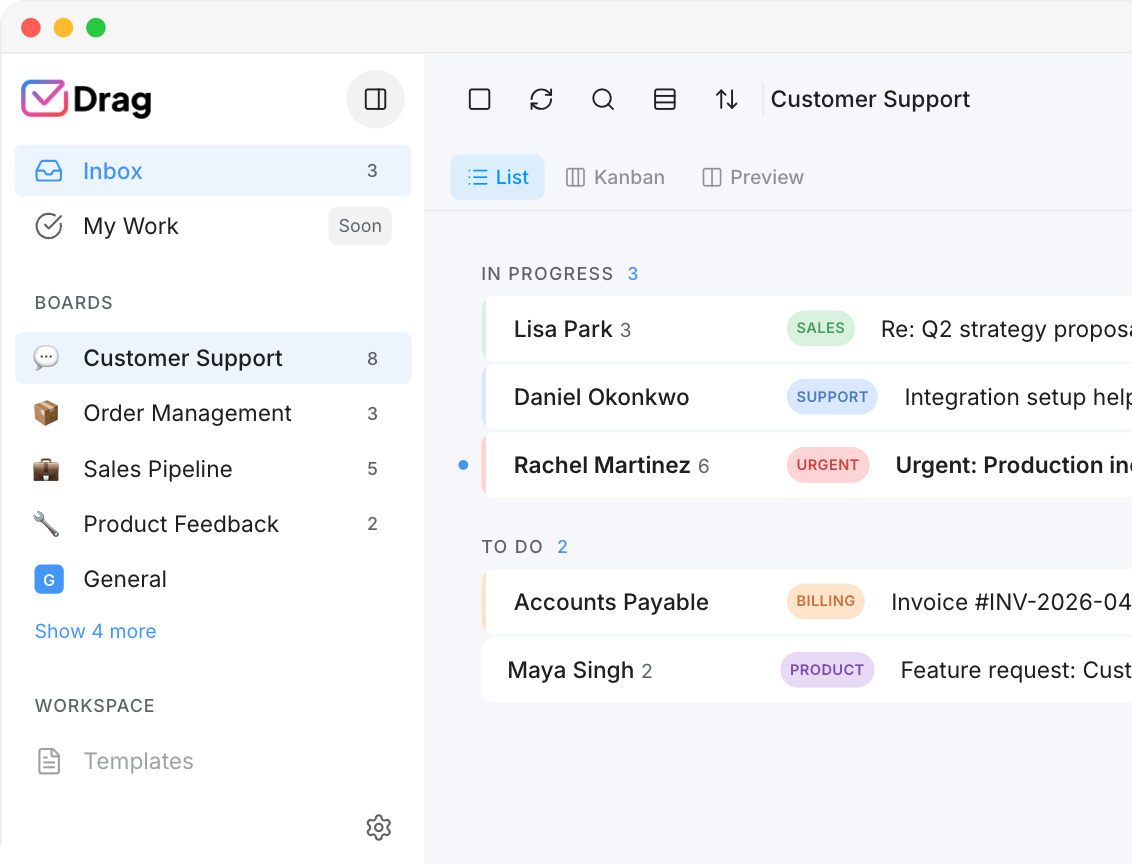
Every email in Drag is a card that carries an owner, notes, due dates, and tasks. Superhuman has no board or assignment layer.
- Drag: Kanban, list, and preview views over the same shared inbox, switched in one click.
- Superhuman: Split Inbox organises one person’s mail; there is no team board or assignment.
Source: Superhuman pricing page feature table (Email Productivity); Drag product.
Run your inbox from Claude (MCP)
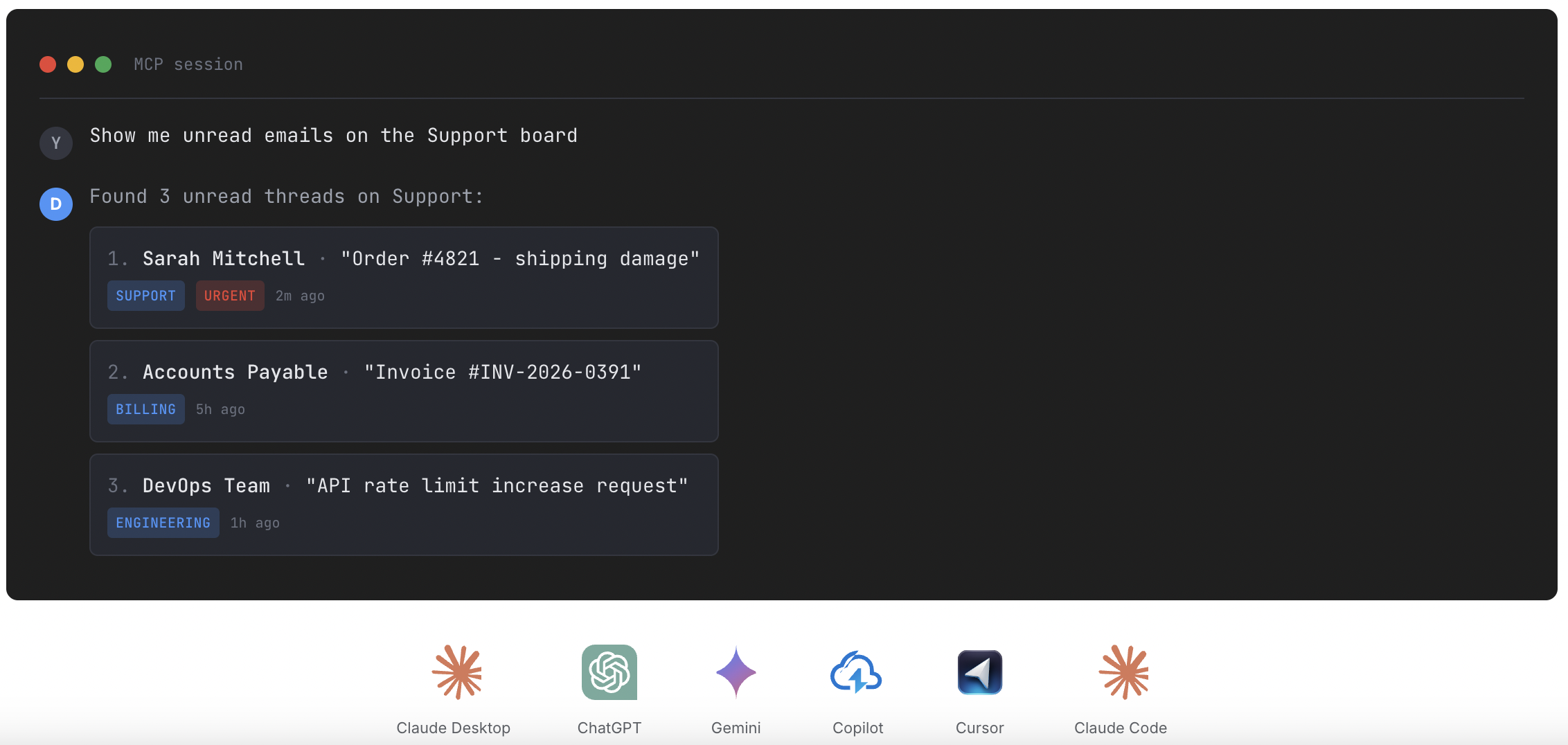
Both ship an MCP server. Drag’s is included on the Pro plan and covers the team’s operation; Superhuman’s is a Business-tier feature scoped to the personal inbox.
- Drag: 47 tools, full read and write, from Claude, ChatGPT, Gemini, Copilot, Cursor, or Claude Code.
- Superhuman: Superhuman Mail MCP is listed on the Business tier at $33 annual / $40 monthly.
Source: Superhuman pricing page (Business tier); dragapp.com/mcp / MCP for customer support
Your team keeps the Gmail it already has
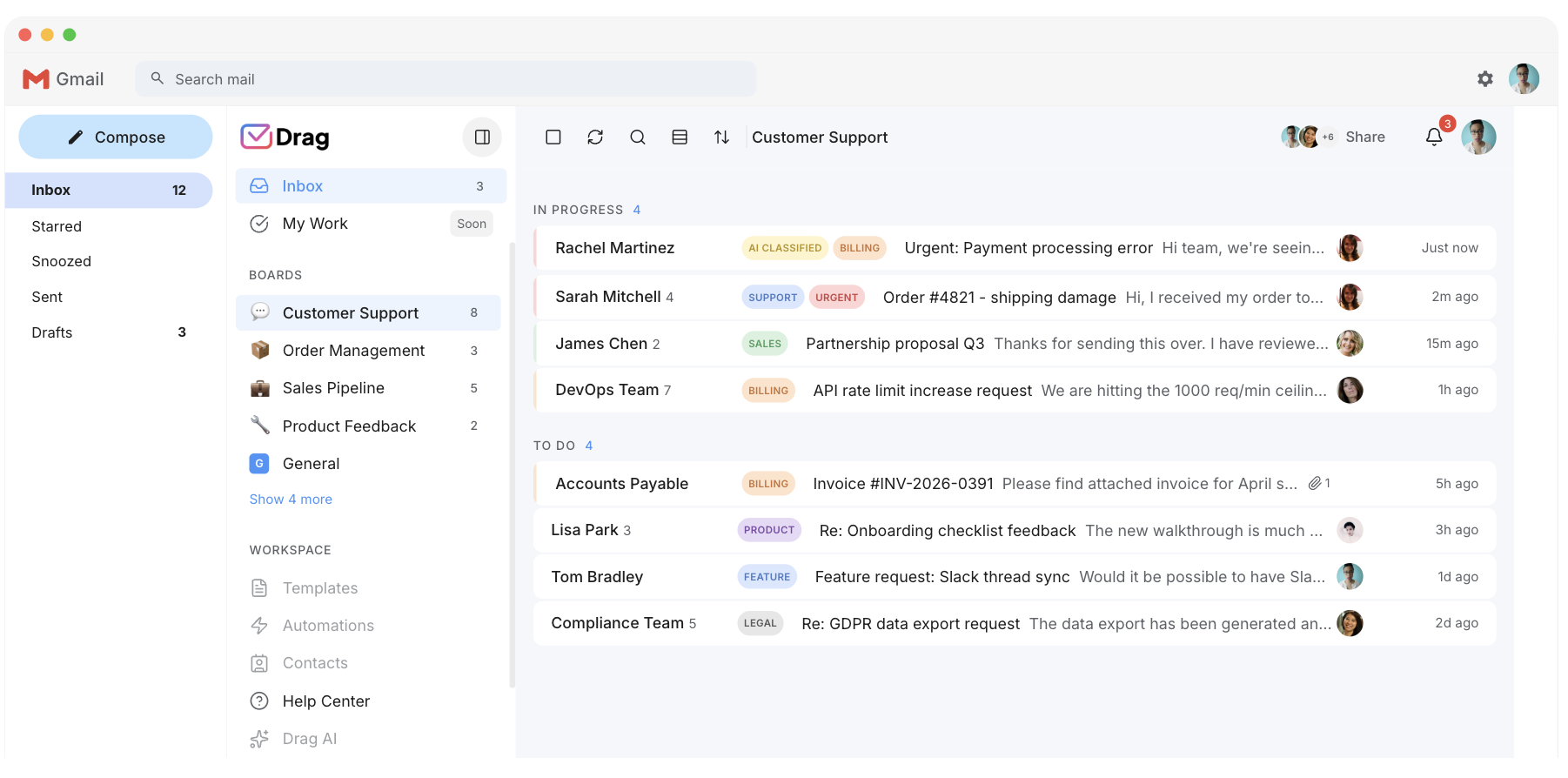
Drag is a layer on Gmail, so nobody changes email client. Superhuman replaces the client, which is the switch it asks every teammate to make.
- Drag: Chrome extension or standalone web, desktop, and mobile apps, same data, same boards.
- Superhuman: a replacement client on desktop and mobile, so adopting it means moving everyone into it.
Source: Superhuman product and platform pages; Drag product.
AI in the seat, not in the top tier
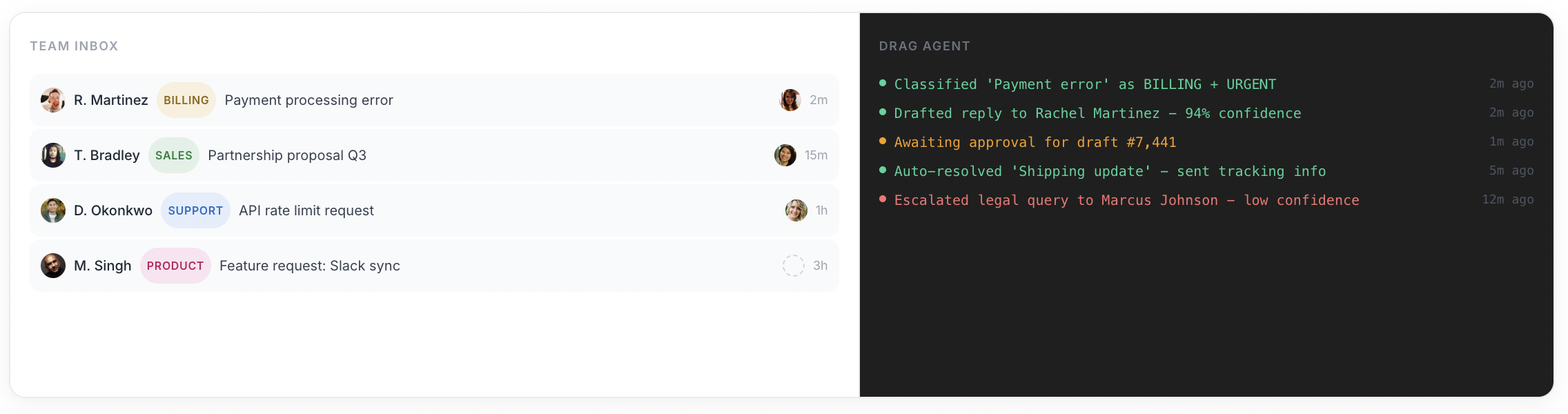
Drag includes Varley, its AI, from its middle plan. Superhuman ships AI on Starter, but lists its headline AI on Business.
- Drag Plus $18: Varley drafts, tags, answers from your docs and acts in your tools.
- Superhuman Business $33: Auto Drafts, Ask AI, Custom Auto Labels with AI, and Mail MCP are listed here, not on Starter.
Source: Superhuman pricing page (Superhuman AI feature table); Drag product.
Security and data architecture
Drag uses permission-based access with instant revocation and does not store your emails on its servers.
- Drag: no email duplication, instant revocation, does not store emails on its servers, Google Cloud Partner, CASA Tier 2, GDPR.
- Superhuman: SOC 2 Type II on every tier, with SSO, SCIM provisioning, audit logs and bring-your-own-key on Enterprise.
Source: Superhuman pricing page (Security feature table); Drag trust center.
Where Superhuman wins
- Raw personal speed: the keyboard-first flow is the deepest in the category, and nothing here, Drag included, out-runs it for one person
- Onboarding: real coaching with every subscription, unusual and genuinely valuable
- Cross-provider personal use: a premium single-inbox experience across Gmail and Outlook
- The suite: since the rebrand, Business-tier buyers get an ambitious bundle around the inbox
If that describes your job, buy Superhuman; we would rather say so than oversell. If the job is a team’s shared email, read on.
There’s nothing to migrate.
Superhuman users are already Gmail or Microsoft users underneath, which makes this the easiest switch on our comparison shelf: your mail never left Gmail. Adopting Drag is adding a Chrome extension or opening the web app, connecting the shared address, and inviting the team. No mailbox moves, no IT project, live in under two minutes, and if you cancel, everything is exactly where it always was.
What customers say
“What we like the most about Drag is the ability to see at a glance where a client is during their Onboarding process, through the use of columns, tasks, and tags. It has been crucial for us because Waste Logics is a growing business and this transparency allows us to work faster and smarter.”
“There really is no comparison when it comes to Drag. We have a great relationship with their team, it’s incredibly easy to use, addresses all of our needs, and the price is right!”
“Drag provided a lot of transparency and unified our team. It allowed us to bring the entire team together to manage emails and tasks collaboratively, as opposed to working in silos, across different tools.”
Frequently asked questions
Is Drag a good alternative to Superhuman?
For teams, yes, and for solo speed, honestly no. Drag replaces the job Superhuman does not do: shared addresses with owners, boards, and AI included, on your existing Gmail, from $12 a seat. One person wanting maximum personal inbox speed is Superhuman’s customer.
Is Drag cheaper than Superhuman?
Yes, at every tier: Drag runs $12, $18 with AI included, and $24, against Superhuman’s $25 to $40, and Drag’s trial needs no card. A 10-seat team on the AI-comparable tiers pays $2,160 a year on Drag Plus against $3,960 on Superhuman Business.
Does Superhuman have a shared inbox?
No. Superhuman offers Shared Conversations and Team Comments, visibility layers on personal inboxes, but no shared address a team owns with assignment and boards. That is the structural difference this page turns on.
Does Superhuman have a free plan?
No, and neither does Drag. Superhuman’s trial requires a card; the Superhuman Suite’s free tier exists but does not include the email app. Drag’s 7-day trial needs no card.
Can I run my inbox from Claude with Drag?
Yes, on the Pro plan: Drag’s MCP server exposes 47 tools with read and write across email, boards, assignments, and analytics. Superhuman also ships Mail MCP, on its Business tier, scoped to the personal inbox.
What happened to Superhuman’s pricing after the Grammarly acquisition?
The seat price held: $25 and $33 annual were set in August 2024, before the July 2025 acquisition, and remain. The packaging changed: the renamed company’s Suite has tiers that exclude the email app, which is where most confusion comes from.
How hard is it to switch from Superhuman to Drag?
Easy. Because Drag works inside your existing Gmail, switching is adding a Chrome extension or the Drag apps, not a migration. There are no mailboxes to move and your shared inbox can be live in under two minutes.
Do I need to migrate or import my email to use Drag?
No. Drag runs on top of your existing Gmail. Your mail stays in Gmail; Drag adds a shared-inbox layer with boards, assignments, and AI.
Can I use Drag and Gmail at the same time?
Yes. Drag works on Gmail, so your team keeps using Gmail exactly as they do now, with Drag’s shared inbox, boards, and AI layered on top.
What happens to my email if I cancel Drag?
Your mail stays in Gmail. Because Drag is a layer on top of Gmail and does not store your emails on its servers, cancelling leaves your mail where it always was.
Does Drag have a mobile app?
Yes. Drag is available as a Chrome extension and as standalone web, desktop, iOS, and Android apps.
Is Drag secure for shared inboxes?
Drag uses permission-based access: it shares access to a shared inbox, revokes it instantly, does not duplicate emails across mailboxes, and does not store your emails on its servers. It is a Google Cloud Partner with CASA Tier 2 verification and is GDPR compliant.
Comparing more than these two? Our guide to the 8 best Superhuman alternatives prices the whole field, and the shared inbox explains what Drag actually does with a team address.


