








The best MCP servers for customer support in 2026: which platforms publish official servers (Plain, Intercom, Pylon, Drag, Front, Gorgias), which read and which can actually reply, and how to connect one to Claude or ChatGPT.
Key takeaways
- By mid-2026, at least seven support platforms ship official MCP servers, with Front, Gorgias, and Kustomer joining the early movers Plain, Intercom, Pylon, and Drag, and the list is growing quarterly. Zendesk's official MCP server is in early access, and Freshdesk's is in an early-access beta for Enterprise plans; neither is generally available. Help Scout and HubSpot Service Hub do not publish official servers.
- They split by segment: Plain and Pylon are Slack-native B2B platforms, Intercom is product-messaging (and its MCP server is read-focused with limited write), and Drag is the only Gmail-native shared inbox with an MCP server.
- Read vs write matters: Intercom's MCP server is read-focused with limited write support for help-center content, while Pylon and Drag support write actions like replying and updating.
- Choose by where your team already works: Slack-first B2B (Plain, Pylon), in-product messaging (Intercom), or Gmail (Drag).
- Watch the direction: an MCP server lets you connect Claude or ChatGPT to your support tool; an MCP client (what Zendesk is building) only lets the platform's own AI reach out. You need a server. Prefer official, OAuth-secured ones.
Table of contents
- What this guide covers
- First, the distinction that trips everyone up: MCP server vs MCP client
- The MCP-native support platforms at a glance
- 1. Plain - best for technical B2B teams on Slack
- 2. Fin (formerly Intercom) - best for pulling product-messaging context
- 3. Pylon - best for Slack Connect-heavy B2B
- 4. Drag - best for Gmail teams running support from the inbox
- 5. Front - best for multichannel teams already on Front
- The newer arrivals: Gorgias, Kustomer, and the waiting room
- How to connect an MCP-native platform
- How to choose an MCP-native support platform
- If your support touches Gmail, the two-minute test is Drag
- Frequently asked questions
The short version: the best MCP server for customer support is the one attached to the platform your team already answers customers in, and as of August 2026 the honest shortlist is Plain and Pylon for Slack-native B2B, Intercom for read-only product-messaging context, Drag (our product, disclosed below) for Gmail shared inboxes, and Front's open-beta server for its own multichannel base, with Gorgias newly in open beta. The Model Context Protocol (MCP) lets AI clients like Claude, ChatGPT, and Cursor connect directly to your tools and act on your behalf. For customer support, that means triaging, drafting replies, and pulling reports by prompt. But there is a catch: your support platform has to publish an MCP server for any of it to work, and in 2026 only a handful do. This page ranks those platforms; for how the chosen tool fits into a full setup, knowledge to human oversight, see the MCP-native support stack guide.
This guide covers the support platforms that actually have an official MCP server today, what each server can really do (reading data is not the same as taking actions), and which type of team each one suits. It is deliberately even-handed: several of these are excellent, and the right choice depends far more on where your team already works than on a feature checklist.
MCP works across clients like Claude Desktop, ChatGPT, Cursor, Windsurf, Claude Code, and others





A note on scope and dates: "MCP-native" here means the vendor publishes its own official MCP server (not a third-party community wrapper). Details verified June 2026; this space moves quickly, so confirm current capabilities on each vendor's documentation.
For the background on what MCP is and how it changes support, see our MCP for customer support guide. The wider connector landscape beyond support lives in our best Claude MCP servers list, and if the vocabulary (server, connector, plugin, skill) is the confusion, this page untangles it.
What this guide covers
- MCP server vs MCP client
- The MCP-native support platforms at a glance
- Plain - best for technical B2B teams on Slack
- Intercom - best for pulling product-messaging context
- Pylon - best for Slack Connect-heavy B2B
- Drag - best for Gmail teams running support from the inbox
- Front - best for multichannel teams already on Front
- How to connect an MCP-native platform
- How to choose
- FAQ
First, the distinction that trips everyone up: MCP server vs MCP client
A lot of "does X support MCP" confusion comes from conflating two opposite things.
- An MCP server exposes your support platform's data and actions to outside AI tools. You connect Claude, ChatGPT, or Cursor to your support tool, and the AI can read your threads and (if the server allows writes) reply, assign, and update. This is what this guide is about, and what Plain, Intercom, Pylon, and Drag publish.
- An MCP client is the other direction: it lets a platform's own built-in AI reach out to other tools. For example, Zendesk is building MCP client capabilities so its AI agent can pull from your CRM, but that does not let you connect Claude or Cursor to Zendesk. The connection flows the opposite way.
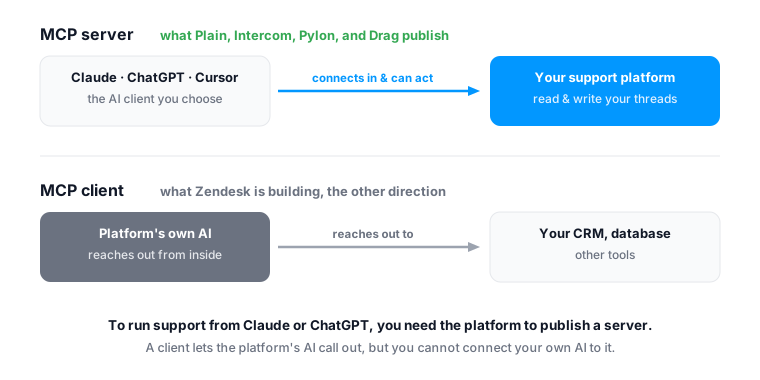
For running your support from an AI client of your choice, you need the platform to publish an MCP server. That is the lens for the rest of this guide.
One more thing worth knowing before you connect anything: most public MCP servers are not secure. Independent security reviews in early 2026 found that a large majority of public MCP servers ship with no authentication or known vulnerabilities, and only a small fraction use OAuth. That is exactly why an official, authenticated first-party server matters more than raw tool count. The platforms below each provide one -- some use OAuth, others (like Drag) use a scoped API key. Prefer official servers over community wrappers, and confirm the authentication model before granting access.
The MCP-native support platforms at a glance
| Platform | Segment | MCP server | Read / write | Best for |
|---|---|---|---|---|
| Plain | Slack-native B2B | Official, native | Read + write | Technical B2B teams that live in Slack and want to build on an API |
| Fin (formerly Intercom) | In-product messaging | Official (US + EU workspaces) | Read-focused, limited write | Teams wanting AI to pull Intercom context, not act |
| Pylon | Slack-native B2B | Official (mcp.usepylon.com) | Read + write | B2B CS teams using Slack Connect heavily |
| Drag | Gmail-native shared inbox | Official (npm package) | Read + write | Gmail teams that run support from their inbox |
Front's official MCP server is in open beta with read and write tools, connected through OAuth apps you configure. Zendesk's MCP server is in early access, and Freshdesk's is in an early-access beta for Enterprise plans; neither is generally available. Help Scout and HubSpot Service Hub do not publish official MCP servers as of August 2026, though third-party community servers exist for some.
Drag AI
The inbox your team and your AI work in together
Shared inbox, live chat, and AI in Gmail, with an MCP server your AI tools can drive.
 1. Plain - best for technical B2B teams on Slack
Segment: Slack-native B2B support. MCP: official, read + write.
Plain is an API-first, Slack-native support platform built for technical B2B teams. It ships a native MCP server (around 30 granular tools) alongside a public GraphQL API and a "bring your own agent" architecture, so engineering-minded teams can wire AI deeply into their support stack. If your customers live in Slack and your team wants infrastructure to build on rather than a UI to configure, Plain is a strong, genuinely modern choice.
- Best for: technical B2B SaaS teams using Slack as a primary support channel.
- MCP strength: native server plus a no-rate-limit API and BYOA, the most developer-extensible of the group.
- Consider if: you want an API-first platform and Slack-native support; less suited to Gmail-centric teams.
For a fuller comparison, see our Drag vs Plain breakdown.
 2. Fin (formerly Intercom) - best for pulling product-messaging context
Segment: in-product messaging. MCP: official, but read-only.
What has this customer raised with us before?
4 previous conversations, three about billing. The unresolved theme: invoices arriving after their finance cutoff date.
Illustrative conversation, shortened.
Intercom is the established in-product messaging and support platform, and it was early to MCP, its server launched in 2025. The honest limitation: Intercom's MCP server is read-focused with limited write support for help-center content, currently at 13 tools. It is genuinely useful for pulling conversation and contact context into an AI client (researching a customer's history before a call, analysing patterns), but you cannot reply, update tickets, or take write actions through it. It runs on US- and EU-hosted workspaces.
- Best for: teams that want AI to read and analyze Intercom data, not act on it.
- MCP strength: mature search and retrieval across conversations and contacts.
- Consider if: read-only is enough; if you need AI to actually reply or update, this is a constraint.
 3. Pylon - best for Slack Connect-heavy B2B
Segment: Slack-native B2B support. MCP: official, read + write.
Pylon is a fast-growing Slack-native support platform for B2B teams, particularly those leaning on Slack Connect with customers. Its official MCP server (at mcp.usepylon.com) supports both read and write, so an AI client can query issues, conversations, accounts, and contacts and update issues and accounts.
- Best for: B2B customer success teams running support through Slack Connect.
- MCP strength: read + write across issues and accounts.
- Consider if: Slack is your primary channel; less relevant for Gmail or in-product support.
Drag AI
The inbox your team and your AI work in together
Shared inbox, live chat, and AI in Gmail, with an MCP server your AI tools can drive.
 4. Drag - best for Gmail teams running support from the inbox
Segment: Gmail-native shared inbox. MCP: official, read + write.
What's waiting in support from overnight? Draft replies to the three oldest.
Found 9 open threads from overnight in the Support board. Three drafts are ready for your review; nothing was sent.
Drafting needed your permission the first time. Sending always does.
Drag is the one Gmail-native shared inbox on this list with its own MCP server. Where Plain and Pylon are Slack-native and Intercom is in-product messaging, Drag turns the Gmail inbox a team already uses into a shared, assignable support queue, and its MCP server (a published npm package, 47 tools across 12 categories) lets an AI client read and write: list and search threads, read full conversations, reply, assign, label, move, manage tasks and contacts, query analytics, send WhatsApp messages, and more. That read + write breadth, on top of Gmail, is its distinct position.
- Best for: teams that run customer support from Gmail and want to drive it from Claude, ChatGPT, or Cursor.
- MCP strength: broad read + write toolset over a Gmail-native shared inbox; works across MCP clients.
- Consider if: your support lives in Gmail. If your team is Slack-first or needs deep multichannel ticketing, one of the others may fit better.
- See it in practice: run your customer support inside Claude or ChatGPT.
 5. Front - best for multichannel teams already on Front
Segment: multichannel shared inbox. MCP: official, open beta.
Front's official MCP server is in open beta as of August 2026, connected through OAuth apps you configure, with read access and limited write actions such as tagging, comments, and drafts. That makes it a genuine option if your team already runs on Front: an AI client can pull conversations and prepare work, though full reply-and-send automation is not what the beta exposes. If you are choosing a platform today for AI-driven support rather than already owning one, the read + write servers above give an assistant more to do.
- Best for: existing Front teams that want AI reading conversations and preparing drafts.
- MCP strength: OAuth-configured access to a mature multichannel inbox.
- Consider if: you are already on Front; the beta's limited writes are the current constraint.
The newer arrivals: Gorgias, Kustomer, and the waiting room
The list grows quarterly. Gorgias's official MCP server is now in open beta, which matters for ecommerce support teams. Kustomer has joined the official-server group. Zendesk's official MCP server remains in early access and Freshdesk's in an early-access beta for Enterprise plans; neither is generally available as of August 2026. Help Scout and HubSpot Service Hub still publish no official server. When any of these reach general availability with documented tools, this page will carry them with the same read/write scrutiny as the entries above.
How to connect an MCP-native platform
The setup is similar across all four platforms: add the server to your AI client, authenticate with your API key, and run a prompt. The server inherits your existing permissions on the platform.
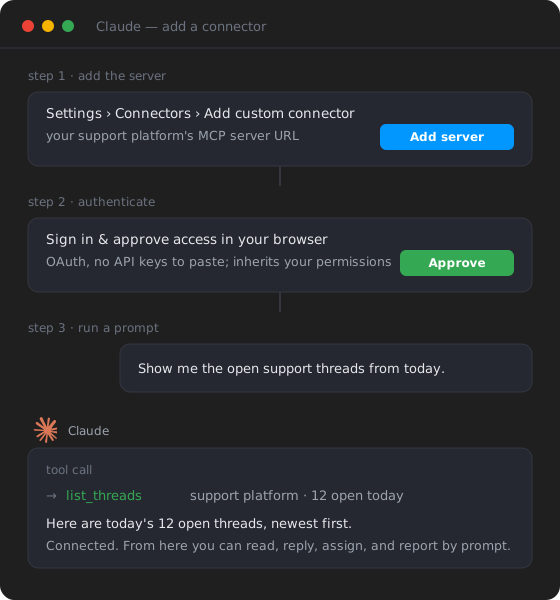
Step 1: add the server. In your AI client (Claude, ChatGPT, Cursor), go to Settings, then Connectors (or the equivalent), and add the platform's MCP server URL. Each platform publishes its own; Drag's is https://app.dragapp.com/mcp, and clients that run servers locally can use its config-file route instead (see the connect guide).
Step 2: authenticate. Add your API key (for Drag, copy it from Settings, then Integrations in the Drag app, and enter it once on the secure connect page that opens; the MCP service stores nothing). The server inherits your existing permissions on the platform, so the AI can only do what your account can do, and you can revoke access at any time.
Step 3: run a prompt. Ask something real: "Show me the open support threads from today." The AI calls the server, pulls your data, and returns the result. From here you can read, reply, assign, and report by prompt.
Each platform's specific setup steps are in its own documentation. For a Drag-specific walkthrough, see our step-by-step connect guide. For the full background on how MCP works, see our MCP for customer support guide.
How to choose an MCP-native support platform
The honest decision rule is "where does your team already work," not "who has the most tools":
If the prior question is why MCP rather than the API at all, the decision guide is the honest split.
- Slack is your support channel, and you are technical / API-first: Plain.
- Slack Connect-heavy B2B customer success: Pylon.
- You use Intercom and want AI to read its data for context: Intercom (remember: read-focused, limited write).
- You already run on Front: its open-beta server reads and prepares work; check whether its limited writes cover what you need.
- Your support runs from Gmail: Drag (the only Gmail-native option, read + write).
Two practical checks before you commit: confirm whether the MCP server is read-only or read + write (it changes what AI can actually do for you), and confirm regional and plan availability. Then connect it to your AI client and try a real task, the hands-on walkthrough shows what that looks like day to day.
If your support touches Gmail, the two-minute test is Drag
Disclosure restated: Drag is ours, and this page ranks it alongside platforms we respect. The reason to test it first is structural, not promotional: it is the one Gmail-native entry, and one of the few whose server lets an AI client complete the whole loop, read the thread, draft the reply, send it with permission, assign and label the rest. The test costs nothing: free for 7 days, no card, the connect guide takes about two minutes, and "show me today's open support threads, draft replies to the three oldest" against your real queue will tell you more than any comparison table, including this one. If Slack is your channel, start with Plain or Pylon instead; the decision rule above is honest on purpose.
Frequently asked questions
Which customer support platforms have an MCP server?
As of mid-2026, at least seven platforms ship official MCP servers, with Front, Gorgias, and Kustomer joining the early movers Plain, Intercom, Pylon, and Drag. Plain and Pylon are Slack-native B2B platforms, Intercom is in-product messaging (read-focused MCP with limited write), and Drag is the only Gmail-native shared inbox with one. Zendesk's official MCP server is in early access, and Freshdesk's is in an early-access beta for Enterprise plans; neither is generally available. Help Scout and HubSpot Service Hub do not publish official MCP servers as of August 2026.
What does 'MCP-native' mean?
It means the vendor publishes its own official MCP server, so AI clients like Claude or ChatGPT can connect to your support data and (depending on the server) take actions. It is different from a third-party community wrapper, which is unofficial and may break.
Is Intercom's MCP server read-only?
Intercom's MCP server is read-focused with limited write support for help-center content, currently at 13 tools. It is useful for pulling conversation and contact context into an AI client, but you cannot reply or update tickets through it. It runs on US- and EU-hosted workspaces.
Which MCP-native platform is best for Gmail teams?
Drag. It is the only Gmail-native shared inbox with an official MCP server, and it supports read and write, so an AI client can read threads and also reply, assign, label, and move them. The others are Slack-native or in-product messaging tools.
Does having an MCP server mean the platform automates support by itself?
No. MCP is the connection layer, not the automation. Your AI client does the reasoning and takes actions through the server; the platform's own built-in AI (if any) is separate. MCP is what lets you choose your own AI tools and build your own workflows.
Do Zendesk or Front have MCP servers?
Front does, as of mid-2026: Front now ships an official MCP server with read access and limited write actions such as tagging, comments, and drafts. Zendesk has announced an official MCP server through an early access program, though it is not yet generally available. Among Gmail-native shared inboxes, Drag is the one with an official MCP server.

Co-founder
Building Drag for nearly ten years: shared inboxes, boards, and now the AI and agent layer, all on Gmail, plus HeyHelp for the personal inbox. Writes the honest versions of the comparisons.
