













Drag and Plain both ship first-party MCP servers and both reject per-resolution AI fees. Where they split: Plain builds for Slack-native B2B teams, Drag for Gmail.
Key takeaways
- Drag and Plain agree on more than most rivals: both ship official MCP servers so AI agents can operate them, and both reject per-resolution AI pricing.
- The real split is where support lives: Plain is a standalone, API-first platform built for Slack-native, engineering-led B2B teams; Drag turns Gmail into the support tool for email-driven teams.
- Pricing differs sharply: Plain runs $35 to $89 a seat with 5 and 10 seat caps that force tier jumps; Drag runs $12 to $24 flat with AI included and no caps.
- If your customers live in shared Slack channels and your engineers work tickets, choose Plain. If your support is email and your team lives in Gmail, choose Drag.
Table of contents
Drag and Plain are both AI-native support tools with official MCP servers and AI included rather than billed per resolution, but they answer one question oppositely: where should support live? Plain is a standalone, API-first platform built for Slack-native, engineering-led B2B teams, from $35 a seat. Drag turns Gmail itself into the support tool for email-driven teams, from $12 a seat with AI included. This comparison is written by Drag's co-founder, so read it knowing that, but the honest routing is simpler than most vs pages: these two products are mostly for different teams, and we will tell you which is which.
What Drag and Plain agree on (which is unusual)
Most head-to-heads start with differences. It is more honest to start with the two bets both companies made, because they define what "AI-native support" means in 2026:
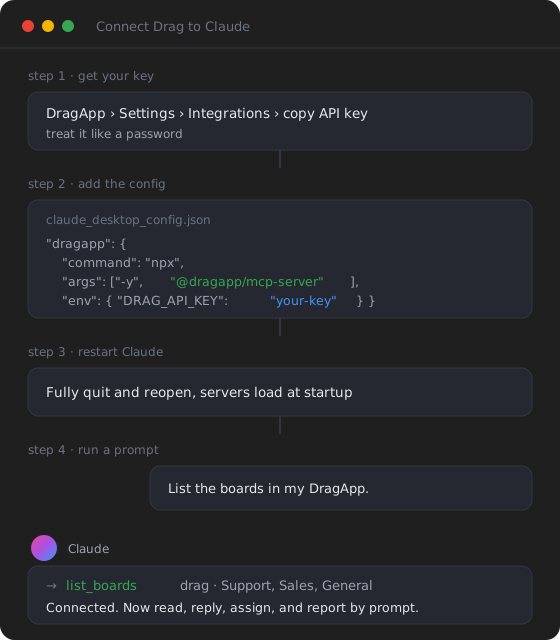
- Support tools should be operable by AI agents. Both Drag and Plain ship official, first-party MCP servers, still rare in this category. Plain's own guide counted three support platforms with official MCP servers as of March 2026 (Plain, Intercom, and Pylon); Drag shipped its server after that count was written, making it one of the few Gmail-side additions to the list. Plain's server exposes 30 read-and-write tools; Drag's exposes 47 across 12 categories. Tool count is not a quality measure, both are real, working servers, but the shared bet matters: whichever you choose, Claude, ChatGPT, or Cursor can read threads, reply, assign, and label on your behalf.
- AI should be included, not billed per outcome at a premium. Plain's pricing page says "no per-resolution surprises"; its customer-facing agent, Ari, is included on every plan. Drag includes Varley, its AI, in the seat from $18. Both companies are making the same argument against the per-outcome pricing that dominates the category (Fin at $0.99 per outcome, Zendesk and Help Scout per resolution). One nuance on Plain's side: its assistant Sidekick is credit-metered (2,000 credits a month on Foundation, expiring monthly), so part of Plain's AI is usage-based even though Ari is not.
If you agree with those two bets, both of these tools are on your side of the argument. The question is which one fits your team.
 What Plain is
Plain is a standalone support platform built for engineering-led B2B teams, the companies whose customers live in shared Slack channels and whose engineers rotate through support. It is API-first in a real sense: a fully public GraphQL API with no rate limits (the same API Plain runs on), a headless portal, and on its top tier, Bring-Your-Own-Agent infrastructure. Channels cover Slack (its home turf), Microsoft Teams, Discourse, email, live chat, and in-app forms. Ari, its customer-facing AI agent, is included on every plan, grounds in your docs, and can run on your own LLM. Free viewer seats mean the whole company can see support without paying for it.
- Pricing: Foundation $35/seat (up to 5 seats), Horizon $89/seat (up to 10 seats), Frontier custom. 7-day trial.
- Honest watch-outs: the 5 and 10 seat caps force tier jumps as you grow; Sidekick's credits expire monthly and it pauses when they run out; and it is a dedicated platform your team adopts, which is exactly right for some teams and overhead for others.
What Drag is
Drag turns Gmail into the support tool: a shared, assignable inbox with boards, collision detection, internal notes, automation, a customer-facing help center, live chat, and WhatsApp, inside the Gmail your team already uses, with a full standalone web, desktop, and mobile app on the same data for anyone who prefers it. Varley, Drag’s AI, is included in the seat from $18, working on your real inbox (drafting, summarising, triaging, tagging), and Drag publishes its own MCP server (47 tools across 12 categories) so AI clients can run the inbox by prompt. Varley’s Agent resolves conversations on its own on Pro.
- Pricing: Starter $12, Plus $18 (AI included), Pro $24. No seat caps or minimums. G2 4.5, 240,000+ users since 2017.
- Honest watch-outs: it is not a standalone API-first platform; if your support motion runs through shared Slack channels with engineers working tickets, Drag is not built for that, Plain is.
Drag · with Varley
The inbox your team and Varley work in together
Shared inbox and live chat for Gmail teams, with Varley, Drag’s AI, included from $18. Plus an MCP server your own AI tools can drive.
The real difference: where support lives
Strip away the feature lists and the split is philosophical. Plain's bet: support for modern B2B happens in Slack and Teams channels, worked by engineers as much as support staff, so the tool should be a dedicated, programmable platform with an API at its core. Drag's bet: for the far larger population of teams, support is still email, and the best support tool is the inbox you already have, upgraded, not another platform to adopt. Both are right, for different companies. The tell is your customers: if they expect a shared Slack channel, you are Plain's customer. If they email support@, you are Drag's.
| Drag | Plain | |
|---|---|---|
| Model | Gmail-native shared inbox (+ standalone app) | Standalone API-first platform |
| Home channel | Email (plus chat, WhatsApp, help center) | Slack (plus Teams, Discourse, email, chat) |
| Built for | Email-driven teams on Google Workspace | Engineering-led B2B with Slack-native customers |
| AI model | Varley included from $18 | Ari included every plan; Sidekick credit-metered |
| MCP server | Yes, 47 tools / 12 categories | Yes, 30 tools, read+write |
| API | REST API + MCP | GraphQL, no rate limits, headless |
| Pricing | $12 to $24/seat, no caps | $35 to $89/seat, 5 and 10 seat caps, Frontier custom |
| Free trial | 7-day trial, no card required | 7-day trial, free viewer seats |
Choose Plain if
Your customers live in shared Slack or Teams channels; your engineers work support and need Linear or Jira in the loop; you want a programmable, headless, API-first platform (or Bring-Your-Own-Agent on Frontier); and $35 to $89 a seat fits. Plain is genuinely one of the best tools ever built for that motion, and its MCP server and included Ari agent mean you are not giving up the AI-native bets by choosing it.
Choose Drag if
Your support is email, your team lives in Gmail, and you want AI included in seats from $12 to $24 with no seat caps, plus a help center, chat, and boards without adopting a new platform. You keep the same two bets, an MCP server and AI in the seat, in the inbox you already have. Try Drag free or see how the shared inbox works.
Frequently asked questions
What is the difference between Drag and Plain?
Both are AI-native support tools with official MCP servers and AI included in the plan rather than priced at a per-outcome premium. Plain is a standalone, API-first platform built for Slack-native, engineering-led B2B teams ($35 to $89 a seat, with seat caps). Drag turns Gmail into the support tool for email-driven teams ($12 to $24, AI included, no caps).
Is Plain a good support platform?
For its audience, genuinely yes: Slack-native B2B support with engineers in the loop, a GraphQL API with no rate limits, a headless portal, and an included AI agent (Ari). The watch-outs are the 5 and 10 seat caps and Sidekick's monthly-expiring credits.
How much does Plain cost?
Foundation is $35 per seat per month (up to 5 seats), Horizon $89 per seat (up to 10 seats), and Frontier is custom. Viewer seats are free, and there is a 7-day trial.
Does Plain charge per AI resolution?
No. Its customer-facing agent, Ari, is included on every plan with no per-resolution fee. Its assistant Sidekick, however, runs on monthly credits that expire, so part of the AI is usage-based.
Do Drag and Plain both have MCP servers?
Yes, both ship official first-party MCP servers, still rare among support tools. Plain's exposes 30 read-and-write tools; Drag's exposes 47 tools across 12 categories. See our guide to MCP for customer support.
Which is better for a Gmail team?
Drag. Plain is not Gmail-native; it is a standalone platform with Slack as its home channel. Drag does shared-inbox support inside Gmail with AI included from $18.
Is Drag an alternative to Plain?
For email-driven teams, yes. For Slack-native, engineering-led B2B support motions, Plain is the better fit and we say so plainly. The two products mostly serve different teams.

Co-founder
Building Drag for nearly ten years: shared inboxes, boards, and now the AI and agent layer, all on Gmail, plus HeyHelp for the personal inbox. Writes the honest versions of the comparisons.
