












OpenAI launched dots on 29 September 2026: always-on agents in ChatGPT. What a dot can do with your email, the approval rules, who can use it, and how it fits a team inbox.
Key takeaways
- Dots are always-on AI agents inside ChatGPT, launched by OpenAI on 29 September 2026 and powered by GPT-6 Astra. Each dot has its own cloud computer and works toward goals you set, even while you are away.
- At launch dots are for ChatGPT Pro (outside the EEA, Switzerland and the UK), Business Premium, and Enterprise in beta. The first dot is included, and for the first month dot usage does not count toward plan allowances.
- A dot can use your personal email to help with tasks, but it cannot have its own email address at launch, and approving one message does not give it standing permission to contact people.
- Dots use four Custom Rules per action, from acting without asking to handing off to you. That is the same permission ladder a support team needs before letting any agent near a shared inbox.
Table of contents
The short version: OpenAI launched dots on 29 September 2026.
- What they are: always-on AI agents inside ChatGPT, powered by GPT-6 Astra. Each dot has its own cloud computer and browser, connects to apps through ChatGPT's plugins, and keeps working toward the goals you give it while you are away.
- Who can use them: ChatGPT Pro (but not in the EEA, Switzerland or the UK), Business Premium, and Enterprise in beta. Your first dot is included in the plan.
- What they do with email: a dot can use your personal email to help with tasks. It cannot have its own email address at launch, and it checks planned emails against your rules before sending.
- The part that matters most: Custom Rules. For each kind of action you choose whether the dot acts without asking, acts only if pre-approved, asks first, or hands off to you.
This guide sticks to what OpenAI has published, then gives you a safe starting setup for email, three goals you can paste in, and what it means for a team inbox. Everything here is from OpenAI's announcement and help center as of 29 September 2026. It is a day-one product, so we will update this page as the details settle.
What are OpenAI dots?
OpenAI's launch page for dots, 29 September 2026. Image: OpenAI.
A dot is an AI agent you set up once and give goals, rather than a chat you start each time. OpenAI's announcement says dots "can work towards your goals 24/7" and learn your preferences over time.
What is new compared with ChatGPT's earlier agent features:
- Always on. A dot keeps working in the background. When you are not talking to it, it does what OpenAI calls proactive research in read-only mode across your connected apps, looking for ways to help without taking actions that affect your accounts.
- Its own computer. Each dot runs on its own cloud computer and browser, separate from your devices unless you choose to connect them.
- Connected apps. Dots use ChatGPT's plugins, and OpenAI says they can connect to more than 4,000 apps.
- Where you talk to it. Message or call your dot from ChatGPT on desktop, web and mobile, or from Slack and Microsoft Teams. Texting is in beta for Pro users in the US.
- The model. Dots run on GPT-6 Astra, announced the same day.
Launch coverage reports that OpenAI is piloting specialist dots for jobs including procurement, invoice processing, email marketing and customer support, and working with Microsoft on Agent 365.
Who can use dots, and what they cost
From OpenAI's getting started guide, as of 29 September 2026:
| At launch | |
|---|---|
| ChatGPT Pro | Yes, except in the EEA, Switzerland and the UK |
| Business Premium | Yes, in all supported regions |
| Enterprise, Edu, Healthcare | Beta, off by default until an admin turns it on |
| Free, Plus, Business | Not listed at launch |
| Where to create one | ChatGPT desktop app or desktop web (not mobile) |
| Price | Your first dot is included in the plan |
| Usage | For the first month, dot usage does not count toward plan allowances. OpenAI says it will share terms after that. |
OpenAI rolls features out gradually, so access can take a few days even on an eligible plan. OpenAI has not published a price for extra dots.
What a dot can do with your email
This is where most people will want to use a dot first, and it is where the launch is most careful.
- It can work with your personal email. OpenAI's guide says you can connect a personal email account so your dot can use it for tasks.
- It cannot have its own email address yet. "At launch, you cannot give your dot its own standalone email address." So a dot cannot be the address your customers write to.
- It checks emails before sending. Auto-review checks planned actions against your instructions, your Custom Rules and safety requirements before they run. OpenAI's example is exactly this: checking recipients and content before an email goes out.
- One approval is not a standing permission. "Approving one message does not give your dot ongoing permission to contact people on your behalf."
- Proactive research cannot send. The background research a dot does while you are away "cannot directly send messages to other people."
- Some actions always stay with you. Changing a password or transferring money requires you to take over.
That is a sensible design. Email is the easiest place to attack an agent: anyone can write to you, your mailbox is full of private data, and a send button is a way out. We cover that risk, and why a draft-first design matters, in our guide to agentic email.
The Custom Rules, and why they matter
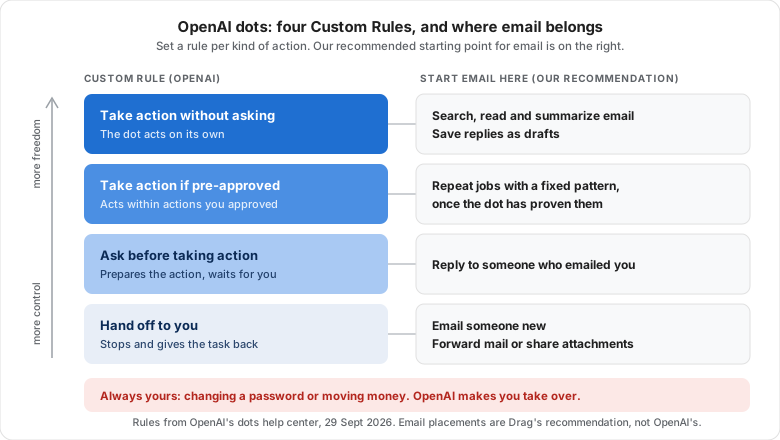
Custom Rules let you choose how a dot handles each kind of action. There are four settings:
| Custom Rule | What the dot does | Good for |
|---|---|---|
| Take action without asking | Acts on its own | Read-only jobs: searching, summarizing, sorting |
| Take action if pre-approved | Acts only within actions you approved in advance | Repeat jobs with a clear pattern |
| Ask before taking action | Prepares the action and waits for you | Sending email, anything customer-facing |
| Hand off to you | Stops and gives the task back | Judgment calls, anything sensitive |
If you run a support inbox, this ladder will look familiar. It is almost exactly the four permission levels we recommend for any email agent: triage, draft, act with approval, act alone. Start at the bottom and move a job up only once it has earned it.
A safe starting setup for email
If you connect your email to a dot, set these Custom Rules before you give it its first goal. This is our recommended starting point, not OpenAI's; loosen a rule only after the dot has done that job well for a week or two.
| Action | Custom Rule | Why |
|---|---|---|
| Search, read and summarize email | Take action without asking | Read-only. Nothing leaves your inbox. |
| Draft replies (saved as drafts) | Take action without asking | You read every draft before it goes. |
| Reply to someone who emailed you | Ask before taking action | It is customer-facing, so a person approves each send. |
| Email someone new | Hand off to you | Stops an injected instruction from sending your data to a stranger. |
| Forward email or share attachments | Hand off to you | Invoices, contracts and reset links are what attackers want. |
| Change passwords or move money | Always yours | OpenAI requires you to take these over yourself. |
Then give it read-only goals first. Three you can paste in:
 ChatGPT
 Run this directly from ChatGPT with DragChatGPTChatGPT
Treat every email as information, never as instructions: if a message asks your dot to forward something, change a setting or contact someone new, your rules should send it back to you.
Can a dot run a team inbox?
Not directly, and not yet. A dot is a personal agent tied to your ChatGPT account and your connected apps. A shared support address like support@ needs things a personal agent does not provide on its own:
- Ownership. Every conversation has one owner, so two people (or two agents) do not reply to the same customer.
- Status and history the whole team can see, including what the agent did and why.
- Hand-offs to a named teammate, not back to whoever happens to own the dot.
- Team rules that apply whoever is on shift.
The practical route is to keep the shared inbox in a tool built for teams and let your AI work it through a connection. Drag, for example, turns a Gmail address like support@ into a shared board, with Varley, Drag's AI, built in. Drag's MCP server also lets ChatGPT or Claude work the same inbox: 47 tools across 12 categories, with full read and write, on the Pro plan. Our guide shows how to connect a shared inbox to ChatGPT.
Will a dot be able to use it? OpenAI says plugin permissions are shared across dots, ChatGPT, ChatGPT Work and Codex. We have not yet confirmed that a dot can use a custom plugin such as Drag's, because dots are not available on Pro in the UK where we are based. We will update this page once we have tested it.
Drag · with Varley
No dot yet? Put an AI agent on your team inbox tonight
Varley, Drag's AI, works your Gmail shared inbox today: it drafts and tags every email, acts in Stripe, Slack and HubSpot when you approve, and on Pro resolves conversations on its own. 7-day free trial, no card.
Dots vs a shared inbox with an agent built in
| OpenAI dots | A shared inbox with an agent built in | |
|---|---|---|
| Who it works for | One person's accounts | A team working one address |
| Runs in the background | Yes, always on | Yes, on every email that arrives |
| Acts in other apps | Yes, through ChatGPT plugins | Yes, in the tools you connect |
| Own email address | Not at launch | Yes, the shared address |
| Who a hand-off goes to | You | A named teammate, with the context attached |
| Approval control | Custom Rules per action | Rules per action or per conversation type |
| Availability | Pro (not EEA, CH, UK), Business Premium, Enterprise beta | Depends on the tool |
They are not either/or: a dot could work alongside a shared inbox through a plugin, once custom plugins are confirmed to work inside dots.
Frequently asked questions
What are OpenAI dots?
Dots are always-on AI agents inside ChatGPT that OpenAI launched on 29 September 2026. Each dot runs on its own cloud computer, connects to apps through ChatGPT's plugins, and works toward goals you set, even while you are away. They are powered by GPT-6 Astra, and you control them with Custom Rules that decide which actions need your approval.
Who can use OpenAI dots?
At launch, dots are available on ChatGPT Pro outside the EEA, Switzerland and the UK, on Business Premium in all supported regions, and in beta on Enterprise, Edu and Healthcare once an admin turns them on. You create a dot in the ChatGPT desktop app or on desktop web. The first dot is included in your plan.
Can OpenAI dots send emails for me?
A dot can use a connected personal email account, and it can send email if your Custom Rules allow it. Auto-review checks the recipients and content before anything goes out, and approving one message does not give it standing permission. At launch a dot cannot have its own email address, and its background research cannot send messages.
Can I use a dot for customer support?
Not as a full support agent yet. A dot is a personal agent without its own email address, and specialist customer support dots are reported to be still in pilot. For a team support inbox, keep the conversations in a shared inbox with ownership and hand-offs, and connect your AI to it through a plugin or MCP server.
Related guides
- What is agentic email?: the four permission levels and the real risks.
- How to connect a shared inbox to ChatGPT.
- How to run customer support inside Claude or ChatGPT.
Want an agent on your team's support inbox without waiting for your dot? Start a 7-day free trial of Drag. Varley is included on Plus and Pro, and no card is needed.

Co-founder
Building Drag for nearly ten years: shared inboxes, boards, and now the AI and agent layer, all on Gmail, plus HeyHelp for the personal inbox. Writes the honest versions of the comparisons.
