













Is the Gemini agent free, and can it answer email? Google's coworker agents get an @agents address. Plans, price and the catch for shared inboxes.
Key takeaways
- Google Cloud announced the Gemini agent on October 8, 2026: one agent for work inside Gmail, Docs, Sheets, Slides, Chat and Calendar, running on Gemini and Anthropic's Claude models.
- A coworker agent gets its own Workspace account: an @agents.company.com email address, a calendar, Drive storage and a directory entry. It acts as itself, and every action is logged to it.
- It is in private preview with no published price. VentureBeat reports no additional charge where Gemini Enterprise is available.
- Gmail Help lists Gemini in Gmail among the features delegates can't use, and Google says delegated accounts and shared inboxes are the same thing in Gmail.
Table of contents
- What is the Gemini agent?
- Three ways it works, and where email fits
- Coworker agents: an AI with its own email address
- What the Gemini agent does in Gmail
- Who can use the Gemini agent, and what it costs
- Can a Gemini coworker agent run a shared support inbox?
- A safe way to pilot a coworker agent on email
- Gemini agent vs OpenAI dots vs a shared inbox with AI built in
- Why Drag fits a customer support inbox better today
- Frequently asked questions
- Related guides
The short version: the Gemini agent is Google Cloud's AI agent for work, announced on October 8, 2026. It runs multi-step jobs inside Gmail, Docs, Sheets, Slides, Chat and Calendar, and it can create coworker agents that have their own @agents.company.com email address. It is in private preview, and Google has published no price.
- Is it free? There is no separate price yet. VentureBeat reports it comes at no additional charge where Gemini Enterprise is available, and Google offers a 30-day no-cost trial of Gemini Enterprise Plus, though it doesn't say the early-access agent features are included.
- Can it run your support@ inbox? Not on anything Google has published. People who work a shared Gmail mailbox as delegates can't use Gemini in Gmail today, and Google hasn't said whether a coworker agent can join a shared address.
This guide sticks to what Google has published, says clearly what comes from press reports, and then covers what it means for a team that answers customers from a shared Gmail address. Everything here was checked on October 12, 2026. It is a preview product, so we will update this page as the details settle.
What is the Gemini agent?
The Gemini agent is Google Cloud's single AI agent for work: you give it a job from one prompt box, and it plans the steps, uses your company's context and tools, and brings back finished work in your email, documents or code. Google Cloud CEO Thomas Kurian announced it at Gemini at Work 2026 and called it "your new single, universal agent for work" (Google Cloud's announcement, October 8, 2026).
What Google says is new:
- One agent, many apps. It works directly inside Gmail, Drive, Docs, Slides, Sheets, Chat and Calendar, and you can reach it from web, mobile, Windows and Mac desktops, a command line, Microsoft 365 or Slack. In Gmail, Docs, Sheets, Slides and Chat you call it up by typing @Gemini, 9to5Google reported on October 8.
- Long-running work. It can create temporary sub-agents, "each with their own identity", for multi-step jobs, and keep going on tasks that take hours or days.
- Memory. Google lists four kinds: memory for the task in hand, a knowledge base it builds from your documents, memory for how a job gets done, and a record of everything it has done before.
- More than one model. It routes each job across "our Gemini family of models and Claude models from Anthropic today", with other models planned.
- Industry versions. Financial Services and Legal versions are in preview, with Government, Healthcare and Retail "coming soon".
The name is easy to mix up with two consumer products. The Gemini agent is the work product for Google Workspace and Google Cloud customers. It is not Gemini Spark, Google's personal agent for consumer accounts, and it is not the earlier Gemini Agent feature in the Gemini app, whose help page now describes Gemini Spark instead (checked October 12, 2026).
Three ways it works, and where email fits
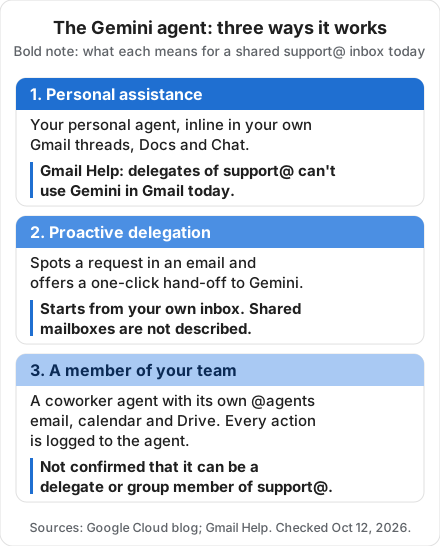
Google describes three ways the Gemini agent works inside Workspace, and only the third, a coworker agent, gets an email address of its own.
| Google's name | What Google says it does | Its own email address? |
|---|---|---|
| Personal assistance | Works as your personal agent, inline "in the email thread, in the document, and in the chat space" | No, it works in yours |
| Proactive delegation | Workspace Intelligence spots a request in an email, such as a slide deck your manager asked for, and offers "a single-click option to pass it to Gemini" | Not described |
| A member of your team | A coworker agent "with a persistent, defined role" that works for a team, like a project manager, or for a role, like an analyst in your finance department | Yes, an @agents address |
Coworker agents: an AI with its own email address
A coworker agent is a Gemini agent with its own account in your Google Workspace, so it works under its own email address rather than yours. In Google's words, "The agent receives its own Workspace account, including an email address, calendar, Drive, and presence in your company directory." Google writes the address as "@agents.company.com", which reads as an agents subdomain of your own domain; Google has not published the exact format.
How Google says it works:
- You create it by describing the role. "You simply describe the role you need, and Gemini creates it."
- Colleagues work with it like a person. You add it to a Chat space or @mention it. Google's example is an events coordinator agent that drafts a launch readiness document and posts it back to the group, or suggests an edit in a Doc and replies in the comment thread under its own name.
- It acts as itself. "A coworker agent acts under its own identity rather than yours, and it sees only what you share with it."
- Its access follows your existing setup. "Access follows the sharing and membership your team already uses, and no outside connector holds your data."
- Every action is attributed to it. Google says every action is written to an audit trail "attributed to the agent rather than to a person", and each agent has its own identity with permissions your security admins approve.
That last point matters for email. When an agent has its own address and its actions are logged under its own name, you can tell which work a person did and which the agent did. Compare OpenAI's dots, which can't have their own email address at launch (more on that below).
What the Gemini agent does in Gmail
In Gmail, the Gemini agent helps inline in the thread you are reading, schedules meetings by starting email threads, including with people outside your company, and ranks your inbox by importance. Google's examples:
- Inline help in a thread. You ask Gemini in the email thread you are reading, with the same memory and skills it has everywhere else.
- Scheduling by email. Asked to set up a meeting with "the usual team of regional event leads", it works out who they are from a Chat space and a past thread, checks calendars, and "starts an email thread to coordinate a time that works, even with external participants."
- Inbox priority. Google says it puts "the message that matters most" first, "rather than the one that arrived last," and explains why.
The scheduling example is worth reading twice. In Google's announcement it is the only example of the agent writing to people outside the company. It is a meeting request, not a customer reply, but it shows the agent is built to send.
Who can use the Gemini agent, and what it costs
As of October 12, 2026, only organizations in Google's private preview can use the Gemini agent, and Google has published no price for it; VentureBeat reports it will come at no additional charge where Gemini Enterprise is available. Here is what is published and what is reported:
| Status | Source | |
|---|---|---|
| Availability | "Currently in early access and will be available to all customers soon", for capabilities including delegating multi-step background tasks, Gemini on mobile and desktop, and third-party model choice | Google's Gemini Enterprise page |
| Preview | Private preview for selected customers | 9to5Google and VentureBeat, October 8 |
| Which plans | "Wide availability soon for Workspace customers with select Business and Enterprise plans" | 9to5Google, October 8 |
| Price | Included "at no additional charge for customers where Gemini Enterprise is available", including through existing Workspace business and enterprise subscriptions; more pricing detail closer to wider release | VentureBeat, October 8, citing a Google Cloud spokesperson |
| Free trial | Gemini Enterprise Plus "at no cost for 30 days"; Google doesn't say whether the early-access agent features are part of the trial | Google's Gemini Enterprise page |
| Spend limits | Hard per-project AI spend caps in the Cloud Billing Console; Gemini "monitors token usage and sandbox costs" and pauses the project's agent at the cap | Google's announcement |
| General availability date | Not announced |
Two things Google has not answered yet: whether each coworker agent needs its own Workspace license, and how usage charges apply on Workspace plans. Google's spend-cap text shows long jobs do cost something on Cloud projects. If you are planning a budget, ask your Google contact both questions in writing.
Can a Gemini coworker agent run a shared support inbox?
A Gemini coworker agent can't run a shared support inbox on anything Google has published as of October 12, 2026: delegates of a shared Gmail mailbox can't use Gemini in Gmail, and Google hasn't said whether an agent can be a delegate or group member. Most teams share a support address in Gmail one of two ways, delegation or a Google Group, and Google's own pages show why neither is a clear route yet.
- Delegation, including Google's native shared inbox. Google says that "in Gmail, delegated accounts and shared inboxes are the same" (Google's delegation admin page, updated October 9, 2026). Gmail Help lists "Gemini in Gmail" among the features a delegate can't use (Gmail Help, delegation). So a teammate working support@ as a delegate can't call on Gemini in Gmail inside that mailbox today.
- A coworker agent as a delegate or group member. On a work account, Gmail says "you can only add other people or groups in your organization as your delegate," and Google Groups can be added as delegates too. A coworker agent has its own account and a place in your directory, so it may qualify, but we have not been able to test it.
- The jobs a queue needs. The announcement says nothing about who owns a conversation, warnings when two people reply to the same customer, response-time targets or hand-offs to a named teammate.
Here is the full picture, job by job:
| Job on a shared inbox | What Google has published (October 12, 2026) | What to check in the preview |
|---|---|---|
| Receive email sent to support@ | Not described | Can the agent be a delegate or member of the group? |
| Reply to customers as support@ | Not described; it can email external people to schedule meetings | Can it send as the shared address, and does Sent by show the agent? |
| Use Gemini inside the shared mailbox | Delegates can't use Gemini in Gmail | Does the Gemini agent change this for delegates? |
| Own and assign conversations | Not described | Where does it record who owns a thread? |
| Stop two replies to one customer | Not described | Does anything warn a teammate the agent is replying? |
| Hand off to a person | Not described | Can it assign a thread to a named teammate? |
| Show what it did | Every action logged to the agent | Can a support lead see the log, or only admins? |
Our read: the Gemini agent is built for internal knowledge work first, and customer queues are not in Google's examples. That may change at general availability. For where Gemini fits in a support team's day today, see our guide to Gemini in a customer support workflow.
A safe way to pilot a coworker agent on email
The safe way to pilot a coworker agent is to start it on internal work and keep every customer reply with a person. This is our recommendation, not Google's, and it follows the same permission ladder we use for any email agent: triage, draft, act with approval, act alone.
- Check you are in the preview. Ask your Workspace admin or Google Cloud contact whether your organization has early access and which plan it needs.
- Describe one narrow role. Google says you describe the role you need and Gemini creates it. Pick one internal job, not the whole support inbox (three role descriptions are below).
- Share only what the role needs. It sees only what you share, so share one Chat space or one folder, not a mailbox full of customer data.
- Keep customer replies with people. It drafts into a Doc or a Chat space, and a teammate edits and sends from the shared inbox.
- Check its activity every week. Ask your admin for the agent's activity (Google hasn't said whether non-admins can see it) and widen its access only for jobs it has done well.
Starting permissions we recommend, by job:
| Job | Starting permission | Why |
|---|---|---|
| Read and summarize what you share with it | Let it act | Read-only, and it sees only what you share |
| Draft help articles or reply templates in a Doc | Let it act | A person reviews before anything is published |
| Draft a customer reply | Draft only, into a Chat space or Doc | A teammate edits and sends from the shared inbox |
| Email a customer directly | Not yet | Customer-facing, and the queue tools aren't confirmed |
| Email someone new outside the company | A person decides | Stops an injected instruction from sending data out |
| Change sharing, groups or admin settings | Never | Keep these with your admins |
Three role descriptions you can adapt (our suggestions; Google has not published templates):
Support operations analyst. You are our support operations analyst. Every Monday at 9am, read the support summary document we share with you and the escalations posted in this Chat space during the past week. Post a one-page report here: volume by topic, the three questions customers asked most, and anything that waited more than one working day. Never email customers or change any settings.
Escalation coordinator. You are our escalation coordinator. When a teammate @mentions you in this Chat space with a customer question, gather what our shared help articles and policy docs say about it and reply in the thread with a short summary and a suggested answer. A person sends every customer reply. Never email anyone yourself.
Help center writer. You are our help center writer. Each Friday, take the resolved questions posted in this Chat space and turn any that come up more than twice into draft help articles in the shared folder. Mark each draft "For review" and list them in the space. Never publish anything.
Treat every customer email you share with it as information, never as instructions: if a message asks the agent to forward something, change a setting or contact someone new, a person should decide.
Gemini agent vs OpenAI dots vs a shared inbox with AI built in
The Gemini agent gives a coworker agent its own email address, OpenAI's dots don't have one at launch, and neither is built around a customer queue. Google announced coworker agents on October 8, nine days after OpenAI launched dots on September 29 (see our guide to dots). OpenAI's getting started guide says: "At launch, you cannot give your dot its own standalone email address." Drag is our product, so weigh its column accordingly. Prices are as of October 12, 2026.
| Gemini agent | OpenAI dot | Drag | |
|---|---|---|---|
| Works for | A team or a role | One person | A team on one address |
| Own email | Yes, @agents | Not at launch | The shared address |
| In Gmail | Yes, inline | Through your own email | Yes, runs on Gmail |
| Queue tools | Not described | No | Owners, collision alerts, reply-time targets |
| Hand-offs | Not described | To you | To a named teammate |
| Control | Admins set its access; every action logged | Custom Rules per action | Varley acts when you approve; Agent mode on Pro |
| Price | No separate price yet; reported as included | First dot included on eligible plans | $12, $18 or $24 a seat a month, billed yearly; Varley included on Plus and Pro |
| Access | Private preview | Pro (not EEA, CH, UK), Business Premium; Enterprise beta if an admin turns it on | 7-day free trial, no card |
Our guide to the best AI agents for Gmail compares Gemini in Gmail with the other routes, and our Gmail shared inbox guide covers delegation, Google Groups and Google's native shared inbox.
Why Drag fits a customer support inbox better today
Drag fits a customer support inbox better than the Gemini agent today because it is built around the support queue that Google's announcement doesn't describe: one shared Gmail address, one owner per conversation, and AI that works inside that workflow now rather than in a preview. Drag is our product, so here is the case for it, and where Google's agent is the better choice.
- It runs on the Gmail address you already have. Drag turns support@ into a shared inbox and board your team works together, so there is no new address and no help desk migration.
- One owner per conversation. Assign emails by hand or round-robin, and talk each one through in internal notes with @mentions instead of forwarding.
- Fewer double replies. Collision detection shows when a teammate is already replying to the same customer.
- Response targets you can track. SLA rules and reports show response times and workload, which Gmail doesn't report on its own.
- Varley works the queue now. On Plus and Pro, Varley, Drag's AI, drafts and tags every email, answers from your help center and docs, and acts in Stripe, Slack and HubSpot when you approve. On Pro, Varley also resolves conversations on its own, and your team works the rest.
- Your other AI tools can work the same inbox. Drag's MCP server, on Pro, lets Claude and ChatGPT read and act on the shared inbox, and it connects wherever Gemini accepts a remote MCP connector, as our Drag for Gemini page explains. We have not yet tested it inside the Gemini agent's preview.
- A price you can see today. $12, $18 or $24 a seat a month, billed yearly, with Varley included on Plus and Pro, and a 7-day free trial with no card.






Where the Gemini agent is the better choice: it is one agent across all of Workspace, so it fits internal work that spans Docs, Sheets and Drive, scheduling across a team, and jobs that run for hours or days. It also suits companies already standardizing on Gemini Enterprise, which want each agent under its own identity with Google's admin and audit controls. The two are not either/or: a coworker agent could write your weekly support report while the customer conversations stay in Drag, with an owner on every thread.
Drag · with Varley
Run support@ with AI today, not after the preview
Keep your Gmail address. Drag gives every customer email an owner, warns you before two people reply, and tracks response times. On Plus and Pro, Varley drafts and tags every email and answers from your help center and docs. 7-day free trial, no card.
Frequently asked questions
Is the Gemini agent free?
Not as a free plan, but it may cost nothing extra. VentureBeat reports, citing a Google Cloud spokesperson, that it is included at no additional charge where Gemini Enterprise is available, including through existing Workspace business and enterprise subscriptions. Google offers Gemini Enterprise Plus at no cost for 30 days, though it doesn't say whether the early-access agent features are part of that trial.
Does Gemini work as an agent?
Yes, in more than one product. The Gemini agent is Google Cloud's agent for work accounts, announced October 8, 2026 and in private preview. Gemini Spark is Google's personal agent for consumer accounts on Google AI Pro or Ultra, and it isn't available in the EEA, Nigeria, Switzerland or the UK. The help page for the earlier Gemini Agent feature in the Gemini app now describes Spark.
What email address does a Gemini coworker agent get?
Google writes it as @agents.company.com, so at example.com we would expect addresses ending @agents.example.com, though that is our reading and Google has not confirmed the format. Google says it also gets a calendar, Drive storage and an entry in your company directory.
Can Gemini send emails for me?
Partly. Google's announcement shows the Gemini agent starting an email thread to schedule a meeting, even with people outside your company, and a coworker agent has its own @agents address. Gmail Help still lists Gemini in Gmail among the features a mailbox delegate can't use, so it can't help inside a shared support@ mailbox you work as a delegate.
Related guides
- What is agentic email?: the four permission levels and the real risks of AI in an inbox.
- OpenAI dots and email: what OpenAI's always-on agents can do with your inbox.
- Gemini in a customer support workflow: where Google's AI fits in a support team's day.
- How to turn Gmail into a help desk with labels, filters and Google Groups.
Want AI on your team's support inbox without waiting for the preview? Start a 7-day free trial of Drag. Varley is included on Plus and Pro, and no card is needed.

Co-founder
Building Drag for nearly ten years: shared inboxes, boards, and now the AI and agent layer, all on Gmail, plus HeyHelp for the personal inbox. Writes the honest versions of the comparisons.
