











A shared inbox costs $12 to $25 per user a month to start. See what teams of 5 and 10 really pay, what AI adds, and work out your own bill.
Table of contents
The short version: a shared inbox costs $12 to $25 per user a month to start. At most tools, a team of five pays $60 to $125 a month, and a team of ten pays $120 to $250. Google Workspace includes basic sharing at no extra charge.
Two things change the bill more than the list price does: how many people a plan allows, and how the tool charges for AI. Move the sliders to see what your own team would pay.
What would your team pay each month?
| Tool | How the bill is made up | Per month |
|---|---|---|
 Help Scout | Free plan: 5 users, 100 contacts a month | $0 |
 Drag (ours) | Starter, $12 per user | $60 |
 Missive | Starter, $14 per user (up to 5 users) | $70 |
 Freshdesk | Growth, $19 per agent | $95 |
 Front | Starter, $25 per seat (up to 10 seats) | $125 |
 Gmelius | Growth, $25 per user (first plan with shared inboxes) | $125 |
 Hiver | Growth, $25 per user (2 to 10 users) | $125 |
 Intercom | Essential, $29 per seat | $145 |
Estimates from each vendor's own pricing page on November 11, 2026, on annual billing, using the cheapest plan that fits the team. Intercom is shown at its listed price; new customers are offered less. Freshdesk's 500 included AI sessions are a one-time allowance, so we do not count them. For 43 tools and more settings, use the full cost calculator.
We read every price on this page from the vendor's own pricing page on November 11, 2026. All prices are per user per month on annual billing. Drag is our product, and it is in every table.
Shared inbox pricing at a glance
Each bar runs from a tool's cheapest plan to its most expensive. The left end is the price you see in ads. The right end is where a growing team can end up.
Most tools start between $12 and $25, and Intercom lists $29. The gap opens higher up: the top plans run from $24 to more than $100 per user.
What a team of 5 or 10 pays
This is the cheapest plan that fits each team size, per month, before any AI charges.
| Tool | 5 users | 10 users | What changes between the two |
|---|---|---|---|
| Drag (ours) | $60 | $120 | Nothing |
| Missive | $70 | $240 | The $14 plan stops at 5 users |
| Freshdesk | $95 | $190 | Nothing |
| Zendesk (email only) | $95 | $190 | Nothing |
| Intercom | $145 ($95 for new customers) | $290 ($190) | Plus $0.99 or more each time its AI handles a conversation |
| HubSpot | $100 at the listed $20 ($35 for new customers) | $200 ($70) | The free tools stop at 2 users; HubSpot's page does not label the billing period |
| Hiver | $125 | $250 | Seats come in blocks of 5 above 5 users; an eleventh user means 15 seats at $55 each |
| Gmelius | $125 | $250 | Nothing |
| Front | $125 | $250 | Nothing; an eleventh seat moves the team to $65 each |
| Help Scout | $0 (up to 100 contacts a month) | $250 | The free plan stops at 5 users |
| Google Workspace | $0 extra | $0 extra | A new shared address may need one more seat |
Google's built-in options cost nothing extra, but they do not show who owns an email or whether it was answered. Our free shared inbox guide covers where each one stops.
What the list price leaves out
Three things raise the bill after you sign up.
1. Plans that stop at a team size
The cheapest plan often has a limit on users. Hire one person past it and the whole team moves up a plan.
| Tool | The limit | What happens past it |
|---|---|---|
| Missive | $14 plan: up to 5 users | Everyone moves to $24 |
| Hiver | $25 plan: 2 to 10 users, sold in blocks of 5 above 5 | Everyone moves to $55, and you pay for 15 seats |
| Front | $25 plan: up to 10 seats | Everyone moves to $65 |
| Gmelius | $19 plan: no shared inbox | Shared inboxes start at $25 |
| Help Scout | Free plan: 5 users, 100 contacts a month | $25 per user |
| HubSpot | Free tools: 2 users | Paid seats; the $90 plan adds a $1,500 onboarding fee |
| Drag | No limit and no seat minimum | Nothing changes |
2. Monthly billing
The prices in ads are for annual billing. Pay month to month and the same plan costs more. Drag is $12 per user on annual billing and $16 on monthly. Hiver's middle plan is $55 on annual billing and $65 on monthly.
3. AI
This is now the biggest difference between tools, so it has its own section.
Drag · with Varley
The inbox your team and Varley work in together
Shared inbox and live chat for Gmail teams, with Varley, Drag’s AI, included from $18. Plus an MCP server your own AI tools can drive.
What AI adds to the bill
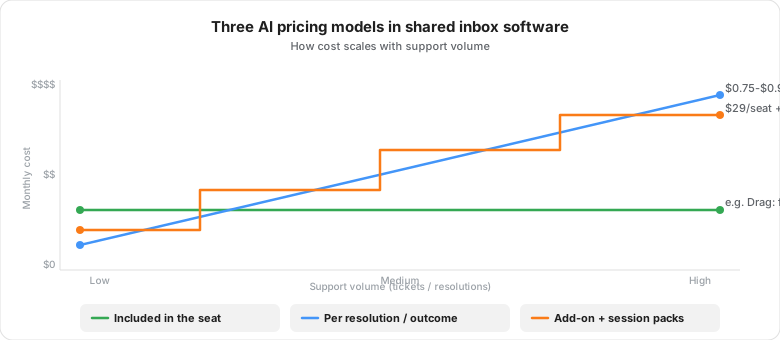
Tools charge for AI in three ways:
- Included in the price per user. The AI comes with the plan, up to a monthly allowance. Drag and Gmelius work this way.
- Charged each time the AI handles a conversation. Vendors call this a resolution or an outcome: a conversation the AI closes without a person. Help Scout charges $0.75 per resolution, Hiver $0.80, Front $0.89 for each conversation its AI resolves, and Intercom from $0.99 per outcome. The bill rises with volume.
- Sold as an add-on. A monthly fee per person or a pack of sessions. Front Copilot is $20 per seat, Freshdesk Copilot is $29 per agent on its $55 plan and above, and Zendesk Copilot is $50 per agent.
Here is what that does to a real bill. Take a team of ten where AI resolves 300 conversations a month:
| Tool | Cost of users | Cost of AI | Monthly bill |
|---|---|---|---|
| Drag (ours) | $240 on the Pro plan | 400 resolutions included | $240 |
| Gmelius | $250 | Included | $250 |
| Freshdesk | $190 | $147 for 3 packs of 100 sessions at $49 | $337 |
| Help Scout | $250 | $225 at $0.75 per resolution | $475 |
| Hiver | $250 | $240 at $0.80 per resolution | $490 |
| Front | $250 | $267 at $0.89 per resolved conversation | $517 |
| Intercom | $290 | At least $297, from $0.99 per outcome | $587 or more |
Three notes on that table. Varley, Drag's AI, resolves conversations on the Pro plan, which includes 40 resolutions per user a month and charges $0.50 for each one after that. Freshdesk gives new customers 500 sessions once, so they are not counted here. And Missive is not listed, because it bills AI through credits or your own AI account.
The pattern is simple. When AI is charged per conversation, the AI can cost as much as the people. Work out the AI cost at your real volume before you compare prices per user.
How prices have moved since 2021
Today's price is not next year's price. This chart follows each tool's cheapest plan across five years of archived pricing pages.
Most entry prices have gone up, and some tools dropped their free plans along the way. Every point links to a dated copy of the vendor's pricing page in our support tool pricing history.
How to budget for a shared inbox
- Price the plan you will need in a year, not the entry plan. Check the user limit on the cheapest plan first.
- Count the AI. Estimate how many conversations AI will handle each month and price them.
- Check the billing period. Annual prices are lower, but you pay for the year.
- Try your top two on the real inbox for a week. Most trials need no card.
For help choosing between tools, see best shared inbox software, which compares eleven tools on fit as well as price.
Work out your own number
The sliders at the top of this page cover eight tools. The shared inbox cost calculator covers 43, including live chat and AI agent tools, with more settings.
Drag is a shared inbox for teams on Gmail, with its own web app and Mac, Windows, iPhone and Android apps too. It costs $12, $18 or $24 per user a month on annual billing, with AI included from $18 and no seat minimum. The 7-day trial needs no card.






Frequently asked questions
How much does shared inbox software cost?
Most shared inbox tools start between $12 and $25 per user a month on annual billing. Drag starts at $12, Missive at $14, and Hiver, Front and Help Scout at $25. A team of five pays $60 to $125 a month. The options built into Google Workspace add nothing to a plan you already pay for.
What is the cheapest shared inbox?
Among paid tools on this page, Drag has the lowest starting price at $12 per user a month on annual billing, with no seat minimum. Help Scout has a free plan for 5 users and 100 contacts a month. Gmail delegation and Google Groups cost nothing extra, but they have no real assignment or reporting.
How much does AI add to the cost of a shared inbox?
It depends on how the tool charges. Some include AI in the price per user, such as Drag from $18. Others charge each time AI handles a conversation: $0.75 at Help Scout, $0.80 at Hiver, $0.89 at Front and from $0.99 at Intercom. At 300 conversations a month, that adds $225 to $297 to the bill.
Why did my shared inbox bill go up?
The usual reasons are a user limit, a move from annual to monthly billing, or AI usage. Missive's $14 plan stops at 5 users, and the $25 plans at Hiver and Front stop at 10. One more hire moves the whole team to the next plan, and Hiver sells seats in blocks of 5. AI charged per conversation also rises with volume.
Is a shared inbox cheaper than a help desk?
Not always. Shared inbox tools start at $12 to $25 per user, and the basic plans at Freshdesk and Zendesk start at $19, which is less than most. The gap opens higher up. The next help desk plans start at $55 per agent, and AI add-ons cost $29 to $50 per agent a month on top of each seat.
Where can I compare shared inbox prices for my team size?
Use the sliders at the top of this page for eight tools, or the shared inbox cost calculator for 43. Both use prices from each vendor's own pricing page. Set your number of users and the conversations AI handles each month, and the totals update as you move the sliders.

Co-founder
Building Drag for nearly ten years: shared inboxes, boards, and now the AI and agent layer, all on Gmail, plus HeyHelp for the personal inbox. Writes the honest versions of the comparisons.