













Learn how to set up auto-replies in WhatsApp Business to respond to customers instantly. Step-by-step guide with examples from DragApp.
Key takeaways
- Auto-replies are free in the WhatsApp Business app under Business tools: an Away message for when you're closed, a Greeting for first contacts.
- The best auto-reply acknowledges, sets an honest response time, and gives one next step, the 23 templates cover every common case.
- Text-only and one-phone are the free app's real limits; buttons, flows, and team inboxes live on the Business Platform.
Table of contents
With over 3 billion active users, WhatsApp has become the world’s biggest messaging app, not just for personal chats. The latest WhatsApp statistics show that its business version is also popular, especially among small and medium-sized companies. While 69% of consumers will likely purchase from a company that can be reached on WhatsApp, 56% will give up on a transaction when the business takes longer to respond. In a world where most things are accessible with a simple touch on our screens, making every second count, these numbers aren’t surprising. Customers expect instant responses, and business owners must meet their expectations to keep up. For this reason, WhatsApp's auto reply option is fantastic. With it, you’ll never miss a customer’s message; by replying while you sleep and off the clock, auto-reply will turn your WhatsApp Business into a customer service powerhouse.
The short version: WhatsApp auto-replies live in the free WhatsApp Business app under Business tools: Away message answers when you're closed or busy, Greeting message welcomes first contacts, and both take five minutes to set up. The 23 copy-paste messages below cover every common situation, hours, holidays, support queues, lead capture, and the honest limits section covers what the free app cannot do, which is where teams graduate to the Business Platform. Regular WhatsApp has no auto-reply; that alone is reason enough to install the Business app.
What is WhatsApp auto reply?
Using this function, you may configure your WhatsApp Business account to reply to incoming messages automatically. It sends a pre-set message on your behalf to incoming chats when you can’t respond immediately. Whether you need a welcoming note for a new interaction, an away message for non-business hours, or a quick response to an often-requested matter, you can personalize and plan your responses. WhatsApp auto-reply goes beyond sending an automated response, it’s more like a virtual assistant for this app. Consider it a WhatsApp version of your email's "out-of-office" response. Whether you use the auto-reply feature directly in the app, WhatsApp business web, or through a WhatsApp shared inbox app or extension, you're taking a big step toward operational efficiency and excellent customer communication.
What are the benefits of using WhatsApp auto-reply?
- Maintaining constant contact with customers and clients. Since the world never sleeps, neither should your business correspondence. The auto reply WhatsApp Business keeps you "online" 24/7. Your consumers will always receive an answer, regardless of when they ask the question later at night or early in the morning.
- Cutting down on customer service agents' workload. We understand, your team is amazing. However, even superheroes must rest. You're assisting your staff by preventing them from overloading with the same old inquiries by creating a WhatsApp business auto reply message.
- Giving prompt answers to FAQs.** Do you have questions that keep coming up? Why not answer them automatically rather than by hand each time? The auto-reply feature can save time and effort by answering those often-asked questions immediately*.*
How to set up auto reply on WhatsApp Business?
In WhatsApp Business, there are three distinct types of automated responses. 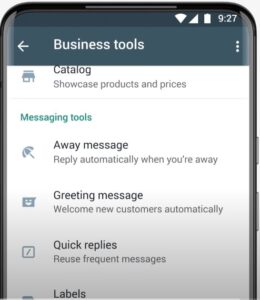 Source: WhatsApp
- Greeting messages. These can be scheduled to be sent when a consumer contacts you for the first time or if it has been a long time since they’ve contacted you.
- Away messages. Use these to define expectations for response times outside of regular business hours.
- Quick replies. These are pre-written answers to FAQs (frequently asked questions).
To learn how to set up the different auto-reply types, you can watch this YouTube tutorial provided by WhatsApp or follow this step-by-step guide.
For Android and iOS Users
- Start up your WhatsApp Business application on your Android or iOS device.
- Navigate to the Business tools menu by tapping the three-dot icon in the upper right, then "Settings," followed by "Business tools."
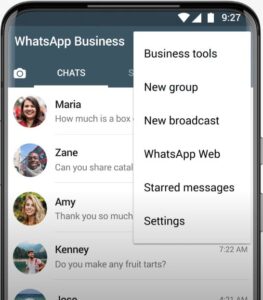 source: WhatsApp
 - Select the auto-response option that fits your needs: "Greeting Message," "Away Message," or "Quick Replies."
- Create your personalized auto-response by tapping "Write a message." Keep it brief and informative. For example, an away message should explain why you're unavailable and when your customer can expect a reply.
- Set up your message timing: - "Always send" for extended absences like vacations - "Custom schedule" for specific daily time slots - "Outside of business hours" for after-hours responses (remember to set your business hours in your profile)
- Choose who receives your auto-reply:
- "Everyone" for all incoming messages
- "Everyone not in the address book" for unknown numbers
- "Everyone except" to exclude certain contacts
- "Only send to" for selected recipients only
Finalize your settings by tapping the checkmark or "Save" button to confirm your auto-reply configuration.
23 auto-reply messages you can copy right now
Swap the bracketed parts, keep them short, and match the tone to your business. Every message below fits WhatsApp's character norms and reads like a human wrote it.
Away messages (general)
 WhatsAppWhatsAppWhatsAppWhatsAppWhatsApp
Business hours
WhatsAppWhatsAppWhatsAppGreeting messages (first contact)
WhatsAppWhatsAppWhatsAppSupport and queue
WhatsAppWhatsAppWhatsAppOrders and sales
WhatsAppWhatsAppWhatsAppHolidays and exceptional closures
WhatsAppWhatsAppLead capture
WhatsAppWhatsAppPersonal / solo use
WhatsAppWhatsAppDrag AI
The inbox your team and your AI work in together
Shared inbox, live chat, and AI in Gmail, with an MCP server your AI tools can drive.
Limitations of WhatsApp auto-reply feature
While the auto reply in WhatsApp can be an immensely helpful feature, it has several limitations that can interfere with your business’ efficiency. The fact that it’s simple to use makes it accessible to small business owners, but, at the same time, restricts its use in more complex scenarios. Here are some of the main WhatsApp auto-reply obstacles:
- It doesn’t provide advanced personalization options*.* Even though you can use this feature to create basic templates, it doesn’t allow the implementation of dynamic content based on customer data and past interactions. That can lead to generic and impersonal responses that will repel rather than attract potential customers.
- It doesn’t allow scheduling flexibility. This is another area where the auto-reply in WhatsApp falls short. While basic scheduling options are available, you can use the feature to adapt to unexpected situations and last-minute changes in availability. Since life happens and humans need flexibility, this rigidity can lead to miscommunication with customers, especially if you own a business with fluctuating hours or are in a niche that often deals with emergencies.
- It doesn’t provide advanced functionalities. For example, while the basic auto-reply option can handle simple inquiries, it can’t deal with intricate customer issues or complex product questions. Although Meta announced they’re working on certain WhatsApp improvements to help both small and large businesses make the best out of the app, the WhatsApp auto-reply still can’t recognize and categorize different customer queries automatically or offer AI-powered responses. This can be a major setback for growing businesses.
- It doesn’t deliver advanced analytics. Without detailed insights into how your auto-replies are performing, measuring effectiveness and improving your communication strategy based on data-driven numbers can be challenging. That’ll additionally make it difficult for you and your team to understand customer behavior, identify common issues, or optimize your auto-responses over time.
When auto-replies stop being enough
An away message buys you time; it does not answer anyone. The moment real volume arrives, orders, support, several people wanting the same number, the free app's limits show: one phone, no assignment, no visibility of who replied, and auto-replies that cannot actually resolve anything. That is Business Platform territory, and it is what Drag is built for: the team's WhatsApp lands as cards on shared boards next to email, everyone works one queue with owners and statuses, and AI drafts the replies your auto-reply used to stall. Plans run $12 to $24 per user per month, and the 7-day trial needs no card.
Frequently asked questions
Does regular WhatsApp have auto-reply?
No. Auto-replies (away and greeting messages) are a WhatsApp Business app feature, and the app is free. On personal WhatsApp the only options are third-party tools, which risk your account.
How do I set up an away message on WhatsApp Business?
Open WhatsApp Business, tap the three-dot menu, then Business tools, then Away message. Turn it on, write your message, set the schedule (always, outside business hours, or custom), and choose who receives it.
Can I send auto-replies with attachments or buttons?
Not from the free app, away and greeting messages are text only. Buttons, rich templates, and automated flows live on the WhatsApp Business Platform, which needs a provider or an inbox tool on top.
Do auto-replies work when my phone is off?
On the free Business app, your phone needs periodic connectivity for messages to flow. Fully phone-independent automation is a Business Platform capability.
What should a good auto-reply say?
A good auto-reply does three things. It acknowledges the message, sets an honest expectation, like 'we reply within 2 hours', and gives one useful next step, whether that is your hours, a link, or a question that moves things forward. Short beats clever, and any template above works as a starting point.
For the replies auto-replies cannot write, the ones that need to answer a specific customer in a live thread, the AI prompts for WhatsApp Business are the companion page: fifteen prompts with sentence caps, tone matching, and the 24-hour window built in.

Co-founder
Co-founder at Drag, writing about Google Workspace, shared inboxes, and how teams actually run email.
