Zoho Desk pricing in 2026: five plans from free to $40 a seat, a 5-user cap on the cheapest paid plan, AI token allowances, and an annual vs monthly gap that hits the popular plan hardest.
Key takeaways
- Zoho Desk runs five plans: a free edition capped at 3 agents, then Express, Standard, Professional, and Enterprise at $7, $14, $23, and $40 per agent per month on annual billing. It is the lowest ladder of any major help desk, and the stickers are real: no ticket meter, no per-resolution charge.
- The annual commitment is the catch. On the UK price list we verified live, paying monthly costs 29% more on Express, 33% more on Standard, and 56% more on Professional, the plan Zoho marks as most popular. Only Enterprise escapes with a 14% premium.
- AI is included rather than sold as an add-on, with a token meter behind it: every paid plan ships AI agents with, in Zoho's words, 'up to 30M free tokens/month', plus bring-your-own-key GenAI. Answer bot needs Standard and the full Zia AI assistant needs Professional.
- The caps decide your real plan: Express allows at most 5 users, light agents cost extra below Enterprise, and live chat only arrives at Enterprise via Zoho SalesIQ. Cheap entry, but the features push you up the ladder.
- For comparison, Drag runs $12 to $24 a seat in Gmail with AI included from $18. Zoho Desk is a separate helpdesk your team logs into; Drag is the shared inbox inside the Gmail your team already uses.
Table of contents
- What Zoho Desk costs in 2026
- Pricing comparison: annual against monthly billing
- What the included AI actually covers
- The caps that decide your real plan
- Zoho Desk and Zoho TeamInbox are different products
- What a 5-person team pays
- When Zoho Desk is the right call
- The Drag comparison, plainly
- Frequently asked questions
The short version: Zoho Desk is the cheapest full help desk among the major vendors, and unusually, the sticker is the price: $7 to $40 per agent per month on annual billing across four paid plans, a genuinely free edition for 3 agents, and no ticket or resolution meter anywhere. The catches live around the sticker instead. Monthly billing costs up to 56% more than annual, the cheapest paid plan caps you at 5 users, the included AI runs on a monthly token allowance, and the features that define a modern help desk, live chat included, sit on the upper plans. It is a low ladder that works hard to move you up it.
Everything below was read from Zoho Desk's own pricing page and plan comparison table on September 7, 2026. Zoho geo-serves its pricing: the page quoted us pounds from a UK connection and offers only EUR and GBP to European visitors, so we show the US-dollar list alongside the UK figures we verified live.
What Zoho Desk costs in 2026
Five plans, priced per agent per month. The US-dollar list, with the UK-served figures we captured for the annual against monthly comparison:
| Plan | USD list (annual) | UK price (annual) | UK price (monthly) | User limit |
|---|---|---|---|---|
| Free | $0 | £0 | £0 | 3 agents |
| Express | $7 | £5.60 | £7.20 | 5 users |
| Standard | $14 | £12 | £16 | Unlimited |
| Professional ("Most popular") | $23 | £18 | £28 | Unlimited |
| Enterprise | $40 | £35 | £40 | Unlimited |
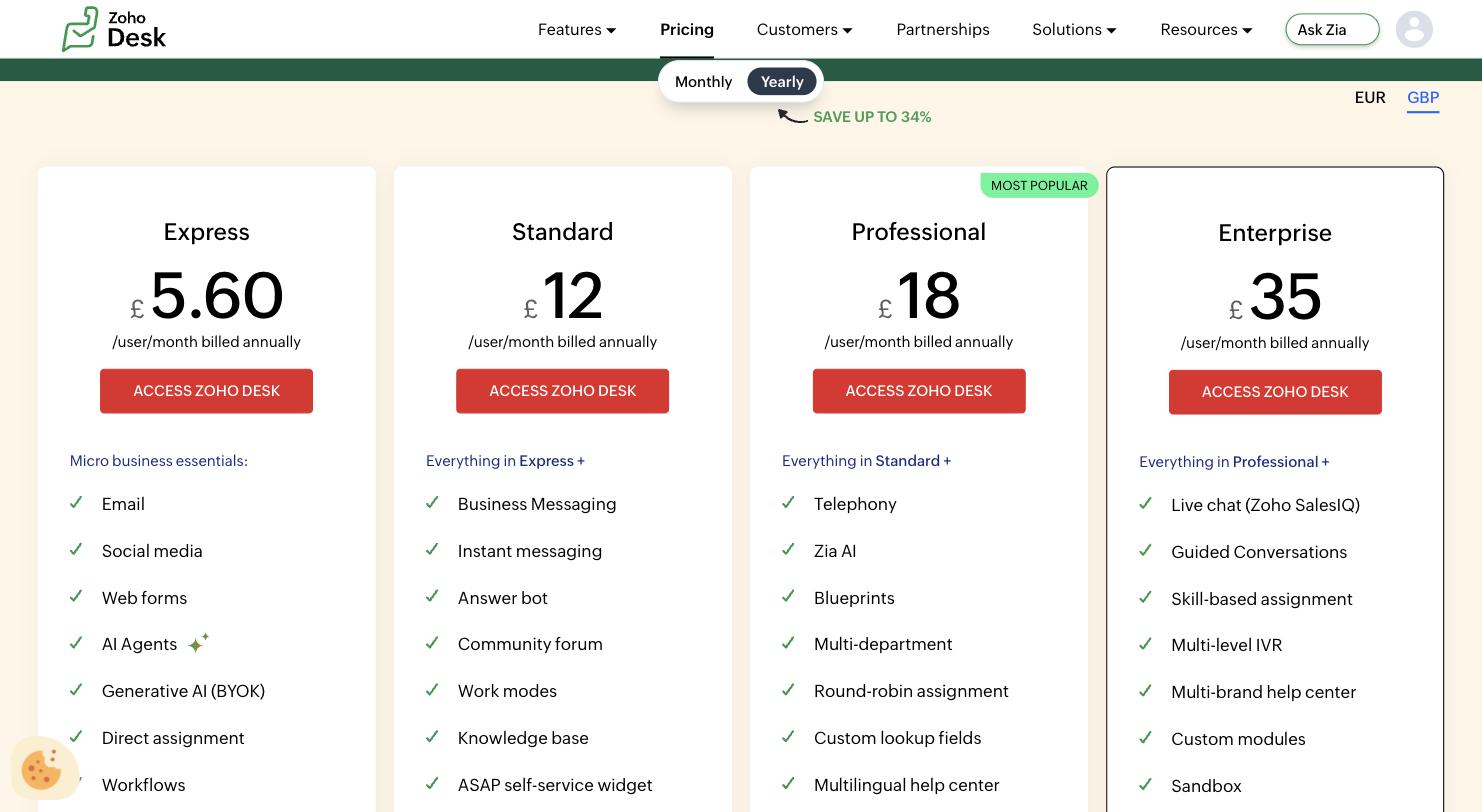
Three structural notes. The free edition is real and permanent: 3 agents, email ticketing, no card, which is rarer than it should be in this category. Express is the advertised cheap door, but the plan comparison table caps it at 5 users, so a sixth support hire forces the jump to Standard. And the page footnotes that applicable local taxes are charged on top, which matters when you are comparing single-digit stickers.
Pricing comparison: annual against monthly billing
Zoho's page banners "save up to 34%" for yearly billing. Flip the toggle and the gap is real, and unevenly spread. On the UK list we verified live:
| Plan | Annual rate | Monthly rate | Monthly premium |
|---|---|---|---|
| Express | £5.60 | £7.20 | +29% |
| Standard | £12 | £16 | +33% |
| Professional | £18 | £28 | +56% |
| Enterprise | £35 | £40 | +14% |
A receipt note on the banner itself: Zoho's math is conservative. The Professional saving computes to just under 36 percent, more than the up to 34 the page claims.
The distribution is the story. The steepest monthly penalty sits exactly on Professional, the plan Zoho badges as most popular and the first one with the full Zia AI assistant, telephony, and Blueprints. A 5-agent team that wants Professional without a year's commitment pays £140 a month instead of £90. Enterprise, by contrast, is barely penalized. Read as a pricing design: the plan most teams want is the one where month-to-month flexibility costs the most, so the ladder converts browsers into annual contracts at the middle rung.
What the included AI actually covers
Zoho's 2026 move is to bundle AI into every paid plan rather than sell it as a priced add-on, and the details are worth quoting exactly. The pricing page's own tooltip for AI Agents, present from Express up, reads: "Bring your own key or use Zoho's LLM to build and deploy AI agents. Includes access to pre-built agents and up to 30M free tokens/month."
Three things follow from that sentence. First, the meter exists: AI usage is counted in tokens, with a monthly allowance. Thirty million tokens is a large allowance for a small team, but it is an allowance, and the pricing page does not publish what happens past it, which is the number we would most want in print. Second, the bring-your-own-key route pushes the AI bill onto your own OpenAI account, and Zoho's tooltip scopes it by data center: OpenAI keys work from its US, EU, AU, IN, JP, CA, and UAE data centers, DeepSeek from the CN one. Where your Zoho account is hosted decides which AI you can bring. Third, the AI is itself laddered like everything else here: AI agents and BYOK GenAI from Express, the Answer bot from Standard, and the full Zia AI assistant, the generative, predictive, and analytical layer Zoho markets hardest, only from Professional.
Drag · with Varley
The inbox your team and Varley work in together
Shared inbox and live chat for Gmail teams, with Varley, Drag’s AI, included from $18. Plus an MCP server your own AI tools can drive.
The caps that decide your real plan
The sticker ladder is gentle; the feature ladder is what moves you up it. From the plan comparison table, verified September 7, 2026:
| What you need | The plan that has it |
|---|---|
| More than 5 users | Standard ($14) or above |
| Answer bot self-service | Standard ($14) |
| Zia AI, telephony, Blueprints, round-robin assignment | Professional ($23) |
| Light agents at all | Professional ($23), at £4.50 per light agent per month on the UK list |
| Live chat (via Zoho SalesIQ), IVR, skill-based routing, sandbox | Enterprise ($40) |
| 50 light agents included free | Enterprise ($40) |
Two of these deserve a sentence. Light agents, the read-and-comment seats most vendors give away, are a paid add-on below Enterprise, so a Professional team that wants ten managers watching tickets pays about £45 a month for the audience. And live chat, table stakes in most 2026 help desk comparisons, is not in Zoho Desk at all until Enterprise, where it arrives as a bundled second product, Zoho SalesIQ. The cheap ladder is honest, but the version of Zoho Desk that matches a Zendesk or Freshdesk feature list is the $23 to $40 slice of it.
Zoho Desk and Zoho TeamInbox are different products
A disambiguation, because the search results blur them. Zoho Desk, this page, is Zoho's help desk: tickets, SLAs, a portal, agents logging into a separate app. Zoho TeamInbox is Zoho's shared inbox product, priced separately at a few dollars per user per month and aimed at teams who want to answer a group address together rather than run a ticket desk. If what you actually want is a shared inbox for a team address, the help desk ladder above is the wrong aisle entirely, and the comparison you should be running is between shared inbox tools: TeamInbox, Drag, and the field we cover in our shared inbox guide. And if you are weighing Zoho Desk itself against staying in Gmail, our Zoho Desk alternative comparison runs that side by side.
What a 5-person team pays
Costed monthly on annual billing, US-dollar list, September 2026:
| Setup | 5-person team, monthly |
|---|---|
| Zoho Desk Free | $0, if you can live with 3 agents and email only |
| Zoho Desk Express | 5 × $7 = $35, at the plan's user cap |
| Zoho Desk Standard | 5 × $14 = $70 |
| Zoho Desk Professional | 5 × $23 = $115 |
| Drag Starter | 5 × $12 = $60 |
| Drag Plus, AI included | 5 × $18 = $90 |
| Drag Pro | 5 × $24 = $120 |
On stickers alone Zoho Desk wins the bottom of this table, and it is worth saying so plainly: $35 a month for five agents on Express is the cheapest paid help desk arrangement any major vendor sells, as long as the team never reaches six people and never needs the Answer bot. The stickers converge exactly where the AI arrives: Zoho Professional at $115 against Drag Plus at $90, which is the honest comparison row, full AI on both sides. You can model your own headcount in the shared inbox cost calculator.
When Zoho Desk is the right call
An honest paragraph, because the value case is real. If you are already inside the Zoho suite, CRM especially, Zoho Desk is the natural help desk: the integrations are first-party, the admin model is familiar, and the ladder undercuts Zendesk and Freshdesk at every rung. Telephony and Blueprints at $23 is aggressive pricing for genuine machinery, the free edition is a real on-ramp for a two-person operation, and if your team commits annually the headline gap never bites. The teams that feel this model hardest are the ones who want flexibility or focus: month-to-month billing carries up to a 56% premium, the cheap plan caps headcount, and the product is a full separate help desk with a training curve to match, which is a lot of apparatus if what your team actually does all day is answer email in Gmail.
The Drag comparison, plainly
Drag prices in one motion: $12 to $24 per seat per month, unlimited users on every plan, with Varley, Drag’s AI, included in the seat from $18, no token allowance to watch and no feature ladder that holds assignment or chat hostage. The deeper difference is architectural. Zoho Desk is a destination: a separate app your team logs into, with tickets, portals, and a suite behind it. Drag turns the Gmail your team already lives in into the shared inbox, so a five-person team is productive the first afternoon, without migrating anything or learning a ticket model. Suite-first teams may genuinely want Zoho's machinery. Teams whose support runs on a Gmail address usually want the workflow they already know, priced flat. The 7-day trial includes every Pro feature, no card required.
Frequently asked questions
How much does Zoho Desk cost per month in 2026?
On annual billing, the US list runs Express $7, Standard $14, Professional $23, and Enterprise $40 per agent per month, with a free edition for 3 agents. Paying monthly costs more: on the UK price list we verified live, the premium runs from 14% on Enterprise to 56% on Professional. Local taxes are charged on top of every sticker.
Is Zoho Desk really free?
Yes, within its limits. The Free edition is free forever for up to 3 agents and covers email ticketing with basic features, no card required. It is one of the few permanent free plans among major help desks. The limits are the point: three agents, email as the channel, and none of the automation, AI assistant, or chat features of the paid ladder.
Does Zoho Desk include AI, or is it extra?
It is included on every paid plan, with a meter behind it. From Express up you get AI agents and bring-your-own-key generative AI with what Zoho describes as up to 30 million free tokens per month; the Answer bot needs Standard and the full Zia AI assistant needs Professional. The pricing page does not publish a rate for usage beyond the token allowance.
What is the difference between Zoho Desk and Zoho TeamInbox?
They are separate products with separate prices. Zoho Desk is a full help desk: tickets, SLAs, portals, and agents working in a dedicated app, from $7 to $40 per agent per month. Zoho TeamInbox is a shared inbox tool for answering group email addresses together, priced separately at a few dollars per user. Teams that just want to share support@ usually want a shared inbox, not a ticket desk.

Co-founder
Building Drag for nearly ten years: shared inboxes, boards, and now the AI and agent layer, all on Gmail, plus HeyHelp for the personal inbox. Writes the honest versions of the comparisons.