













Set a customer service SLA your email team can actually keep: research-backed targets, the clock rules most SLAs get wrong, a copy-paste template, and how to enforce it in Gmail.
Key takeaways
- A customer service SLA is two promises, not one: how fast a human first replies (response) and how fast the issue is fixed (resolution). Write both, per priority, in business hours.
- The research-backed first-reply standard for email is one hour: in Toister Performance Solutions' March 2020 survey of 3,200+ customers, 88 percent said a one-hour reply would satisfy them.
- Most SLAs fail on the clock rules, not the targets: auto-acknowledgements must not stop the clock, business hours and time zones must be defined, and a resolution clock pauses only while you wait on the customer.
- Gmail has no SLA timers. Teams enforce SLAs in Gmail with a daily age sweep, or with time-based rules that notify the owner before a conversation breaches and response-time reports that show compliance.
Table of contents
- What a customer service SLA is: two promises, not one
- What SLA targets should an email support team set?
- The clock rules most SLAs get wrong
- SLA due-time calculator: when is an email actually due?
- A customer service SLA template you can copy
- Worked example: rolling out an SLA in six weeks
- How to enforce an SLA when support runs through Gmail
- What to do when you breach an SLA
- Which SLA metrics to review every week
- Frequently asked questions
- Related guides: response times, auto-replies and running support from Gmail
Most customer service SLAs are copied from a help desk template, set targets nobody measured, and quietly stop being checked by the second month. This guide is for teams whose support runs through email, usually a shared Gmail address: what to promise, how to count it honestly, and how to keep the promise without a full help desk.
The short version: a customer service SLA (service level agreement) is a written promise about how fast your team will first reply to a customer and how fast it will resolve the issue, measured in business hours and split by priority. For email, the research-backed first-reply target is one hour, with resolution within one business day for standard requests. An automatic "we got your message" reply does not count as a response. The rest of this page covers the evidence, the clock rules, a due-time calculator, a template you can copy, and how to enforce it in Gmail.
What a customer service SLA is: two promises, not one
An SLA is a commitment, written down, about the speed and quality of support. In practice it contains two separate promises that most templates blur together:
- First response time: how long until a human replies to the customer. This is the number customers feel, and the one most research measures.
- Resolution time: how long until the issue is actually fixed and the conversation is closed. It is longer, less predictable, and depends on things outside the support team.
Keep them separate because they fail for different reasons. First-reply breaches are almost always a coverage or ownership problem (nobody knew it was theirs). Resolution breaches are usually a dependency problem (waiting on engineering, finance, or the customer).
The second distinction is who the promise is to:
- External SLA: published to customers, sometimes in a contract with service credits for breaches. Common in B2B and enterprise support.
- Internal SLA: a team standard nobody outside sees. Most small teams should start here. It gives you the discipline without the legal exposure, and you publish it only once you hit it reliably.
What SLA targets should an email support team set?
Start from what customers expect, then adjust for what your team can sustain. The best public evidence on email expectations is still consumer research from Toister Performance Solutions. In March 2020 it surveyed more than 3,200 customers in the United States, United Kingdom and Canada. Nearly a third expected a reply to an email in one hour or less, and 88 percent said a one-hour reply would satisfy them. Toister's recommended standard is one hour. (Our email response time guide audits where the other widely quoted numbers come from.)
The gap between that expectation and what businesses deliver is large. SuperOffice's customer service benchmark study, which emailed 1,000 companies, reported that 62 percent never replied at all, the average reply took 12 hours and 10 minutes, and 90 percent never acknowledged that the email had arrived. The study page carries no publication date, so treat the figures as a directional snapshot rather than this year's average.
Those two sources support a simple starting table for an email team:
| Priority | Examples | First response | Resolution |
|---|---|---|---|
| Urgent | Can't log in, payment failed, outage, legal or data request | 15 minutes to 1 business hour | Same business day |
| Standard | How-to questions, billing questions, bug reports | 1 business hour | 1 business day |
| Low | Feature requests, partnership pitches, feedback | 1 business day | As agreed, or closed with a reply |
Two adjustments make the table yours:
- Measure before you promise. Track two weeks of real first-reply times, set the target near what your team already achieves on a good day, and tighten it each quarter. A target you breach daily teaches the team to ignore it.
- Aim for a compliance rate, not perfection. Most teams track the share of conversations that met the target. Somewhere around 90 percent is a healthy goal. Hitting 100 percent every week usually means the target is too loose.
The clock rules most SLAs get wrong
The targets get the attention, but most broken SLAs fail on how time is counted. Settle these five rules before you publish anything:
- The clock starts when the email arrives, not when someone opens it or when it is assigned.
- An auto-acknowledgement does not stop the clock. "We've received your message" is useful (and SuperOffice's figure suggests most companies skip it), but it is not a response. An SLA that counts it reports a speed your customers never experience. Our auto-reply guide covers writing a good one.
- Business hours and time zones are defined in writing. "One business hour" means nothing until you state the hours, the time zone, and the holidays. Distributed teams should say whose clock it is. An email that lands at 6pm on Friday, with a one-hour target and 9-to-5 hours, is not late until 10am Monday.
- The resolution clock pauses only while you wait on the customer. When you ask the customer a question, pause. When they answer, it restarts. Never pause for internal waits (engineering, finance, a manager), because those are exactly the delays an SLA exists to expose.
- A reopened conversation keeps its history. If a customer replies to a "solved" thread saying it isn't solved, count it as the same case, not a fresh clock.
Here is one conversation run through those rules, from a Friday afternoon to Monday:
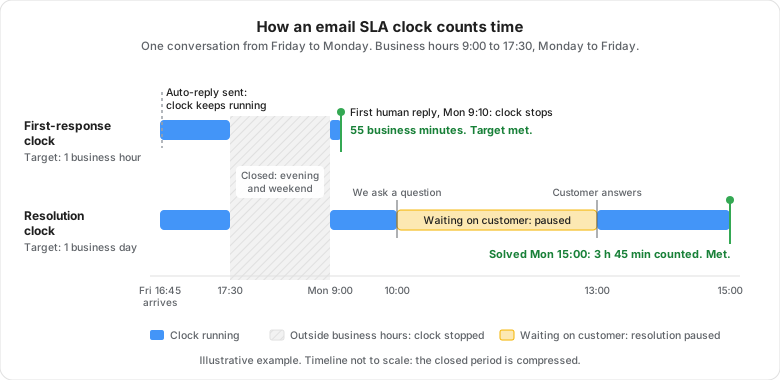
The auto-reply at 16:45 changes nothing on either clock. The weekend costs nothing, because the team is closed. And the three hours spent waiting for the customer's answer don't count against the resolution target, while every internal delay would.
Drag · with Varley
The inbox your team and Varley work in together
Shared inbox and live chat for Gmail teams, with Varley, Drag’s AI, included from $18. Plus an MCP server your own AI tools can drive.
SLA due-time calculator: when is an email actually due?
Business-hours arithmetic is where SLAs quietly go wrong, especially for email that arrives late on a Friday, over a weekend or before a public holiday. Enter when the email arrived, your hours, your holidays and your target. The calculator gives the due time in your customer's time zone as well as yours, charts the worst moment in the week for an email to land, and gives you a link to share the result with your team:
SLA due-time calculator
When is an email actually due? Enter the arrival in your team's local time.
Due Monday, Oct 5 at 09:15
That is 2 days 16 h 30 min after it arrives, on the wall clock.
Longest wait for a reply, by arrival day (week of Sep 28)
The worst moment on each day for an email to arrive, and how long it can then wait on the wall clock while still meeting the target.
Hover over or tap a bar to see that day's worst case.
Worst case this week: an email that arrives Friday, Oct 2 at 16:31 is not due until Monday, Oct 5 at 09:01, a wait of 2 days 16 h 30 min. Your out-of-hours auto-reply should set that expectation.
Show as a table
| Arrival day | Worst arrival | Due | Longest wait |
|---|---|---|---|
| Monday, Sep 28 | 16:31 | Tue Sep 29, 09:01 | 16 h 30 min |
| Tuesday, Sep 29 | 16:31 | Wed Sep 30, 09:01 | 16 h 30 min |
| Wednesday, Sep 30 | 16:31 | Thu Oct 1, 09:01 | 16 h 30 min |
| Thursday, Oct 1 | 16:31 | Fri Oct 2, 09:01 | 16 h 30 min |
| Friday, Oct 2 | 16:31 | Mon Oct 5, 09:01 | 2 days 16 h 30 min |
| Saturday, Oct 3 | 00:00 | Mon Oct 5, 10:00 | 2 days 10 h |
| Sunday, Oct 4 | 00:00 | Mon Oct 5, 10:00 | 1 day 10 h |
Share your team's worst case
“An email can wait 2 days 16 h 30 min and still meet a 1-business-hour SLA. Work out your team's worst case.”
Links keep your settings, so colleagues see the same numbers.
One business day counts as the length of your business day. Holiday lists cover 2026 and 2027 and do not include regional or half-day closures: add those as closure dates.
A few common cases, with business hours of 9:00 to 17:30, Monday to Friday:
| Email arrives | First-response target | Due |
|---|---|---|
| Friday 16:45 | 1 business hour | Monday 9:15 |
| Friday 18:00 | 4 business hours | Monday 13:00 |
| Saturday 12:00 | 1 business hour | Monday 10:00 |
| Wednesday 10:00 | 1 business day | Thursday 10:00 |
The Friday 16:45 email is the one teams get wrong most often. It has 45 minutes of business time on Friday, so a one-hour target leaves only 15 minutes on Monday morning, when the weekend's backlog is also waiting.
A customer service SLA template you can copy
This is an internal SLA for a team running support from a shared email address. Replace the bracketed parts and keep it to one page.
CUSTOMER SUPPORT SLA: [team name], [support@yourcompany.com]
Effective [date]. Owner: [name]. Reviewed [monthly / quarterly].

HOURS
Business hours: [Mon-Fri, 9:00-17:30], [time zone].
Holidays: [list or link]. Outside hours, an auto-reply states
the next response window.

TARGETS (business hours)
Urgent   first response [1 hour]    resolution [same business day]
Standard first response [1 hour]    resolution [1 business day]
Low      first response [1 day]     resolution [as agreed]
Priority is set by the first person to read the email,
using [link to priority definitions].

CLOCK RULES
- Starts when the email arrives in the shared inbox.
- Auto-acknowledgements do not count as a response.
- Resolution pauses only while we wait on the customer.
- A reopened conversation continues its original case.

OWNERSHIP AND ESCALATION
Every conversation has one named owner within [30 minutes].
At [75%] of the first-response window: owner is reminded.
At breach: [team lead] is notified and replies or reassigns.
Customer followed up twice without resolution: escalate to [lead].

MEASUREMENT
Weekly: median first response time, median resolution time,
compliance rate per priority, breaches by tag and by hour.
Target compliance: [90%]. Targets change only by editing this page.
Worked example: rolling out an SLA in six weeks
This is an illustrative example of the rollout above, not a customer case study. A four-person team answers a shared support@ address that gets around 120 emails a week.
- Weeks 1 and 2, measure. Before promising anything, the team samples every conversation's first-reply time. The median is 2 hours 40 minutes, and the slowest replies cluster on Monday mornings and between 12:30 and 14:00.
- Week 3, set an internal target they can nearly hit. First response within 2 business hours for standard email, 30 minutes for urgent. Compliance in the first week is 78 percent.
- Week 4, fix the system, not the people. The breaches are structural: nobody covers lunch, and Monday's weekend backlog is shared out by whoever gets to it first. The team staggers lunch, assigns Monday's backlog by round robin at 9:00, and turns the three most common questions into templates.
- Weeks 5 and 6, tighten. Compliance reaches 91 percent, so the standard target moves to 1 business hour. The team publishes nothing to customers until it has held that for a full quarter.
Notice what did not happen: nobody was told to work faster. Every improvement came from coverage, ownership and templates.
When you are ready to publish a customer-facing version, keep it to two sentences: your hours, and your first-response promise ("We reply to every email within one business hour, Monday to Friday, 9am to 5:30pm UK time"). Don't publish the resolution target until you have hit it for a full quarter.
How to enforce an SLA when support runs through Gmail
Gmail has no SLA timers, no priorities, and no breach alerts, and neither do Google Groups' Collaborative Inbox or Gmail delegation. That leaves two honest routes.
Plain Gmail (free, manual). It works for a small team with a disciplined routine:
- Label every conversation with an owner and a status, so unowned mail is visible. Our Gmail customer support playbook has a label system you can copy, and our guide to turning Gmail into a help desk adds the filters and saved searches, including a past-target search.
- Twice a day, search the shared inbox for unanswered mail past your window. Gmail's
older_thanoperator accepts days, months and years but not hours, so hourly targets have to be checked by eye, sorted by date. - Once a week, sample threads and note first-reply times and breaches.
The limit is that it depends on someone remembering, and the moment the sweep is skipped, the SLA stops existing.
A shared inbox tool (automatic). A tool that works on top of Gmail can start the clock for you, remind the owner before a breach, and report compliance. In Drag, an SLA is built from the same rule builder as the rest of Drag's automation rules:
- Set your business hours on the board, so clocks only count time you are open.
- Create a rule that starts when a conversation arrives on the board.
- Add an After step with your target window and tick Within business hours.
- Add the If no reply condition, so the rule only continues when nobody has answered.
- Add Send notification to alert the assignee. A second rule with a longer delay escalates to whoever should step in.
SLA rules are on Drag's Pro plan. To measure the result, Drag's reports show average response time per teammate, tag and time period, which is the weekly review above without the spreadsheet. Full disclosure: Drag is our product. The plain-Gmail routine above works without it.




What to do when you breach an SLA
Breaches will happen. What matters is that each one is visible, answered, and used to fix the system.
- Before the breach: remind the owner at around three quarters of the window. That's where most breaches are saved.
- At the breach: the team lead is notified and either replies or reassigns within the hour. The customer gets a real reply, or at least an honest holding line with a time ("We're checking this with our billing team and will update you by 3pm").
- After two customer follow-ups: escalate, whatever the clock says. A customer chasing twice is a breach in spirit even when the numbers look fine.
- Every week: review breaches by tag, hour and weekday, not by person. Monday mornings, one tag that always needs another team, or a lunchtime gap in coverage are the usual culprits, and each has a structural fix: a rota, a template, or round-robin assignment.
- For contractual SLAs: know in advance what a breach costs (service credits are common in B2B contracts) and who tells the customer. Hearing about a breach from you beats discovering it on an invoice.
Which SLA metrics to review every week
Keep the weekly review short, and use medians rather than averages, because one lost email that waited four days drags an average far more than it reflects the typical customer's experience.
| Metric | What it tells you |
|---|---|
| Median first response time, per priority | Whether customers feel the speed you promise |
| Compliance rate, per priority | The share of conversations that met the target |
| Median resolution time | Whether issues actually get fixed, not just acknowledged |
| Breaches by tag, hour and weekday | Where the system is short, as opposed to who is slow |
| Oldest open conversations | What is about to become a complaint |
Our shared inbox management guide covers the rest of the weekly routine: ownership, statuses and triage.
Frequently asked questions
What is the difference between an SLA, an SLO and a KPI?
An SLA is the promise made to someone else, often with consequences for breaking it. An SLO (service level objective) is the internal target you aim for, usually set tighter than the SLA so you have a buffer. A KPI is any metric you track to judge performance. For a support team: "reply within one business hour" is the SLA, "95 percent within 45 minutes" is the SLO, and median first response time is the KPI.
Should a small team publish its SLA to customers?
Not at first. Run it internally for a quarter, measure your real compliance, and publish only what you hit reliably. When you do publish, keep it short: your hours and your first-response promise. A published target you miss teaches customers to distrust every other promise, while an internal target you miss just teaches the team something.
Do weekends count toward a customer service SLA?
Only if you say so. Most email SLAs run in business hours, so a Saturday email's clock starts when you open on Monday. If you offer weekend cover, state it as a separate, usually longer, target. Either way, the out-of-hours auto-reply should tell the customer exactly when to expect a human, because that is the expectation your SLA will be judged against.
What is a good SLA compliance rate?
Most teams aim for around 90 percent of conversations inside the target. Well below that and the target is unrealistic or the coverage is thin. Consistently at 100 percent and the target is probably too loose to mean anything. Track compliance per priority, because 100 percent on low-priority mail can hide a problem with urgent mail.
Related guides: response times, auto-replies and running support from Gmail
- Professional email response times: the research behind response-time benchmarks, and which widely quoted numbers have no source.
- Gmail for customer support: the full playbook, from labels to escalation rules.
- Auto-reply emails: writing the acknowledgement that buys your SLA breathing room.
- SLA rules in Drag: how time-based reminders work on a shared Gmail inbox.
If your team runs support from a shared Gmail address and wants the clock, the reminders and the reports without leaving Gmail, start a 7-day free trial of Drag. No card is needed.

Co-founder
Co-founder at Drag, writing about Google Workspace, shared inboxes, and how teams actually run email.
