













Google Workspace pricing for 2026: $7, $14 or $22 a user yearly, $8.40 to $26.40 flexible, team totals, Gemini by plan, and what support@ costs.
Key takeaways
- Google Workspace costs $7, $14 or $22 a user per month for Business Starter, Standard and Plus on a one-year commitment, and $8.40, $16.80 or $26.40 on the month-to-month Flexible Plan (US list prices, checked October 26, 2026).
- A 10-person team pays $70, $140 or $220 a month on annual billing. Flexible billing costs 20% more for the freedom to remove users and cancel anytime.
- Every Business plan gets Gemini in Gmail: Help me write, Suggested Replies, AI Overviews of threads, Proofread and the side panel. Standard and Plus add Help me schedule, mail merge and Gemini in Docs, Sheets, Slides, Meet, Chat and Drive.
- A shared address costs nothing as an alias or a Google Group, and normally one extra seat when it is its own account. Delegates of that account can't use Gemini in Gmail.
- Business plans stop at 300 users. Annual prices went from $6, $12 and $18 to $7, $14 and $22; Business Standard's rise came in 2025, when Google folded Gemini into every plan.
Table of contents
- Google Workspace pricing at a glance: Business Starter, Standard and Plus
- Annual or Flexible Plan: what the 16% saving costs you
- What a team pays: 5, 10 and 25 people
- What a shared address like support@ costs on Google Workspace
- Gemini in Gmail by plan: what each Google Workspace plan includes
- Google Workspace add-ons and the costs that come on top
- Google Workspace price history: 2023 to 2026
- Google Workspace vs Microsoft 365 for a small email team
- Which Google Workspace plan to choose for a team that lives in email
- Running support@ on Google Workspace with Drag
- Frequently asked questions
- Related guides
The short version: Google Workspace costs $7, $14 or $22 a user per month for Business Starter, Standard and Plus when you commit for a year, and $8.40, $16.80 or $26.40 on the month-to-month Flexible Plan. Enterprise is priced by Google's sales team. Those are US list prices from Google's own pricing page and billing help, checked on October 26, 2026.
- What does a small team pay? Ten people pay $70 a month on Starter, $140 on Standard or $220 on Plus with annual billing ($84, $168 or $264 on Flexible).
- Is Gemini extra? No. Every Business plan includes Gemini in Gmail, and Standard and Plus include it in Docs, Sheets, Slides, Meet, Chat and Drive too.
- What about support@? Free as an alias or a Google Group; normally one more seat if it is a mailbox people sign in to or are delegated.
We sell a shared inbox that runs on top of Gmail, so the support@ and sales@ questions below are the ones our customers ask us when they set up Workspace. Everything here comes from Google's and Microsoft's own pages, linked where we use them.
Google Workspace pricing at a glance: Business Starter, Standard and Plus
Google Workspace has three Business plans for teams of 1 to 300 people, plus Enterprise for larger or more regulated companies. This table shows the US price per user per month and what each plan adds for a team that lives in email, from Google's pricing page and its Business edition comparison, checked October 26, 2026.
| Plan | Annual / Flexible | Storage | What it adds for email |
|---|---|---|---|
| Business Starter | $7 / $8.40 | 30 GB | Custom business email, Gemini in Gmail, Meet for 100 |
| Business Standard | $14 / $16.80 | 2 TB | Mail merge, custom email layouts, Help me schedule, Meet for 150 with recordings |
| Business Plus | $22 / $26.40 | 5 TB | Vault for retention and eDiscovery, Meet for 500 |
| Enterprise | Contact sales | 5 TB or more | S/MIME, data loss prevention, data regions |
Prices are per user per month; storage is per user, pooled.
Three rules sit under every row:
- 300 users is the ceiling. Google sells Starter, Standard and Plus "for a maximum of 300 users". Above that you talk to sales about Enterprise.
- Storage is pooled. Each user adds their allowance to one shared pot for the whole organization, and you can buy more pooled storage on any Business plan.
- Taxes are extra, and prices outside the US differ. In the UK, for example, Google lists the plans in pounds.
New customers also see an introductory discount and a 14-day free trial on Google's pricing page. On October 26 the banner offered "up to 50% off your first 3 months", while the fine print said the introductory price covers "the first 20 users added, for 12 months". The two disagree on the length, so check the price at checkout and plan on the list price after that.
Nonprofits and schools buy on separate terms. Google for Nonprofits lists Google Workspace for Nonprofits at $0, Business Standard at $3.50 and Business Plus at $6.16 a user per month with a one-year commitment; education editions have their own price list, which this guide leaves out. We also haven't priced mixing plans across users, because Google's help doesn't publish a clear rule for Business plans.
What will date first: the introductory offer, AI Inbox reaching Business Starter, and whether Google's native shared inbox takes a license. We recheck this page monthly.
Annual or Flexible Plan: what the 16% saving costs you
The Annual/Fixed-Term Plan is cheaper because you commit to a number of licenses for a year, while the Flexible Plan charges about 20% more for the right to add or remove people at any time. Google's Flexible Plan help and Annual/Fixed-Term Plan help set out the trade:
| Annual/Fixed-Term Plan | Flexible Plan | |
|---|---|---|
| Business Starter / Standard / Plus | $7 / $14 / $22 | $8.40 / $16.80 / $26.40 |
| How you pay | Usually a yearly payment up front; some accounts can pay monthly | Monthly, in arrears, for the accounts you had that month |
| Adding people | Buy more licenses any time, prorated | Add any time, prorated |
| Removing people | You can't reduce licenses until renewal | Remove any time, prorated |
| Downgrading | Only after switching to Flexible at renewal | Any time |
| Canceling | You still owe the rest of the year | Any time, no penalty |
Google's pricing page calls the annual discount "Save 16%". Both ways of saying it are right: annual is 16.7% cheaper than Flexible, and Flexible is 20% more expensive than annual.
Our rule of thumb: go annual for the people you are sure of and keep the account on Flexible while headcount is still moving. A 10-person team on Business Standard saves $336 a year by committing ($1,680 instead of $2,016), which is exactly what two unused annual seats cost, so commit only for the people you are sure will stay.
What a team pays: 5, 10 and 25 people
A team's Google Workspace bill is the plan price times the number of people who sign in, so 10 people on Business Standard pay $140 a month on annual billing. The table works it through for three team sizes at US list prices, before tax and before any shared addresses.
| Team | Starter | Standard | Plus |
|---|---|---|---|
| 5 people | $35 ($42) | $70 ($84) | $110 ($132) |
| 10 people | $70 ($84) | $140 ($168) | $220 ($264) |
| 25 people | $175 ($210) | $350 ($420) | $550 ($660) |
Monthly totals on annual billing, with the Flexible Plan in parentheses.
A year on the annual plan comes to $420, $840 or $1,320 for 5 people; $840, $1,680 or $2,640 for 10; and $2,100, $4,200 or $6,600 for 25, on Starter, Standard and Plus.
What the per-user tables on most pricing pages leave out is the role addresses: support@, sales@, billing@. How you set those up decides whether they cost anything.
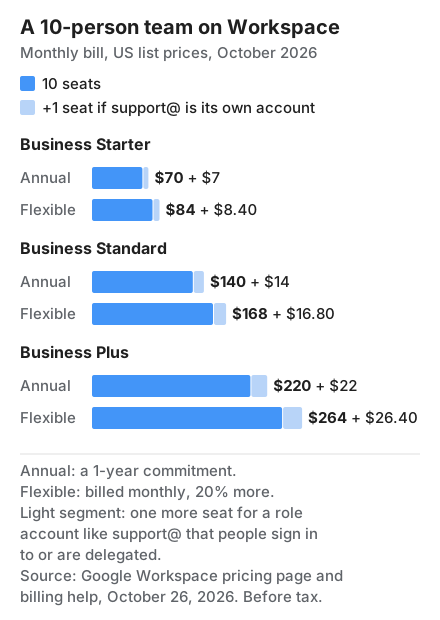
What a shared address like support@ costs on Google Workspace
A shared address costs nothing extra as an alias or a Google Group, and normally one more seat when it is its own mailbox that people sign in to or are delegated. There are four ways to set one up in Workspace, and they differ in cost and in what the team can do with the mail:
| How support@ is set up | Extra cost | What the team gets |
|---|---|---|
| Alias on one person's account | $0 (up to 30 aliases per user) | Mail lands in one person's inbox; nobody else sees it |
| Google Group with Collaborative Inbox | $0 (Groups for Business is in every Business plan) | Everyone gets a copy; Collaborative Inbox adds assigning and marking done |
| Delegated account | Normally one seat | Up to 1,000 delegates on a work account; replies come from support@ |
| Google's native shared inbox | Likely one seat (Google publishes no license terms) | Delegates read, send and delete; each reply shows who sent it |
The sources, all checked October 26, 2026: Google's alias help says "You can add up to 30 aliases for each user, at no extra cost"; the Business edition comparison lists Groups for Business on Starter, Standard and Plus; and the shared inbox help lists the native shared inbox for those same three plans, still "being released in phases".
Four things catch teams out:
- A Group doesn't receive customer email by default. On Workspace, a new Group won't take mail from outside your domain until an admin, or the group's owner if policy allows, turns it on (Google's Groups policy help). Our guide to the Google Groups Collaborative Inbox walks through the setting.
- Delegates lose Gemini. Gmail Help lists "Gemini in Gmail" among the features that aren't available for delegated accounts on the web. So on a delegated or native shared support@, the AI you pay for in your plan doesn't work on the shared mail.
- The native shared inbox is a mailbox account. Google's help creates it from the Users section and lets you convert an existing account into one. It doesn't say whether it takes a license, so budget one seat until Google does.
- Archiving a leaver doesn't keep their address alive. Google's archiving help says archived users "Can't receive new email". If customers still write to a departed colleague, move the address to a Group or an alias first.
Three role addresses as their own accounts on Business Standard cost $504 a year on annual billing. As Groups, they cost nothing. Our guide to shared mailboxes in Google Workspace compares the four set-ups in more depth, and Gmail delegation, explained covers the delegate limits.
Gemini in Gmail by plan: what each Google Workspace plan includes
Every Business plan has included Gemini since 2025, and in Gmail the three plans get almost the same features: Standard and Plus add Help me schedule and Salesforce for Gemini. This is the Gmail section of Google's Business edition comparison, read on October 26, 2026, with one last row for the other apps:
| Gemini feature | Starter | Standard | Plus |
|---|---|---|---|
| Side panel | Yes | Yes | Yes |
| Help me write | Yes | Yes | Yes |
| Suggested Replies | Yes | Yes | Yes |
| AI Overview for email threads | Yes | Yes | Yes |
| Proofread | Yes | Yes | Yes |
| Help me schedule | No | Yes | Yes |
| Salesforce for Gemini | No | Yes | Yes |
| Gemini in Docs, Sheets, Slides, Meet, Chat and Drive | No | Yes | Yes |
AI Inbox follows a different calendar. Gmail's new AI Inbox view, a list of suggested to-dos and topic summaries, is rolling out to paid Workspace plans in the US, for accounts set to English (US), from October 2026, with Standard and Plus first and Starter "in the coming months", according to Google's Workspace Updates post of October 15. Like Gemini in Gmail, it doesn't work on delegated inboxes: Gmail Help says it "Does not support attachments, delegated inboxes, or encrypted emails". Our Gmail AI Inbox guide has the dates and the settings.
If what you want is AI on the email itself, Starter already covers the writing features. The gap between plans is everywhere else in Workspace, and on any shared mailbox, where none of the plans' Gmail AI applies. Our comparison of AI email assistants prices the other options for one person and for a team of five.
Google Workspace add-ons and the costs that come on top
Google Workspace add-ons are billed on top of the plan, and none of them changes what Gmail itself can do. These are the extras from Google's pricing page and help, checked October 26, 2026:
| Add-on or extra | Price | Who it's for |
|---|---|---|
| AI Expanded Access | Not listed; shown at checkout in your currency | Business Standard, Plus and Enterprise users who hit AI limits |
| Google Voice | From $10 a user per month | Teams that want business phone numbers in Workspace |
| Extra pooled storage | Not listed on the pricing page | Any Business plan running out of space |
| Archived User licenses | Bought in the Admin console or through sales | Keeping a leaver's data after their seat is freed for someone else |
| AppSheet Core and Workspace Studio | Included, per Google's pricing page; paid AppSheet plans are extra | Every Business plan |
AI Expanded Access raises the limits on features such as image and video generation, Sheets, Slides and the Gemini app. Its limits table has no Gmail rows, so it adds nothing to the email features above. Bought online, it is billed on the Flexible Plan.
The other cost is the tool your team uses to work a shared queue, if Gmail's own options run out. That's the last section below.
Google Workspace price history: 2023 to 2026
Google Workspace list prices have risen twice since 2023: a 20% Flexible Plan rise rolled out in 2023 and 2024, and the 2025 rise when Gemini moved into every plan. This is the record, oldest first:
| When | What changed | Source |
|---|---|---|
| Before April 2023 | Starter $6, Standard $12, Plus $18 a user per month | TechRadar (press report); Google's 2025 post confirms Standard at $12 |
| April 2023 to February 2024 | Flexible Plan rose 20%, to $7.20, $14.40 and $21.60: from April 2023 for subscriptions over 10 licenses, from February 2024 for 1 to 10; annual plans kept their price | Dates: Google's Flexible Plan help. Prices: TechRadar (Feb 13, 2024) |
| January 16, 2025 | Gemini included in every Business plan; Business Standard $12 to $14 for new customers | Google Workspace blog (Jan 15, 2025) |
| March 17, 2025 | Existing customers moved to the new prices, or at renewal on annual plans | Same post |
| July 7, 2025 | The new prices reached very small business customers | Same post, updated April 28, 2025 |
| October 2026 | $7, $14 and $22 annual; $8.40, $16.80 and $26.40 flexible | Google pricing page, Flexible Plan help |
Google's January 2025 post put the change this way: a Business Standard customer who had paid $32 a user with the Gemini Business add-on "will pay just $14 per user, per month". For a team that never bought the add-on, the same change was a $2 rise. The post quotes only Standard: Starter and Plus now cost $7 and $22 on annual billing, up from $6 and $18, but we couldn't find Google's own date for those two moves, so we haven't given one. TechRadar's figures are press reports; the 2023 and 2024 dates are Google's.
Google Workspace vs Microsoft 365 for a small email team
Google Workspace Business Starter and Microsoft 365 Business Basic cost the same $7 a user per month on yearly billing, and the bigger difference for an email team is how each one handles a shared address. Prices from Google's pricing page and Microsoft's business plan comparison, checked October 26, 2026:
| Product | Price a user a month, yearly | Shared address | People on one shared address |
|---|---|---|---|
 Workspace Business Starter Workspace Business Starter | $7 | Group (free) or an account (normally a seat) | Up to 1,000 delegates |
 Microsoft 365 Business Basic Microsoft 365 Business Basic | $7 | Shared mailbox, no license up to 50 GB | 25 users |
 Drag, on a Gmail address Drag, on a Gmail address | $12, $18 or $24 | Shared inbox on the address you have | Every Drag seat |
Microsoft's shared mailbox page (updated March 13, 2026) says "A shared mailbox can store up to 50 GB of data without assigning a license to it" and supports "a maximum of 25 users". So a team that mostly needs shared addresses gets them free on Microsoft and as Groups on Google. Drag is our product, priced here because it is one of the ways teams work a shared Gmail address.
Which Google Workspace plan to choose for a team that lives in email
For most small teams that work out of Gmail, Business Starter is enough: it has the same Gemini writing features in Gmail as the more expensive plans, and the shared addresses can be Groups at no cost. Move up when one of these is true:
- You need more than 30 GB a person, for big attachments or a lot of Drive files. Standard's 2 TB is about 67 times Starter's 30 GB.
- You record meetings or want Gemini in Docs, Sheets, Slides and Meet. Both start on Standard.
- You send mail merge campaigns or book appointments from Gmail. Mail merge, custom email layouts and booking pages start on Standard.
- You must retain or search email for legal reasons. Vault starts on Plus.
Two choices matter more than the plan for a customer-facing team. Decide early which shared addresses are Groups and which are accounts, because accounts cost seats and lose Gemini for their delegates. And commit annually only for the headcount you are sure of; Flexible covers the rest. If you are moving onto Workspace from another provider, our Google Workspace migration guide covers the switch.
Running support@ on Google Workspace with Drag
Drag turns a Gmail address your team already has, such as support@, into a shared inbox inside Gmail, so nobody needs to sign in to a separate help desk. We make Drag, so weigh this section with that in mind. What it adds on top of any Workspace plan:
- An owner for every email. Assign conversations, see who is on what, and get a warning before two people reply to the same customer.
- Response times you can see. SLA rules, reminders and reports for the shared address.
- AI on the shared mail. On Plus and Pro, Varley, Drag's AI, drafts and tags every email in the shared inbox, which Gmail's own Gemini doesn't do for delegates. On Pro, Varley also resolves conversations on its own.
- A price you can see. $12, $18 or $24 a seat a month billed yearly ($16, $22 or $30 monthly), with a 7-day free trial and no card.






A five-person support team on Business Starter with Drag Plus pays $35 for Workspace and $90 for Drag a month on yearly billing: $125 in all.
Drag · with Varley
Already on Workspace? Make support@ a real shared inbox.
Keep the Gmail address your customers already write to. Drag gives every email an owner, warns you before two people reply, and tracks response times. On Plus and Pro, Varley drafts and tags every email. 7-day free trial, no card.
See how it works on our shared inbox for Gmail page, or compare plans on Drag pricing.
Frequently asked questions
Is there a free version of Google Workspace for business?
No. Every Business plan is paid, from $7 a user a month on annual billing, and Google offers a 14-day free trial before you are charged. Registered nonprofits are the exception: Google lists Google Workspace for Nonprofits at $0, with Business Standard and Plus at large discounts. Personal Gmail stays free but has no custom domain.
What are the downsides of Google Workspace?
The main ones are cost and limits rather than features. Business plans stop at 300 users, Starter's 30 GB a person fills quickly with attachments, and Flexible billing costs 20% more. For email teams, the catch is shared addresses: an account normally costs a seat, and its delegates can't use Gemini in Gmail.
Which Google Workspace plan is best for a small team that mostly uses email?
Start on Business Starter and upgrade only the day you hit a limit, because upgrading is allowed at any time even on an annual plan while downgrading has to wait for renewal. For an email team the usual triggers are storage, mail merge campaigns and a legal need to keep mail in Vault.
Can I cancel or downgrade Google Workspace in the middle of a year?
Only on the Flexible Plan. On an annual plan you can add licenses or upgrade at any time, but Google's billing help says you can't remove licenses until renewal, downgrading means switching to Flexible at the renewal date, and canceling early leaves you owing the rest of the year's commitment.
Related guides
- Shared mailboxes in Google Workspace: the four ways to share support@, with the setup steps for each.
- Google Groups Collaborative Inbox: the free shared address, and the external-email setting to switch on first.
- Gmail delegation, explained: delegate limits, and the features delegates can't use.
- Gmail AI Inbox: which Workspace plans get it, and when.
- AI email assistants compared: eight tools priced for one person and for a team of five.
- Google Workspace email aliases: how to add the free aliases every user gets.
- Moving to Google Workspace: a migration guide for every source and team size.
Running a shared address on Workspace? Start a 7-day free trial of Drag. Varley is included on Plus and Pro, and no card is needed.

Co-founder
Building Drag for nearly ten years: shared inboxes, boards, and now the AI and agent layer, all on Gmail, plus HeyHelp for the personal inbox. Writes the honest versions of the comparisons.
