
Managing email doesn’t have to be endless sorting, replying, and follow-up reminders. The right AI in Gmail can turn your inbox into a forward-facing workspace.
While Google Gemini focuses on general AI assistance, it isn’t as powerful as its alternatives. Strategic AI in Gmail resources are designed to handle complex workflows and improve email productivity. These tools don’t replace Gmail, they make it smarter.
In this guide, we’ll break down the smartest ways to use AI in Gmail beyond Gemini, show practical use cases, and explain how different AI platforms help teams work faster and more efficiently without leaving their inbox.
Why and how AI can help Gmail better than Gemini?
While Gemini offers more generic AI support, many Gmail-based workflows need more. Specialized AI tools work inside Gmail to manage tasks, prioritize messages, automate follow-ups, and enhance team collaboration. This makes them more effective than Gemini for day-to-day email productivity.
How can AI turn Gmail into tasks?
AI resources for Gmail can automatically convert emails into actionable tasks, eliminating the need to manually move information into separate tools. Instead of treating email as static communication, workflow-focused AI turns messages into work.
What AI does in Gmail:
- Converts emails into tasks automatically
- Extracts action items and deadlines
- Assigns ownership to teammates
- Tracks task status directly in Gmail
Best for:
Individuals and teams who rely on Gmail as their main source of work requests and tasks.
Example use case:
A support manager receives multiple client emails requesting fixes. AI instantly turns each message into a ticket, assigns it to the appropriate teammate, sets a due date, and tracks progress without leaving Gmail.
Why this works better than Gemini:
Gemini can suggest next steps, but workflow AI actually executes them by managing tasks, deadlines, and ownership.
How does AI in Gmail prioritize important emails better than filters?
Standard Gmail filters rely on static rules, while AI prioritization tools use intent, urgency, and past behavior to highlight the emails that matter most. Over time, AI learns which messages lead to action and which ones can wait.
How AI filters work in Gmail:
- Intent and urgency detection
- Self-learning from past actions
- Presenting high-impact emails first
- Archiving and deprioritizing messages according to workflow needs
Best for:
Professionals managing high inbox volume who need to focus on critical conversations first.
Example use case:
A sales manager receives hundreds of emails daily. AI highlights urgent deal-related messages and pushes low-priority threads aside, helping them focus on the emails with better conversion rates.
Why this works better than Gemini:
Gemini summaries may condense content, but they don’t actively reorganize the inbox or reduce clutter in real time.
Can AI in Gmail help you write faster replies without sounding generic?
Yes, the right AI email assistants speed up replies with natural-sounding drafts that match your tone and writing style. These tools focus on drafting and reviewing, not replacing human touches, making them ideal for repetitive communication.
What can the ideal AI writing assistant do?
- Draft context-based responses
- Match tone and writing style
- Speed up high-volume canned responses
Best for:
Customer-facing roles that send similar emails repeatedly.
Example use case:
A customer support manager uses AI to draft responses to FAQs. Each reply is optimized for clarity and branding, while taking less time and just requiring basic edits before sending.
What’s the difference between specialised AI in Gmail and Gemini for writing?
Email assistants are optimized for fast, repeatable replies, while Gemini drafts can feel generic and require more manual input and reviewing.
How can AI summarize long Gmail threads effectively?
Dedicated AI tools can summarize entire email threads, highlighting what matters most and reducing reading time.
How AI summaries help:
- Highlighting key discussion points in different threads
- Showing what decisions were made
- Extracting pending actions and responsibilities
- Tracking milestones
Best for:
Teams managing complex conversations with multiple stakeholders.
Example use case:
A project manager joins an ongoing email thread and instantly sees a summary of what’s been discussed, what’s resolved, and what still needs action, so that they can determine the next steps.
Are these summaries better than Gemini?
Yes, summaries that encompass multiple inbox threads and the entire workspace can save time and prevent misunderstandings, while Gemini only provides suggestions without context for the full conversation.
Is AI in Gmail able to improve team collaboration?
Sure, AI email management tools bring structure to shared inboxes by keeping the entire team updated on what’s happening on this channel.
What features does AI inbox management include?
- Automated task assignments
- Real time reply status
- Collision detection
Best for:
Support, sales, and operations teams working from shared inboxes.
Example use case:
Multiple teammates monitor the same support email. AI assigns incoming emails, shows who’s replying, and ensures no message is answered twice.
Why this is more helpful than Gemini:
Gemini doesn’t manage multi-user workflows, ownership, or collaboration status.
Can AI in Gmail reveal patterns to improve productivity?
Analytics-focused AI reveals patterns such as response times, workload distribution, and communication bottlenecks. These insights help teams improve how email is used overall.
What AI tools can monitor in Gmail:
- High and low-volume periods
- Overall response times
- Productivity by user or inbox
- Trending keywords and subjects
Best for:
Managers and team leaders looking to optimize workflows and performance.
Example use case:
A team lead reviews AI-generated insights showing delayed responses and uneven workloads, then adjusts processes to reduce delays and improve efficiency.
Is this method more data-friendly than Gemini?
Yes. Gemini can offer inbox insights by connecting to Google Sheets or a third-party tool, but this requires additional subscriptions and prompts. The ideal AI platform can turn the data into actionable tasks to improve productivity.
Why is AI more effective when it enhances Gmail instead of replacing it?
Staying within the inbox reduces context switching and keeps emails, tasks, and collaboration in one place, making implementation easier and workflows smoother.
Enhancing Gmail with AI-powered tools adds capabilities Gemini can’t match, such as assigning ownership, tracking follow-ups, prioritizing messages, and analyzing email patterns. That way, teams benefit from automation and insights without leaving the platform they already rely on every day.

Turn Gmail into your Team’s Workspace.
- 2.5x faster responses.
- 20 hours less spent per month, per team member.
- 40% more deadlines achieved and happier teams.
What types of AI tools work best with Gmail?
Not all AI tools serve the same purpose in Gmail. Some help teams collaborate, others speed up writing, and some focus on solving specific email tasks. Here are some options:
1) What are AI-powered shared inboxes?
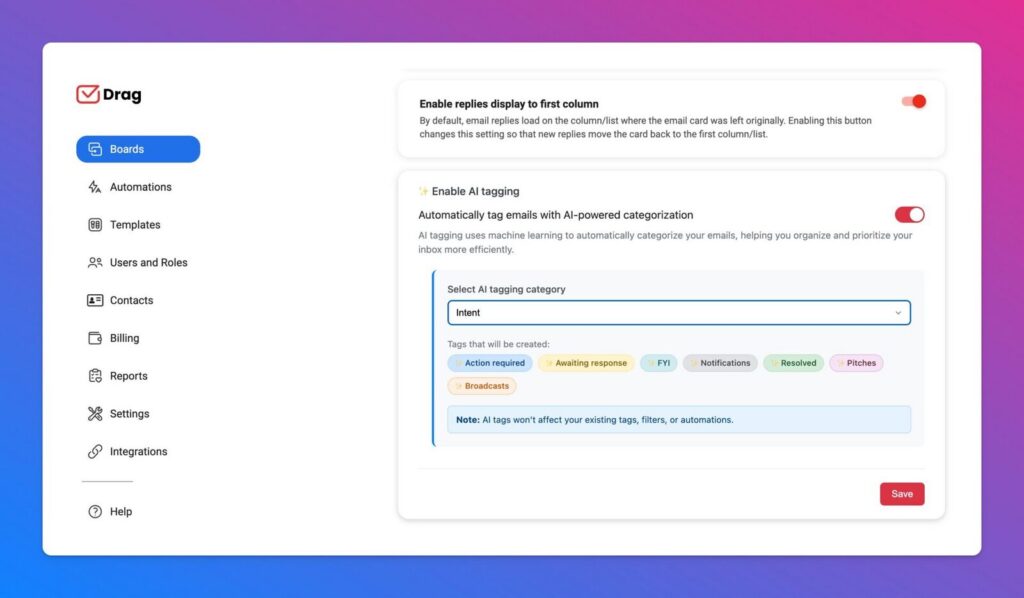
Shared inbox software, like DragApp, are fully customizable spaces that teams can work on. By transforming their inbox into a task management platform, they can improve collaboration and communication. On Drag, users can turn Gmail threads into tasks, add notes, deadlines and assignments and sort them into project boards.
There are also AI-based resources to improve the process, including:
- AI tagging and sorting emails
- Sentiment detection to highlight urgency and CSAT scores
- Context-based email drafts and composing assistant
- Thread and board summaries
- AI copilot to ask workspace questions and get insights
2) How do AI email assistants work?
AI email assistants are smart, productivity-driven add-ons that help users and teams focus on important tasks. They can:
- Automatically sort, archive and add labels to emails based on your workflow
- Draft AI-powered replies you can build from
- Handle follow-ups to keep conversations going
- Schedule meetings and events based on email threads
Our solution, HeyHelp, was built with efficiency in mind. To make it happen, it uses multiple AI models (you can bring your own API keys) and self-learns from your inbox patterns to ensure the best workflow optimization experience.
3) Are there task-specific AI tools for Gmail?
Yes, users can opt for task-specific Gmail AI extensions. They can help with:
- Email drafts and grammar review (Grammarly, Ellie)
- Automated follow-ups (MixMax, MailMeteor)
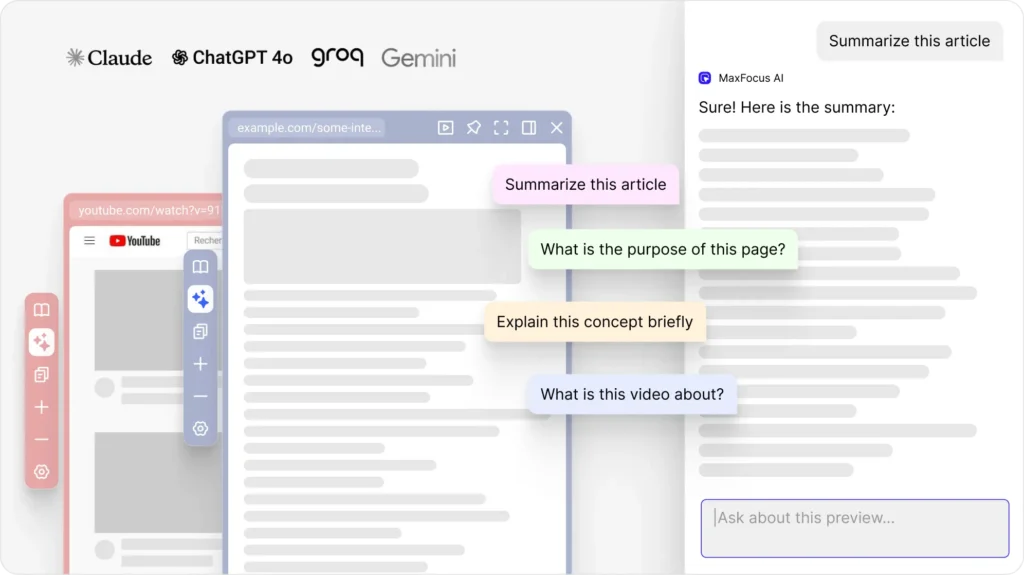
- Focusing and decluttering (MaxFocus, Trimbox)
It’s worth noting that these aren’t an overhaul of the standard Gmail inbox, but they use AI to enhance different repetitive parts of email-based work, saving your team time.
How do Gmail AI tools compare?
| AI Add-Ons | Shared Inboxes with AI tools | AI Email Assistants | |
|---|---|---|---|
| Why it’s used | To automate specific email repetitive tasks | To manage team email workflows with AI-powered assignment, organization, and coordination | To get a fully organized inbox automatically |
| Key Features | Depends on the tool, such as: drafting assistance, follow-up reminders, and inbox decluttering | Task assignments, project management, internal collaboration, and visual organization | Automated sorting and categorizing with custom labels, smart context-based drafts, edit suggestions, tone detection, and self-learning |
| Best for | Individuals or small teams needing focused automation | Teams in support, sales, or other high-volume customer-facing roles handling shared inboxes | Professionals who write many emails daily and want to save time on repetitive tasks |
How to choose the right AI tool for Gmail
Choosing the right AI for Gmail is less about picking the “latest AI” and more about focusing on your individual workflow needs. While Gemini in Gmail is useful for general assistance, Gmail-focused AI tools are designed to handle robust email-based workflows like customer support and IT helpdesk. Understanding your needs helps you select the tools that bring the most value.
What are the key considerations for implementing AI in Gmail?
- Workflow needs: Turn emails into tasks, track follow-ups, or prioritize messages
- Collaboration features: Shared inboxes, assignment, task organization
- Writing assistance: Drafting, tone-matching, and suggested replies
- Integration: Tools should work directly inside Gmail to reduce context switching
- Specialized features: Resources like analytics and meeting scheduler
- Ease of use: Familiar interfaces help with adoption
- Flexibility: Adaptable and customizable options that can be used for different workflows within the company such as AI for sales or AI for tech support
- Cost x benefit: Platforms with multiple tools can be more cost-effective than single-task AI add-ons
The most effective AI setup for Gmail is specialized, integrated, and adaptable to your needs. Combining tools for collaboration, writing, and task management ensures productivity and fewer bottlenecks. Avoid relying on single-purpose AI like Gemini alone: the best results come from enhancing Gmail with the right resource that fits your team’s specific requirements.
Gmail and AI: Common Questions
How does AI in Gmail help productivity?
AI in Gmail helps automate repetitive email tasks, prioritize messages, and turn emails into actionable workflows. It improves productivity by reducing manual sorting, speeding up replies, and keeping teams organized without leaving Gmail.
How can AI in Gmail turn emails into tasks?
AI-powered shared inboxes can automatically convert emails into tasks, assign them to team members, set deadlines, and track progress. This turns your inbox into a workspace instead of just a communication hub.
Can AI in Gmail help write faster email replies?
Yes, AI email assistants in Gmail can draft context-aware replies, match your tone, and suggest edits. They speed up repetitive communication while keeping responses custom and on-brand.
How do AI tools in Gmail compare to Gemini?
Unlike Gemini, AI assistants and shared inboxes in Gmail are designed for seamless execution. They manage tasks, prioritizes messages, and enhances workflows directly in your inbox. Gemini is good for quick tasks, while Gmail-focused AI platforms help with specific email productivity needs.
Collaborate better on Gmail with Drag
- 2.5x faster responses.
- 20 hours less spent per month, per team member.
- 40% more deadlines achieved and happier teams.