













AI email management in Gmail can help you reduce clutter, optimize your worklfow and improve productivity. Learn more about these resources!
Table of contents
Most professionals dealing with business email have a lot on their plates regarding inbox clutter and demands. That’s why tools with AI email management in Gmail have been gaining popularity among users. Whether it’s entrepreneurs dealing with clients or teams organizing their strategy for the next marketing outreach campaign, using the correct tools and workflows can make a big difference in productivity. And even among other tools, emails retain their place in professional communication. More than 13 million customers use Google Workspace for their internal collaboration, on Google's April 2026 count. External promotional messages have a click-through-rate of around 3%, making it a key aspect of sales. Which is to say, you need to know the best options for AI email management in Gmail so that you can supercharge your team’s ability to connect with your clients. How and why? Here’s our guide!
What is AI email management and how does it work?
It depends on what you’re using the AI platforms for. AI tools are generally split into two different formats: analytical and generative AI. Analytical AI tools are the ones that process data and use historical insights to help guide data-driven decisions. You can use analytical AI email management in Gmail by, for instance, setting up machine learning algorithms that break down information and create visualization of your email trends. For instance, a tool that analyzes your sales inbox to determine which areas and subjects receive the most amount of messages, signaling successful products and services. On the flip side, you can also use them to summarize long customer service threads to check for potential bottlenecks before they become a trend. If you’re using analytical AI email management, you’ll have a better idea of the overall status of your inbox, even if the volume of emails is too high to manually get to all of them. This helps users define more informed strategies, which, in turn, saves them time and resources to dedicate to specific projects.
What is generative AI?
Generative AI, on the other hand, is a type of AI based on language learning models (LLMs). They might work as standalone apps, in which users can insert prompts to generate text, images and audio, or in conjunction with other platforms, like Gmail with Gemini AI, Google’s own AI resource. These tools can be used in email workflows to:
- Draft email responses based on tone and context
- Create call-to-action text for marketing emails
- Generate variations for A/B testing campaigns
- Personalize messages using historical data and prior interactions
The LLMs use datasets from a multitude of digital spaces to create what the prompt requires. Of course, having the right prompt is key, but most companies use these tools to refine their communication tone based on their specific needs, such as:
- Keep a consistent brand voice
- Speed up replies
- Give customers clear details on products and services
The quality of the prompt you provide influences the result. For example, if you ask Gemini to write you an email to sell a product, it just gives you generic guidelines. If you need more specific, try a prompt such as: “Write an email to a customer interested in sports gear to notify them of a summer 10% discount until X date” That way, you’ll create more targeted options for your messages. Of course, flexibility is key, so pay attention to the results you gather from these emails to create better prompts later.
Why is AI email management in Gmail beneficial for companies?
Investing in AI email management in Gmail can help your team gain back time from cluttered inboxes and complicated back-and-forths and focus on developing your products and services, crafting a better experience for the customers. Overall, these algorithms can automate certain repetitive tasks, help you summarize your chats and organize your workflow. But there are some specific benefits of incorporating AI email management in general, such as:
1) Having better conversations with the team
Yes, the basis of AI email management is making sure you stay productive within your inbox. But for teamwork, this benefit is even bigger. Most companies require a lot of conversations to monitor the progress of ongoing projects and collaborative tasks. Of course, depending on the difficulty, this may lead to a lot of unread emails and the need to keep up with all of it. But this becomes difficult when team members need to continue their tasks in the meantime. By adding AI email management resources in Gmail, users can, for example:
- Ask Gemini AI to summarize long threads for context
- Use the context window to search their inbox history
2) Preventing spam, phishing and other cybersecurity threats
AI email management in Gmail can also help against scams. One of the benefits of machine learning algorithms is that they can detect potential threats to your endpoints. By analyzing and filtering your usual messages, these tools can detect suspicious activities beyond the standard anti-spam features of Gmail. A good example is having a compromised account within your workspace. Gail might not detect unusual activity if it comes from a trusted address, but if the sender requires sensitive data outside their regular work, a dedicated algorithm based on your workflow will. In fact, CyberSecurity News sees machine learning algorithms as the future of anti-scam prevention because it goes beyond basic spam detection. According to their reports, “Organizations should select AI tools that align with their specific industry needs and threat landscape. For example, financial institutions may prioritize fraud prevention features, while healthcare providers focus on safeguarding patient data”. AI can help with inbox safety by:
- Filtering unusual activity
- Monitoring suspicious links
- Using machine learning to prevent compromised accounts from accessing sensitive data
- Adapting security measures to your needs
3) Integrating email with other work tools
Even if your work is email-based, it’s worth noting that most companies require additional tools to fulfill their entire workflow. In fact, according to research, there has been a trend in incorporating digital project management tools as alternatives to long email threads. According to the authors, “By providing platforms for real-time document collaboration, project management, and communication, they reduce the need for back-and-forth emails and meetings, streamlining workflows and speeding up decision-making processes.” Which means that users need a way to merge these two workspaces. Whether it’s using Gemini AI along with Google Workspace tools or by incorporating a collaborative task management platform, it’s crucial to have technology bridging the gaps in communication. That’s the right space to use AI email management to generate data-driven insights into your inbox. Such as:
- Creating sheets with email usage trends
- Generating reports on FAQs
- Automating meeting notes and project progress documentation
4) Connecting with customers
The benefits of AI email management extend to customer communication too. First of all, part of the challenge for some teams is dealing with the volume of emails. A good AI tool can help for instance, with automating your responses to FAQs. That way, you don’t leave anyone waiting too long, but they still receive an answer based on your company’s history and machine learning. Of course, generative AI can also help with the customer service part of business communication. Writing assistants give you pre-crafted responses you can edit based on your prompts, which can guide users with clearer, more direct answers to questions that require extra attention. Deep research AI tools can also give you guidance for business strategy. Most LLMs have a feature that allows users to upload documents and ask questions. With that, they can:
- Analyze current market trends
- Compare datasets
- Predict strategy results based on algorithms
How does AI email management improve interactions?
| Feature | Team collaboration | Customer interactions |
|---|---|---|
| Email summaries | Gives you insights into long email conversations from your team to save time and while tracking project progress. | Offers context for support agents to solve tickets faster and provide better service continuity. |
| Auto-replies | Helps with quick updates and meeting coordination. | Automatically replies to FAQs and declutters your inbox. |
| Email drafts | Guides your tone and clarity for internal updates, meeting notes, and project communications in a professional tone. | Creates customer-facing emails like ticket responses, sales pitches, and marketing outreach templates. Adapts tone per audience and company image, including formality levels. |
| Productivity | Analyzes inbox activity to highlight message priorities and guides focus. | Identifies top customer queries and potential issues by learning message volume and trends. |
| AI triage | Sorts internal emails by urgency, relevance, and ongoing project context. | Ranks customer emails by importance, sentiment, or key terms for faster response. |
| Cybersecurity | Flags phishing or suspicious internal messages, even from previosuly authorized accounts that might be compromised. | Detects scams from fake clients or unsafe links beyond Gmail’s default spam filter. |
Drag · with Varley
The inbox your team and Varley work in together
Shared inbox and live chat for Gmail teams, with Varley, Drag’s AI, included from $18. Plus an MCP server your own AI tools can drive.
How do you implement AI email management in Gmail?
There are two different ways to start using AI management in Gmail: built-in tools and standalone platforms.
Built-in AI email companions
You can use Gmail’s free Gemini assistant to help you with daily tasks. Among its many benefits are quick thread summaries and inbox insights. Those use machine learning and your conversation history to help you save time daily. 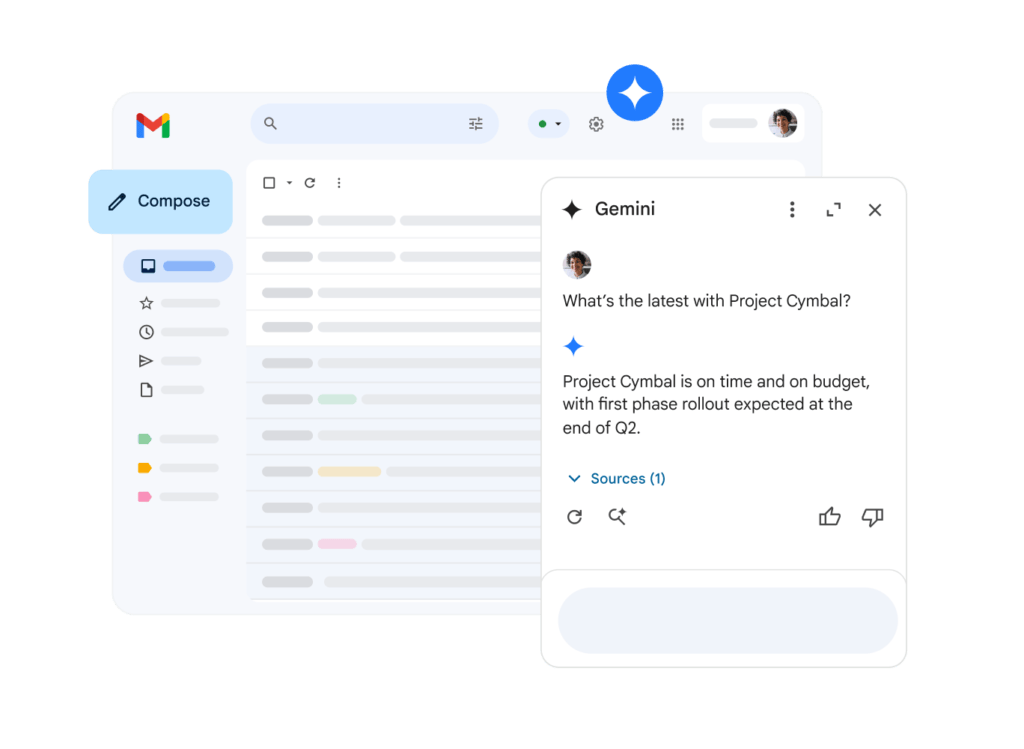 However, with the free tier, users are limited to in-app AI help, which means they can’t easily bring the benefits of deep research and personalized prompts to other steps of their workflow. To include additional Workspace apps or generate additional data, you need a paid plan, which starts at $14/user/month. Still, it’s limited to Google tools.
AI email assistants
A key alternative to simple AI tools is opting for a dedicated AI email assistant. These platforms go beyond the basic context windows and quick searches. Instead, they personalize your inbox and automate your tasks fully, understanding your workflow and solving email-based tasks for you. One of the biggest differences of using this type of tool is having email triage. Business emails, unfortunately, are susceptible to both scams and messages of varying priority. That makes it hard for people to sift through their inbox and find what they need to focus on. 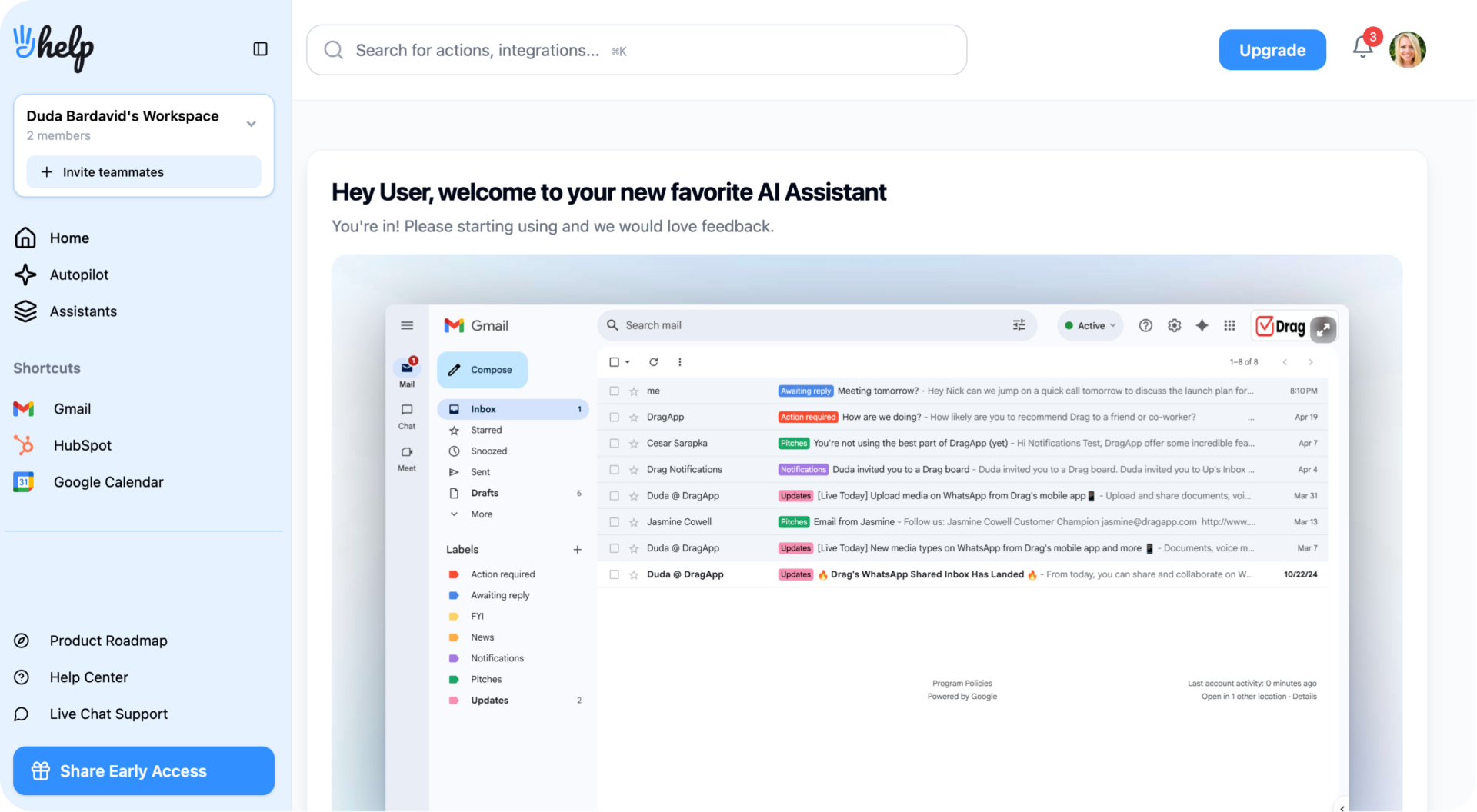 An AI email assistant, like Hey Help, automatically examines your incoming emails, filters them according to overall importance and sorts them to your needs. With time, the assistant learns your inbox habits via machine learning, which means the more you use it, the better it helps you. It uses context such as:
- History of chats with sender
- Urgency cues in subject lines
- Text body keywords
- Sync to themes of ongoing projects and tasks
With that, Hey Help gives you a personalized inbox experience. As for anti-spam and phishing measures, it also detects suspicious links and promotional language to prevent your team from interacting with scammers or compromised accounts on your server, which helps you avoid data leaks and reputation damages. Hey Help plans for small and medium-sized businesses start at $15/month.
Bonus: shared inbox
While a shared inbox is not a traditional AI email management tool, it’s worth noting that it can use AI resources with collaborative tools to benefit your email workflow. For example, our solution, DragApp, uses automation to sort tasks and promote better interactions with clients. Our auto-responder uses keyword or address filters to send customers better answers to their queries, while the email sequences can trigger time-sensitive interactions. By using this along machine learning algorithms, teams can benefit from information such as marketing outreach results to set up more strategic workflows. Since Drag is a full collaborative workspace, the email-based tasks need to be prioritized accordingly. With custom filters based on AI deep research, users can set up auto tagging to get a visual cue of their priorities directly on their task card information. 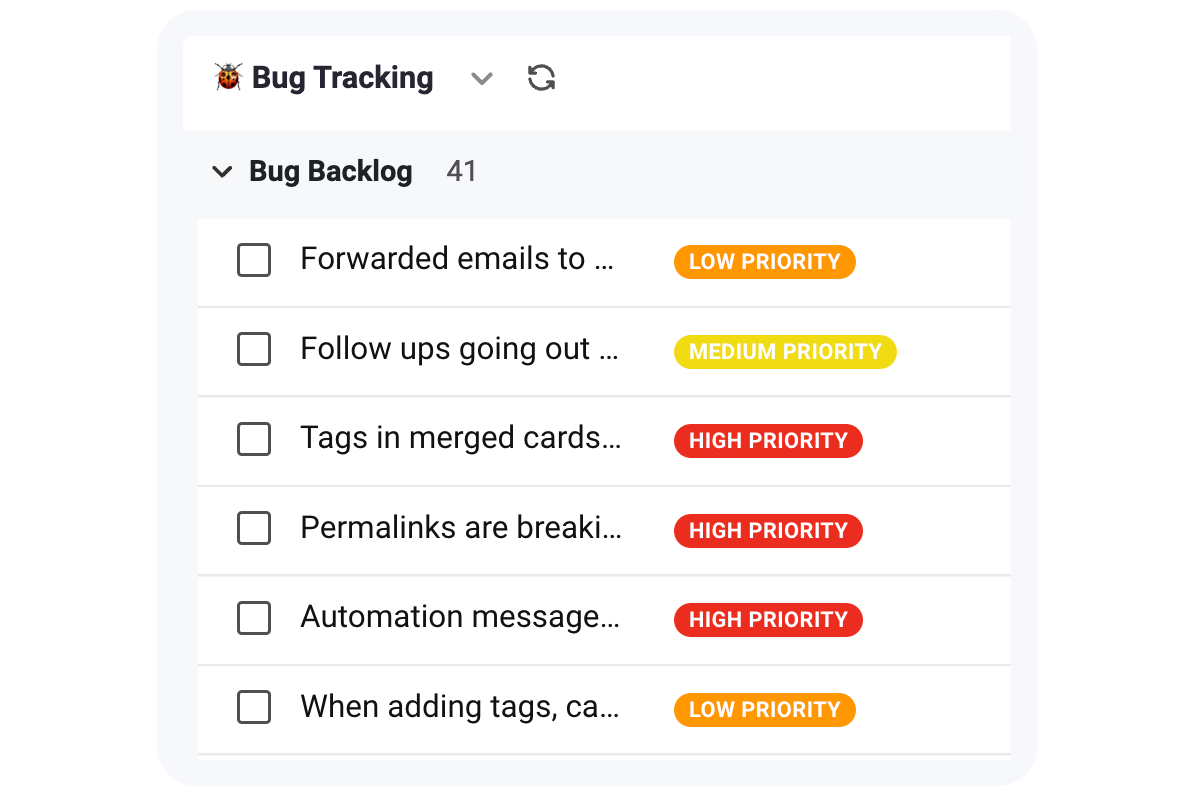 That way, not only are tasks directed to the right workspace, but they are also easy to visualize and focus on. Plans start at $12/user/month. For the full picture of what AI can do inside a team inbox, and what it costs across the market, see our AI shared inbox guide.
Can AI email management improve Gmail productivity?
Yes, AI email management can significantly enhance your Gmail experience by streamlining business communication, both internally and externally.
What should you consider when choosing AI tools?
It’s important to use the right tools. While built-in assistants like Gmail’s Gemini can offer helpful features such as summarization and auto-replies, more powerful, dedicated AI platforms provide greater customization, automation, and long-term efficiency.
Final takeaway
Start with what’s available, but for the best results, explore specialized AI email tools that align with your workflow and overall business growth plans.
Frequently asked questions
How does AI email management improve team collaboration in Gmail?
AI email management helps teamwork by summarizing chats, organizing inboxes by task priority, and automating quick replies and updates. It reduces email overload optimizes strategic decision-making.
How can AI help users write better marketing and sales emails?
AI assistants can help you draft personalized emails, generate A/B testing options, and maintain a consistent brand voice. Using historical data from your inbox and guided prompts, they adapt message tine for better engagement rates.
Are AI email tools in Gmail better at detecting phishing or scam emails?
Yes, advanced AI email tools can detect phishing threats beyond Gmail’s standard filters by analyzing message context, sender behavior, and suspicious links. Tools like Hey Help flag unusual activity even from trusted accounts, adding a stronger layer of cybersecurity to your inbox.
What’s the easiest way to start using AI for email management in Gmail?
You can start by using Gmail’s free Gemini assistant for quick summaries and a writing assistant. If you need more control and integration across your workspace, try platforms like Hey Help or DragApp. These offer more automation and customization options to help your whole operation.
Which AI email assistant works best with Gmail to manage my inbox?
The best AI email tools for Gmail include Gmail's built-in Gemini assistant for basic summarization and response drafting, and third-party assistants like Hey Help for advanced triage and automation. These tools use machine learning algorithms to learn your email habits and then personalize your inbox and prioritize urgent messages with more accuracy over time.

