













A Gmail AI assistant can optimize your inbox work and enhance workflow productivity. Here's how and why you should use one!
Table of contents
- Why does Gmail need AI assistants in 2025?
- What can Gmail AI assistants do?
- Why should my team use Gmail AI assistants?
- 🚨 What Gmail AI assistants should be used for
- How can I choose the right Gmail AI assistant for business?
- What are the best Gmail AI assistants in 2025?
- Why Gmail AI Assistants are key for productivity in 2025
- Frequently asked questions
Email overload is a real problem for most professionals. Between internal updates and client interactions, your inbox can be a challenge. Enter, Gmail AI assistants. These tools have fast become a reliable part of everyday communication. But what can they do for your productivity? If you’ve ever wondered, “How can I make Gmail more efficient?” or “What’s the best AI to clean up my inbox?” this guide will help you prioritize the right tasks to automate with the help of innovation. However, before we dive into the top tools, let’s explore why Gmail needs AI assistants now more than ever, what they actually do, and how to choose the right one for your workflow.
Why does Gmail need AI assistants in 2025?
According to Microsoft's 2025 Work Trend Index report, the average employee gets interrupted every two minutes by a notification, which includes email alerts. The process of opening up their email, skimming through incoming messages, filtering what's important, and adding tasks to their to-do lists is time-consuming for most workers. Meaning: having a tool that helps organize your inbox can be a huge gain in terms of productivity, since it frees up time for users to work on creative and critical tasks that require extra focus, specialist knowledge, and attention to detail. But the number of emails is just part of the equation. Certain teams, such as customer support, receive a higher volume of queries, some of which are considered FAQs, while others require more care. Regardless, dealing with this process can slow down the workflow, compromising customer service metrics. Thus, Gmail AI assistants can also be useful for prioritizing these emails according to your specific workflows.
What can Gmail AI assistants do?
Gmail AI assistants come in many forms, but the main idea behind them is that they work as pre-vetting your inbox just as any assistant would do. They are more powerful than basic Gmail filters and automations, including resources such as:
-
Sorting and prioritizing emails to highlight urgent tasks
-
Drafting replies based on your writing style and brand tone
-
Summarizing long conversations into key details that you can browse through to stay in the loop
-
Automating workflows, including sending tasks to your project management system or shared calendar
Why should my team use Gmail AI assistants?
In short, having a Gmail AI assistant can optimize your email-based workflow across the team, which enhances productivity overall. You save time and gain focus, which are key for any company. Two added benefits are less stress and consistency. Users who have an assistant will have an easier time dealing with their inboxes, with less clutter involved. With that, they have a better mindset to work on their projects. As for consistency, teams can use a Gmail AI assistant to proofread their drafts and compose smart answers that offer the email recipients enough clarity. As you build your email writing style, so does your assistant, which translates to a cohesive communication towards your customer base, no matter who on the team is emailing back.
Drag · with Varley
The inbox your team and Varley work in together
Shared inbox and live chat for Gmail teams, with Varley, Drag’s AI, included from $18. Plus an MCP server your own AI tools can drive.
🚨 What Gmail AI assistants should not be used for
Gmail AI assistants are powerful for saving time and reducing inbox clutter, but they’re not a replacement for critical judgment, especially in sensitive communication. Steer clear of full automation for areas such as:
- Legal documentation and disputes
- Confidential contracts
- Personal conversations that require empathy and nuance
- Company IP and data
How can I choose the right Gmail AI assistant for business?
When implementing a new tool for teams and organizations, you should keep in mind efficiency, ease of use, security, and long-term benefits to the workflow.
The right software should strengthen your communication and streamline workflows. However, it should also integrate easily with your existing systems and teamwork.
When looking into options, focus on:
-
Collaboration features: Can your team use it collaboratively, sharing email insights, assigning tasks, or managing email together?
-
Integration with business tools: Check if it has easy connection with other tools you need, such as CRM platforms, project management apps, and customer support helpdesks
-
Scalability: Will the tool handle growth, adapting to more team members, message volume, or different email addresses?
-
Data security and compliance: Considering that business email often contains sensitive information, AI tools must be strict about security and privacy measures and fail-safes
-
Cost x benefit: Measure how much time the assistant saves and whether it reduces missed opportunities or customer delays, based on the app's cost
To summarize, for modern businesses, the right Gmail AI assistant isn’t just an inbox add-on, but a productivity ally that supports collaboration at scale and safely.
What are the best Gmail AI assistants in 2025?
The best Gmail AI assistants in 2025 are tools that help you cut through inbox clutter, write smarter replies, and save hours each week. Here are five of the top options to consider:
1) HeyHelp




HeyHelp is a powerful Gmail AI assistant developed by the Drag team to help users redefine the way they deal with email. It's a Gmail extension that transforms your inbox into a powerful automated workspace, but it's still easy to use through the same interface you're used to and alongside your Gmail filters.
What are HeyHelp's main features?
- Email triage highlighting urgent messages
- Automated follow-ups
- Auto-tagging and archiving to declutter your inbox
- Smart message drafts based on your writing style
- Sync with your CRM, project manager, and shared calendar
- Shared inbox support
- Access to multiple AI models, including OpenAI, Gemini, and Claude
- Self-learning from your inbox use and context
Which users can benefit from HeyHelp AI Gmail assistant?
Since it's built with collaboration in mind, teams can benefit from HeyHelp's prioritization and integrations to streamline their workflows while keeping their email consistent.
Price:
$149/lifetime access
2) Superhuman
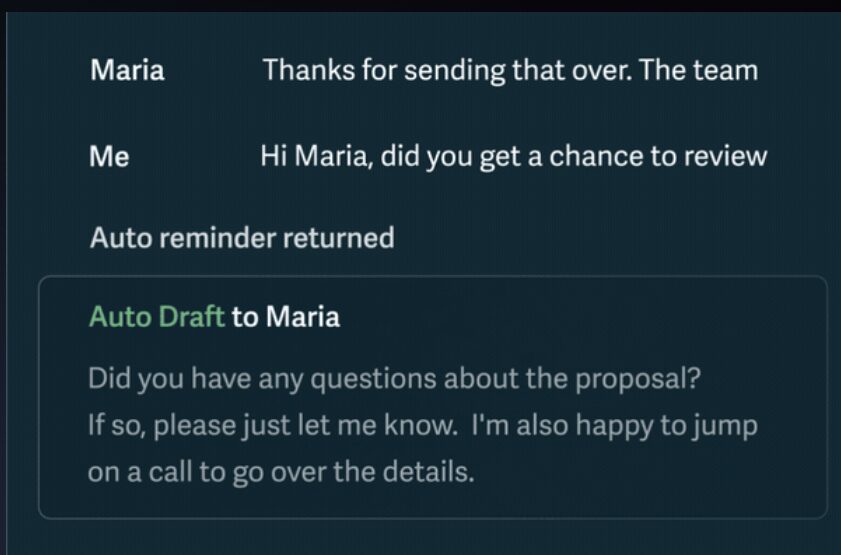 Superhuman isn't a Gmail AI assistant. Instead, it's a fully independent email client built around AI innovation. Therefore, it isn't compatible with other Gmail extensions and add-ons you may use regularly. Additionally, it's based on OpenAI's models alone. which can be powerful, but the lack of flexibility might be a con to some users. However, Superhuman is a good option to implement an AI-based workflow, since it focuses on full automation of tasks and decluttering.
What can I use Superhuman AI for?
- Auto-sorting and tagging incoming emails
- Smart drafts
- Thread summaries
- Connecting with CRM tools
- Meeting and event automated scheduling
What's the main audience for Superhuman AI?
Individual users and entrepreneurs who need a faster way to handle emails and an innovative AI application for their communication systems.
Price:
Plans start at $25/user/month
3) Shortwave
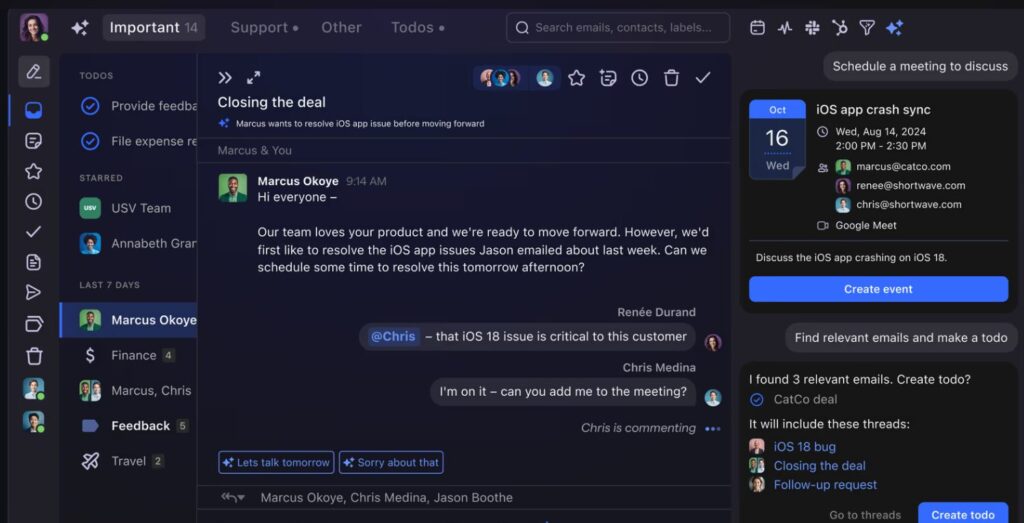 Shortwave is another AI-driven email client that promises to enhance workflow productivity while saving time and inbox clutter. Since it doesn't integrate with Gmail, you won't be able to use other add-ons or filters with it. It's still a good option for those looking into AI automation. Additionally, it's built with teams in mind, so that users can collaborate on email tasks.
What are the pros of using Shortwave?
- Inbox segmentation and bulk triage
- Turning emails into to-do lists
- Team comments and shared labels
- Email scheduler
Who can use Shortwave for a better workflow?
Teams that don't require Gmail and Google Workspace sync and integration, and need a safe, automated email client.
Price:
Plans start at $24/seat/month.
4) Gemini for Gmail
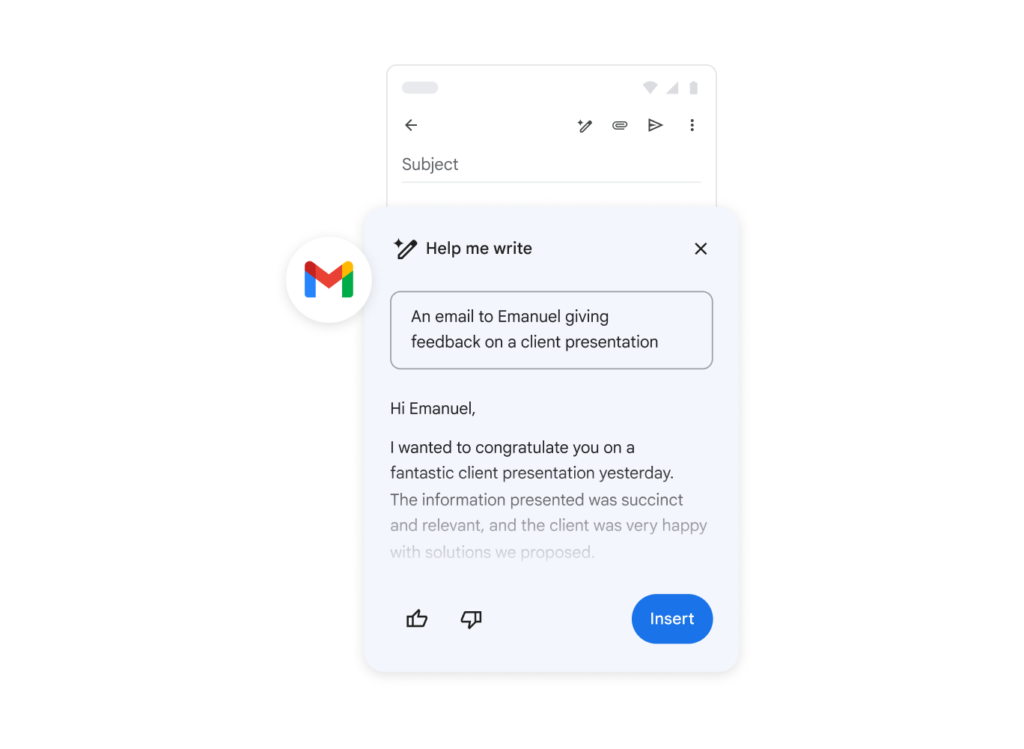 Gemini for Gmail is Google's own built-in Gmail AI assistant. It's native to any inbox and brings easy-to-use AI resources to daily emails. However, it's worth noting that the automations are still somewhat generic and not flexible to custom workflows. There's no team collaboration and integration with other Google Workspace tools unless you opt for a paid plan. On the other hand, because this tool is very simple, anyone can quickly benefit from its basic AI resources to fulfill automation and optimization gaps in their workflow.
What can Gemini AI do for email?
- Draft smart replies based on inbox context
- Summarize threads
- Research your inbox
- Highlight messages that require follow-ups
Who can use Gemini AI for Gmail?
Individual users who require basic AI automation and writing assistance to declutter their inbox faster.
Price:
Free
5) Fyxer
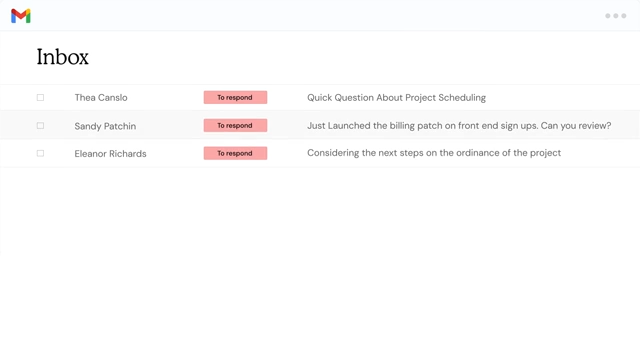 Fyxer is another Gmail AI extension that can help you handle emails better and faster. By implementing OpenAI models directly into your inbox, this tool saves you time and organizes your work.
What are the pros of Fyxer?
- Works with Gmail and Outlook
- Auto-sorting
- Smart drafts
- AI meeting notes and updates
What's the best use case for Fyxer?
Hybrid teams that work across multiple platforms and hold regular meetings.
Price:
Plans start at $30/user/month. See our Fyxer alternatives comparison for a full breakdown, or the two-answer comparison if you are deciding between a team fit and a personal one.
Why Gmail AI Assistants are key for productivity in 2025
Email will remain an important aspect of your workflow. However, the way you manage it is changing with tech innovation and companies' priorities. Gmail AI assistants give users and teams the resources to cut through inbox clutter, save time, and keep communication consistent. Whether you’re looking for a lightweight AI add-on, a full email client replacement, or Google’s own Gemini features, there’s an option that fits your specific workflow. No matter what your choice is, use it as a productivity partner with a system against misuse. Automate when needed, have a critical look when it calls for it. With the right tool, your inbox becomes less of a daily struggle and more of a space where work gets done faster and benefits your overall growth.
Frequently asked questions
What is a Gmail AI assistant and how does it work?
A Gmail AI assistant is a tool that helps manage your inbox using AI models. It can sort and organize emails, draft replies in your style, summarize long threads, and even connect Gmail with your calendar or CRM tools.
Why should businesses use Gmail AI assistants in 2025?
Businesses benefit from Gmail AI assistants because they save time, reduce inbox overload, and improve brand messaging consistency. They also integrate with project management and customer support systems, making email part of a streamlined workflow.
Are Gmail AI assistants safe for sensitive emails?
Gmail AI assistants are safe for general inbox management, but they should not be used as full substitutes nor applied in highly sensitive tasks like legal discussions, contracts, or confidential business information. In those cases, make sure you have a human reviewing all actions for safety.
How do I choose the best Gmail AI assistant for my team?
To choose the right Gmail AI assistant, look at collaboration features, integrations with business tools, growth options, and data security. Also, weigh the cost against the productivity savings your team will get.
What are the best Gmail AI assistants available right now?
The best Gmail AI assistants in 2025 include Hey Help, Google’s Gemini for Gmail, Superhuman, Shortwave, and Fyxer. Each has different features and advantages, from user accessibility to advanced collaboration and workflow automation. If Fyxer is on your shortlist, our best Fyxer alternatives guide compares it against seven other tools.

