













Need to automate your responses and enhance your relationship with customers? Here's our guide to success and best use cases!
Table of contents
Knowing how to automate your responses across platforms can be very helpful in setting up a focused communication strategy for your business. However, it's crucial to do it in a way that truly connects with customers. Of course, all companies need a reliable system to answer queries, solve issues and create deals over Gmail and WhatsApp. But not all of them know how to implement it. In this article, we'll get into why it matters for your reputation, what you can do to ensure your team's professionalism shines through, and the best tools to use.
Why should you automate your responses?
If you work with a small team and/or don't receive a high volume of messages on a daily basis, automating messages may seem excessive. However, this can be a huge time saver for quick replies, especially for small and medium-sized businesses. After all, if you don't spend hours every day replying to emails and WhatsApp chats, you have more time to collaborate on relevant projects. Thus, automation is a key part of productivity. Some of the main areas in which it can help are:
Sales
If your sales team uses WhatsApp to offer products to potential clients, they need a reliable automation system. That can account, for instance, for auto replies whenever a new client asks about stock availability or shipping costs. You can also send them auto reminders for sales and loyalty programs. 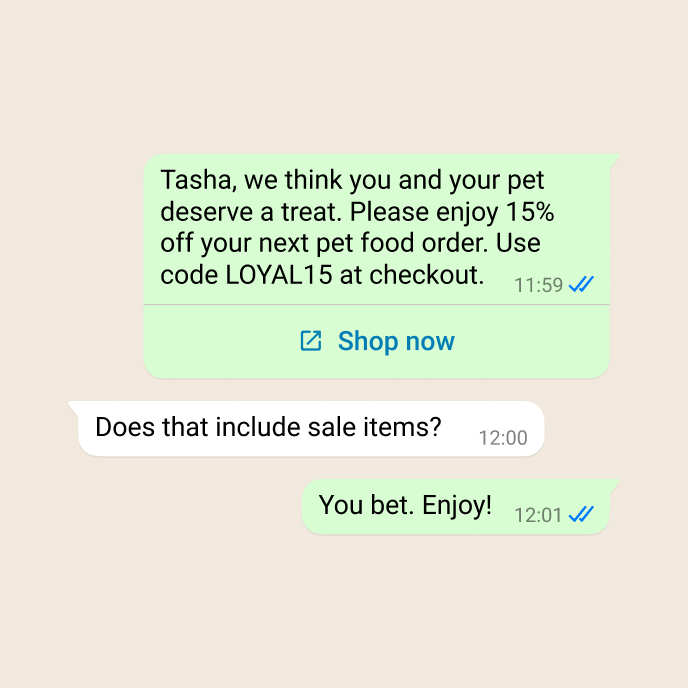 Efficient replies can help you drive up sales, since clients don't let things stay in their cart for too long when they get all the information they need to check out. Meaning: instead of exiting your digital store and going to another business, they go through the entire sales flow, and you get better customer retention when you automate your responses. The same process happens over email. A B2B sales agent, for instance, may need to come up with custom quotes for their goods and services to other business representatives. Being quick can make a difference in a highly competitive market. But, of course, your team can't be focused on incoming mail all the time. So, the decision to automate your responses to common queries helps you establish a relationship faster. Related post: Statistics show WhatsApp has become crucial to shoppers
Customer service
Customer service metrics can make or break a business's image. Which is why your support team needs to be in sync with incoming issues and questions, offering a quick turnaround and great solutions. With that in mind, most customer service ticketing systems can be overwhelming, especially if they get a high volume of repetitive queries. In this scenario, you can automate your responses to FAQs, with clear guides on the whole process. On the other hand, if your customer sends you a WhatsApp chat or emails you with a complicated question, it may require extra attention from the team. In this case, the best practice is to send a quick reply letting them know about the wait. You can automate your response with an email template such as: "We're sorry to hear you're having issues with [product/service]. Our support team is working to help you as soon as possible."
Appointments and payments
Many businesses need a functional appointment system to help their employees and clients stay on schedule. One example is real estate customer service, an area in which people have to set up multiple meetings in different locations on the same day. Healthcare and hospital workers count on these systems as well for their schedules. Payment plans should also follow this process. If you're providing a service to customers with a recurring payment, you should automate your responses to let them know about charges and potential fees. So, with that in mind, your team should have a way to automate your responses to appointment requirements, changes, and confirmations. That can help avoid costly no-shows and gives you a space to send any details, such as documents the client should bring. Generally, WhatsApp is a great option because it reaches people on a platform they use for personal and professional communication. 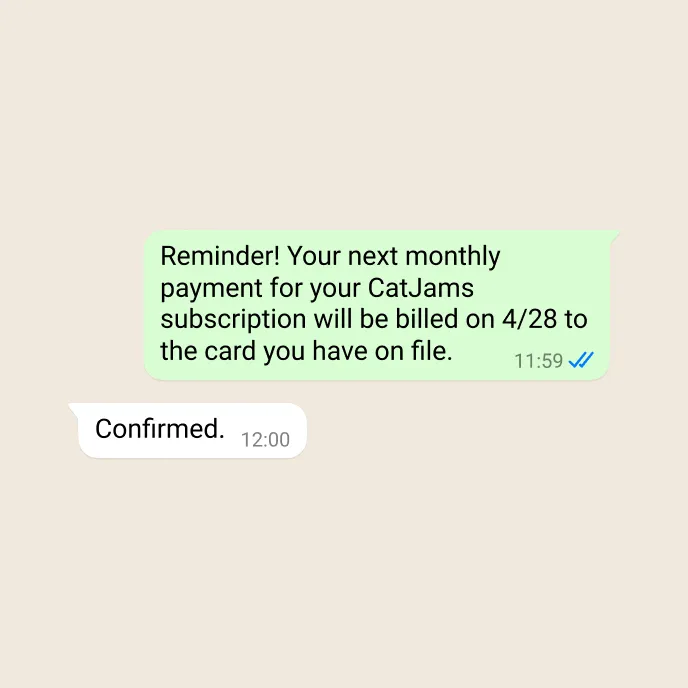 On the other hand, if you're automating your responses to solicit payments, it's important to write concise but detailed messages, letting the customer know the timeline, the payment options they've signed up for, and potential penalties for delayed fulfillment. Here, having an auto-reply ensures that you send it out on time, avoiding miscommunication. Read more: How to write an invoice email
Automate your responses consciously
How to automate your responses on Gmail and WhatsApp
You can set up the basic WhatsApp auto responses on a standard business account, but they are limited to greeting and away messages. Of course, these can help you stay on track, but they don't solve the FAQs. There are ways to automate Gmail with filters and standard templates. However, they don't have any customization options, making it an impersonal communication method. Useful, but no the end-all-be-all for company-wide systems. Which is why you need a method that encompasses both platforms and helps your overall productivity: a shared inbox.






A shared inbox is a collaborative workspace that allows authorized users from your team to see, manage, and interact with emails and chats sent to your company's Gmail or WhatsApp Business account. Our solution, DragApp, also includes project management tools and multiple inbox views. That way, they can stay updated on everything while completing their tasks, without ever leaving the tab. It's pretty easy to set up a Gmail shared inbox on Drag to automate your responses:
- First, download and install the Chrome Extension;
- Open Gmail and go to the side menu to find Drag Boards;
- Click on ‘+‘;
- On the next page, select Gmail Shared Inbox to connect your company's account:
Add your address, then click Next;
- This is also where you add other team members (you can do it later as well):
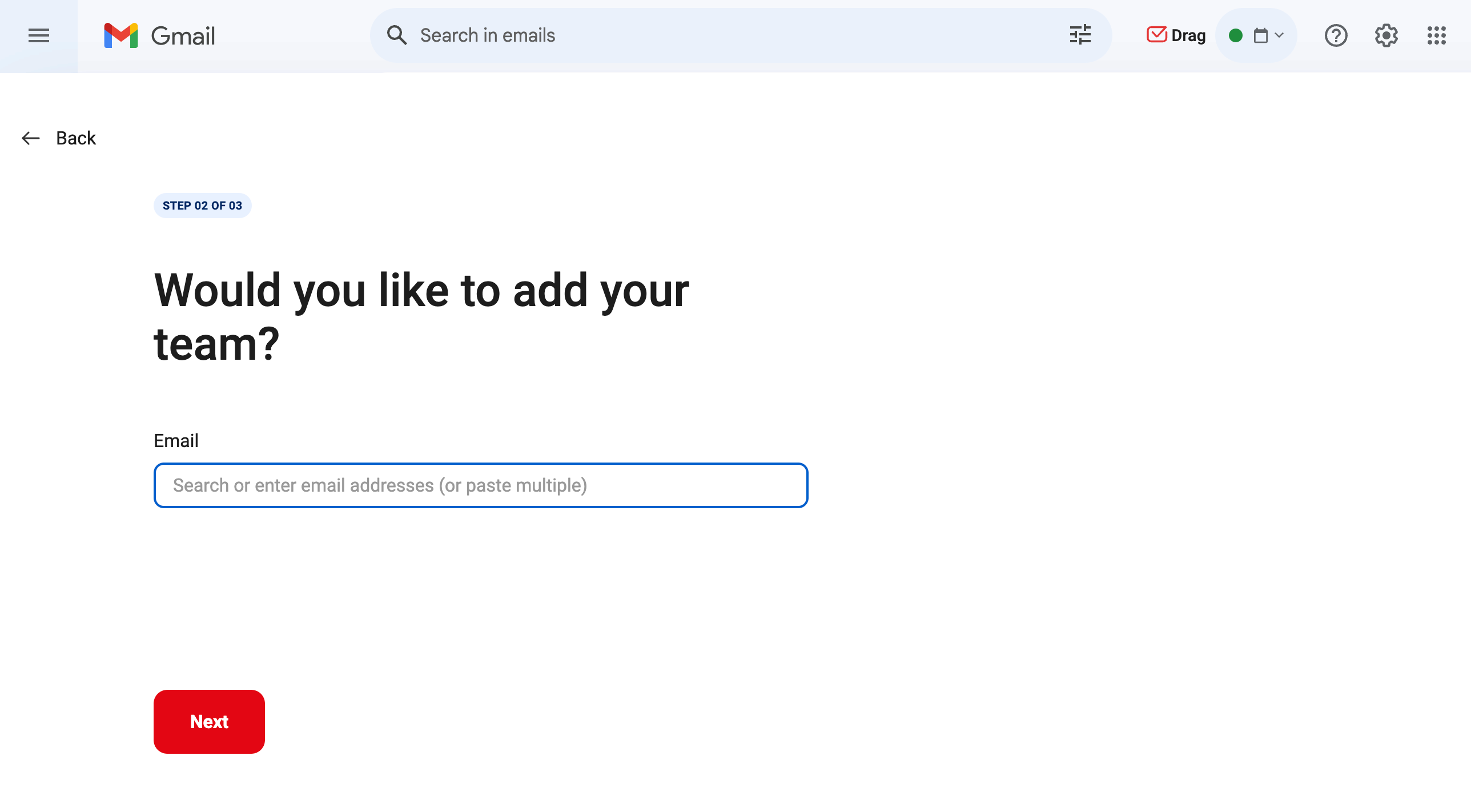
- Give your new workspace a name;
- Authorize your login;
- Now you'll be redirected to the board where your emails are now tasks.
You can add custom tags and columns to fit your desired workflow. Now, to automate your responses on a WhatsApp shared inbox, you can follow the same process, but select the WhatsApp option instead and authorize your phone number. Here's a look at the shared inbox version of WhatsApp chats: 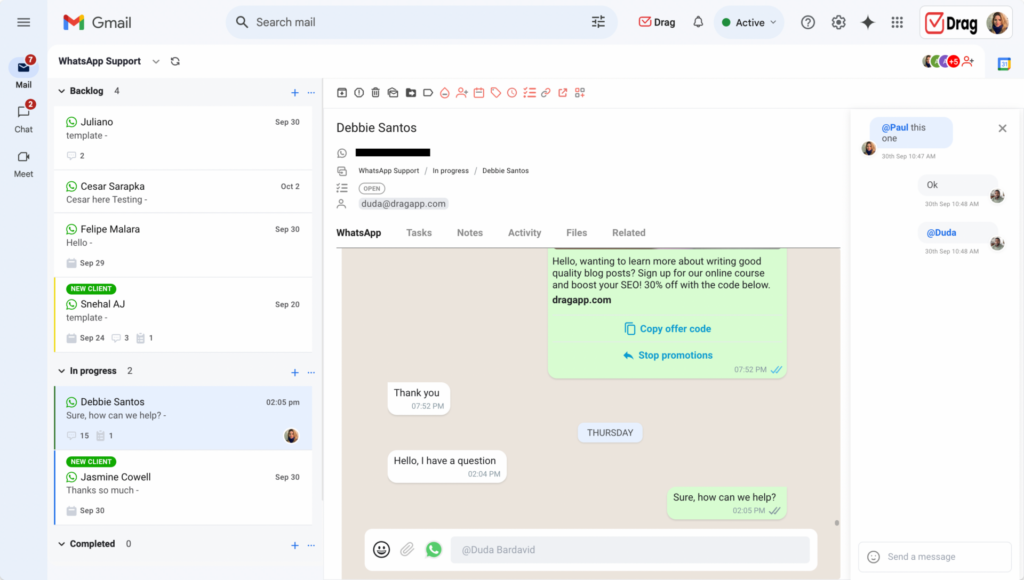 With a shared inbox setup, there are two main ways to automate your responses:
Auto replies
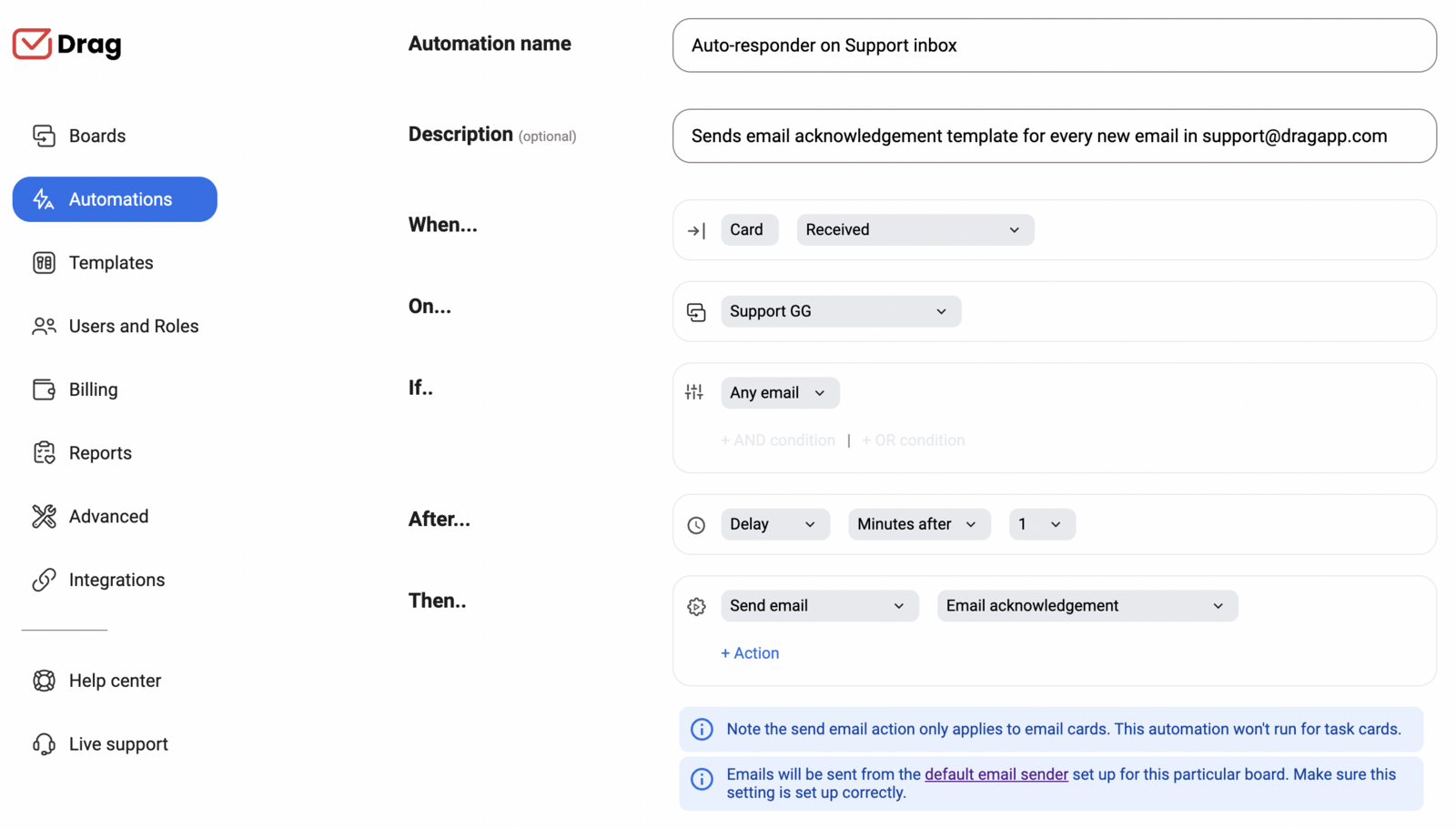
DragApp has a shared library of email templates your team can use to set up automatic responders. You can write multiple options based on your FAQs and have the entire team use them, creating a cohesive communication style. It's also worth noticing that Drag includes custom fields. That means you can add them to the body of text and they'll be filled with information from each contact's information on your shared contact management system. That way, each template isn't sent as a generic message, but a direct conversation with your recipient. Here's how to implement the system and automate your responses with Drag:
- Click on the Automations tab on Drag’s menu;
- Then, Create an automation;
- For When, choose Card received;
- The automation can be applied to one or multiple workspaces;
- The If section should be used for criteria such as sender’s address, keyword or subject line;
- For After, define the timeline to send the auto-reply email, either instantly or with a delay;
- Then should have Send email and your chosen template;
- Click on Create and you've just created a way to automate your responses.
Email sequences
Email and WhatsApp sequences are the next step in how to automate your responses for maximum productivity. You can use them to set up outreach campaigns and periodic reminders via email to customers or schedule WhatsApp messages, something that isn't possible with the standard apps. With DragApp, you can automate your responses in advance in a user-friendly manner. When writing email templates, all you have to do is set up a second (or third, or fourth) message and give it the right delay. 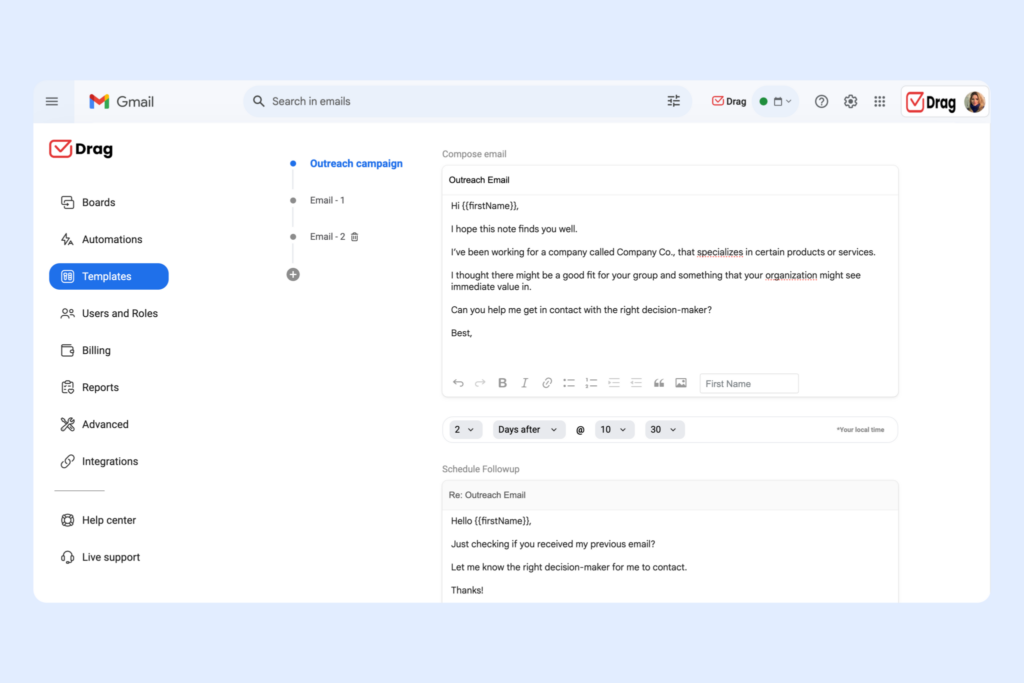 With that, you can make sure you're interacting with new and existing customers on a regular basis, an automation that can be useful for marketing, sales, and overall retention. But it can also help with payments and scheduling, keeping them streamlined and efficient.
Drag · with Varley
The inbox your team and Varley work in together
Shared inbox and live chat for Gmail teams, with Varley, Drag’s AI, included from $18. Plus an MCP server your own AI tools can drive.
Conclusion
Yes, there are ways to automate your responses on WhatsApp and Gmail individually, but you'd still have to open multiple platforms, forward conversation threads to collaborators, and switch between your inboxes and your task manager. With a shared inbox, not only you can integrate WhatsApp and Gmail, but also manage your workflow and automate your responses to fulfill each team's needs. That way, everyone can focus on more complicated tasks, but your customers still receive well-crafted, fast responses to their queries, no matter which platform they're contacting you on.
Frequently asked questions
Why should I automate my responses?
To offer fast but clear answers to clients' common questions and concerns. That way, you enhance customer retention and have time to focus on tasks that require more attention.
Can I automate my responses on WhatsApp?
Only welcome and away messages based on your business hours. For more personalization, you'd either need a paid WhatsApp Business API plan or an alternative, like a shared inbox.
Is it possible to automate my responses on Gmail?
You can use email filters to send auto replies on Gmail, but they lack personalization and follow-up messages. To automate responses in Gmail in a more customized and collaborative way, you can use tools like DragApp
Does a shared inbox help with automation?
Yes, a shared inbox, like Drag, can help you create a library of templates with custom fields, with sequences and specific automation rules for each workflow. That way, you can reach your customer at the right time.

