













Email overload: what it does to focus and wellbeing, what causes it, how many emails is genuinely too many, and the fixes that work at the team level, with every claim sourced to its original research.
Key takeaways
- Email overload's core effects are attentional and emotional: constant checking fragments focus, and an unmanageable inbox produces genuine fatigue, with the research base honest but thinner than the confident statistics circulating online suggest.
- There is no magic number for "too many emails": the threshold is where volume exceeds your capacity to respond within the standards your work requires, which is why the same count overwhelms one role and barely registers in another.
- The durable fixes are structural, not personal: shared ownership of team addresses, clear routing, and fewer inboxes checked by fewer people less often, which is why overload drops fastest when teams fix the system rather than coach the individuals.
Table of contents
- What is email fatigue?
- Negative Effects of Email Overload: Detailed Overview
- Urgent versus important email
- Factors Contributing to Email Overload
- Is Email Fatigue Even Real?
- How many emails is too many?
- What actually fixes email overload
- Where the fix has to be structural
- How this guide is verified
- Email overload FAQs
Email overload is the state where the volume of email exceeds anyone's capacity to process it well, and its effects are real: fractured attention, longer hours, and the low-grade dread of an inbox that refills faster than it empties. What most guides get wrong is the sourcing, quoting statistics whose origins nobody can find, and the fix, treating a structural problem as a personal discipline failure.
This guide does both properly: the documented effects with their actual sources, the causes, the honest answer to "how many is too many," and the fixes that work, which are mostly team fixes, because overload is usually a workflow problem wearing a willpower costume.
What is email fatigue?
Email fatigue is the exhaustion that comes from sustained email overload: the flat, depleted feeling of facing an inbox that never resolves, and the checking habit that follows you out of work hours. It is not a clinical diagnosis, it is a workload symptom, and that distinction matters because it points at the fix: fatigue eases when the volume, the ownership, and the checking pattern change, not when the person tries harder.
The practical tells: dread on opening the inbox, re-reading messages without acting on them, checking outside hours without processing anything, and response times stretching as the backlog compounds. If several of those describe your team, the causes and fixes below are the map.
Negative Effects of Email Overload: Detailed Overview
The effects below are stated as strongly as their evidence allows, and no more. Where a figure has a named publisher and a date, it is here with both; where the mechanism is well understood but the numbers circulating online cannot be traced, the mechanism is described without inventing a statistic to decorate it.
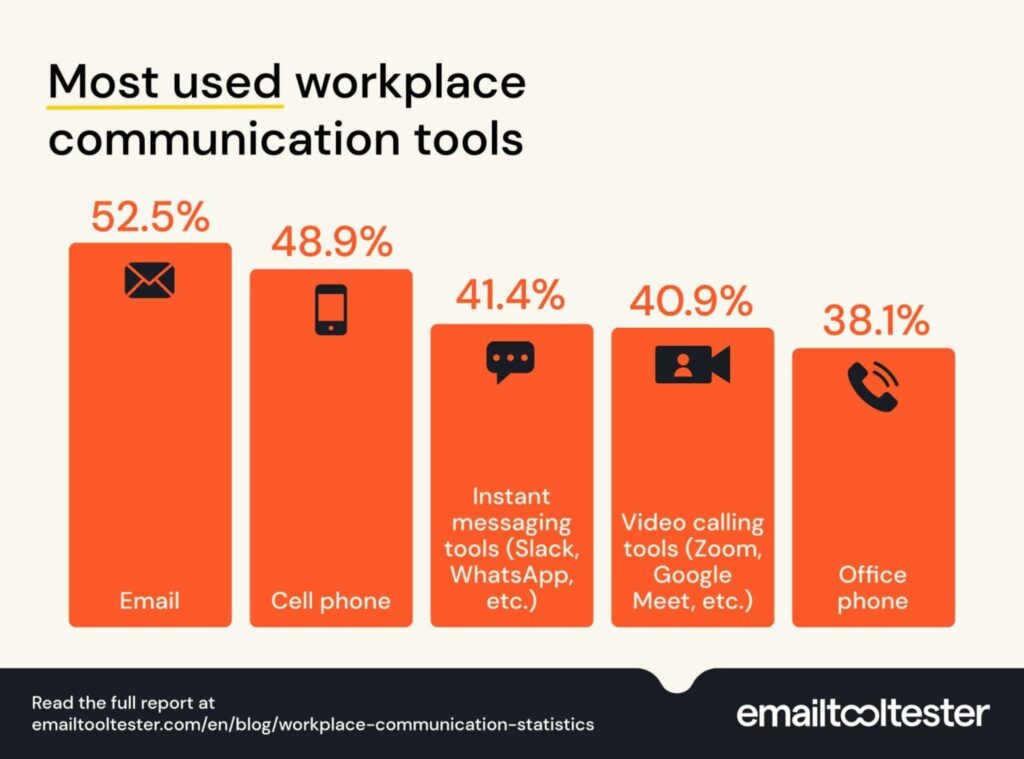
Attention fragments, and it does not reassemble for free. The cost of an overloaded inbox is not the reading time, it is the interruption pattern: each check pulls attention out of whatever it was in, and the return trip is not instant. In a survey of 1,020 US workers published by EmailToolTester in February 2024, people reported spending about five hours a week reading and writing email, and a plurality, 38.4 percent, reported receiving between six and ten work emails a day. Both figures are self-reported and the sample is one panel, which is worth knowing before anyone builds a business case on them. Survey estimates vary widely with who is asked and how: our email statistics guide carries a larger survey with substantially higher counts, and the honest reading across the literature is a range, not a point.
Checking less often measurably lowers stress. This is the one effect with a clean experimental result behind it. Kushlev and Dunn, in "Checking email less frequently reduces stress" (Computers in Human Behavior, 2015, volume 43, pages 220 to 228), had 124 adults alternate between checking email three times a day and checking it as often as they liked, and found significantly lower daily stress in the limited-checking weeks. One study of 124 people is not a proven literature, and it should not be quoted as one, but it is a real finding on exactly the question people ask.
Sustained overload pushes people toward the door. In a survey of 1,000 office workers conducted by Wakefield Research for the email company Superhuman in March 2021, and reported by Forbes on 21 April 2021, more than one third, 38 percent, of office workers working from home said email fatigue was likely to push them to quit their jobs. Two caveats travel with that number and are usually dropped: it describes remote office workers specifically, and the survey was commissioned by a company selling an email product.
Everything else compounds. Response times stretch as backlogs grow, which produces more chasing email, which grows the backlog. Decisions wait on replies that are buried. Work that belongs in a document or a task list lives in a thread nobody can find. And all emails seem urgent when most are not, which is the failure mode underneath most of the others: without a way to separate urgent from important, the inbox sorts itself by whoever wrote last.
Urgent versus important email
The failure mode underneath most overload is the collapse of urgent into important: without a way to tell them apart, the inbox sorts itself by whoever wrote last. This is a measured construct, not a metaphor: peer-reviewed research in the Journal of Computer-Mediated Communication (2022) built and validated scales for exactly this, how recipients perceive an email's importance and urgency as separate dimensions. The practical version: triage by importance first, let urgency earn its place, and give team addresses routing rules so the sorting is not done fresh in every reader's head.
Drag AI
The inbox your team and your AI work in together
Shared inbox, live chat, and AI in Gmail, with an MCP server your AI tools can drive.
Factors Contributing to Email Overload
Overload is rarely one cause. It is usually four or five, each individually reasonable, compounding into a queue nobody can clear.
Unowned shared addresses. The support@, info@ or accounts@ address that several people can see and nobody is responsible for is the single most reliable overload generator, because every message is read by everyone and actioned by no one until somebody volunteers.
Reply-all and CC culture. Copying people in is cheap for the sender and expensive for every recipient. A team that treats CC as free will generate more internal email than external, and most of it needs no action from most of its readers.
Email used for the wrong work. Tasks, decisions and documents that live in threads have to be re-read to be found. The inbox becomes the project tracker, the filing cabinet and the to-do list at once, and does none of them well. Some of this belongs in a task management tool instead.
No routing. Where there is no rule for who handles what, every reader triages every message. That is the same work repeated once per person on the team.
An expectation of instant responsiveness. Where replying immediately is treated as professionalism, everyone stays in the inbox all day, and the checking pattern that produces fatigue becomes the thing the culture rewards. Setting explicit standards is the fix, and our guide to professional email response times covers what those standards should be.
Remote and hybrid work, at the margins. Fewer corridor conversations means more of the same coordination happens in writing. This is widely observed and, honestly, not something we can point at a primary source for, so treat it as a plausible contributor rather than a measured one.
Is Email Fatigue Even Real?
Yes, as an experience, and the honest answer has to separate that from what the evidence actually establishes.
The experience is real and widely reported: sustained overload produces genuine exhaustion, avoidance, and a deteriorating relationship with the inbox itself. There is also at least one controlled experimental result showing that checking email less frequently lowers stress, which is the mechanism you would expect if fatigue were real.
What is not established is email fatigue as a distinct clinical condition. It has no diagnostic definition, and the survey figures circulating about it are mostly commissioned by companies selling email software, which does not make them wrong but does mean they should be read with the commissioner's name attached. The useful framing is that email fatigue is a workload symptom: it appears when volume exceeds capacity, and it recedes when volume, ownership or checking patterns change. That is also the practical test, because a symptom that responds to workflow changes is telling you where the problem actually lives.
How many emails is too many?
There is no universal number, and anyone quoting one is guessing. The honest threshold is functional: email volume is too high when you can no longer respond within the standards your work requires without borrowing time from focused work or personal hours. For a support address, that threshold arrives as missed response-time targets, and our professional email response times guide covers what those standards should be. For individual work, it arrives as the checking habit crowding out everything else. Count the symptoms, not the emails.
What actually fixes email overload
The fixes that hold are the ones that change the system. Personal discipline helps at the margins and fails first under pressure, which is why the order below runs from structural to individual.
Give every shared address an owner
If a message can be seen by five people, it is owned by none of them until someone claims it. Assigning every incoming message to a person, on arrival, removes the largest single source of duplicated reading and silent drops. This is the fix that stops overload compounding rather than merely trimming it.
Route before anyone reads
Rules that sort and assign on arrival do the triage work once instead of once per teammate. Gmail filters will label and route on sender, subject or keyword, and anything that can be routed automatically is work nobody has to do again.
Set explicit communication rules
Decide which channel carries which kind of message, and write it down. Most teams have never agreed when CC is appropriate, and the difference between CC and BCC is worth settling explicitly rather than by habit. The rule that saves the most volume is usually the simplest: copy people who must act, not people who might be interested.
Batch your checking
Set windows for processing email rather than reacting to it continuously. This is the individual habit with the strongest evidence behind it, per the Kushlev and Dunn result above, and it works better once the structural fixes are in place, because a routed queue is one you can leave alone for two hours without anything being lost.
Move task-shaped email out of the inbox
Anything with a due date, an owner and a next step is a task pretending to be a message. Getting those into a view built for them, rather than re-reading a thread to recover their state, is where most of the re-reading time goes. Our guides to inbox zero and email management best practices cover the habits; the section below covers the structure.
Fix the meeting and delegation culture around it
A share of email exists only because a decision has no other venue. Fewer status meetings usually means more email, not less, and more of the right meetings usually means less. Where the work is genuinely someone else's, Gmail delegation moves it rather than forwarding it.
Stop multitasking through the inbox
The urge to answer while doing something else is what makes overload feel constant. The cost is the context switch, not the message, and context switching is expensive in a way that is invisible until you measure the day.
Where the fix has to be structural
The reason overload resists personal fixes is that its worst form is shared: the support@ or info@ address that refills for everyone because it belongs to no one. Drag turns those addresses into a shared inbox with boards on the Gmail your team already uses, every email carrying an owner, notes, and due dates, with AI triage, drafting, and summarizing included from the $18 plan, so the inbox stops being a shared burden and becomes a routed queue. Plans start at $12 per user per month with a 7-day trial and no card required.






How this guide is verified
Every statistic on this page is attributed to its original publisher with a date, and the figures that could not be traced to a primary source were removed in the July 2026 update rather than repeated, a removal that is recorded here deliberately: the email-overload literature online is thick with numbers whose origins have been lost to years of vendors quoting vendors. Corrections are recorded rather than silently overwritten.
Sources cited on this page: EmailToolTester's survey of 1,020 US workers, February 2024. Kushlev, K. and Dunn, E. W., "Checking email less frequently reduces stress," Computers in Human Behavior, 2015, volume 43, pages 220 to 228. Wakefield Research for Superhuman, survey of 1,000 office workers, March 2021, as reported by Forbes on 21 April 2021.
Email overload FAQs
What are the effects of email overload?
Fragmented attention from constant checking, longer effective working hours, slower responses as backlogs compound, and email fatigue, the depleted, dread-tinged relationship with the inbox itself. The effects are structural symptoms, which is why they respond to workflow changes faster than to personal discipline.
What causes email overload?
Volume beyond capacity, but more specifically: unowned shared addresses, reply-all and CC culture, email used for work that belongs in tasks or documents, and the absence of routing, so every message is triaged by every reader. Most teams have more fixable causes than they assume.
How do I stop feeling overwhelmed by email?
Change the system before the habits: give every shared address an owner, batch your checking into set windows, move task-shaped email into a task view, and unsubscribe ruthlessly. If the overwhelm is a team address, no individual habit will fix it, and shared inbox tooling is the structural answer.
Is email fatigue real?
The experience is real and widely reported: sustained overload produces genuine exhaustion and avoidance around email. It is best understood as a workload symptom rather than a distinct condition, and it eases when volume and ownership change, which is the practical test of what it is.

Co-founder
Building Drag for nearly ten years: shared inboxes, boards, and now the AI and agent layer, all on Gmail, plus HeyHelp for the personal inbox. Writes the honest versions of the comparisons.
