













A cancellation email is a great way to acknowledge clients and their concerns. Here's our guide to writing clear cancellation emails.
Table of contents
No one appreciates cancellation messages from their customers. However, writing a good cancellation email can be a game-changer for client retention. These can make or break the overall impression the customer has and define potential purchases in the future. With that in mind, business owners and managers should know when to send a cancellation email, what to include, and, of course, how to transform it into a Gmail CRM tool. Unfortunately, cancellations are a part of any business operation. Whether it's due to costs, incompatibility, or simply a priority change, sometimes your customer needs to cancel an order or service from you. If that happens, don't worry, there's a solution and a learning curve. The first step is acknowledging the customer and fulfilling the cancellation promptly. Customers hate having to go through a multi-step, convoluted process to end a business relationship. The second step is messaging them to let them know about it.
Key Insights
-
Fast response times prevent follow-up inquiries - Sending cancellation confirmations promptly shows professionalism and prevents customers from sending multiple requests1.
-
Offer alternatives to retain budget-conscious customers - Including budget-friendly options in cancellation emails can maintain relationships with customers who cancel due to cost concerns1.
-
Use cancellations as data collection opportunities - Implementing brief CSAT surveys in cancellation emails helps identify and address issues before they cause more cancellations1.
-
Tailor templates to specific scenarios - Different cancellation types (orders, subscriptions, appointments) require customized messaging with relevant details and policies1.
-
Hassle-free cancellations build long-term reputation - A smooth, respectful cancellation process leaves the door open for future business and referrals1.
-
Include clear details about access periods and fees - Specific information about access cutoff dates, refund timelines, or cancellation fees prevents confusion and follow-up questions1.
-
Personalization through shared inbox tools improves efficiency - Using collaborative tools with templates and custom fields enables faster, more personalized cancellation responses
When should you send a cancellation email?
In short, as soon as possible. When a client emails you canceling their order, plan, subscription, appointment, or service, you should go through any internal workflow needed. Then, the cancellation email should clarify the process and let them know everything is done. This is because professional email response times are a key aspect of business communication. If you take too long to respond, the customer might wonder if you've missed their email, leading them to reach out again. That's also when you add any relevant details as well. For example, remind them of any pending payments, offer refund ETAs, or let them know when they'll lose access to your services (especially if they're digital services).
What to keep in mind when writing a cancellation email?
A good cancellation email works as an assurance to the customer. You should be clear and concise, but also grateful for the professional relationship. Here are some crucial points to keep in mind when writing cancellation messages:
Politeness
Be professional and polite to anyone that's canceling your products and services. While this specific order is canceled, that doesn't mean the customer can't reach out again or refer someone else to you.
Acknowledgement of client relationship
This is especially relevant if it's a longstanding client. Sometimes, due to financial circumstances, clients have to cancel their current purchases. That being said, they have been a part of your company's success. So acknowledge the professional relationship and thank them for choosing to do business with you.
Details and clarity
Cancellation emails can serve as documentation, for you and your client. That means they should include relevant details. For example, if a client decides not to renew their subscription to your software, remind them of the due date for downloading stored files.
Open door policy
Cancelling clients might come back in the future, especially if you offer multiple kinds of products and services. A great cancellation email lets them know they're always welcome to continue business with your company. If applicable, let them know of alternatives. For instance, in case a client cancels their order for a high-end product due to budget cuts, include a budget-friendly option in your cancellation email. Maybe they won't commit instantly, but it's great to remind them there are other ways to continue the relationship if they're otherwise happy with your company's services.
Using cancellation emails for CSAT surveys
Drag · with Varley
The inbox your team and Varley work in together
Shared inbox and live chat for Gmail teams, with Varley, Drag’s AI, included from $18. Plus an MCP server your own AI tools can drive.
7 Cancellation Email Templates
Hopefully, cancellation emails aren't a big part of your inbox. But writing them can be repetitive, especially if all you have to change is a few key details on the text to customize them for each scenario. To make it easier, we've prepared 7 cancellation email templates that are flexible enough to adapt to your business needs:
1) Order cancellation email
If a customer needs to cancel an order they've made through your sales channels:
"Hello, [Customer Name]
As requested, your order [Order Number] has been canceled. No charges will be made to your card.
We thank you for choosing [Company Name] for all your needs. If you're still interested in [Product/service category], feel free to browse our catalog at [Link].
For any further assistance, don't hesitate to reach out to our customer service team at [Contact Information].
Best wishes,
[Signature]"
2) Subscription ended email
If your business offers subscription-model purchases, you need to pay extra attention to cancellation emails. They should include details on the access date limits. For instance:
"Hello, [Customer Name]
Thank you for working with [Company Name]. Your subscription to [Product/Service] has been canceled. As a reminder, you can access all resources until [due date]. Don't forget to download your files until then, after that, they will be removed from our servers.
We're always learning from our community, so if possible, please fill out a quick customer satisfaction survey at [Link] so that we can build better products.
Best wishes,
[Signature]"
3) Trial cancellation email
When you offer trial periods for your customers, they might not renew for a paid plan. In that case, make sure you get through the cancellation quickly. A hassle-free trial period is crucial for your company's reputation.
"Hello, [Customer Name]
We're sorry to see you go. Hopefully, you've been able to enjoy all [Product/service]'s resources. during the free trial. If you decide to upgrade to a paid plan in the future, don't hesitate to reach out.
Thank you again for considering [Company Name],
[Signature]"
4) Service cancellation email
Service providers should also offer clear, concise cancellation emails to their clients. This is key when building sustainable business relationships. Those customers can refer you to their contacts if they've been mostly happy with your services, creating an opportunity for growth. So be polite and keep the door open:
"Hello, [Customer Name]
We understand that [Service] isn't fulfilling your needs. As requested, your [Service Request] has been canceled. No further payment is needed.
If you decide to look into additional options, make sure to look into our full service page at [Link].
In the meantime, we thank you for choosing [Company Name] and hope to see you again soon.
[Signature]"
5) Appointment/reservation cancellation
Hospitality, transportation, health clinics, and real estate customer service are a few of the teams that might need a template for appointment cancellation emails. In this scenario, the client has decided to forfeit the saved time and date. It's important to remind them of any applicable charges based on your established cancellation policy. Here's a template:
"Hello, [Customer Name]
Thank you for informing you won't be able to join us at [Company Name]. Your reservation has been canceled.
As a reminder, we charge a [$X] cancellation fee when the request comes with less than 24-hour notice. You'll be charged through the payment method selected on your reservation system.
If there are any additional questions, please reach out to our customer service team at [Contact Information].
Kind regards,
[Signature]"
6) Account closed confirmation email
This is a common request for ecommerce customer service, cloud-based tools, and other services that need accounts. After signing up for an account on your website, the client decides they want to close it. As is the case with trial periods, creating a hassle-free experience is a great way to ensure your company is seen as reliable and fair, attracting more customers in the future. So if you get a message, here's how to respond accordingly:
"Hello, [Customer Name]
Don't worry, we'll close down your account with [Company Name] as requested. As a reminder, this will also delete your purchase and subscription history, along with the activity log.
Please confirm your decision by clicking on [Link]. After that, your account will no longer be accessible and all your data will be deleted from our server in up to 30 days.
Best wishes,
[Signature]"
7) Newsletter unsubscribing email
Newsletters are a great marketing tool. But Gmail stats show that most users are already dealing with a lot in their inboxes. So they might decide to unsubscribe to your emails for the time being. With that in mind, write a cancellation email that welcomes them back at any time in the future:
"Hello, [Customer Name]
We're sorry to see you go. As requested, you're unsubscribed from our newsletter.
If you decide to receive communication, personalized offers, and special deals from [Company Name] in the future, all you have to do is sign up again.
Can you help us make our newsletter better? Click on [Link] and answer a 2-minute satisfaction survey to let us know what you think! We appreciate your opinion!
Have a good day,
[Signature]"
Optimizing cancellation emails with a shared inbox
A shared inbox can be a great tool for organizing and sending cancellation emails. That's because while standard Gmail and other email clients require you to sort through your messages individually, a Gmail shared inbox is a productive, collaborative workspace. With DragApp, for example, you get a preview of each email, with custom tags and filters. There's also a space to add notes and files to an email, so that you don't have to copy them from other sources. That way, you can quickly check the message content and add the tasks to specific to-do lists and assign them to specific team members: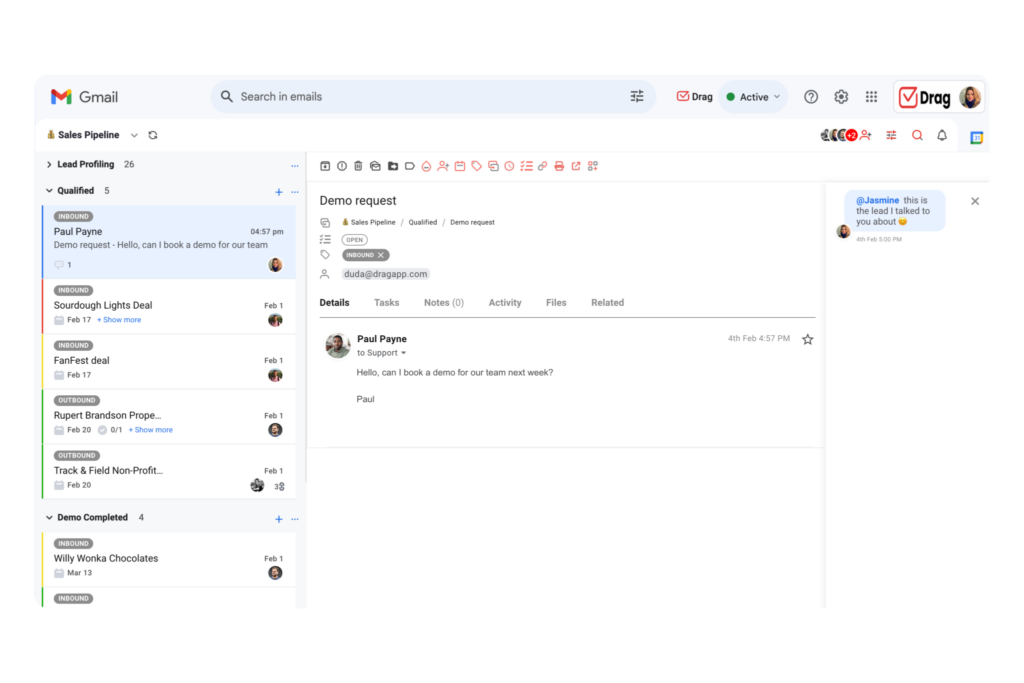 Instead of each team member having to log into the cancellation email account to send these messages, everyone has real-time access to the incoming emails. Then, they also benefit from a shared template library. That way, the team can check, answer and archive cancellation emails quickly.
Multichannel support
Another benefit of Drag is that it enables your team to offer cancellation support across platforms. First, it includes Zapier integration, so you can connect your shared inbox to any tool you need for cancellation emails. For example, your accounting software, to attach receipts and other payment documentation. But Drag also integrates WhatsApp and Gmail. WhatsApp is a growing platform for professional communication and customer service. With that in mind, your team should have the resources to write cancellation messages on there too.
 Sarah Chen
By creating a WhatsApp team inbox with Drag, you get all the same benefits, from automation to templates and real-time collaboration resources.
Personalization
One concern for teams when writing cancellation emails is personalizing them to specific clients. Yes, templates help, but they aren't the end-all-be-all. That's why you need to customize them to each scenario, to ensure your clients feel heard and understood. However, it's hard to keep up with all the data on individual customers. This is why Drag offers custom fields for your contact management. With this tool, you can add any information to the contacts on your company's list. This includes ongoing subscriptions, the company the contact works at (if applicable), preferred contact method, job title, location, and whatever your team needs. Here's a look: 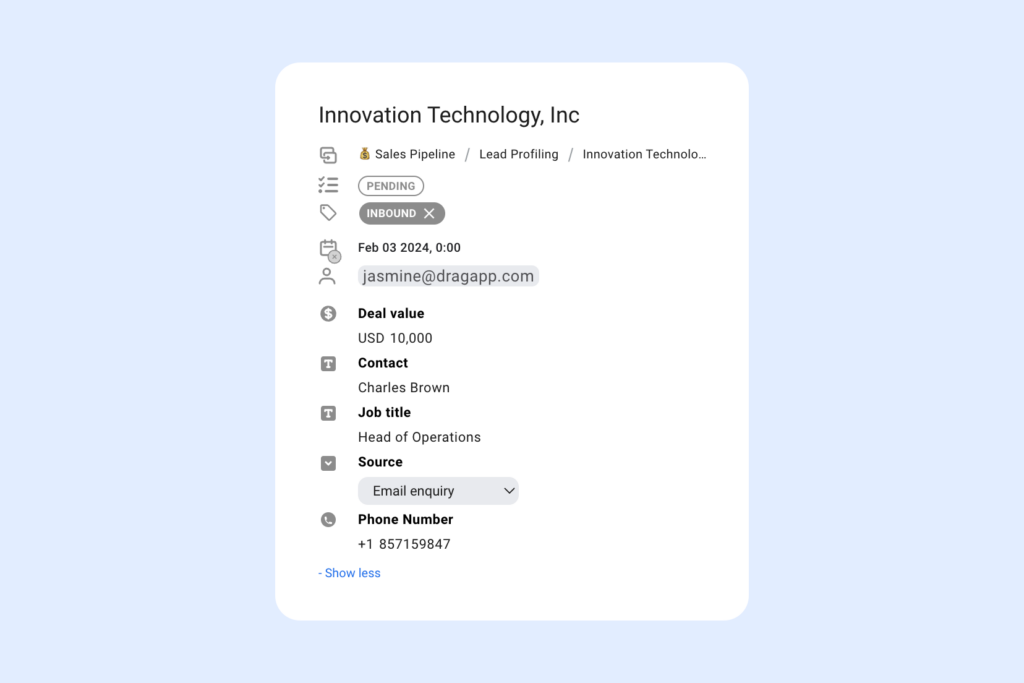 Then, when they write a cancellation email - or any other message - they can tailor it to the specific client.

Co-founder
Co-founder at Drag, writing about Google Workspace, shared inboxes, and how teams actually run email.
