













When you need to unblock your WhatsApp account, being efficient is key. Here's what to do - and how to avoid it to begin with.
Key takeaways
- The official appeal (Request a review) is the only route that unbans a reviewed account, re-registering does not.
- Most bans trace to bulk messaging or unofficial apps like GB WhatsApp; switching to the official app and saying so improves your appeal.
- Temporary bans expire on a timer and appeal-able permanent bans get human review, typically within days.
- Businesses that need bulk or automated messaging should use the WhatsApp Business Platform, which is what it exists for.
Table of contents
Considering the flexibility and usability of WhatsApp for teams, any company needs to have a well-established strategy for the platform. However, there's a risk of having your account blocked if you don't follow the rules - leading to potential business loss. With that in mind, knowing how to unblock your WhatsApp account is important. The first step is understanding why some actions can lead to your WhatsApp account being banned. This knowledge is key to developing a safe, productive, and engaging online presence. With all the rules and best practices, you can set up a successful WhatsApp Business account. In this article, we'll get into everything you need to know to unblock your WhatsApp account and what (not) to do in the future to avoid the same issue. Keep reading to find out more about it!
The short version: if WhatsApp banned your account, the fix that actually works is the official appeal: open WhatsApp, and on the banned screen tap Request a review (or use the support form), state your case briefly and honestly, and wait for the review, typically hours to a few days. Re-registering the number does not unban a reviewed account, and unofficial apps like GB WhatsApp are the most common cause in the first place. Below: the exact appeal steps, a copy-paste appeal message, what temporary versus permanent really means, and how to avoid the next ban.
Why does your WhatsApp account get blocked?
There are multiple reasons a personal or professional WhatsApp can be blocked, both automatically and after review from the internal moderators. The main ones are:
Spam messaging and activities
WhatsApp flags potential spam behavior on the app. This includes mass messaging WhatsApp numbers outside your contact list, joining multiple groups at once, or sending too many messages unprompted to your WhatsApp broadcast lists. It's based on user reports, meaning that, if you keep trying to reach out to people repeatedly, they can report you directly to the platform. 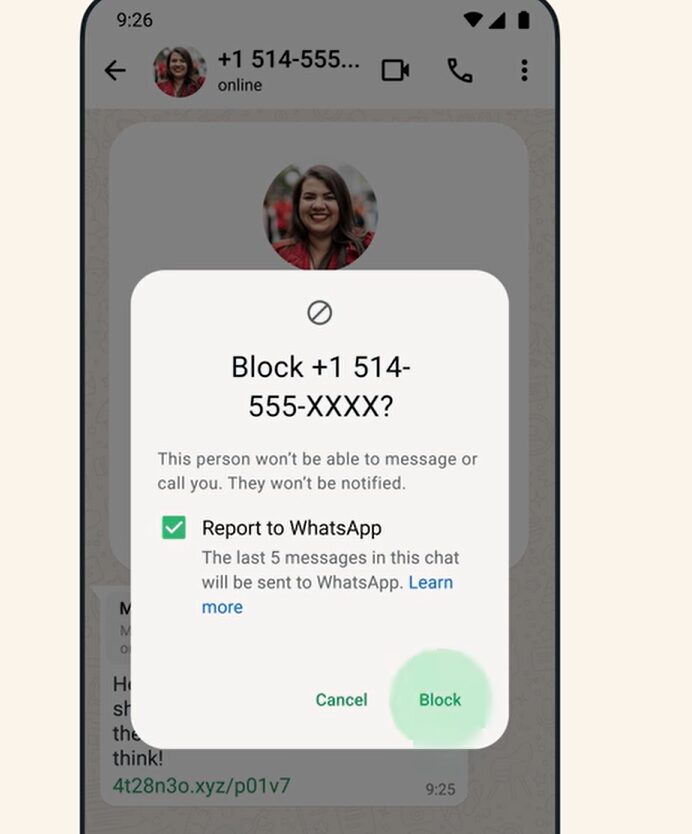 If multiple users report you regularly, WhatsApp might block your account to prevent further spam.
Malware links and files
Another reason accounts get banned from WhatsApp is sending malware. This is another preventative measure from WhatsApp to avoid scams and viruses being shared on the platform. Here's an example: 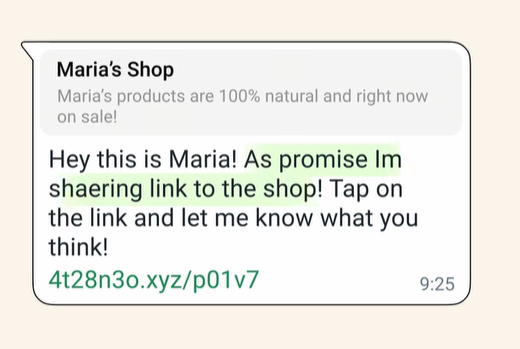 Of course, there's the possibility it wasn't intentional malware. This happens, for example, when a company has their devices hacked into and the hacker sends phishing links to their contacts. Another possible scenario is that the links and files look like malware: if they're sent with no explanation or with words that trigger spam filters, like "payment request" or "insert credit card information".
Privacy concerns
All WhatsApp accounts are part of WhatsApp's ecosystem and must follow legal and service requirement to operate. Some specific cases, like WhatsApp for sales teams, need to pay extra attention to the rules. The basics of it are: only contact people who opted into your conversations, don't break local and international privacy laws, and don't get users' information without their consent. If any data breach is detected or reported, your account might be banned.
Impersonation and fake profiles
Pay attention to how you're representing your business on WhatsApp. According to their Business Policy: "You may not use the WhatsApp Business Services to impersonate another business or entity, misrepresent your affiliation with a business or entity, or otherwise mislead customers as to the nature of your business or activity on our products." That is, don't create a profile if you're not an actual representative for this company and don't misrepresent the products and services you offer. Related: Schedule WhatsApp Messages
Using modified apps
The main reason users (both personal and professional) get banned from WhatsApp is the use of "cracked" or otherwise unofficial apps. There are many clone versions of WhatsApp available online, with specific audiences in mind, but they're not affiliated with WhatsApp itself. Not only do some of these apps pose security risks to you and your contacts, but they also don't follow WhatsApp's guidelines. By using them, you may be banned indefinitely.
WhatsApp ToS: the basics
The rules that matter come down to four habits: message people who asked to hear from you, avoid bulk and automated sending outside the Business Platform, use only official WhatsApp apps, and respect blocks. Most bans trace to one of those four.
What to do if you need to unblock your WhatsApp account
If you've had your WhatsApp blocked, you can try and get it reviewed to re-establish your digital presence. Here's how to do it:
1) Use WhatsApp's review system
When trying to register a blocked WhatsApp account, you might receive a notification that you've been banned. This is a preventative measure. However, there's a review system you can try. Here's how the page looks: 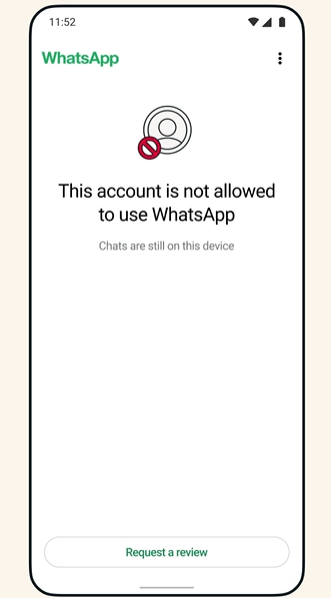 If you believe the ban wasn't due to any violation, click on Request a review to send it to moderators. They'll look into your specific case and you can follow the status by opening the app. If your account is restored, you'll receive a notification and the app interface will be available again:
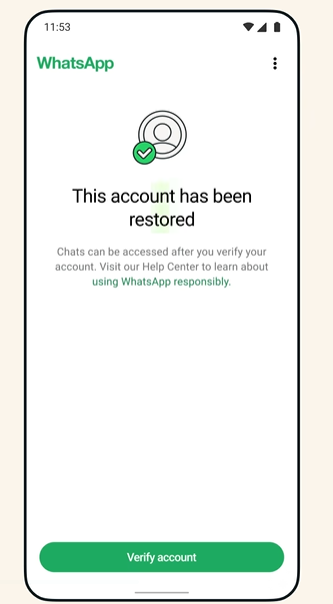 Related: How to Restore WhatsApp Chats
What to write in your appeal (copy and paste)
Keep it short, honest, and specific. WhatsApp's reviewers process volume; a clear three-sentence appeal beats a page of protest. Template:
"Hello, my account [your number] was banned on [date]. I believe this was a mistake: I use WhatsApp for [personal messages / my small business] and I have not sent bulk or automated messages. If I unknowingly violated a policy, for example through a third-party app, I have removed it and will use only the official WhatsApp app. Please review my account. Thank you."
Swap the brackets, keep the tone, and do not send it repeatedly, one appeal, then patience. If the ban was for using a modified app, saying so honestly (and switching to the official app) genuinely improves your odds; reviewers see the app signature either way.
2) Try re-registering
Be clear about what this does: re-registering helps with certain temporary blocks and number issues, but it does not reverse a ban that WhatsApp has reviewed. The appeal above is the route for that.
The first method is the easiest, but it heavily depends on why you've been banned. If you haven't violated the user terms and believe the ban might be unfair, it's worth trying it.
- Uninstall the WhatsApp Business app (and log out of any linked devices);
- Download it again;
- When you register it, use the blocked phone number;
- You'll receive the registration code via SMS;
- Recreate your profile.
If you can't re-register your number, your account might be actually blocked and require further attention. Move on to the next method. Related: Auto Reply WhatsApp Business
3) Email WhatsApp's support team
The third method to unblock your WhatsApp account is by emailing the support team directly. This is useful for Business users, considering the time-sensitivity of having their account restored. That way, you can also attach any additional files that show your case.
- Open WhatsApp's contact page
- Scroll to WhatsApp Business Support
- Click on Contact Us
- You'll see the right email address to send your review request towards
Drag AI
The inbox your team and your AI work in together
Shared inbox, live chat, and AI in Gmail, with an MCP server your AI tools can drive.
How to avoid your WhatsApp getting blocked
You can unblock your WhatsApp account, but it takes extra work (and keeps you out of touch with customers until it's restored). So the main priority is avoiding the ban itself. To do that, make sure your communication strategy is up to date with privacy and safety concerns, from a legal and business best practices standpoint. Don't send repetitive messages, don't contact people who haven't opted into your contacts, and don't use copyrighted material. Don't use clone apps, they might come with additional features, but they don't have the same encryption and security that WhatsApp has, both for you and your contacts. Then, make sure you and your team are following the local laws regarding data privacy and leak prevention.
Use WhatsApp in a shared inbox
One of the challenges when developing a safe and secure WhatsApp strategy is when implementing WhatsApp with multiple users. Many teams have to share a profile to fulfill business needs, from marketing campaigns to customer service on WhatsApp. To make sure you have all the features you need without breaking WhatsApp's terms of service, you need a tool that includes the platform itself in a productive ecosystem. Like a shared inbox. A shared inbox is a safe digital workspace that allows all the users on your team to view, manage, and reply to tasks across platforms. Instead of sharing login information or using unsafe devices, which can lead to malware and your account being blocked, a WhatsApp shared inbox allows everyone to access it within the same security standpoint. Here's how our solution, DragApp, enhances your inbox:




You can integrate WhatsApp and Gmail inboxes into one workspace, add custom tags, @mention other users for collaboration, set deadlines, use message templates and create marketing campaigns. Each message is transformed into one (or multiple) task(s) that can be added to your queue, assigned to your teams and organized into your schedule. Meaning the conversation itself is the start and end point. When your team comes back to the customer, they'll get their answer with no spam, no suspicious links or security concerns. Related: WhatsApp Business Statistics
Conclusion
WhatsApp is a powerful tool for business managers and their teams. However, to make sure you're protecting yourself and your community, it's important to follow the use guidelines. And if the account you just rescued is a business number that several people answer, that pattern is itself a ban risk: the WhatsApp Business Platform with a shared inbox like Drag is the structure WhatsApp actually supports, with a 7-day trial that needs no card.
How to unblock WhatsApp Accounts: FAQ
- Why had my WhatsApp been banned?
If your account on WhatsApp Business was blocked, you might have been reported by too many users. Spam or suspicious behavior causes the platform to preemptively block you to avoid scams.
- How can I unblock my WhatsApp account?
You can request a review on the app or contact WhatsApp through their email.
- How to avoid getting reported on WhatsApp?
Don't send repetitive messages, don't misrepresent your products and services, disconnect compromised devices from your account, don't share login credentials, follow local privacy laws, and make sure you're not breaking the business policy or offering prohibited goods and services.
- Can you use additional apps with WhatsApp?
Only the official WhatsApp and WhatsApp Business apps are allowed. Unofficial or modified apps like GB WhatsApp are the most common cause of bans and are detected by their app signature, so switching to the official app is both the fix and the prevention. For bulk or automated messaging, use the official WhatsApp Business Platform, which is built for it.

Co-founder
Co-founder at Drag, writing about Google Workspace, shared inboxes, and how teams actually run email.
