













A broadcast list in WhatsApp can improve communication and connection with your customers. Here's how to use the WhatsApp broadcast list.
Table of contents
WhatsApp's broadcast list is an essential tool for professional communication. Companies can use it to highlight offers, advertise products, and send relevant reports to customers and partners. With a broadcast list, WhatsApp Business users can communicate, at once, with several contacts. No need to send out the same information over and over again. In this article, we'll look into broadcast lists on WhatsApp as a communication strategy and how to optimize them.
What exactly is a WhatsApp broadcast list?
A WhatsApp broadcast list is a way to send simultaneous messages to multiple contacts. For example, the sales team uses WhatsApp to tell customers about ongoing offers. But copying and pasting takes a lot of time and can cause productivity loss. With a broadcast list, WhatsApp sends individual messages to all chosen contacts. From there, the recipient can decide to continue the conversation and the agent receives the individual notification. Each broadcast list created on WhatsApp Business supports up to 256 contacts. So it's an interesting (and free) option for small businesses that deal with lower volumes of daily messages. All you need is a business account to set it up.
What is the difference between a broadcast list and a group on WhatsApp?
WhatsApp groups are conversations between multiple contacts. That is, all members can see (and, depending on the setting, reply to) messages sent in a conversation. As for broadcast lists, they create individual chats. Only the sender can view which contacts are receiving the bulk broadcast message, which protects the identity of the recipients and works best for business communication.
When should you use a WhatsApp broadcast list?
There are some scenarios where a broadcast list makes it easier for teams working on WhatsApp to stay organized and productive.
Customer segmentation
Audience targeting makes all the difference in outreach campaigns to new customers. One way businesses are enhancing this is by using generative AI in marketing to automate targeting and personalize messaging more effectively. If you use WhatsApp for marketing teams, these lists as an organization strategy. You can use past conversations as a filter to create lists based on customers' interests. If a customer has previously asked about sportswear, for instance, they can be added to an active lifestyle list. Then, when there is a campaign aligned to a specific interest, the list is ready. Related Post: Schedule Messages on WhatsApp
Announcements and reports
Sometimes a company needs to send newsletters and operational announcements to multiple contacts at the same time. The broadcast list allows, for example, you to let customers know about business hours, exchange policies and other relevant information.
Buying and selling
Your WhatsApp sales team needs to stay up-to-date on conversations to ensure conversion rate. A broadcast list works as a first contact, both in direct sales and B2B. After receiving the message, the interested customer responds and the sales agent follows the company's workflow. Vendor purchases can be organized through a broadcast list on WhatsApp as well. Here, the head of logistics and inventory management can contact multiple suppliers and service providers at once via WhatsApp requesting quotes. From the answers, they can continue the process directly with each option.
Product and service launches
A broadcast list is a great resource during a launch campaign and implementation of products and services to the company catalog. This is because, in addition to targeting, you can maximize campaign efforts through mass messaging. Then, monitor and track conversion rates, which helps define the launch cycle as a whole. Besides getting your product quickly to the customer's inbox, a broadcast list is a form of communication that serves as a long-term reference.
How to create a broadcast list on WhatsApp
- Opens the WhatsApp Business app (you can't create a list on a WhatsApp desktop);
- Click Menu > New broadcast;
- Select the applicable contacts;
- Click on the checkmark icon and you're done. Now sent messages will appear for all contacts in the list.
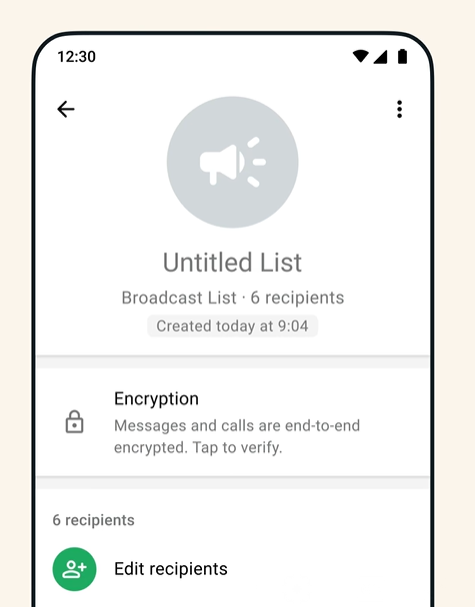 Keep in mind that only contacts who have your number saved on WhatsApp will receive your broadcast list messages.
Drag · with Varley
The inbox your team and Varley work in together
Shared inbox and live chat for Gmail teams, with Varley, Drag’s AI, included from $18. Plus an MCP server your own AI tools can drive.
The impact of WhatsApp CRM
CRM (Client Relationship Management) is a fundamental aspect of any business. Having a segmented, data-driven, and useful contact list can make managing your company's sales and marketing resources easier. Since most customers globally use WhatsApp as their main form of personal communication, WhatsApp CRM has grown in popularity. So, after creating this information channel, you need to register and analyze interactions with customers. The teams that manage these conversations can track the results obtained based on filters specific to each company and its contact base Transform WhatsApp into a collaborative workspace
The limitations of a WhatsApp broadcast list
The WhatsApp broadcast list is an important feature, but it does not meet all the needs of today's teams. It's a fairly simple tool, so it doesn't include resources used daily in customer interactions, such as:
Customer metrics
Data is increasingly critical for strategic decision-making. Therefore, teams that use WhatsApp as the main interaction channel need to monitor information about their chats with customers. Data such as sales conversion rates, customer service metrics, and A/B testing of promotional links, among others, are not currently available on WhatsApp. For example, when testing the success of a marketing campaign sent through the broadcast list, you need to manually check how many conversations were opened by the recipients or how many replied. This can be confusing and time-consuming when there are simultaneous campaigns. Besides, you still need to export the data to an analysis tool or spreadsheet. Related Post: How to Unblock Whatsapp Account
Message Automation
Another limitation when using a WhatsApp broadcast list is the lack of automation. There is no native protocol in WhatsApp Business to continue conversations as customers respond.
Integrations
In general, teams use WhatsApp in conjunction with other business tools that are part of their workflow. For example, when using WhatsApp for customer service, you must read the message, filter the related tasks, and add them to the ticketing system for an agent to work. Or if the company works with B2B software implementation, the onboarding period can be tricky. A message to all new users via broadcast list is the starting point. If difficulties arise, you'll need to individually add all users who need help to the support ticketing system. This means each task takes longer to finish.
What to use instead of a WhatsApp broadcast list?
A WhatsApp shared inbox is a solution designed to facilitate mass communication and collaboration on WhatsApp. A WhatsApp-compatible shared inbox tool, like DragApp, is a way to centralize your work on the platform where it starts. That is, teams that deal with multiple WhatsApp messages on a daily basis can turn a simple list of conversations into a collaboration space. Each chat has an automatic task card, to which the team can add important information such as deadlines, files, notes, and tags. Then, when you open the inbox, everything you need to continue the task is already there. Here's an example: 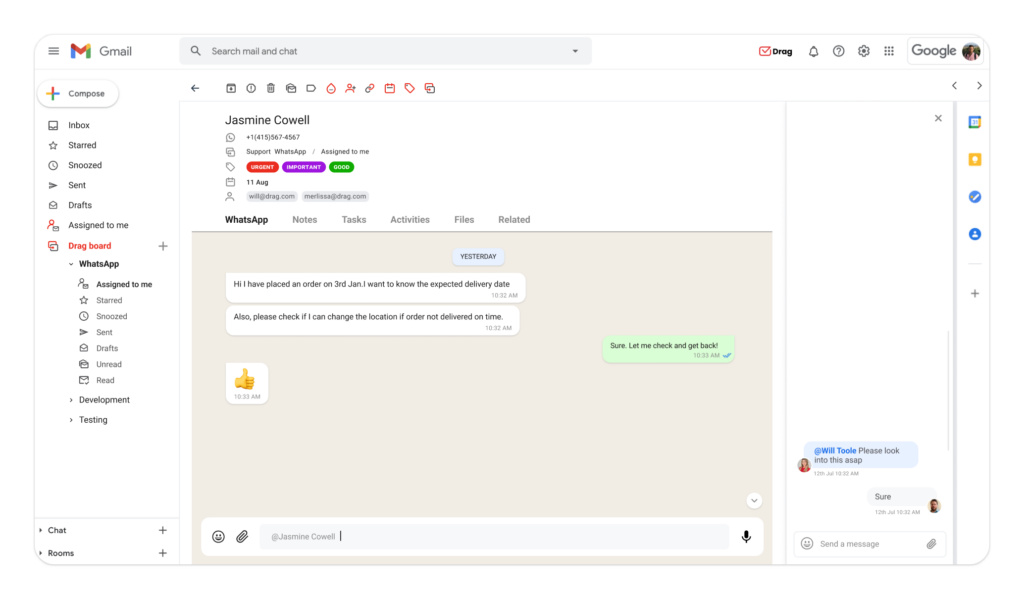
Custom metrics
Besides making the management of all chats started through a broadcast list easy, DragApp has analytics tools that track essential data about them. It's possible, for example, to filter WhatsApp interactions by tag or keyword and analyze response times, customer service ticket completion rate, and volume of responses to marketing campaigns, among other important data. 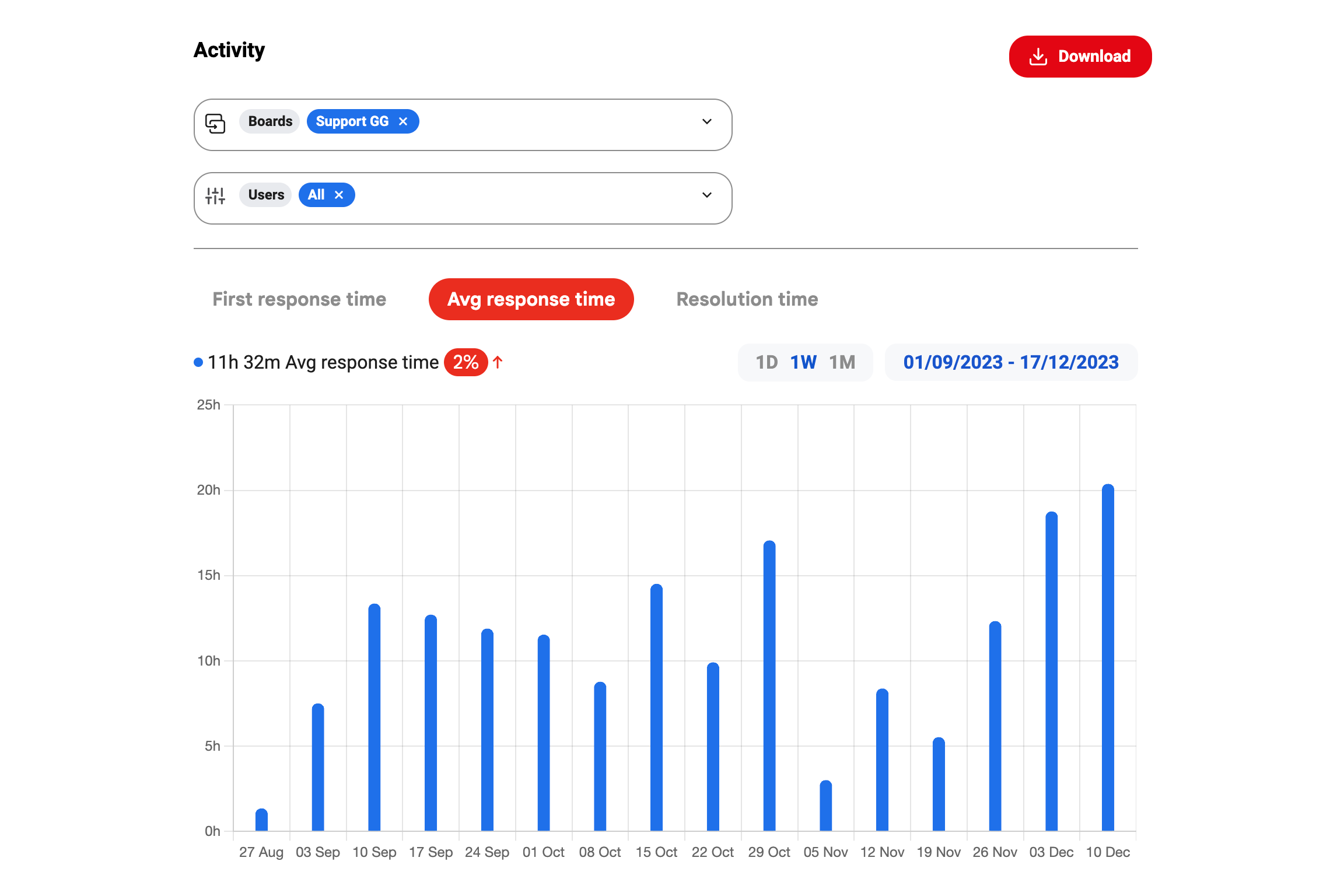 Read More for: WhatsApp Statistics
Message sequences
Automations are a great way to optimize broadcast lists. With WhatsApp automatic messages, you can offer faster solutions to customer problems, remind contacts of promotions, and send additional information about your products that can convert leads into sales. Drag includes automated sequences. Teams can write message templates for recurring customer interactions based on filters and keywords. Then they create specific rules for each sequence. With these automations, you don't have to send repetitive responses to FAQs. You can also include custom fields in the text, which avoids the impersonal tone of a standard broadcast list. 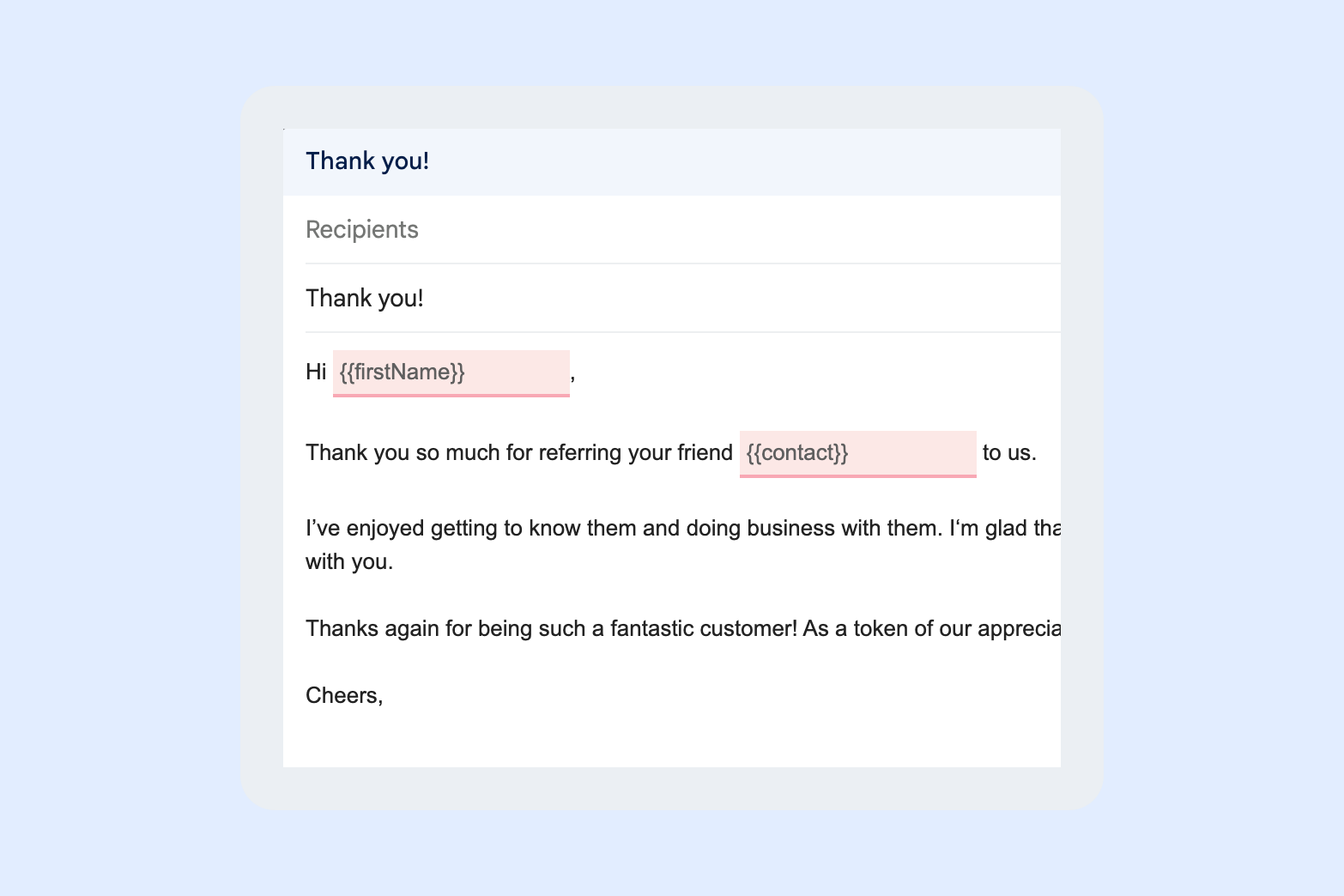
Integrations
One of the highlights of DragApp is the integration with more than 5000 business tools. In addition to enabling WhatsApp and Gmail integration on a collective workspace, Drag supports Zapier integration, which helps teams create automated workflows between different platforms.
Custom CRM
Finally, Drag offers the ultimate contact list with custom fields. Besides fields like phone number, name and company, each contact includes space for other information relevant to the company's workflow. You can include fields like the department the contact works at, areas of interest, contract value, location, etc. 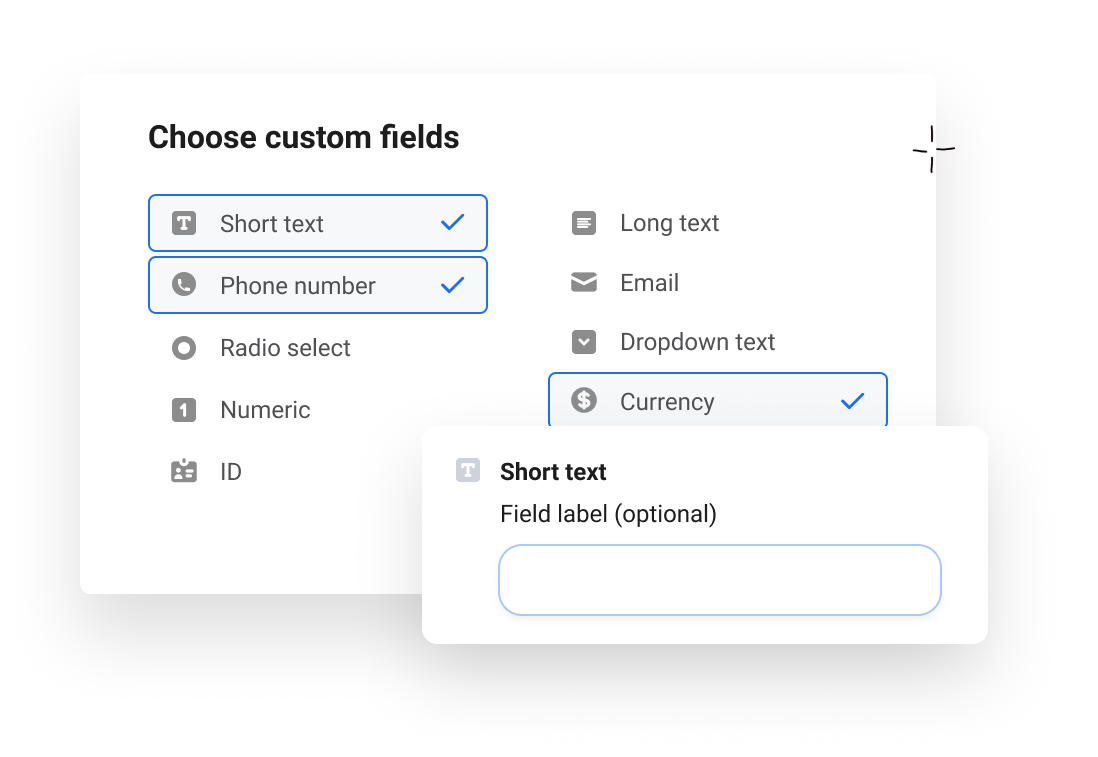 This feature contributes to an efficient CRM system that can be used to develop new products and services, as well as future strategies for the company. Similar Post: How to Backup WhatsApp Chats
Conclusion
The WhatsApp broadcast list is a feature that makes sending repetitive messages easier for your team. However, there's a need to mix it with tools that optimize the information obtained in these conversations. With a shared inbox, teams can do customer service, marketing, sales, and operations directly from WhatsApp chats in an organized, productive way that adapts to their needs. They can also track and monitor data from these interactions in order to continue improving their work.
Whatsapp Broadcast List FAQ
- What exactly is a WhatsApp broadcast list?
A broadcast list is a custom list of contacts in WhatsApp. When you send a message to this list, all selected contacts receive an individual message.
- How many contacts can I add to the WhatsApp broadcast list?
Each broadcast list allows up to 256 contacts.
- Are broadcast lists and WhatsApp group chats the same thing?
No, a WhatsApp group sends all members a single message on the same chat. With the broadcast list, each contact receives an individual message.
- Can I automate broadcast lists on WhatsApp?
No, to send a message to a broadcast list, you need to write it manually or use a message template.
- How to use WhatsApp broadcast lists for CRM?
CRM can be done manually with the help of a CRM tool or with a shared inbox. From this process, you can create broadcast lists based on your company's contact segmentation.
- What is the best alternative to a broadcast list on WhatsApp?
A shared inbox, such as DragApp, optimizes the results of a broadcast list. it offers engagement metrics, message automation and CRM organization, transforming WhatsApp into a perfect tool for business communication. Optimize WhatsApp with a shared inbox

Co-founder
Co-founder at Drag, writing about Google Workspace, shared inboxes, and how teams actually run email.
