







Crisp is genuinely good value for chat-led teams: an all-in-one messaging platform priced per workspace, which works out around $9.50 a seat with ten agents. The catch is the grain of the product and the shape of the pricing. Crisp was born as a chat widget, so email support works but fights the design. And every plan below $295 has a hard seat cap, so your 11th hire triples the bill, while the AI runs on monthly credits that expire. If your support mostly arrives at support@ and your team lives in Gmail, an email-first shared inbox with AI included and flat per-seat pricing fits better. Here is the honest comparison, including exactly where Crisp wins.

For email-driven teams on Gmail, Drag is the better Crisp alternative: a shared inbox inside Gmail with boards, help center, chat, and WhatsApp, Varley, Drag’s AI, included from $18 a seat, flat per-seat pricing with no caps, and its own MCP server. Crisp remains the better pick for chat-led teams that fit inside its seat caps: at 5 to 10 agents its $95-per-workspace Essentials plan is genuinely cheaper than almost any per-seat tool. The economics flip at the caps: agent 11 forces Crisp's $295 tier, each extra brand needs its own workspace, and Hugo's AI credits expire monthly.
Choose Drag if you…
- Your support mostly arrives by email and your team lives in Gmail.
- You are (or will be) past 10 agents, run multiple brands, or hate pricing cliffs: Drag is flat per seat with no caps.
- You want AI included in the seat, not credits that expire and switch the AI off.
- You want to run the inbox from Claude or ChatGPT (Drag's MCP server covers the whole inbox with 47 tools; Crisp's newer MCP server is thinner, with no published tool list).
- You want Gmail-native plus a full standalone app on the same data.
Choose Crisp if you…
- Your support is genuinely chat-led (website widget first) and your team fits inside a plan’s seat cap.
- You want the all-in-one breadth: chat, campaigns, help center, and a status page in one subscription.
- You are a 5-to-10 agent single-brand team: per-workspace pricing is real value at that size.
The real question: where does your support actually arrive?
Before features: where does your support actually arrive? Crisp is built widget-out, chat is the grain, email is supported. Drag is built inbox-out, email is the grain, chat and WhatsApp are included. Teams pick wrong here constantly, usually by choosing the tool that matched how they imagined support rather than how it arrives. Check your last hundred conversations: if most started at support@, you are an email-first team evaluating a chat-first tool.
Second question: count your team eighteen months out. Crisp’s plans cap seats hard (4, then 10, then the $295 jump); Drag adds seats at the same flat price forever. Pick for where the volume and the headcount are actually going.
Drag vs Crisp at a glance
Verified July 2026; confirm on each vendor’s site.
| Feature | Drag | Crisp |
|---|---|---|
| Pricing model | ||
| Model | Per seat, flat | Per workspace |
| Starting price | $12/seat (7-day trial) | Free (2 seats, chat only); $45 (4 seats) |
| 10-agent cost | $180 (Plus, AI incl.) | $95 (Essentials) |
| 11th agent | +$18 | Forces $295 Plus tier |
| Seat caps | None | 4 / 10 / 20 (extra seats only on Plus) |
| Multiple brands | Boards in one plan | One workspace (subscription) per brand |
| AI | ||
| AI cost | Included from $18; bought credits never expire | Credits by tier ($5/$25/$75), expire monthly |
| AI when allowance runs out | N/A: included | Hugo stops unless pay-as-you-go |
| AI per-conversation rate | Included | ~$0.05–0.10 (cheapest published rate) |
| MCP server (Claude/ChatGPT operate the inbox) | Yes: 47 tools | No |
| Platform & fit | ||
| Built around | The email inbox (Gmail-native) | The chat widget |
| Works inside Gmail | check_circle | cancel |
| Standalone app too | Yes (web/desktop/mobile) | Yes |
| Channel gating | Chat + WhatsApp included | WhatsApp/Instagram/SMS need Essentials+ |
| Breadth | ||
| Help center | check_circle | check_circle |
| Live chat | check_circle | Included (its home turf) |
| Email campaigns / bulk sends | Not a campaign tool | check_circle |
| Status page | cancel | check_circle |
| Boards / Kanban workflow | check_circle | cancel |
Why Gmail teams pick Drag over Crisp
Six reasons, each with the honest trade-off named.
Pricing
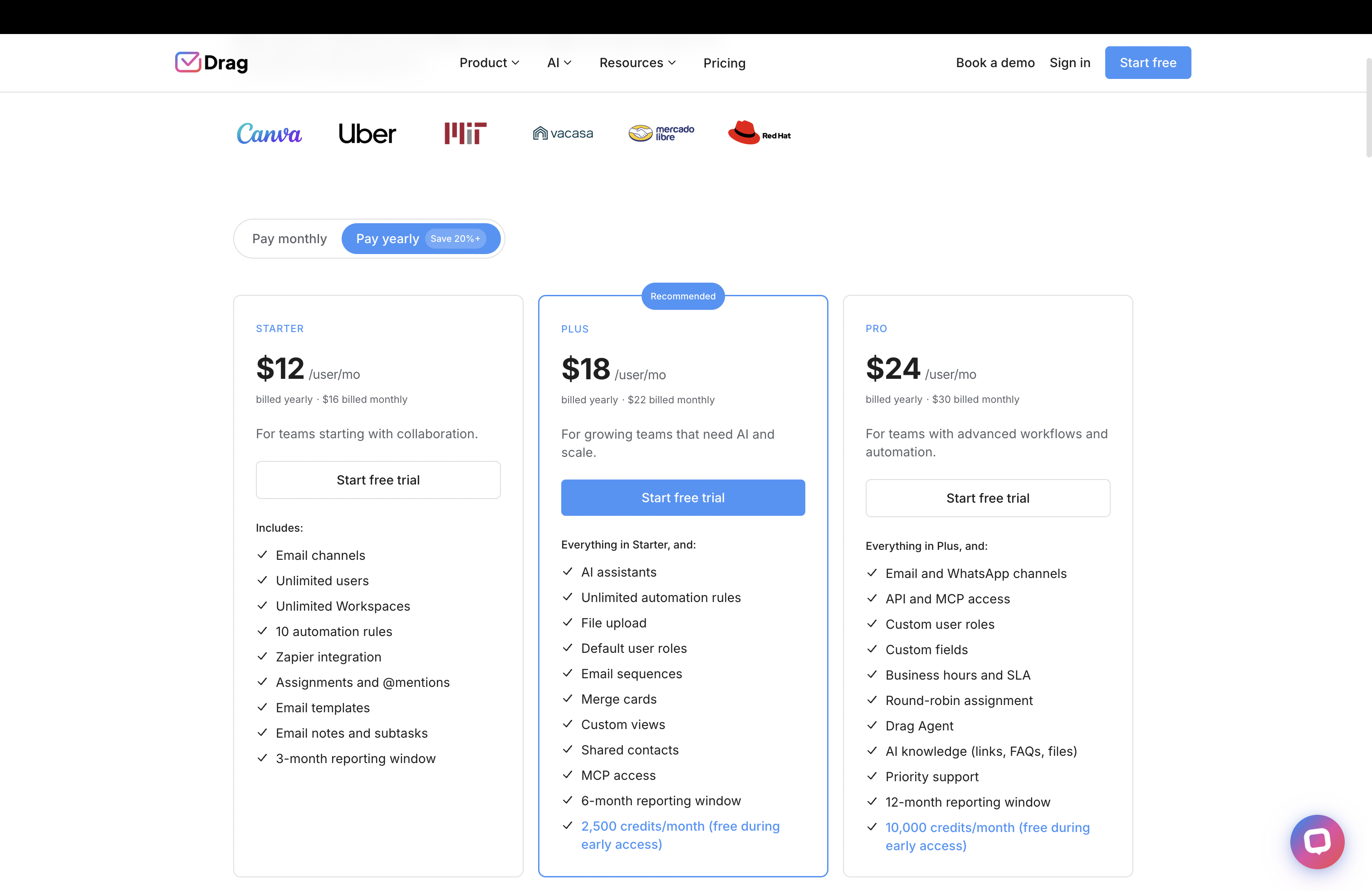
Flat per-seat pricing, no caps, no cliffs
Every Drag seat costs the same whether you are the 1st or the 100th agent. Crisp’s per-workspace model is genuinely cheap inside the caps, but the 11th agent forces a 3x jump to $295, and Essentials was recently cut from 20 seats to 10. Multi-brand teams feel it twice: each brand needs its own workspace at its own subscription.
AI
AI included, and credits that never expire
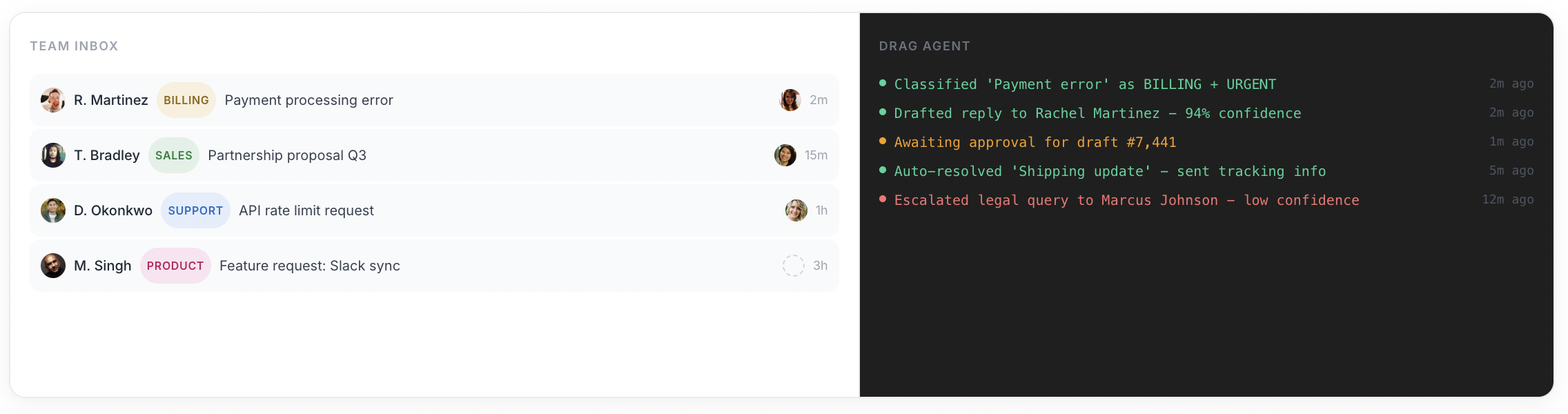
Drag Plus ($18) includes Varley, with monthly AI credits in the seat: it drafts and tags every email, answers from everything your team knows and acts in your tools. Credits you buy on top never expire, and tagging never stops. Crisp bundles Hugo AI credits by tier ($5 Mini, $25 Essentials, $75 Plus) at roughly $0.05 to $0.10 per conversation, the cheapest published rate in the category, but credits expire monthly and Hugo stops answering when they run out unless you enable pay-as-you-go.
Varley · Drag’s AI
One AI, four ways it works.
Varley, Drag’s AI, knows your help center, docs and past conversations. It drafts and tags every email, answers your team in Copilot, acts in Stripe, Slack and HubSpot when you approve, and on Pro resolves conversations on its own. Monthly AI credits come with every Plus and Pro seat, with no per-seat AI add-on.
Crisp bundles Hugo credits that expire monthly. Credits you buy for Varley never expire, and AI tagging keeps running even at zero.
- CopilotAsk Varley, then let it act
- AgentsVarley resolves conversations on its own
- IntelligenceWhat Varley knows, and the tools it acts in
- AssistsVarley in every email: drafts, tags, summaries
Included in Plus. Pro gets 2x the usage. Power users top up any time.
Varley resolves the routine ones on its own.
On Pro, Varley’s Agent reads the email, checks your policy, acts in tools like Stripe, replies in your team’s voice and closes the conversation. Anything it isn’t sure of goes to your team, with everything it found. Included in Pro.

I was charged twice this month
Daniel Okonkwo · Customer
- 9:38:13
Read Daniel’s email
Billing · Urgent
- 9:38:15
Checked your refund policy
Duplicate charges: refund in full
- 9:38:18
Found both charges in Stripe
$49 on 12 April, twice
- 9:38:22
Refunded the duplicate
$49 back to Daniel’s card
- 9:38:30
Replied to Daniel
Policy cited, in your team’s voice
- 9:38:35
Closed the conversation
Logged, with its sources
Connect Claude to your inbox in about two minutes.
Paste one URL into Claude’s settings, enter your API key once, and your inbox becomes 47 tools with full read and write, WhatsApp included, on the Pro plan. ChatGPT, Gemini, Copilot and Cursor connect the same way. Then just ask:

Summarise unread Support threads and assign billing to Sarah.

Label everything mentioning refunds and move it to In Progress.

What was our first-reply time this week vs last?
Crisp now ships an MCP server of its own, though it is thin, with no published tool list. Drag’s covers the whole inbox, 47 tools with full read and write.
Explore the MCP serverMCP server
@dragapp/mcp-server
47
tools · 12 categories · read + write
https://app.dragapp.com/mcp
paste into Claude › Settings › Connectors

 + any MCP client
Email-first
Email is the grain, not the add-on
Crisp was born as a chat widget; email support works but fights the design. Drag was built inbox-out: support@ volume lives where the team already works, in Gmail. If most of your conversations start at support@, you are an email-first team, and the tool should match.
Dual experience
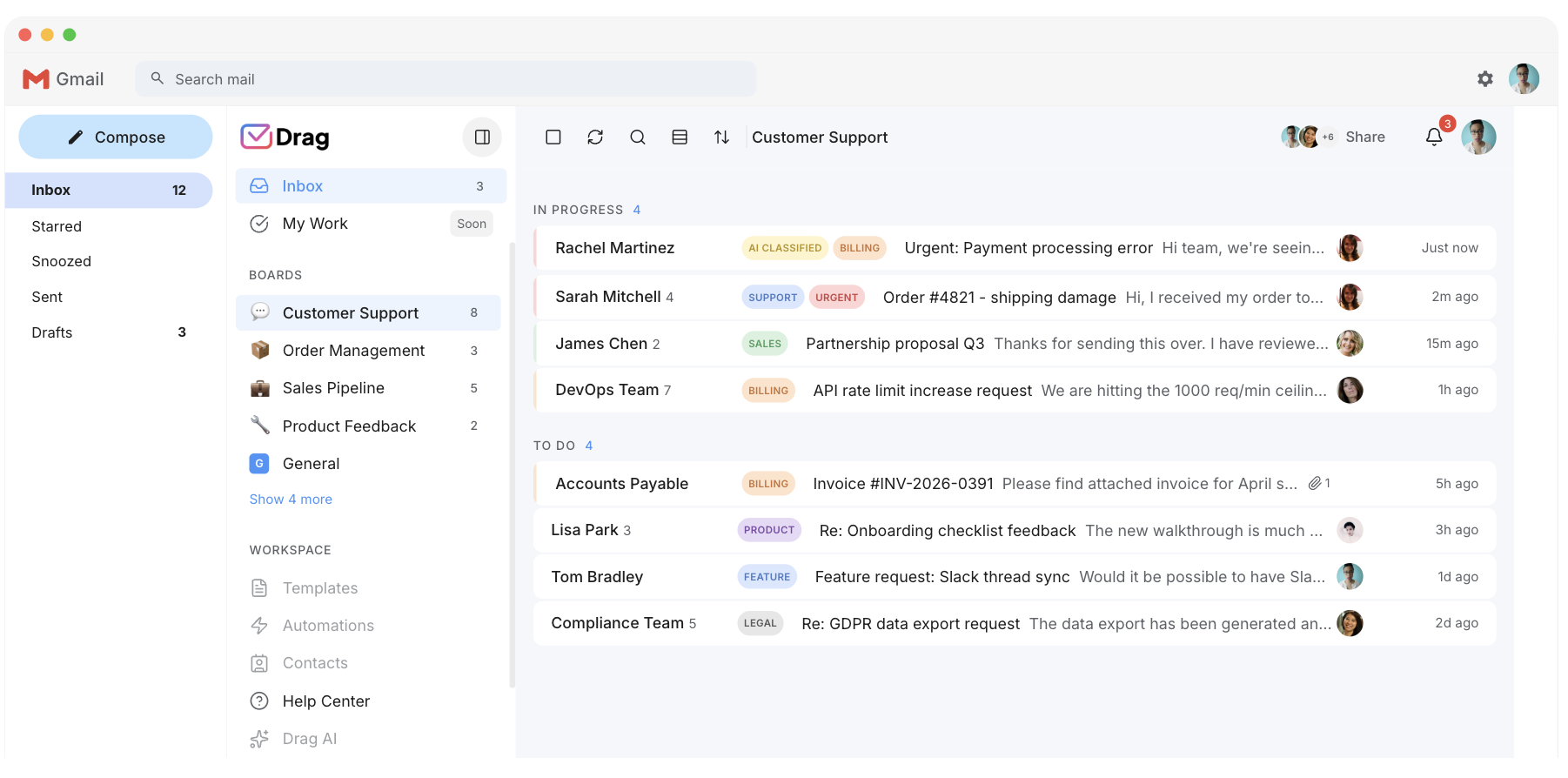
Gmail-native, with a full standalone app when you want one
Drag works inside Gmail for the team that never wants to leave, and as a standalone web, desktop, and mobile app on the same data for the team that prefers a dedicated workspace. Same boards, same assignments, same AI. Crisp is a standalone platform only.
Features
The support stack included
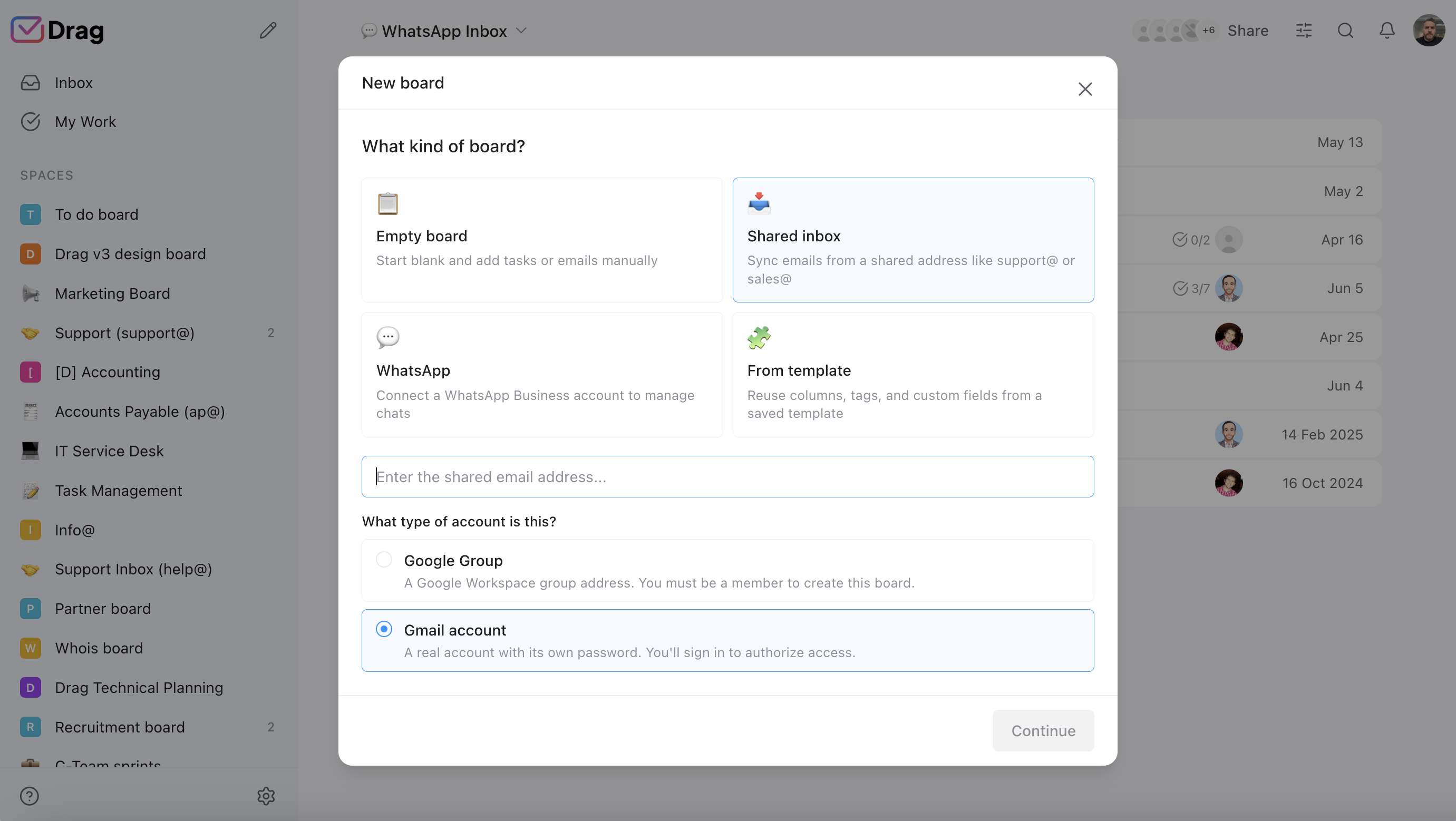
Help center, live chat, WhatsApp, boards, automation, and analytics are included in the Drag seat, not gated by tier. Crisp gates channels by plan: WhatsApp, Instagram, and SMS need Essentials or above. Crisp also includes email campaigns and a status page that Drag does not offer, which is a genuine advantage for teams that need them.
The pricing maths, both directions
Crisp’s per-workspace model makes direct comparison depend entirely on team size. The calculator below uses Drag’s per-seat price; the note explains how Crisp’s tiers work and where each tool is genuinely cheaper.
AI features
 Drag Plus (AI included)
$2,160/yr
$18/user/mo × 10 seats · AI included
 Crisp Essentials
from $1,140/yr+
$95/mo flat · up to 10 seats · Crisp prices per workspace with hard seat caps, so this is the flat plan for the team size, not a per-seat cost: Mini (~$45) up to 4 agents, Essentials (~$95) up to 10, then agent 11 forces the ~$295 Plus tier. Each extra brand needs its own workspace and subscription, and Hugo AI runs on monthly credits ($5/$25/$75 by tier, ~$0.05-0.10 per conversation) that expire, with Hugo stopping when they run out unless pay-as-you-go is on. Drag is flat per seat with AI included.
Estimate based on annual per-seat pricing (Drag) and published per-workspace plan pricing (Crisp), July 2026. Crisp's figure is the flat workspace plan for the tier your team size falls in, not a per-seat cost. Confirm current pricing on each vendor's site.
Worked examples: where each tool wins on price
The honest maths at four common team sizes (one brand, annual billing):
| Team size | Drag (Plus, AI incl.) | Crisp | Who wins |
|---|---|---|---|
| 2 agents | $36/mo | Free (chat only) or Mini $45 | Drag (cheaper + full email) |
| 4 agents | $72/mo | Mini $45 | Rough parity (Crisp edges raw price) |
| 10 agents | $180/mo | Essentials $95 (~$9.50/seat) | Crisp, clearly |
| 12 agents | $216/mo | Plus $295 | Drag (the cliff) |
One brand assumed. Each extra brand on Crisp adds a full workspace subscription. Drag handles multiple brands as boards in one plan. Hugo AI credits ($5/$25/$75 by tier) expire monthly on Crisp; Varley is included in Drag Plus and Pro. (Figures use published pricing, July 2026; confirm on each vendor’s site.)
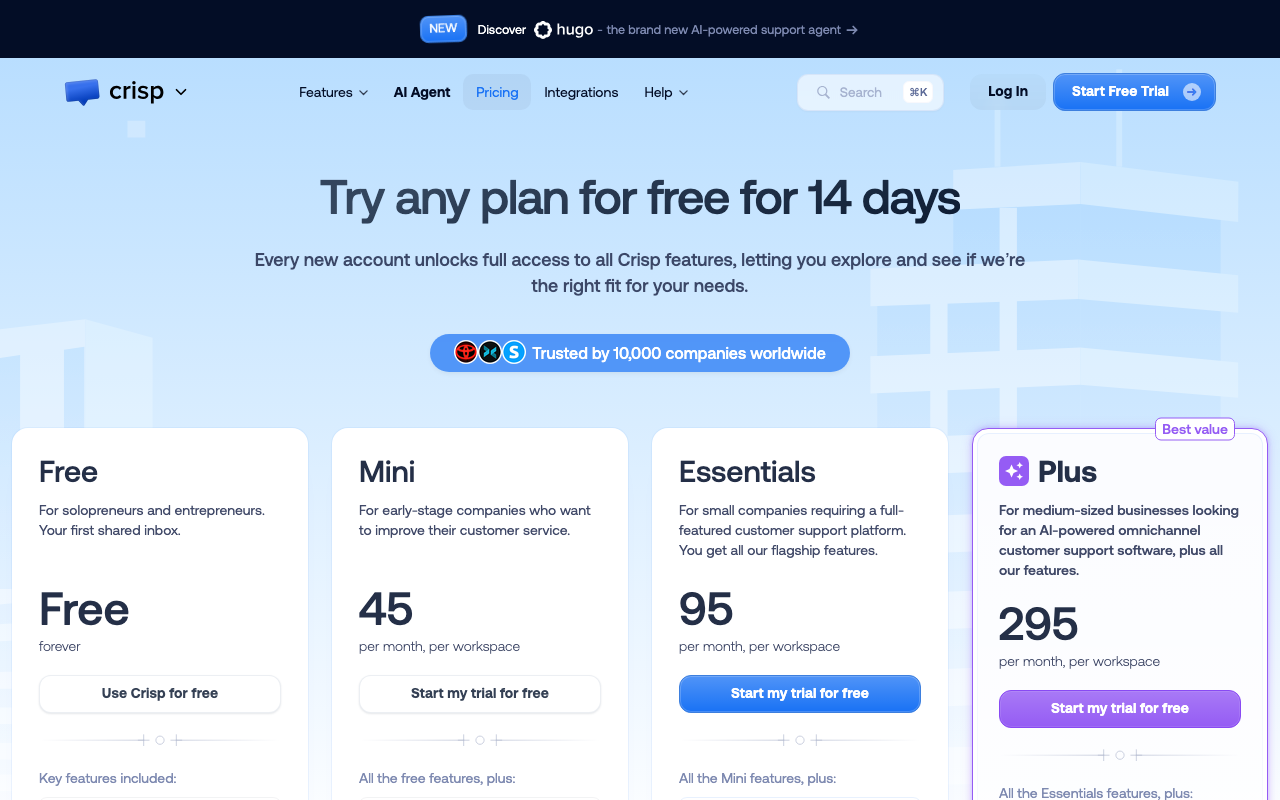
Source: Crisp pricing page, July 2026.
Drag vs Crisp, feature by feature
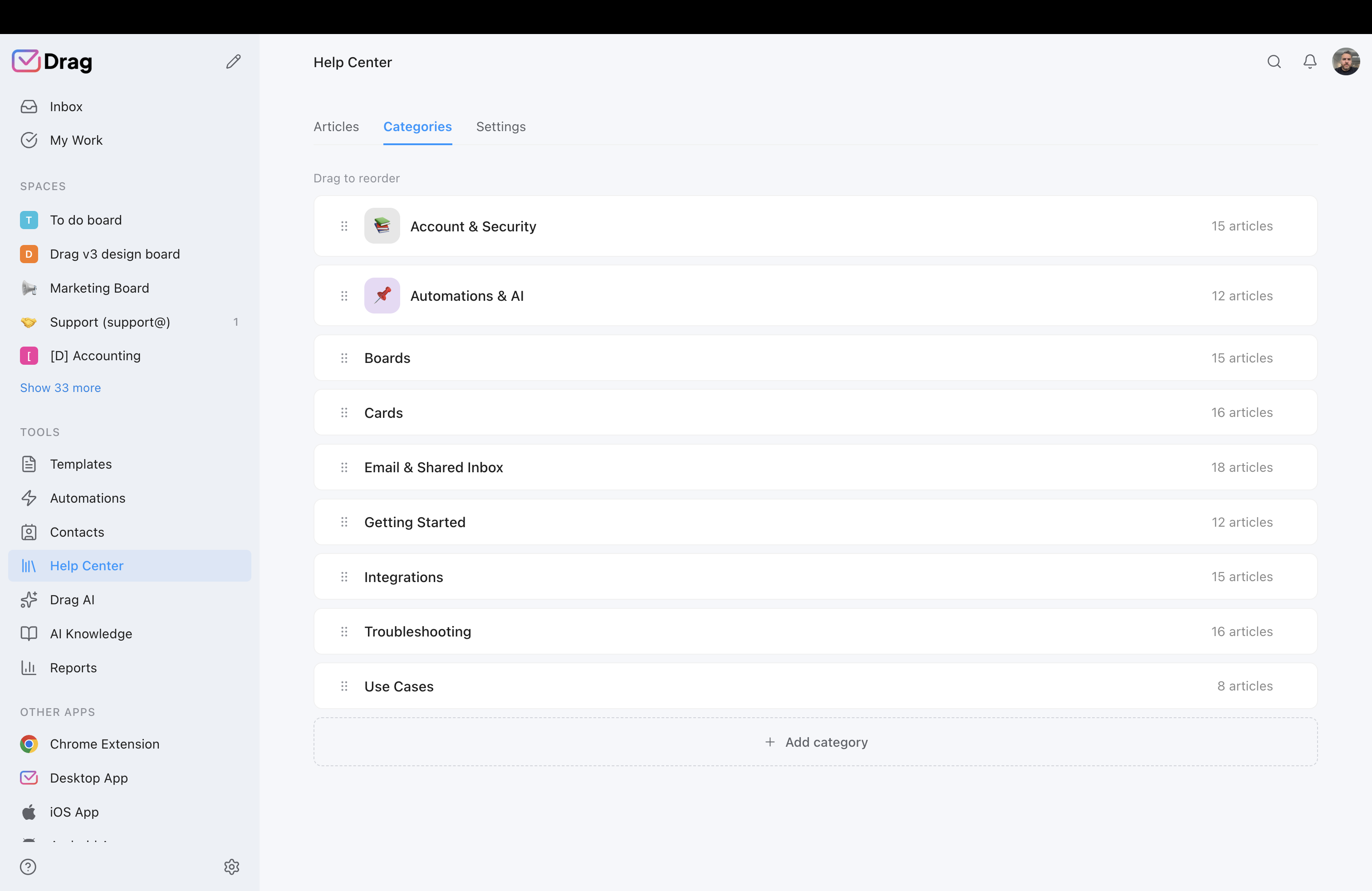
The detail layer for evaluators. Each claim is backed by a product screenshot and, where we state a Crisp limitation, a cited source.
Pricing model
Drag is $12 to $24 a seat, flat, no caps, no minimum. Crisp is per workspace with hard seat caps: Free (2), Mini $45 (4), Essentials $95 (10), Plus $295 (20 + $10 extra). The 11th agent forces a 3x jump; each brand multiplies workspaces.
- Drag: $12 Starter, $18 Plus (AI included), $24 Pro. No seat minimum, no cap.
- Crisp: per-workspace, hard caps below Plus. The 11th agent forces the $295 tier; each brand needs its own workspace.
Source: Drag pricing, Crisp pricing page.
Shared inbox and workflow
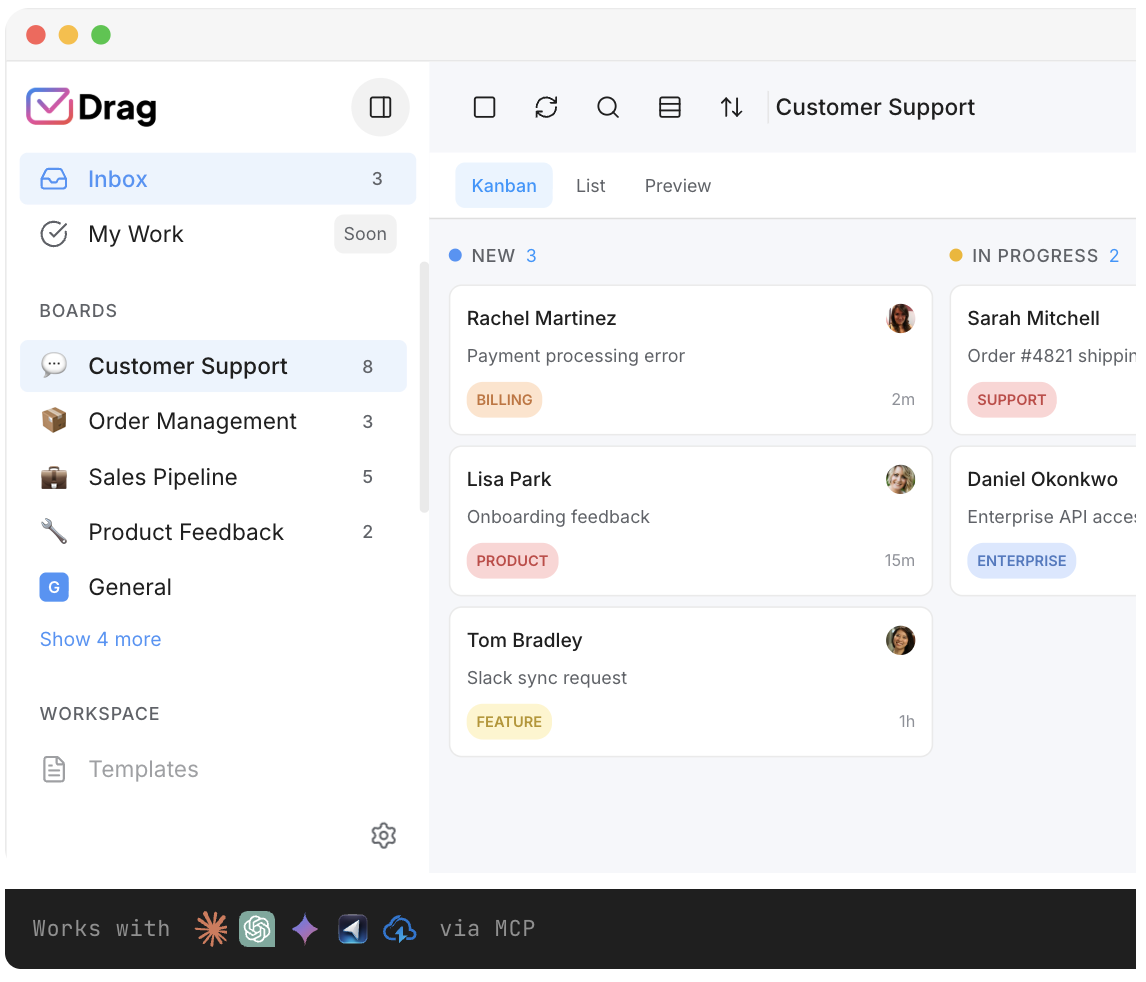
Both tools offer a shared inbox. Drag adds boards, Kanban views, assignments, collision detection, and comments inside Gmail. Crisp’s inbox works in its standalone app with assignment and routing.
- Drag: boards, Kanban views, assignments, comments, and collision detection, inside Gmail.
- Crisp: shared inbox with assignment, routing, and an integrated chat widget.
AI
Drag includes Varley, its AI, in the seat from $18. Crisp bundles Hugo AI with monthly credits that expire.
- Drag Plus $18: Varley drafts, tags, answers from your docs and acts in your tools. Bought credits never expire.
- Crisp Hugo: credits by tier ($5/$25/$75), expire monthly. Hugo stops when out unless pay-as-you-go is on.
Source: Crisp pricing (Hugo credits); Drag product.
MCP server
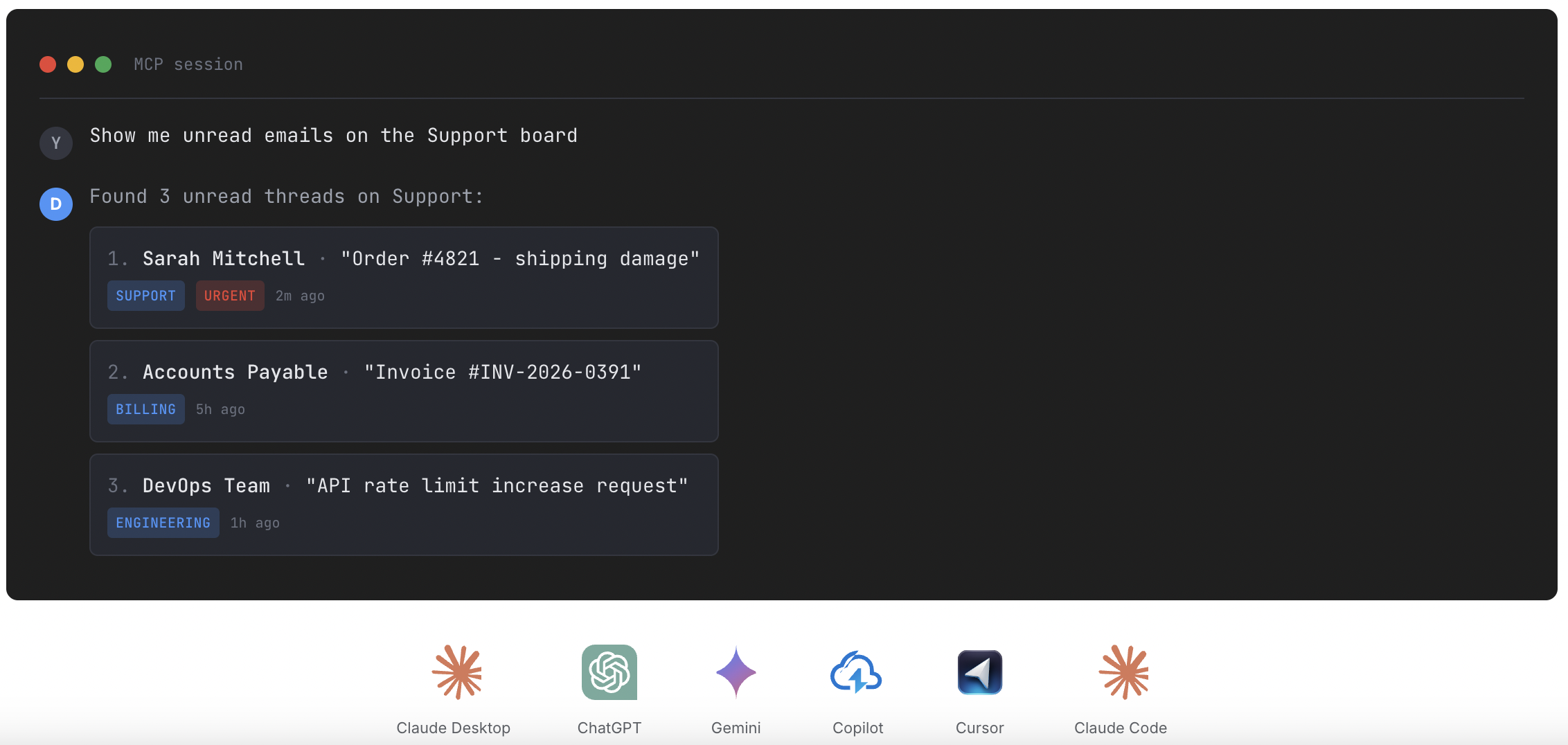
Drag publishes its own MCP server (47 tools across 12 categories), connected from Claude’s settings screen in about two minutes. Crisp now ships an MCP server too, though it is thin, with no published tool list.
- 47 tools, full read and write from Claude, ChatGPT, Gemini, Copilot, Cursor, or Claude Code.
- Crisp: Hugo uses MCP outbound; no inbound MCP server for your inbox.
Source: Crisp Hugo documentation; MCP for customer support / What is an AI support agent?
Gmail-native vs standalone platform
Drag offers both a native in-Gmail experience and a full standalone app on the same data. Crisp is a standalone platform only.
- Drag: native Gmail experience or standalone web, desktop, and mobile app, same data, same boards.
- Crisp: standalone app only. Not inside Gmail.
Breadth honestly compared
Crisp’s email campaigns and status page are real extras Drag does not have; Drag’s boards, Kanban workflow, and Gmail-nativeness are extras Crisp does not have. Both include a help center and live chat.
- Drag: boards, Kanban, Gmail-native, AI included, WhatsApp, help center, live chat.
- Crisp: campaigns, status page, chat (home turf), help center, Hugo AI credits.
If you switch: what you keep, what changes
The honest question a Crisp team asks is not “is Drag cheaper” (at the right team size, it is), it is “what happens to the way we work today?” Here is the straight answer.
What you keep
The shared inbox, assignment, a help center, live chat, and reporting. The core collaborative-inbox workflow transfers directly, and most of it is included rather than gated by tier.
What changes for the better
Your team works inside Gmail instead of a separate platform, AI is included instead of monthly credits that expire, there are no seat caps or pricing cliffs, and you gain boards, a Kanban workflow, and an MCP server to run the inbox from Claude or ChatGPT.
What you would handle differently
Crisp’s email campaigns and status page are not in Drag; teams using those keep a dedicated tool for them. And if your support is genuinely widget-first chat, Crisp’s chat widget is its home turf. We would rather tell you that now than after you switch. If email is the heart of your support and the other channels are secondary, Drag handles the job at a fraction of the cost once you are past the seat caps.
Where Crisp is the better choice
Straight up: for a chat-led, single-brand team of five to ten people, Crisp is one of the best-value tools in this whole category, about $9.50 a seat on Essentials with chat, inbox, help center, campaigns, and a status page included, plus the cheapest published AI rate anywhere (~$0.05 a conversation).
- Your support is genuinely chat-led. The website widget is the primary channel, and your team fits inside a plan’s seat cap.
- You want one subscription that does a bit of everything. Chat, inbox, help center, campaigns, and a status page, all in one per-workspace price.
- You are a 5-to-10 agent single-brand team. Per-workspace pricing is real value at that size; at ~$9.50 a seat, almost nothing per-seat beats it.
Drag is for the other team: email-first, Gmail-resident, growing past the caps or across brands, and wanting AI that is simply included. For the fuller Crisp alternatives landscape, see the Crisp alternatives guide.
Moving from Crisp to Drag is quick
Drag installs in Gmail in minutes: no platform migration, no seat-cap arithmetic, and AI included in the seat. Your support@ history is already in Gmail, which means your archive comes with you for free.
What customers say
“Drag keeps all our client communication visible and organized in Gmail. We stopped dropping emails the first week.”
“We tried three shared inbox tools before Drag. It is the only one my team actually kept using because it is right inside Gmail.”
“The AI drafts save us hours every day. Having them included in the price instead of metered per use was the deciding factor.”
Frequently asked questions
Is Drag a good Crisp alternative?
For email-driven Gmail teams, yes: shared inbox in Gmail with boards, help center, chat, and WhatsApp, AI included from $18, flat per-seat pricing, and its own MCP server. Chat-led teams inside Crisp’s seat caps are often better served staying.
How much does Crisp cost?
Per workspace: Free (2 seats, chat only), Mini $45 (4 seats), Essentials $95 (10 seats), Plus $295 (20 seats, the only tier allowing extra seats at $10 each). AI credits ($5/$25/$75 by tier) expire monthly.
Is Crisp cheaper than Drag?
It depends on team size, honestly: at 10 agents Crisp Essentials ($95) beats Drag Plus ($180). At 1–4 agents they are close, and from agent 11 the maths flips hard: Drag $198 vs Crisp $295, before extra brands multiply Crisp workspaces.
What happens at Crisp’s seat caps?
Plans below Plus have hard limits (4 and 10 seats). The 11th agent forces the $295 tier, a 3x jump. Crisp also reduced Essentials from 20 seats to 10 in its 2026 restructure.
How does Crisp’s AI (Hugo) pricing work?
Monthly credits bundled by tier ($5 Mini, $25 Essentials, $75 Plus) at roughly $0.05\u20130.10 per conversation, the cheapest published rate in the category. Credits expire monthly, and Hugo stops answering when they run out unless pay-as-you-go is enabled. Drag includes Varley, its AI, in the seat, and credits you buy never expire. Full comparison: Drag vs Hugo.
Can I run multiple brands on one Crisp plan?
No: each brand or product needs its own workspace, each with its own subscription (Crisp discounts 3+). Drag handles multiple addresses and brands as boards inside one plan.
Is Crisp good for email support?
It works, but Crisp is chat-first by design: the widget is the grain of the product. Teams whose volume arrives at support@ usually find an email-first tool a better fit.
Does Crisp have an MCP server?
Crisp now ships an MCP server, though it is thin, with no published tool list. Drag’s covers the whole inbox: 47 tools across 12 categories, connected from Claude’s settings screen in about two minutes, so Claude or ChatGPT can search, draft, assign, and reply.
Can my team keep working in Gmail?
With Drag, yes, natively, plus a standalone web, desktop, and mobile app on the same data. Crisp is a separate platform.
Is my data secure with Drag?
Permission-based access, emails not stored on Drag’s servers; Google Cloud Partner, CASA Tier 2, GDPR.
How long does switching take?
Minutes: Drag installs in Gmail and your email history is already there.
Does Drag do live chat and a help center like Crisp?
Yes, both included, plus WhatsApp. Drag does not do Crisp’s email campaigns or status page; teams needing those keep a dedicated tool for them.
What is the best Crisp alternative besides Drag?
Depends on need: Tidio (chat-led SMB), HelpCrunch (like-for-like bundle), Intercom (premium AI), Gorgias (Shopify). See the full Crisp alternatives guide for details.
Is Crisp worth it?
For chat-led single-brand teams inside the seat caps, genuinely yes, it is one of the best-value all-in-ones available. For email-first, growing, or multi-brand teams, the caps, credits, and workspace multiplication usually make an alternative like Drag the better fit.


