

 Chrome
 iOS
iOS Android

 vs
vs
Drag vs Front: the same collaborative inbox, in Gmail, without the seat minimums
Front is a polished, capable shared inbox. But it runs from $25 to $105 a seat, caps its Starter plan at 10 seats and one channel, and charges AI as add-ons that stack. Drag does the same collaborative job for $12 to $24 a seat, with AI included, no seat minimum, your choice of a standalone app or working right inside Gmail, and its own MCP server. Here is the honest, side-by-side comparison.

Table of contents

Founder’s Take
A personal note from Nick, co-founder of Drag
Front is mainly an Enterprise product. They’re typically the type that gets VC funding and moves up into the Enterprise space.
What that means in practice: teams of 10, 15, even 50–100 can end up paying for a tool that’s over-specced for them, with the cost of Front’s sales, account management and support teams baked into the monthly per-seat price. You can see it in the pricing history: a $9 seat in 2020 is $25 today, and the ladder tops out at $105 before the AI add-ons.
We get it, but it’s not for everyone. If you’re a team looking for under 100 seats, give us a try.
The verdict
The best Front alternative for Gmail teams is Drag: it delivers the same collaborative shared inbox (assignment, comments, boards, and AI) for $12 to $24 per seat with AI included, compared with Front's $25 to $105 per seat plus stacking AI add-ons. Drag's distinguishing feature is that it works both as a standalone app and natively inside Gmail on the same data, so different team members can work whichever way they prefer, where Front is a standalone app only. Front remains the better choice for teams that need deep multichannel support (SMS, social, and voice) with mature routing in one provider-agnostic workspace.
Choose Drag if you…
- You want the same collaborative inbox for far less: $12 to $24 a seat, all in.
- You want AI included in the seat, not add-ons that stack on a higher price.
- You do not want a single-channel, 10-seat-capped entry plan with AI sold separately.
- You want the choice: a full standalone app for some of the team, native Gmail for the rest, same data.
- You want to run your inbox from Claude, ChatGPT, or Cursor (Drag has its own MCP server).
- You want to stay Gmail-native, with no email duplication between mailboxes.
Choose Front if you…
- You need deep multichannel in one workspace, email, SMS, social, and live chat, with mature routing.
- You support more than one email provider and want a provider-agnostic standalone app.
- You need Front's specific analytics, CRM context, and routing depth for a larger operation.
Looking at more options? See our best Front alternatives for 2026 for a broader comparison.
Drag vs Front at a glance
| Feature | Drag | Front |
|---|---|---|
| Pricing & plans | ||
| Starting price (per seat/mo, annual) | $12 | $25 (Starter, single channel, ≤10 seats) |
| Top standard plan | $24 (Pro) | $105 (Enterprise) |
| AI cost | Included from $18 | Add-ons that stack |
| Seat minimum | None | Not stated today (explicit under older plans) |
| Platform & access | ||
| Works inside Gmail | check_circle | cancel |
| Standalone web/desktop/mobile app | check_circle | check_circle |
| Choice of Gmail or standalone app, same data | check_circle | cancel |
| Email duplication across mailboxes | No (permission-based) | N/A (standalone) |
| AI & automation | ||
| AI assistants included | 6, in the seat | Add-ons (stack) |
| MCP server (run inbox from AI clients) | check_circle | cancel |
| Automation / assignment rules | check_circle | check_circle |
| Channels & support | ||
| Multichannel (SMS, social, voice) | Email + WhatsApp + live chat | Deeper multichannel |
| Customer-facing help center | check_circle | Add-on / higher tiers |
| Boards / Kanban view | check_circle | check_circle |
Pricing and features verified June 2026; confirm current details on each vendor’s site.
Why Gmail teams pick Drag
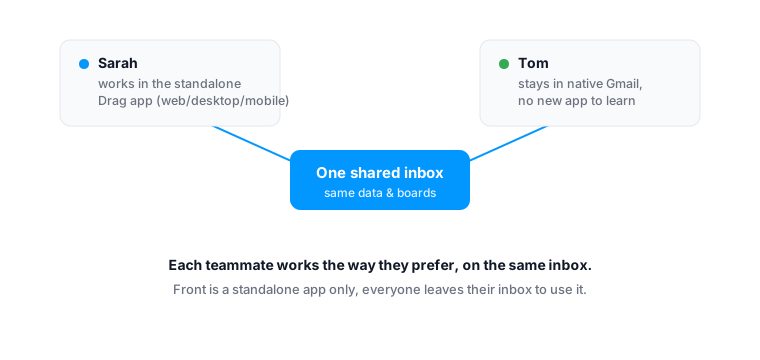
Dual experience
Work in Gmail or a standalone app, whichever suits each person.
This is the difference Front cannot match. Front is a standalone app, you and your whole team leave the inbox and live in Front. Drag gives you both: a full standalone web, desktop, and mobile app for people who want a dedicated workspace, and a native in-Gmail experience for people who would rather not leave their inbox, on the same shared data and boards. Your power users get an app; your Gmail diehards stay in Gmail; everyone shares the same inbox. No forced migration, no retraining.
Pricing
The same collaborative inbox, for a fraction of the price.
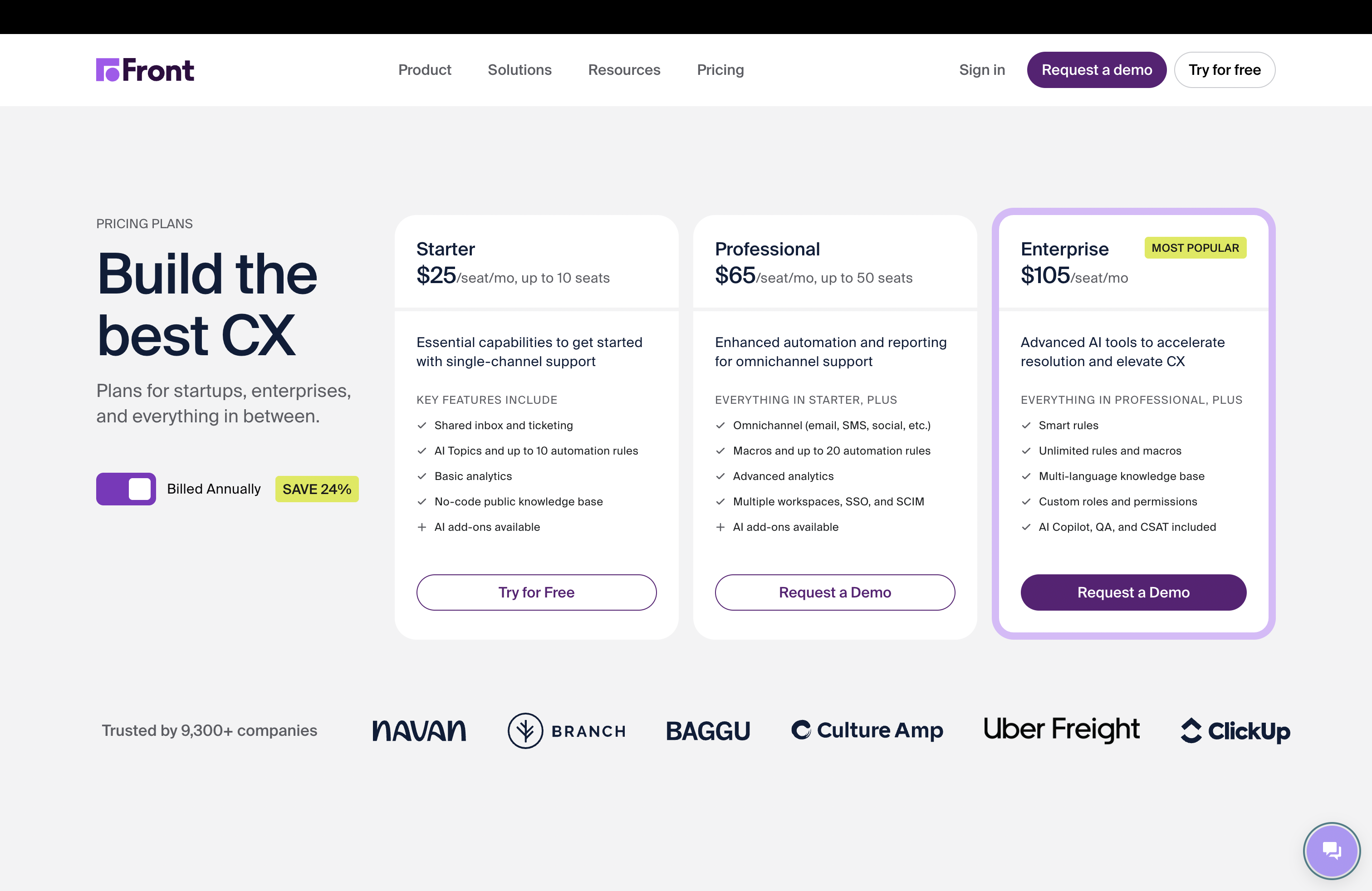
Drag is $12 to $24 a seat across every plan, with no seat minimum. Front runs $25 (Starter, single channel, capped at 10 seats) to around $65 to $105 (Enterprise), with a 2-seat minimum and AI as stacking add-ons. For a 15-person team that wants AI, the all-in difference runs into thousands a year.
- Drag: $12 to $24 a seat, AI included from $18, no seat minimum.
- Front: $25 to $105 a seat, AI add-ons that stack, Starter capped at 10 seats.
Source: Drag and Front pricing pages, June 2026.
AI Platform
AI included, not added on.
Drag includes six AI assistants in the seat from $18: draft, tag, sentiment, compose, summarise, and co-pilot. One predictable bill, no separate AI tier. Front charges AI as add-ons that stack on top of its plan price.
See Drag AISix AI assistants, included
Connect Claude to your inbox in about two minutes.
Paste one URL into Claude’s settings, enter your API key once, and your inbox becomes 47 tools with full read and write, WhatsApp included, on every paid plan. ChatGPT, Gemini, Copilot, and Cursor connect the same way. Then just ask:

Summarise unread Support threads and assign billing to Sarah.

Label everything mentioning refunds and move it to In Progress.

What was our first-reply time this week vs last?
Front’s official server is in open beta and connects through OAuth apps you configure; by Front’s own docs, some AI assistants are not yet compatible.
Explore the MCP serverMCP Server
@dragapp/mcp-server
47
tools · 12 categories · read + write
https://app.dragapp.com/mcp
paste into Claude › Settings › Connectors

 ClaudeChatGPTGeminiCopilotCursor+ any MCP client
Drag Agent
Early AccessComing to Drag: an autonomous agent that classifies inbound email, retrieves context from your knowledge base and connected tools, takes action (refunds, ticket updates, CRM notes), drafts a sourced reply, and resolves the thread, all without a human in the loop. Currently rolling out in Early Access. Front has AI assistants for drafting and sorting, but no autonomous resolution agent of this kind.
09:41:02 CLASSIFY intent=billing, entity=invoice #4821
09:41:03 RETRIEVE stripe.invoices.get(4821) → $249.00 paid
09:41:04 RETRIEVE kb.search('refund policy') → 30-day window
09:41:05 ACT stripe.refunds.create(amount=249.00) → rf_8xK2
09:41:06 DRAFT confidence=0.96, sources=2, tokens=142
09:41:07 SEND thread_id=t_9f3a → resolved
Classify
Reads the email, identifies intent and extracts key entities.
Retrieve
Pulls context from your knowledge base, CRM, and previous conversations.
Act
Takes real action: issues a refund, updates a ticket, logs a note.
Resolve
Drafts a response, cites its sources, and sends or escalates.
Features
Boards, automation, and support tools included.
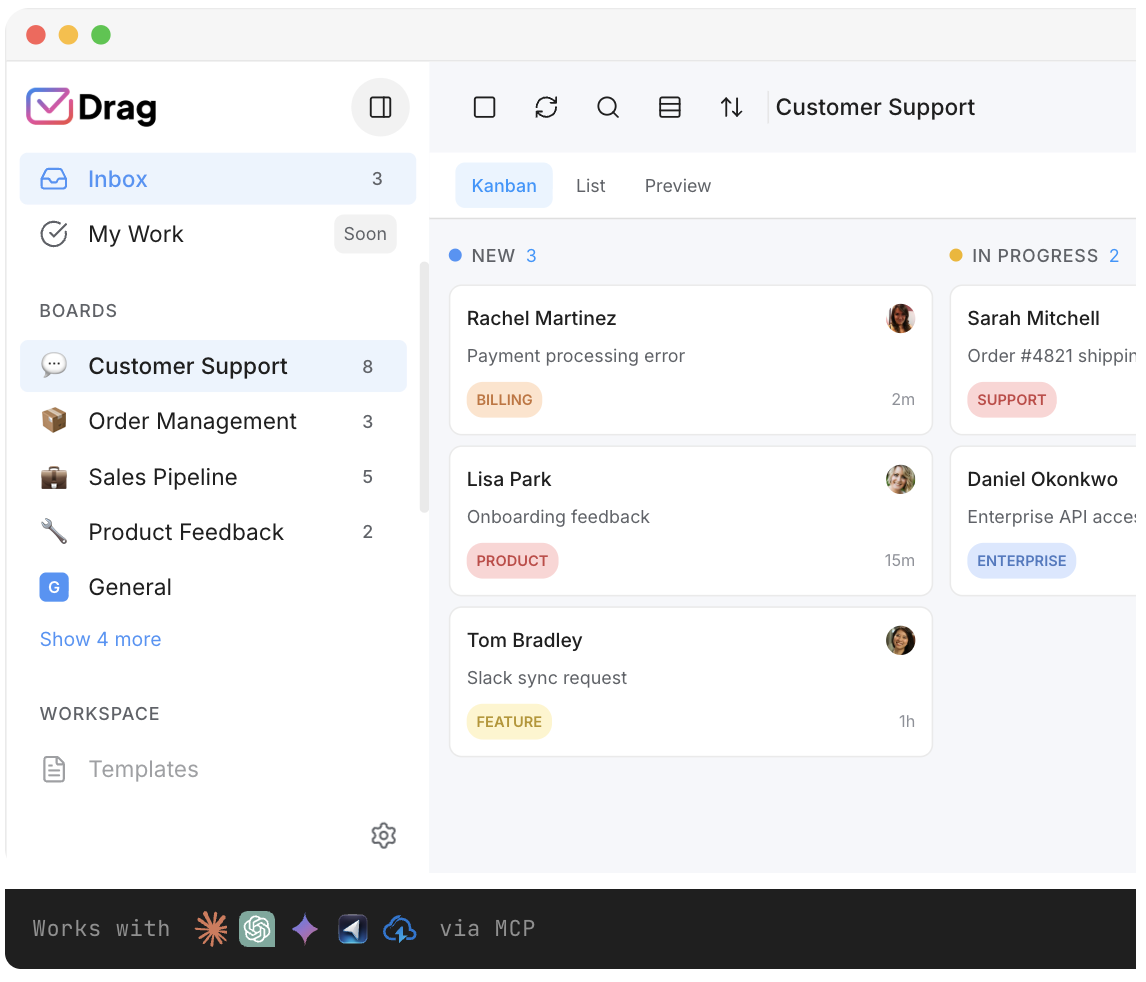
Boards and Kanban views, automation and assignment rules, a customer-facing help center, a live-chat widget, WhatsApp, and reporting, the collaborative and support features a team leaving Front expects, included rather than tiered up.
Security
Gmail-native, with a cleaner security model.
Drag keeps your team in Gmail and uses permission-based access rather than duplicating emails between mailboxes: access is granted to a shared inbox and revoked instantly when someone leaves, and Drag does not store your emails on its servers. It is a Google Cloud Partner with CASA Tier 2 verification and GDPR compliant.
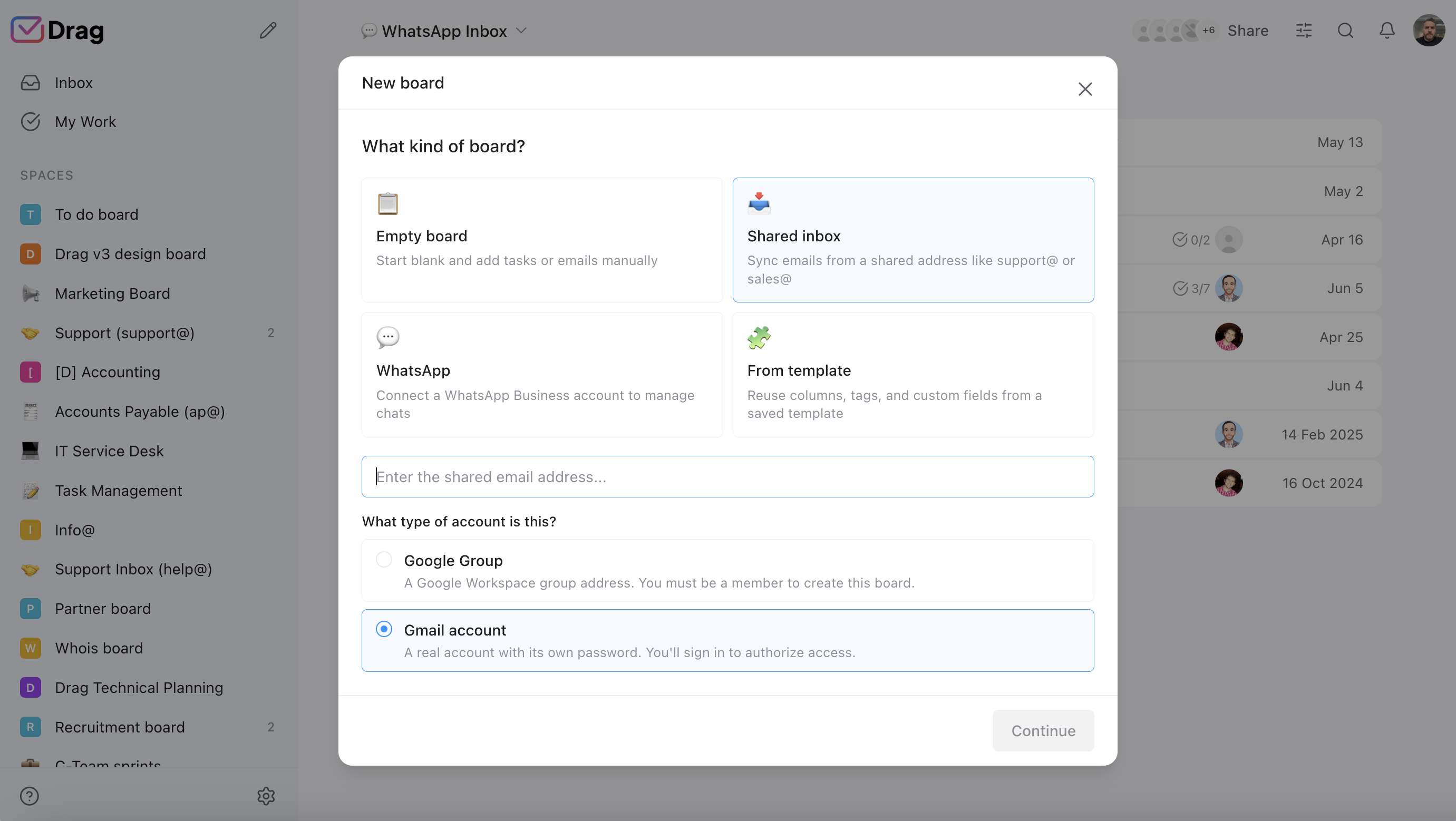
- Drag: permission-based access, revoked instantly. No email duplication. Emails never stored on Drag servers.
- Google Cloud Partner, CASA Tier 2, GDPR compliant.
Pricing: Drag vs Front
Most teams that outgrow Front’s single-channel Starter want AI and more than one channel, so the realistic comparison is Drag Plus (AI included, $18) versus Front Growth plus AI add-ons. Drag has no seat minimum.
AI features
 Drag Plus (AI included)
$2,160/yr
$18/user/mo × 10 seats · AI included
 Front Growth + AI
from $9,480/yr+
$79/user/mo × 10 seats · Front AI is a paid add-on that stacks on the plan; Starter is single-channel and capped at 10 seats. Growth/Enterprise cost more ($65-$105/seat).
Your team saves at least $7,320/yr with Drag.
Estimate based on annual per-seat pricing, June 2026. Front shown around Growth with AI; Starter is single-channel/\u226410 seats, Enterprise is $105. Confirm current pricing on each vendor's site.
Pricing comparison: Drag vs Front
Each bar runs from that product’s cheapest published plan to its most expensive, read from its own pricing page (Front’s 2026 ladder verified against the January 2026 Wayback capture). Drag’s whole range ends below where Front’s begins, before Front’s AI add-ons are counted.
- Drag$12$24everything included
- Front$25$105+ Autopilot $0.89/res →


Entry seat to top published per-seat tier, 2026. A striped tail marks a metered vendor: AI is charged per resolution beyond the top seat. Quote-only Enterprise tiers excluded.
Prices from each vendor's own pricing page, August 2026; historical points backed by web.archive.org captures of the vendor's pricing page.
Front pricing history: $9, then $19, now $25 to $105
Front’s entry price doubled at the 2021 rebrand from frontapp.com to front.com, held at $19 for five years, then rose 32% in the 2026 tier rebrand. The top of the ladder is $105 before AI add-ons, which is the enterprise trajectory in one line.
Prices from each vendor's own pricing page, August 2026; historical points backed by web.archive.org captures of the vendor's pricing page.
| Tool | 2021–26 | Basis | 2021 | 2022 | 2023 | 2024 | 2025 | 2026 |
|---|---|---|---|---|---|---|---|---|
| Drag | +$4(+50%) | per-seat | $8 | $5 | $8 | $8 | no capture | $12 |
| Front | +$6(+32%) | per-seat | $19 | $19 | $19 | $19 | $19 | $25 |
| Inflation (US CPI) | +23% | reference | $12 | $12.96 | $13.49 | $13.88 | $14.26 | $14.78 |
| When | Lineup | Entry / mid | AI |
|---|---|---|---|
| 2020 | frontapp.com era | Starter $9 per user per month, annual | Pre-AI era |
| 2021 | Rebrand to front.com | $19 entry: the price doubled at the rebrand | Pre-AI era |
| 2022 | Starter gains a 2-user minimum and 10-seat cap | $19 entry | Pre-AI era |
| 2023–2025 | Ladder holds | $19 entry, five years running | AI features appear as paid add-ons |
| 2026 | Tier rebrand: Starter / Professional / Enterprise | $25 / $65 / $105, entry up 32% | Add-ons stack: Copilot $20, Smart QA $20, Smart CSAT $10 a seat; Autopilot metered on top |
A worked example: a 12-person support team
Put real numbers on it. A 12-person support team that wants AI and more than the single channel Front’s Starter allows:
- Front: Growth at roughly $65 per seat, plus the AI add-on, lands around $79 per seat all-in. 12 seats × $79 × 12 months = about $11,376 a year (and Front’s 10-seat Starter cap means this is the realistic tier for a team this size).
- Drag: Plus at $18 per seat, AI already included, no add-on. 12 seats × $18 × 12 months = about $2,592 a year.
- Difference: roughly $8,700 a year, for the same core job of a collaborative, assignable, AI-assisted shared inbox.
That gap is why teams leave Front, and it widens as you add seats. The interactive calculator above lets you put in your own team size. (Figures use published per-seat annual pricing, June 2026; confirm current numbers on each vendor’s site.)
Drag vs Front, feature by feature
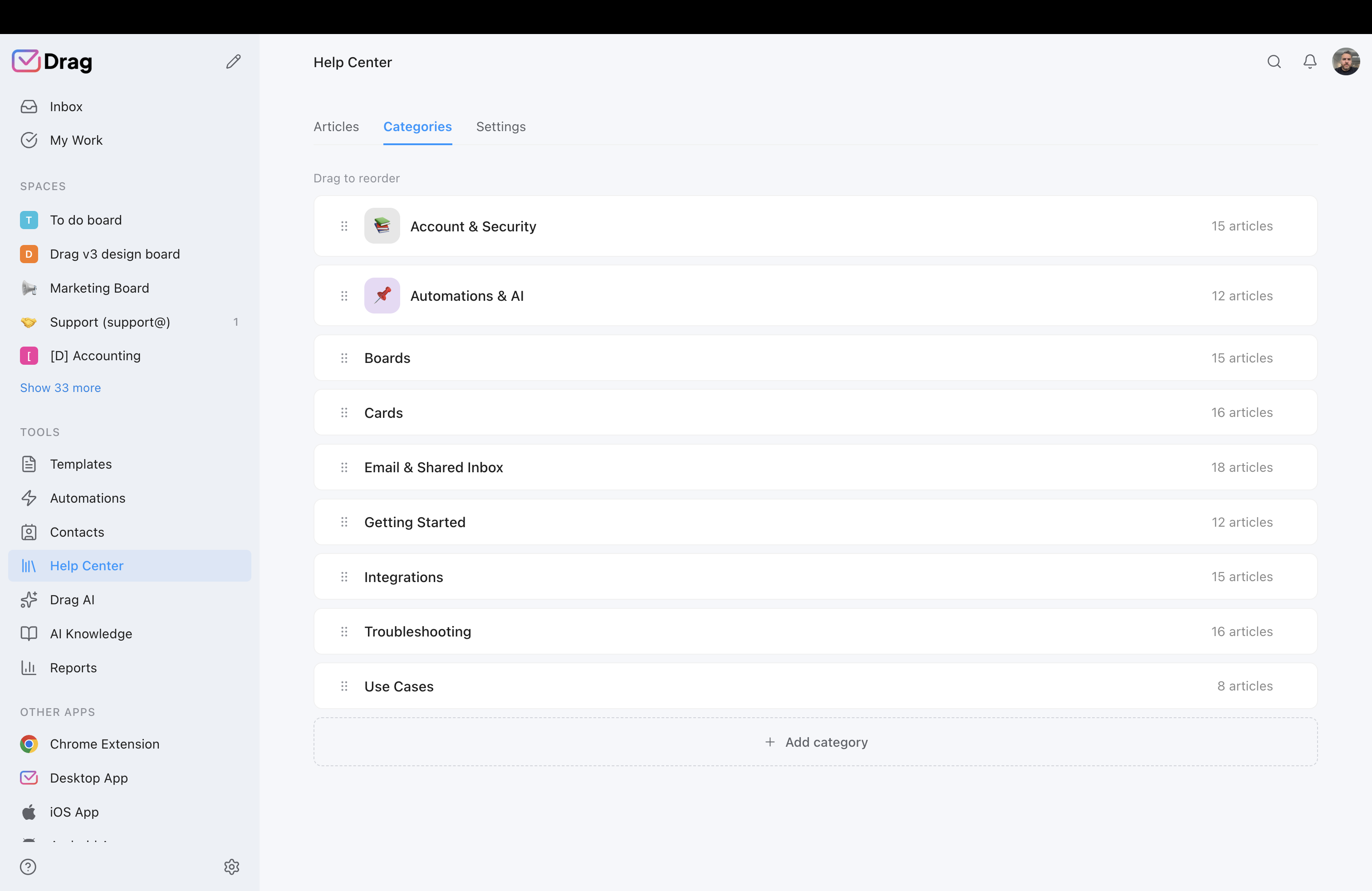
The detail layer for evaluators. Each claim is backed by a Drag product screenshot and, where we state a Front limitation, a cited source.
Price and seat structure
Drag is $12 to $24 a seat with no minimums. Front runs $25 to $105 a seat, with a single-channel Starter capped at 10 seats and stacking AI add-ons.
- Drag: $12 Starter, $18 Plus (AI included), $24 Pro. No seat minimum.
- Front: $25 Starter (single channel, 10-seat cap), ~$65 Growth, $105 Enterprise, plus stacking AI add-ons.
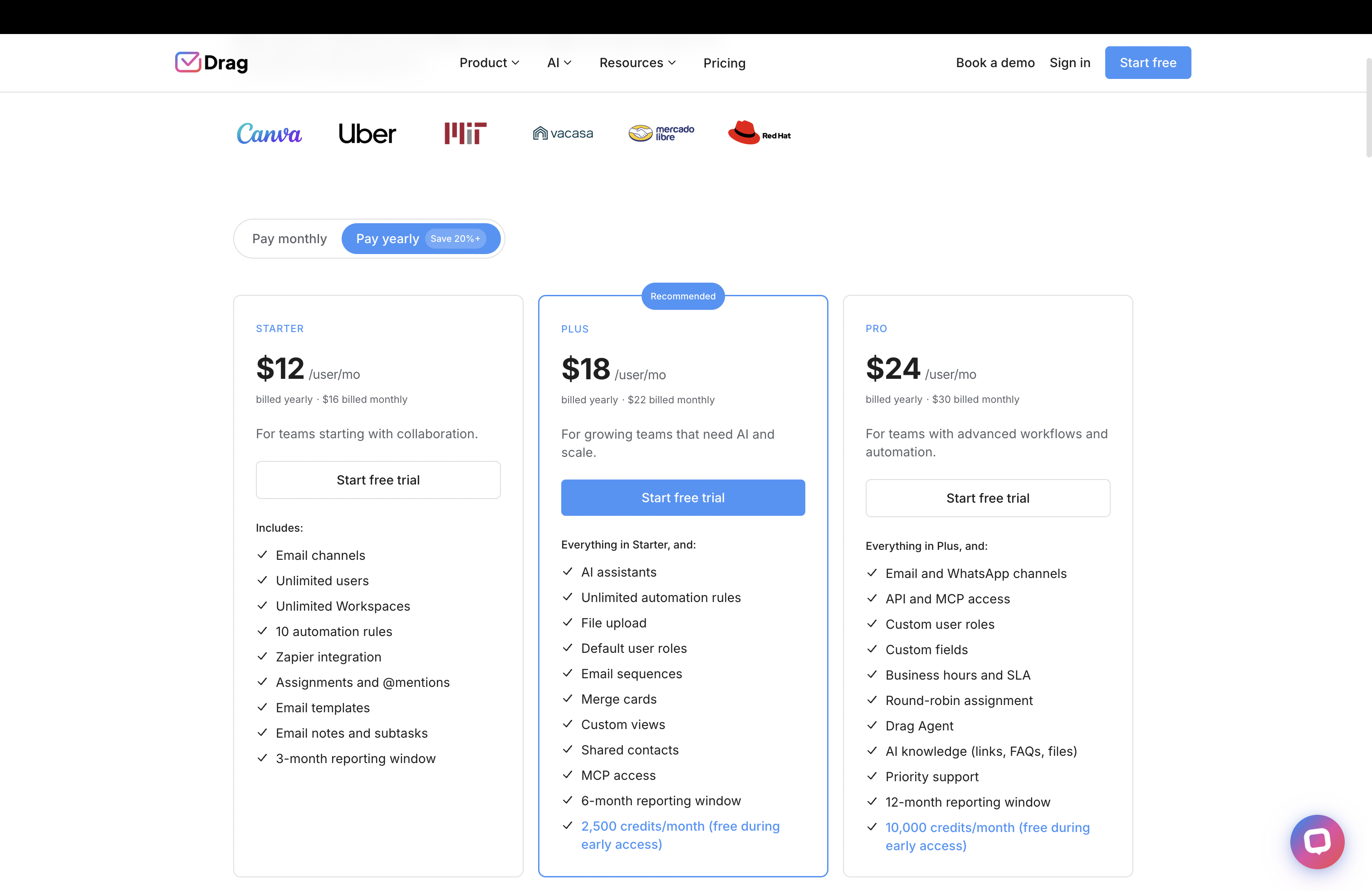
Source: Drag pricing, Front pricing page.
Gmail or standalone app
Drag offers both a native in-Gmail experience and a full standalone app on the same data. Front is a standalone app only.
- Drag: native Gmail experience or standalone web, desktop, and mobile app, same data, same boards.
- Front: standalone app only. Your team leaves the inbox.
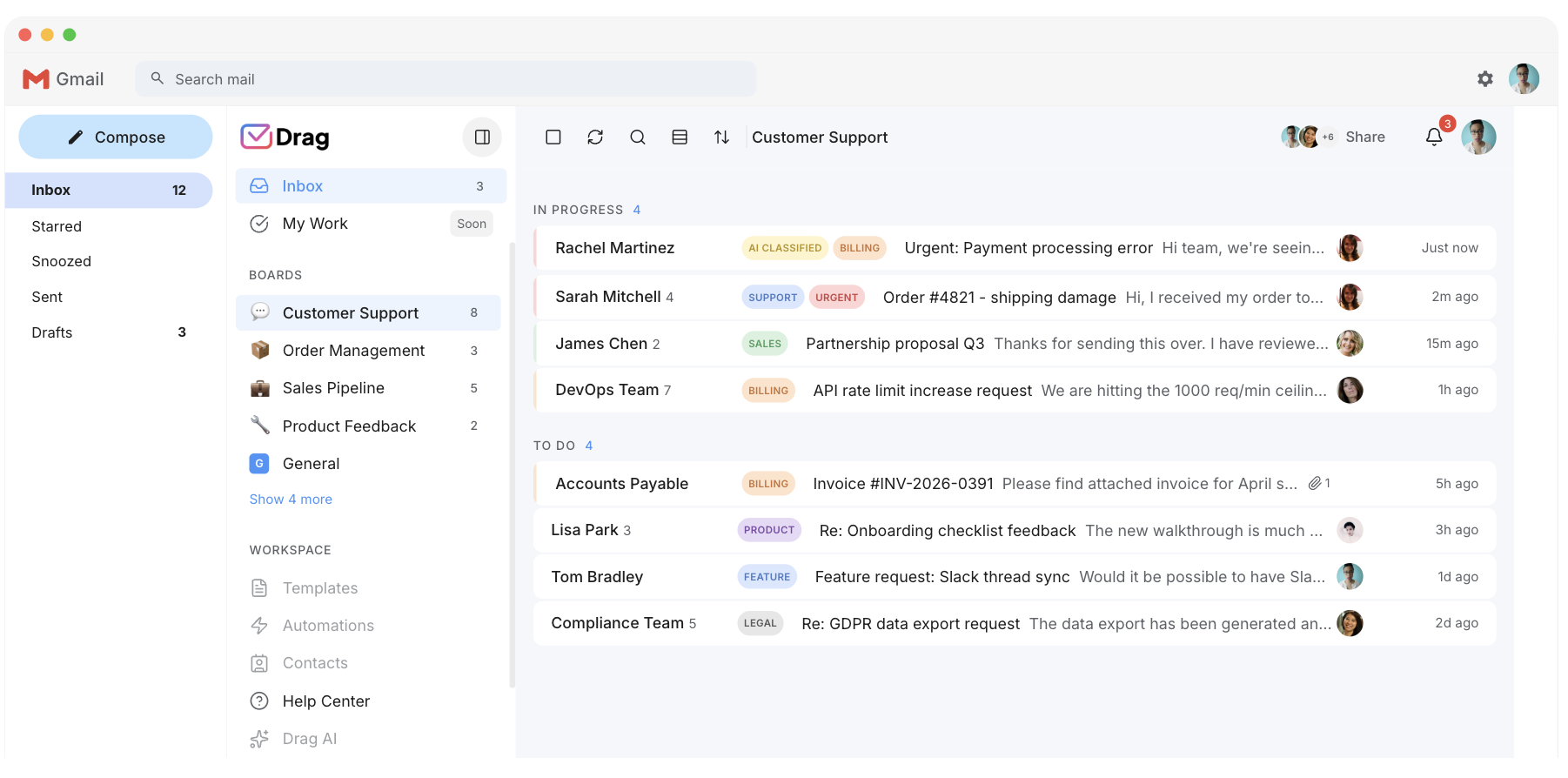
AI
Drag includes six AI assistants in the seat from $18. Front charges AI as add-ons that stack on top of the plan price.
- Drag Plus $18: draft, tag, sentiment, compose, summarise, co-pilot.
- Front: AI is paid add-ons that stack on the plan price.
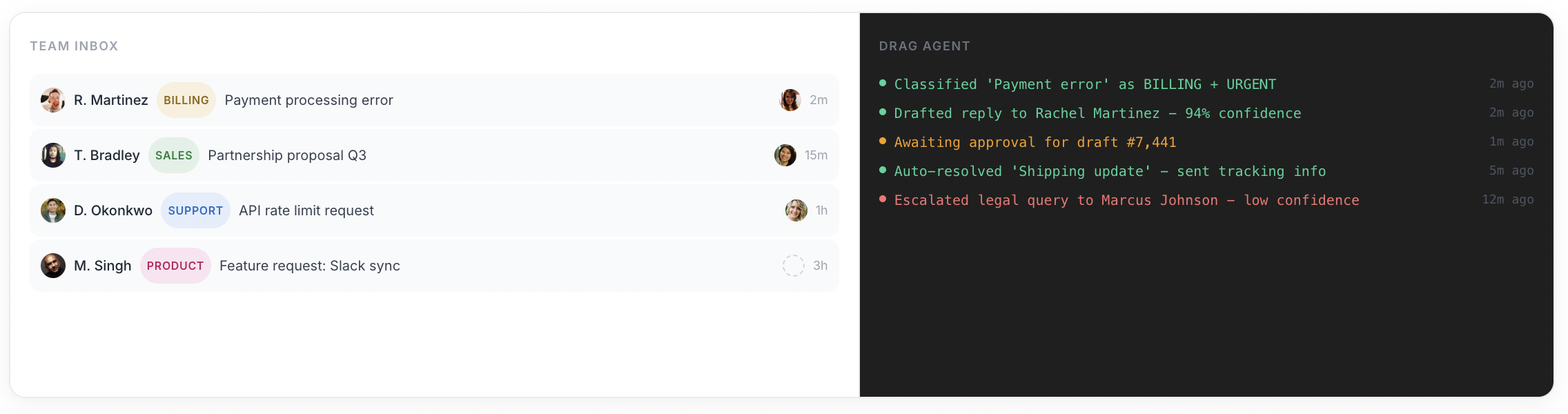
Source: Front pricing page (AI add-ons); Drag product.
MCP server
Drag publishes its own MCP server (47 tools across 12 categories). Front now ships an official MCP server with read access and limited write actions such as tagging, comments, and drafts.
- 47 tools, full read and write from Claude, ChatGPT, Gemini, Copilot, Cursor, or Claude Code.
- Front: no MCP server.
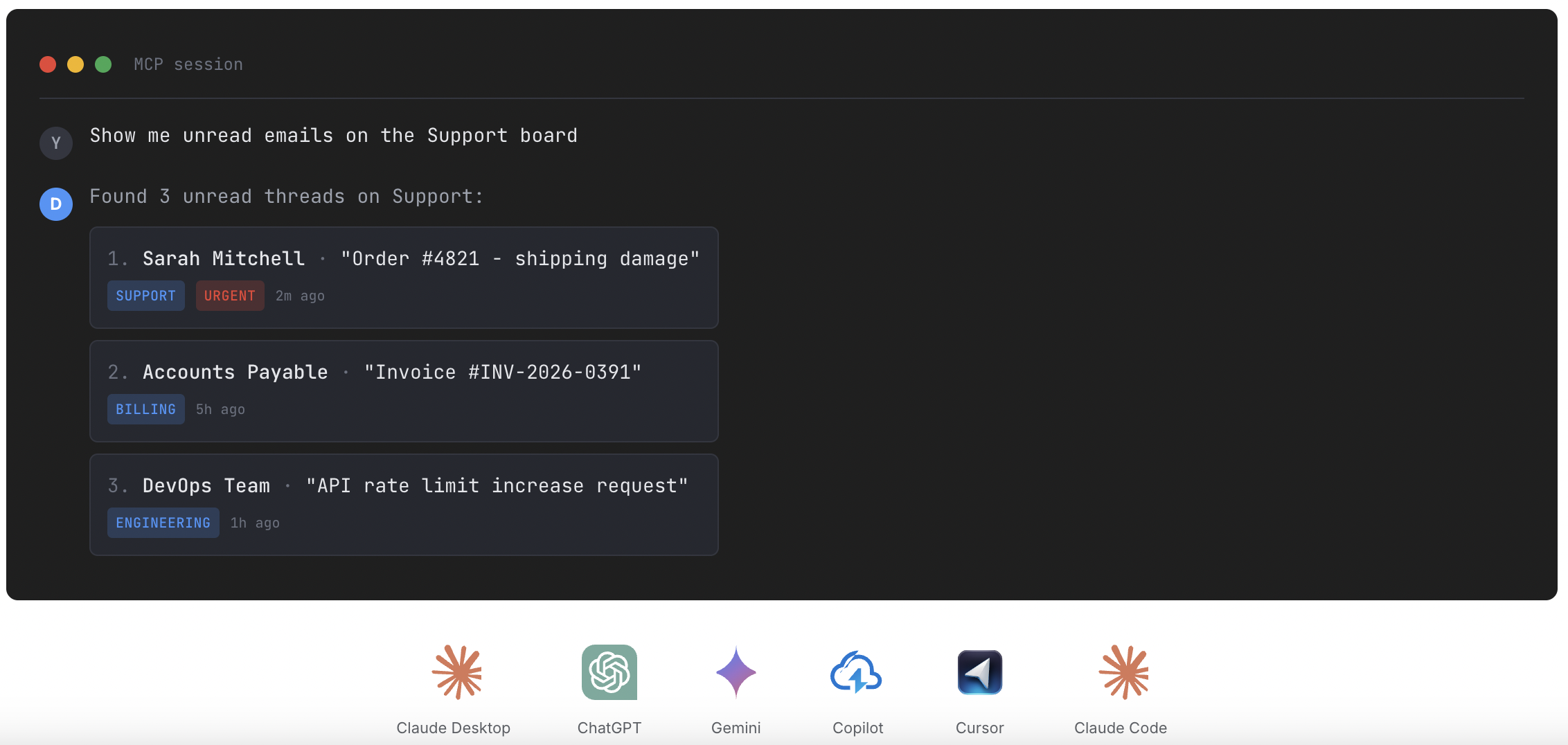
Source: Front integrations; MCP for customer support
Boards and collaboration
Both tools offer boards and collaboration. Drag runs inside Gmail.
- Drag: boards, Kanban views, assignments, comments, and collision detection, inside Gmail.
- Front: boards, assignments, comments, and collision detection, in its standalone app.
Help center and live chat
Drag includes both. Front tiers or limits them.
- Drag: customer-facing help center plus a live-chat widget that lands in your Gmail inbox.
- Front: help center and live chat on higher tiers or as add-ons.
Security and offboarding
Drag uses permission-based access with instant revocation and no email duplication.
- Drag: no email duplication, instant revocation, does not store emails on its servers. Google Cloud Partner, CASA Tier 2, GDPR.
Source: Drag security/trust center.
If you switch: what you keep, what changes
The honest question a Front team asks is not “is Drag cheaper” (it is), it is “what happens to the way we work today?” Here is the straight answer.
What you keep
The shared inbox, assignment, internal comments and @mentions, collision detection, boards and a Kanban view, automation and assignment rules, a help center, live chat, reporting, and AI assistance. The core collaborative-inbox workflow transfers directly, and most of it is included rather than tiered up.
What changes for the better
Your team can stay in Gmail instead of living in a separate app, AI is included instead of a stacking add-on, there is no seat minimum, and you gain an MCP server to run the inbox from Claude or ChatGPT.
What you would handle differently
Front’s deepest multichannel is its real strength. Drag covers email, WhatsApp, and live chat well, but if a meaningful share of your support comes through SMS, social DMs, or voice in one unified queue, that is where Front is stronger, and you would either keep those channels elsewhere or stay on Front. We would rather tell you that now than after you switch. If email is the heart of your support and the other channels are secondary, Drag handles the job at a fraction of the cost.
Where Front fits better
To be straight: Front is the better choice if:
- You need deep multichannel in one workspace. Email, SMS, social, and live chat with mature routing and assignment. If phone and SMS support are core to your operation, that depth matters.
- You support more than one email provider. Front is provider-agnostic; Drag is Gmail and Google Workspace focused.
- You need its specific analytics and CRM-context depth for a larger operation.
For most Gmail teams whose priority is the same collaborative inbox at a lower, flatter price, with AI included, no seat minimum, and the choice of Gmail or a standalone app, Drag is the closer fit.
Switching from Front to Drag is quick
Drag installs in Gmail in minutes, no migration project, no retraining on a new app, and your team can keep working in Gmail or move to the standalone app at their own pace.
What customers say
“What we like the most about Drag is the ability to see at a glance where a client is during their Onboarding process, through the use of columns, tasks, and tags. It has been crucial for us because Waste Logics is a growing business and this transparency allows us to work faster and smarter.”
“There really is no comparison when it comes to Drag. We have a great relationship with their team, it’s incredibly easy to use, addresses all of our needs, and the price is right!”
“Drag provided a lot of transparency and unified our team. It allowed us to bring the entire team together to manage emails and tasks collaboratively, as opposed to working in silos, across different tools.”
Frequently asked questions
Is Drag a good Front alternative?
Yes, for Gmail teams. Drag delivers the same collaborative shared inbox (assignment, comments, boards, AI) at a much lower, flatter price ($12 to $24 a seat), with AI included rather than stacking add-ons, no seat minimum, and the choice of a standalone app or working inside Gmail. Front fits better if you need deep multichannel or a provider-agnostic app.
How much cheaper is Drag than Front?
Substantially. Drag is $12 to $24 a seat with AI included from $18. Front runs $25 (single-channel Starter, capped at 10 seats) to $105, with AI add-ons that stack. For a 15-person team the all-in difference runs into thousands a year.
Does Front have a seat minimum?
Front’s older plan structure had an explicit 2-seat minimum; today its pricing page does not state one prominently. What is current: the Starter plan is capped at 10 seats and a single channel. Drag has no seat minimum, so you pay only for the seats you use.
Can my team use Drag inside Gmail instead of a separate app?
Yes, and this is a key difference from Front. Drag offers both a native in-Gmail experience and a full standalone web, desktop, and mobile app, on the same data. Different team members can work whichever way they prefer. Front is a standalone app only.
Does Front charge extra for AI?
Yes, Front’s AI features are paid add-ons that stack on top of the plan price. Drag includes six AI assistants in the seat from the $18 Plus plan, with no separate AI bill.
Does Drag have an MCP server and Front does not?
Both have one, with different depth and setup. Drag's MCP server offers 47 tools across 12 categories with full read and write, including WhatsApp, and connects from Claude's own settings screen in about two minutes: paste one URL, enter your API key once. Front's official server is in open beta with read and write tools; it connects through OAuth apps you configure, and Front's own docs note some AI assistants are not currently compatible.
What is Front’s pricing in 2026?
Front runs from $25 a seat (Starter, single channel, capped at 10 seats) to around $65 and up to $105 a seat (Enterprise) on annual billing, with AI features as paid add-ons.
Does Drag support multichannel like Front?
Drag handles email, WhatsApp, and live chat. Front offers deeper multichannel (SMS, social, voice via integrations) in one workspace, so if heavy multichannel is core to your operation, Front is stronger there.
Will switching from Front disrupt my team?
No. Drag installs in Gmail in minutes with no migration project and no forced retraining; your team can stay in Gmail or adopt the standalone app at their own pace.
Is Drag Gmail-native?
Yes. Drag works directly inside Gmail and Google Workspace (and offers standalone apps too). Front is a standalone app not tied to Gmail.
Is my data secure with Drag?
Yes. Drag uses permission-based access (revoked instantly when someone leaves), does not duplicate emails between mailboxes, and does not store your emails on its servers. It is a Google Cloud Partner with CASA Tier 2 verification and is GDPR compliant.
Does Drag have boards and Kanban like Front?
Yes. Drag organises shared inboxes into boards with columns, assignments, and a Kanban view, directly in Gmail.
Does Drag include a help center and live chat?
Yes, both are included: a customer-facing help center and a live-chat widget that flows into your Gmail shared inbox. Front tiers or limits these.
Does Drag do automation like Front?
Yes. Drag supports automation rules, auto-tagging, and assignment, the core automation a team leaving Front expects.
How many users does Drag support?
Any number, with no seat minimum. Drag is used by more than 200,000 users across 50+ countries.
Can I run support reports from Drag?
Yes, both in-app and, uniquely, through its MCP server. You can ask an AI client like Claude for response times and activity by prompt.


