













Need to bring together WhatsApp conversations, relevant lead information and workflow capabilities? So you need a WhatsApp CRM.
Table of contents
WhatsApp, the highly-popular messaging app, has a lot of different opportunities for business managers. They can connect with new and existing clients and enhance their brand. One of the ways in which brands can improve this connection is by investing in CRM. And thats means WhatsApp CRM as well.
Key Insights
Insights in this post:
1. Import Data into Existing CRMs:
- Export chats periodically to integrate with existing platforms.
2. Use CRMs with WhatsApp Integration:
- Tools like Zoho CRM offer native or Zapier-based connections to sync WhatsApp data.
3. Adopt a Shared Inbox Solution:
- Tools like Drag provide collaborative workspaces within WhatsApp, enhancing productivity with features like task notes, live chat, and analytics.
What is a WhatsApp CRM?
WhatsApp CRM is an application that brings together WhatsApp conversations carried out with customers, relevant lead information, and workflow capabilities. CRM (Client Relationship Management) is a key system for any business. That is, your digital workspace needs to be organized to function properly. And one of the ways to achieve this is by categorizing and collecting customer behavior. A WhatsApp CRM enables you to do this straight from WhatsApp conversations.
Why implement WhatsApp CRM?
However, these standalone platforms are not always ideal. Nowadays, a fulfilling digital workspace has to include the main points of connection with customers. Hence: WhatsApp CRM. Considering WhatsApp has billions of unique worldwide users, customer-facing teams should offer their services there. When you set up an official brand WhatsApp account, your clients can reach out easily. Then, as conversations happen, you need to find a good way to organize and sort the information gathered through the app. This information will be valuable both for immediate action and for future decisions.
Which departments need WhatsApp CRM?
After setting up WhatsApp for your company, you might wonder when and how CRM matters. Here are a few examples:
Marketing
A WhatsApp for marketing teams is a great way to reach out to new potential buyers. However, when messages aren't applicable, they tend to get ignored. So CRM can be a great way to make sure you're finding the right audience. Say you're creating a social media campaign with a link to your WhatsApp page. By doing some A/B testing through CTAs and targets, it's possible to determine some data about which customers connect with your products and services.  source: WhatsApp Of course, you can monitor how many people click on the ad and send a message on WhatsApp. However, there are more robust tools dedicated to CRM.
Sales
Your brand strategy should include a WhatsApp for sales teams. In fact, WhatsApp itself offers great resources for sales through the Business App. Catalogs, business hours, and WhatsApp auto-replies are great for enhancing sales rates. However, how can you track the success? That's where CRM comes in. With the right tools, you can monitor what kinds of products are purchased more often, for example. That being said, it usually requires exporting the WhatsApp Business App's information to another platform, which takes time. So the ideal solution is to bring CRM to WhatsApp itself. That way, you can check in real time. Related Post: What Is Chat Backup in WhatsApp
Customer Service
Your customer service team might be the one receiving the most WhatsApp messages. That means the process gets confusing, given that agents have to check each chat individually. However, your WhatsApp for customer service could be better with CRM add-ons. Instead of focusing on single chats, agents can see each customer's profile. That way, they can check for previous interactions and queries, purchase history, and more. It's also more productive when developing documentation. A CRM system allows your team to build a registry of solutions. Then, when browsing in the future, it's easier to check for help.
Drag · with Varley
The inbox your team and Varley work in together
Shared inbox and live chat for Gmail teams, with Varley, Drag’s AI, included from $18. Plus an MCP server your own AI tools can drive.
Key features of a good WhatsApp CRM system
Before looking for the right WhatsApp CRM solution, it's important to understand the features you're looking for.
Project management tools
WhatsApp, in itself, is a pretty straightforward platform. It's a multimedia chat app with individual conversations. That means if you want to implement WhatsApp CRM, it has to be a more robust system. Say, for example, your sales team is trying to close a deal to send merchandise to stores. Your agents need to be able to check each representative's profile. They should also see the tasks attached to each deal. The manager, on the other hand, needs a full view of current deadlines and task assignment capability. This isn't possible on WhatsApp because information is scattered through chats. So a WhatsApp CRM system has to transform these chats into actionable tasks. Then, the manager assigns them accordingly. Related Post: WhatsApp for Team Collaboration
Data reports
Of course, you need to know the data about your conversations. How good are your customer service metrics? How many potential clients leave their carts at checkout? Which marketing campaign works better? Your WhatsApp CRM tool must include frequent data reports and/or an analytics panel. That way, you can monitor any changes and develop better strategies in the long run.
Automation tools
Any new tool added to your digital workspace has to add benefits to your workflow. That includes your WhatsApp CRM platform. One of the ways you can optimize your tasks is by including automation resources into your search. With automation, you can, for instance, set up periodical WhatsApp chats with existing customers, reminding them of seasonal sales, subscription renewal dates, and specific deals they shouldn't miss. It's also useful for reengaging cold leads: if someone has interacted with your company, but didn't complete a purchase, you can use automation to remind them of your products and services.
Custom fields
Finally, your WhatsApp CRM should be flexible enough that you can customize it to your team's needs. When a business interacts with customers directly on WhatsApp, their profiles are based on previous interactions. But if your company does B2B business, it might need extra fields, such as company name, job title and seniority. 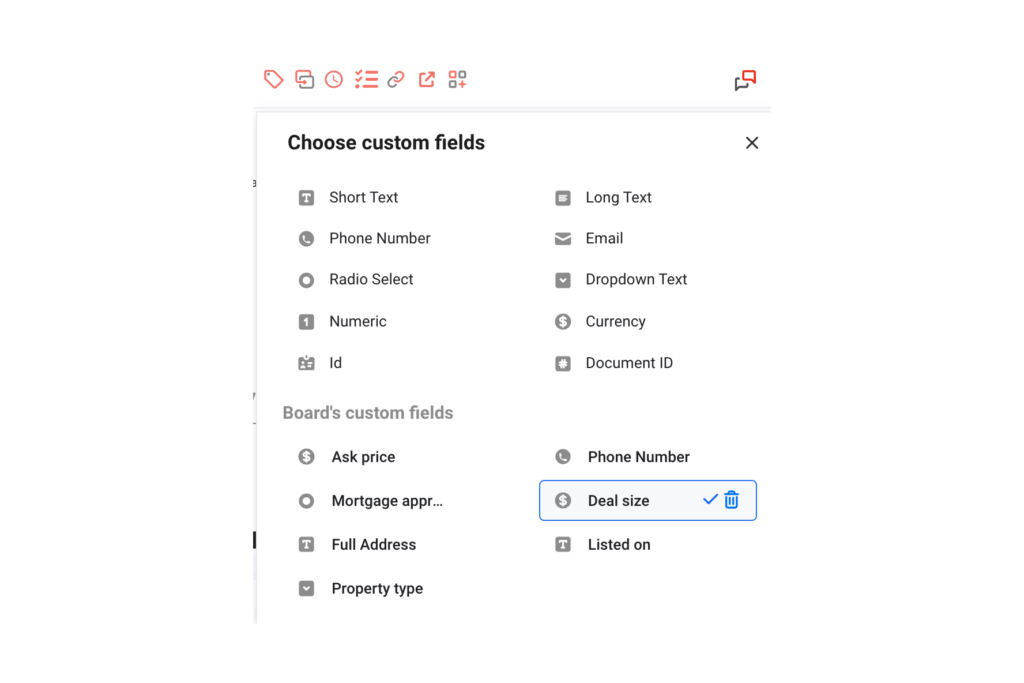
Best practices when doing WhatsApp CRM
There are a few good practices to keep in mind when doing WhatsApp CRM.
Safety and privacy
The first one is the type of data you collect. All information should be compliant with regional privacy laws, such as GDPR. When setting up your ads and contact pages, you should be clear on why the information is required. Secondly, you must follow good security practices when dealing with sensitive information. Pay attention to any endpoints and data leak risks and review everything periodically to avoid mishaps. Similar Post: How can I unlock my blocked WhatsApp account
Message volume
How to set up WhatsApp CRM: 3 methods
Now that you know how important CRM is when interacting with customers on WhatsApp, the next step is building your system. There are three different ways to do it:
1) Importing WhatsApp data into your CRM
The first method is simply using a data export tool and migrating all your WhatsApp chats to a CRM platform. There are multiple software options, such as WAXP, that export conversations, labels, and groups. Here's a look:
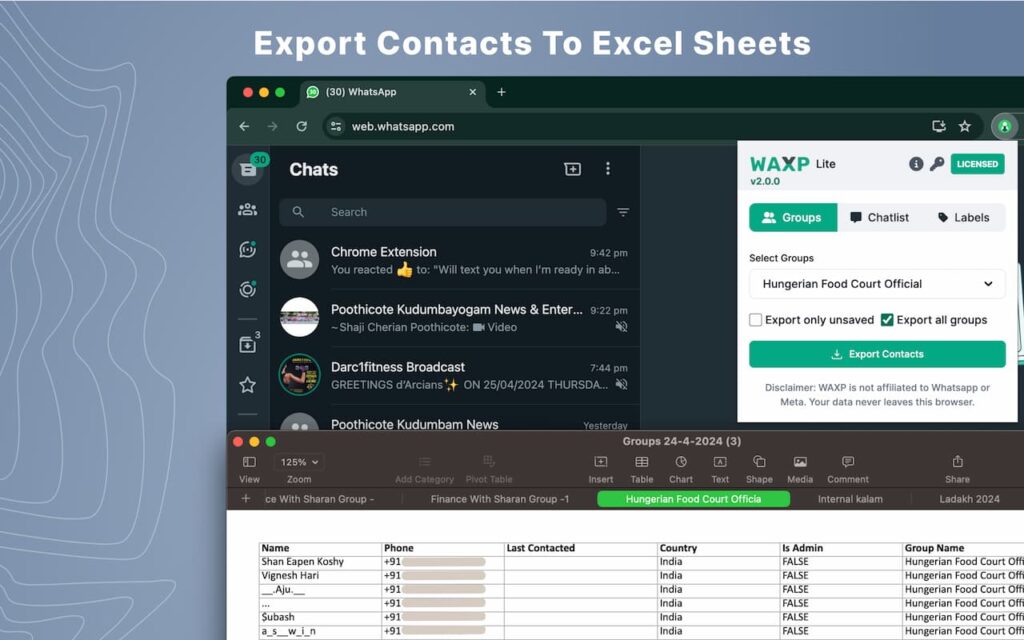 Afterward, you import this file into a platform of your choice. For example, when using CRM to develop campaigns, you might look into CRM tools for marketing agencies. Of course, this method has an issue: the export/import process needs to be done periodically to update the data. The main advantage, however, is that if you're already using a CRM tool, you don't need to switch to bring WhatsApp to the mix. Related Post: How to Schedule WhatsApp Messages
2) CRMs with WhatsApp integration
A more dynamic method is picking a CRM tool with WhatsApp integration. Usually, they offer a native connection or Zapier integration with your WhatsApp Business profile. There are even free CRM Gmail tools, such as Zoho CRM, that help you include WhatsApp contacts. That way, you can manage your clients from different platforms in one spot. Here's how it looks:
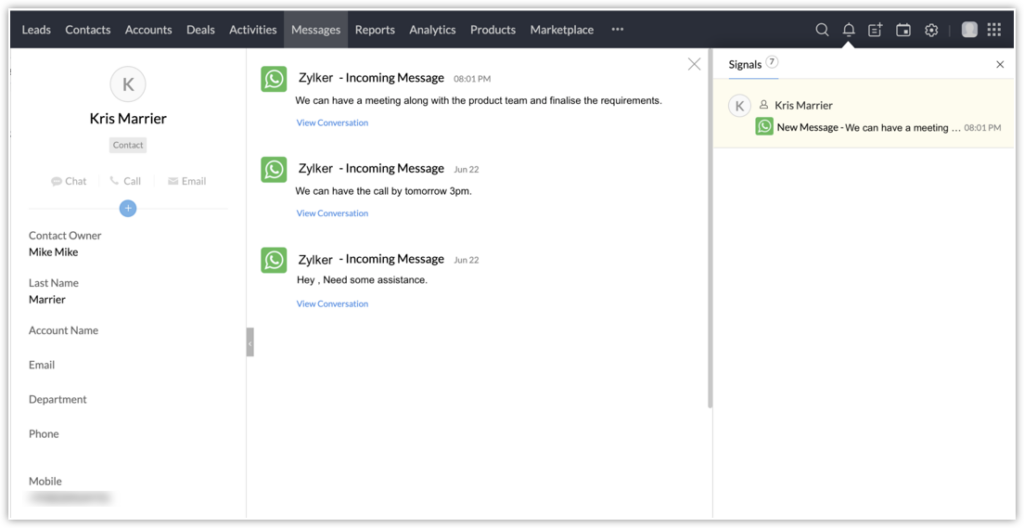 The downside is that most of these tools weren't developed with WhatsApp in mind, so they work better on email contacts and chats. And while they offer overall CRM support, they aren't full-on digital workspaces. Related Post: WhatsApp Users Worldwide
3) WhatsApp shared inboxes
The third and more robust option is implementing a WhatsApp shared inbox. A shared inbox is a collaborative workspace that allows your entire team to work together on pending tasks. With project management resources like ticketing, shared calendars and analytics included. A team inbox on WhatsApp is accessible to everyone in real-time. That way, each agent can check chats with clients and start dealing with related tasks. However, shared inboxes include more collaboration tools. Drag, our solution, includes task notes, shared tags and a live chat. That way, your team can document changes and @mention other team members when needed. Here's a glimpse of the WhatsApp shared inbox workspace: 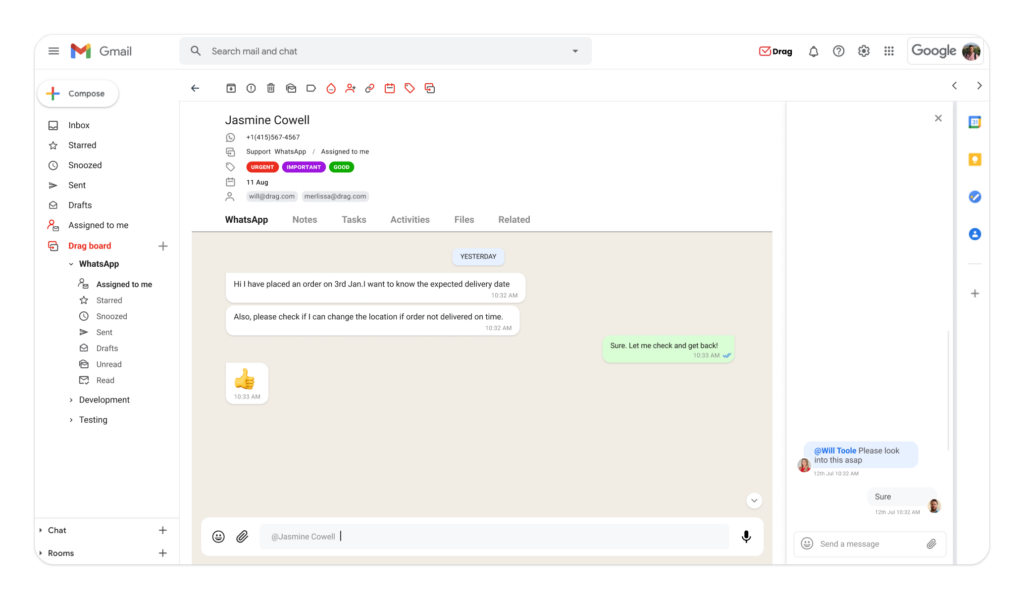 The main advantage of this method is that a shared inbox is built into your WhatsApp interface, much like a Gmail shared inbox following Gmail's practicality. It's just as easy as interacting with customers through chats. However, with collaboration and productivity resources, the workflow is more efficient. As for WhatsApp CRM, the shared inbox solution makes everything more accessible. All users can check customer profiles and history. The same for calendars, deadlines, and activity logs. Related Post: WhatsApp Web vs WhatsApp Desktop
The impact of WhatsApp CRM
As your communication strategy grows, it's crucial to find better ways to connect with customers. Using WhatsApp for CRM is a great way to benefit from the app's popularity. Being on WhatsApp helps your company bring awareness to its products and services and connect with customers. A WhatsApp CRM add-on, such as a shared inbox, can take it to a new level of organization and data-driven strategy.
What you need to know about WhatsApp CRM
- Do I need to have WhatsApp CRM?
Probably! If your company uses WhatsApp for marketing, sales, and customer service, you need a reliable way to sort and filter your contacts.
- What features should I have with my WhatsApp CRM?
Automation helps you optimize sending relevant messages to your WhatsApp contacts. You can also include project management tools, like shared calendars and internal chats to keep up with the team. Data reports help you stay on track with your inbox.
- I have a CRM tool already? Is it worth switching to one with WhatsApp integration?
You can still use your existing CRM tool by exporting WhatsApp contact data and importing them into the app. That is doable, depending on the volume of contacts. However, most companies benefit from live syncing these platforms and opt for CRMs with WhatsApp integration. That way, the data received through your chats is uploaded din real time to the platform.
- Can I add CRM tools directly to my WhatsApp inbox?

Co-founder
Co-founder at Drag, writing about Google Workspace, shared inboxes, and how teams actually run email.
