













WhatsApp on two phones (or even more devices) can help your productivity. Learn how to implement it for your team!
Table of contents
Setting up WhatsApp on two phones is possible (and needed, if you use WhatsApp for teams), but it isn't a straightforward process. Since WhatsApp Business accounts are made to have a primary device, you need to know the correct resources to access them fully on more than one phone. There are different use cases in which you need to install WhatsApp on two phones, such as a dedicated customer service account that is used by more than one team member. But there are different methods to do this, using both the platform itself and additional features. In this article, we will better understand why the need to log into WhatsApp on two phones exists and how best to achieve simultaneous access without harming your team's productivity and collaboration. Keep reading to learn more!
Why use WhatsApp on two phones?
There are different cases in which having a WhatsApp account on more than one device can help productivity, especially when working in teams. If you're doing sales through WhatsApp, for instance, your team needs to provide continuous support to customers, showing the advantages of their products and services and closing deals effectively. After all, when sellers provide quick and complete answers, they help build customer loyalty and prevent potential leads from being left behind during the purchase process. This, however, requires the sales team to remain connected to WhatsApp. And in the case of small and medium-sized businesses working with multi-channel sales, this effort requires time and resource allocation. Here, having the option of WhatsApp with multiple users changes things. That is, ensuring that different team members have access to the conversations in your account, so that the sales pipeline remains seamless and fewer people give up on the purchase. Using a team account can strengthen other sectors of the company as well. The marketing team, for instance, benefits from this feature to create WhatsApp-based campaigns. Instead of working on individual campaigns, this allows your team to unify the reach and ROI tests by using a single WhatsApp on two phones (or as many as they need). The main advantage of this feature, however, is to offer customer service more effectively. Although many teams have response automation systems for times when they are offline, it is important to avoid long delays in service and organize the ticket queue so that solutions come faster. For this, the team must have access to WhatsApp service and receive tickets from the platform according to their availability. Transform WhatsApp into your team's workspace
How to use WhatsApp on two phones
Considering the advantages of having the same WhatsApp account on two (or more) phones, you need to understand the available methods to implement it.
1) WhatsApp Business Web
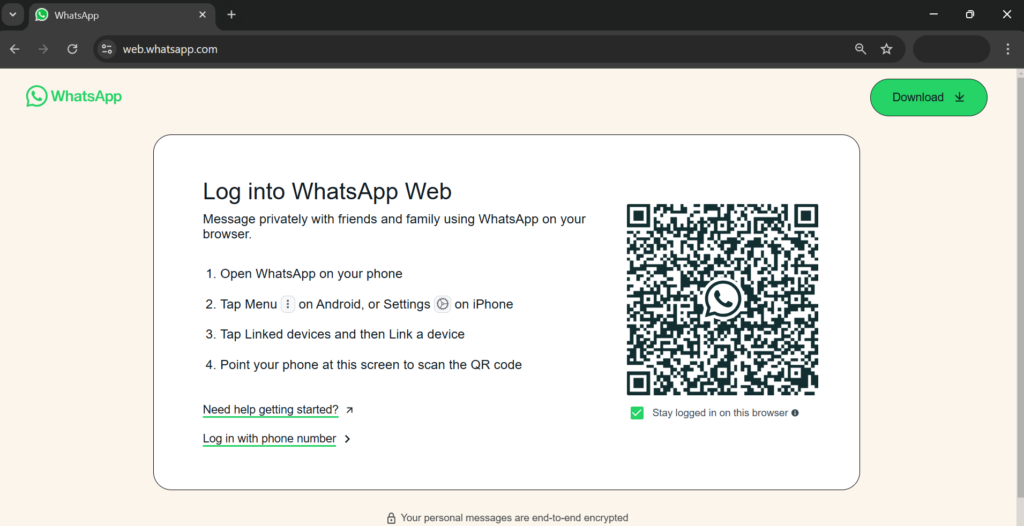 One of the options for having WhatsApp on two phones is the WhatsApp Business Web version. Although it has been developed for use in browsers, its flexibility can help in cases where it is necessary to log in on two phones temporarily. To do this, just follow the step-by-step:
- Open WhatsApp Business on your main phone;
- Access web.whatsapp.com in the secondary device;
- In the app, click Menu > Linked devices;
- Then Link device;
- Scan QR code displayed on the second phone with the first phone;
- Authorize the connection;
- Now you can access WhatsApp on two phones through the browser.
Pros and cons of WhatsApp Business Web
There are two main disadvantages of this method to use WhatsApp on two phones. The first is that, like all logins via WhatsApp Web, it is temporary: every time the browser is closed, you need to carry out the process again. That is, in case you need to access the company account quickly, it can help, but it is not a permanent solution. The second disadvantage is that WhatsApp Web does not allow access to broadcast lists. That is, it is not a viable method to send bulk messages on WhatsApp, making it limiting for areas such as marketing and appointment scheduling. Related post: How to Unblock a WhatsApp Account
2) Linked devices
The second solution available directly on WhatsApp is the standard device linking. Unlike temporary logins such as WhatsApp Web, this option allows you to use WhatsApp on two phones even after being offline. To connect, follow this step-by-step:
- Install WhatsApp Business on the secondary phone and open the app;
- Click More options > Link as a companion device;
- Open WhatsApp Business on your main phone
- Click Tools > Meta verified > Linked devices
- Then Link device;
- Scan the QR code shown on the secondary phone
- Choose a name for each connected device to keep it organized.
Pros and cons of linked devices
Linking devices is quite straightforward. Plus, the connection is maintained as long as the main phone logs in to WhatsApp every 14 days and the secondary devices are not inactive for more than 30 days. However, there are some limitations to the free method. First of all, each WhatsApp Business account allows up to 4 linked devices, which may not be enough for certain teams and their workflows. Another relevant caveat is that, although it is possible to name each device, the manager cannot assign conversations to each of them. That is, although a shared WhatsApp can contribute to teamwork, it is still necessary to use external platforms to allocate tasks based on WhatsApp chats. Meta offers the Meta Verified subscription plans for businesses, enabling up to ten linked devices and task allocation, with monthly fees ranging from $14.99 to $349.99.
3) WhatsApp Shared inbox
 Sarah Chen
An alternative for teams who need to access WhatsApp on two phones (or multiple devices in general) is to use a shared inbox like Drag. This removes the need to share credentials or log in with QR codes. Instead, the manager can create a collaborative workspace that encompasses the team's communication channels, including WhatsApp and email. Therefore, they can start and finish all tasks without having to leave the platform or access resources in another space. Each shared inbox can be customized according to what the team needs: while customer support works with tickets, marketing flows get Kanban boards focused on lead acquisition. After setting up an effective system, simply invite teams to the required workspaces by following the guide below:
-
Open the board that you need to share;
-
Click on the Share dashboard with team icon;
-
On the following page, scroll down to Invite member and enter the email addresses of each user you want to add;
-
Click Send!





Each team member has their individual access to the board, which also allows managers to assign tasks manually and automatically, boosting organization and productivity. Drag can be accessed on desktop or mobile devices, that is. So, beyond helping your team to check WhatsApp on two phones, it also integrates email, no matter where each employee is logged in. Drag's plans start at $12/user/month. Related post: How to Backup and Restore WhatsApp
Additional features of shared WhatsApp inboxes
In addition to fostering teamwork, Drag brings automation features that allow you to expand your WhatsApp benefits. The standard app limits automatic messages on WhatsApp to welcome and away auto-replies. But what about auto replies to your customers' frequently asked questions to close sales? Or an appointment reminder system? Drag allows users to set up a variety of automatic responses for multiple workflows, using standard response templates and automation triggers, such as keywords and senders. That is, your professional WhatsApp gains more customer service resources with this solution. Another advantage is the option to schedule messages on WhatsApp. In addition to instant automation flows, Drag allows users to create rules with delays of days, weeks, and even months between messages. This makes it possible, for instance, to create follow-up messages for subscription renewal, service scheduling reminders, and even alerts about seasonal sales deadlines.
The benefits of using WhatsApp on two phones
Having your account connected to more than one device can strengthen teamwork. Instead of forwarding and responding to requests via individual accounts and having to go back to the team inbox, it makes more sense to have all internal and external communication centralized. Of course, you need to use the right resources. A shared inbox, like Drag, includes task assignment and automation options that help organize projects and optimize the company's WhatsApp strategy to deliver faster and more efficient service at any time, from any device.
Drag · with Varley
The inbox your team and Varley work in together
Shared inbox and live chat for Gmail teams, with Varley, Drag’s AI, included from $18. Plus an MCP server your own AI tools can drive.
WhatsApp on two phones Q&A
Can I log in to WhatsApp on two phones? Yes, as long as you use WhatsApp Web or link a secondary device through Meta Verified. Having two main devices isn't possible. Is there a disadvantage to using WhatsApp Business Web on two phones? When using WhatsApp Web, the connection is only active while the browser is open and online. That is, you have to re-authorize the connection each time you open the browser. Is it worth using WhatsApp Business on two phones? You can use up to four linked devices on WhatsApp Business for free. For more features, such as task allocation or additional devices, you need a Meta Verified plan, which can be costly and not worth it for smaller businesses. Can you stay organized with WhatsApp on two phones? Do you need to assign tasks, create custom workflows and use individual logins? Then you should opt for a shared inbox solution to have WhatsApp on two (or more) phones, such as DragApp. Transform WhatsApp into your team's workspace

